
giriiş
Thank you for choosing the GNCC 1080P Indoor Security Camera. This manual provides detailed instructions for setting up, operating, and maintaining your camera to ensure optimal performance and security for your home. This camera offers high-definition video, advanced detection features, and two-way audio communication.
Kutuda Neler Var?
Lütfen paketinizin içeriğini kontrol edin. Herhangi bir ürün eksik veya hasarlıysa, müşteri desteğiyle iletişime geçin.
- Kapalı kamera
- Güç Adaptörü
- Kullanım Kılavuzu
- Montaj Vidası
- 2m güç kablosu
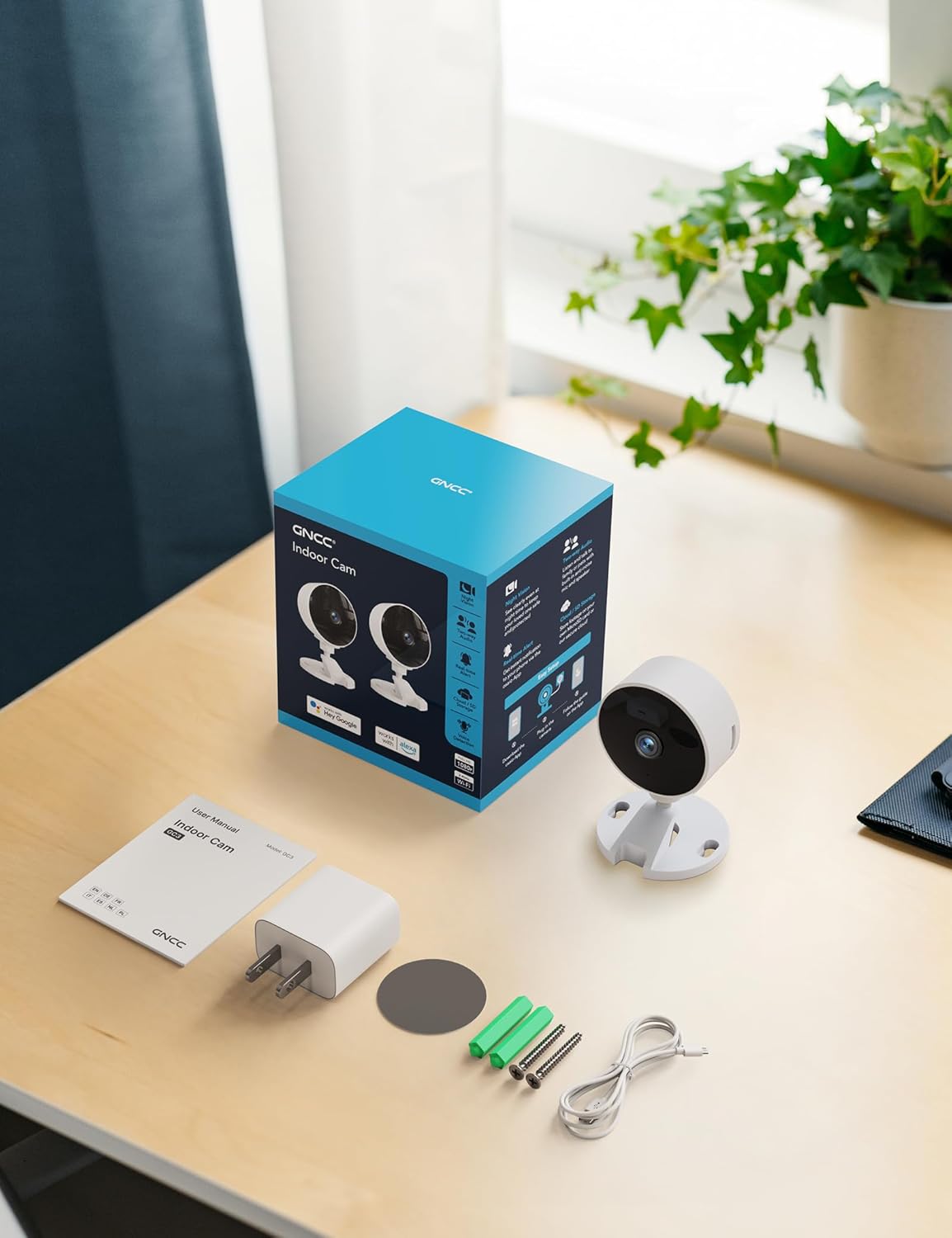
Image: All components included in the GNCC Indoor Camera package, neatly laid out on a wooden surface.
Ürün Özellikleri
The GNCC Indoor Security Camera is equipped with several features designed to enhance your home security and monitoring experience:
- 1080P Full HD Çözünürlük: Provides clear and detailed video monitoring.
- 15m Gece Görüşü: Built-in infrared LEDs enable clear vision up to 15 meters in low-light conditions.
- Smarter AI Detection: Advanced AI (subscription required) for identifying people, pets, vehicles, and packages, reducing false alerts.
- Esnek Depolama Seçenekleri: Supports local recording with a 128GB Micro SD card (not included) and offers a 14-day free cloud storage trial.
- Kolay Kurulum: Can be installed quickly using 3M tape or included screws for wall mounting.
- Gizlilik Modu: One-tap privacy mode to disable the lens and LED for enhanced privacy.
- İki Yönlü Ses: Gerçek zamanlı iletişim için dahili mikrofon ve hoparlör.
- Akıllı Entegrasyon: Compatible with Alexa and Google Home for voice control.
- Aile Paylaşımı: Allows sharing access with up to 3 users.

Image: Visual representation of the camera's core functionalities, including HD resolution, night vision, and two-way audio.
Kurmak
1. Açma
- Sağlanan güç adaptörünü kameranın güç girişi portuna bağlayın.
- Güç adaptörünü standart bir elektrik prizine takın.
- Kamera açılacak ve bir gösterge ışığı durumunu gösterecektir.
2. Uygulama Kurulumu ve Hesap Oluşturma
- Download the official GNCC app from your smartphone's app store (iOS App Store or Google Play Store).
- Uygulamayı açın ve yeni bir hesap oluşturmak için ekrandaki talimatları izleyin veya zaten bir hesabınız varsa giriş yapın.
3. Kamerayı Uygulamaya Ekleme
- In the GNCC app, tap the "+" icon to add a new device.
- Select "Security Camera" or the specific model if prompted.
- Kamerayı 2.4GHz Wi-Fi ağınıza bağlamak için uygulamanın talimatlarını izleyin. Note: This camera is not compatible with 5GHz Wi-Fi networks.
- You may be required to scan a QR code displayed on your phone with the camera lens or enter a code manually.
- Once connected, name your camera and assign it to a specific room or location.

Image: The GNCC camera alongside a smartphone showing the camera's live feed and app interface, demonstrating connectivity.
4. Montaj Seçenekleri
Kamera, esnek montaj seçenekleri sunmaktadır:
- Masaüstü Yerleşimi: Simply place the camera on a flat surface like a shelf, table, or desk.
- Duvara Montaj: Use the included 3M adhesive tape for a drill-free installation, or use the provided screws for a more permanent fixture. Ensure the mounting surface is clean and dry before applying adhesive.
Kullanım Talimatları
Canlı View ve Uzaktan İzleme
Once connected, you can access the live video feed from your camera anytime, anywhere, through the GNCC app.

Image: A smartphone screen showing the live feed from the GNCC camera, illustrating remote monitoring capabilities.
Çift Yönlü Ses
The camera features a built-in microphone and speaker, allowing for two-way communication. Tap the microphone icon in the app to speak, and release to listen. This is ideal for communicating with family members or pets.

Image: A visual representation of the two-way audio feature, showing a child and a pet, with text bubbles indicating conversation.
Gece Görüşü
The camera automatically switches to night vision mode in low-light conditions, providing clear black and white images up to 15 meters. This ensures continuous monitoring even in complete darkness.

Image: A baby sleeping in a crib, demonstrating the camera's clear night vision capabilities in a dark environment.
Hareket ve Ses Algılama
The camera can detect motion and sound, sending instant alerts to your smartphone. With an optional AI subscription, the camera can differentiate between people, pets, vehicles, and packages, reducing false alarms. You can customize motion detection zones within the app.

Image: Children and a dog triggering motion and sound detection, with example alert notifications shown.
Depolama Seçenekleri
Your GNCC camera supports two primary storage methods for recorded footage:
- Mikro SD kart: Insert a Micro SD card (up to 128GB, not included) into the camera's slot for continuous local recording.
- Bulut Depolama: A 14-day free trial of cloud storage is included. Cloud storage provides secure, off-site backup of your recordings, accessible from anywhere.

Image: The camera with visual cues for both SD card and cloud storage, highlighting flexible recording options.
Gizlilik Modu
To ensure privacy, the GNCC camera features a one-tap privacy mode within the app. Activating this mode will fully disable the camera lens and LED indicator, preventing any recording or live viewIng.
Bakım
- Temizlik: Fotoğraf makinesinin objektifini ve gövdesini temizlemek için yumuşak, kuru bir bez kullanın. Sıvı temizleyicilerden veya aşındırıcı malzemelerden kaçının.
- Donanım Yazılımı Güncellemeleri: Regularly check the GNCC app for firmware updates. Keeping your camera's firmware up-to-date ensures optimal performance, security, and access to new features.
- Atama: Kameranın doğrudan güneş ışığından, ısı kaynaklarından ve aşırı nemden uzakta, sabit bir yere yerleştirildiğinden emin olun.
Sorun giderme
| Sorun | Olası Neden / Çözüm |
|---|---|
| Kamera Wi-Fi'ye bağlanmıyor |
|
| No video feed / Offline status |
|
| Video kalitesi zayıf |
|
| Hareket/ses uyarıları alınmadı. |
|
| İki yönlü ses çalışmıyor |
|
Özellikler
| Özellik | Detay |
|---|---|
| Model Adı | GC3B-1P |
| İç/Dış Mekan Kullanımı | Kapalı |
| Video Yakalama Çözünürlüğü | 1080p Full HD |
| Gece Görüş Aralığı | 15 Metre |
| Bağlantı Teknolojisi | Kablosuz (Wi-Fi) |
| Wi-Fi Frekansı | 2.4 GHz (5 GHz ile uyumlu değil) |
| Güç Kaynağı | Kablolu Elektrik |
| Denetleyici Türü | Amazon Alexa, Google Home |
| Montaj Tipi | Masaüstü Montajı, Duvar Montajı |
| Depolama Seçenekleri | Mikro SD Kart (en fazla 128 GB, dahil değildir), Bulut Depolama |
| Çift Yönlü Ses | Evet |
| AI Algılama | Motion, Sound (AI features require subscription) |
| Ürün Boyutları | 2.56 x 2.76 x 3.54 inç |
| Ürün Ağırlığı | 2.24 ons |
| Renk | Beyaz |
| Dahil Bileşenler | Indoor camera, Power Adapter, Instruction Manual, Mounting Screw, 2m power cord |
Garanti ve Destek
GNCC products are designed for reliability and performance. For specific warranty details, please refer to the warranty card included with your product or visit the official GNCC webalan.
If you encounter any issues or have questions regarding your GNCC 1080P Indoor Security Camera, please contact GNCC Customer Support through the following channels:
- Official GNCC Webalan: Look for the "Support" or "Contact Us" section.
- E-posta Desteği: Refer to the contact information provided in the GNCC app or on the product packaging.
- Uygulama İçi Destek: Some issues can be resolved directly through the help section within the GNCC application.
Please have your product model (GC3B-1P) and purchase information ready when contacting support.