
giriiş
This manual provides instructions for the NORTH EDGE ET482 Outdoor Sports Smartwatch. It covers device setup, operation, maintenance, and troubleshooting. Please read this manual thoroughly before using your smartwatch to ensure proper function and to maximize its features.
Paket İçeriği
The NORTH EDGE ET482 Smartwatch package includes the following items:
- NORTH EDGE ET482 Smartwatch
- Kullanıcı Kılavuzu
- Manyetik Şarj Kablosu
Ürün Bittiview
Familiarize yourself with the physical components of your ET482 smartwatch.
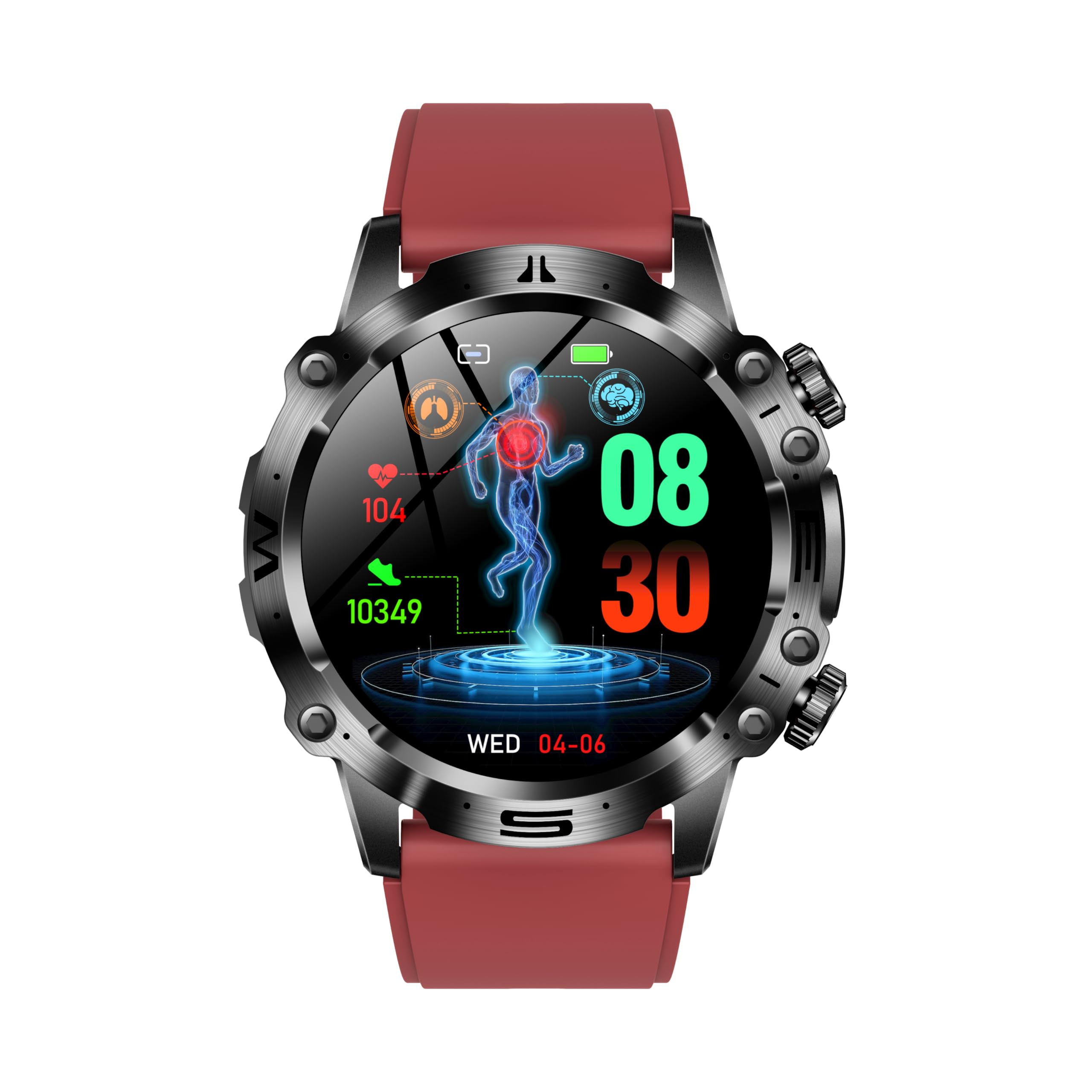
Şekil 1: Ön view of the NORTH EDGE ET482 Smartwatch, showcasinAMOLED ekranı ve fiziksel tuşlarıyla dikkat çekiyor.

Şekil 2: Arka view of the NORTH EDGE ET482 Smartwatch, highlighting the optical heart rate sensor and magnetic charging contacts.
The smartwatch features an AMOLED HD display, physical buttons on the side for navigation, and advanced sensors on the rear for health monitoring.
Kurmak
1. Akıllı Saati Şarj Etme
Before first use, fully charge your ET482 smartwatch. Connect the magnetic charging cable to the charging contacts on the back of the watch and plug the USB end into a power adapter (not included) or a computer's USB port. The watch will display a charging indicator. A full charge typically takes approximately 2 hours.
Şekil 3: Illustrates the magnetic charging connection on the back of the smartwatch.
2. Güç Açma/Kapatma
- Güç Açık: Press and hold the power button (usually the top right button) for a few seconds until the NORTH EDGE logo appears.
- Kapat: From the watch face, swipe down to access quick settings, or navigate to the 'Settings' menu. Select 'Power Off' and confirm. Alternatively, press and hold the power button until the power off option appears.
3. Uygulama Kurulumu ve Eşleştirme
To unlock the full functionality of your ET482 smartwatch, you need to install the companion application on your smartphone.
- Uygulamayı indirin: Arama the official NORTH EDGE companion app in the Apple App Store (for iOS 8.2 and above) or Google Play Store (for Android 4.4 and above).
- Bir hesap oluşturun: Uygulamayı açın ve yeni bir kullanıcı hesabı oluşturmak için ekrandaki talimatları izleyin veya zaten bir kullanıcı hesabınız varsa oturum açın.
- Bluetooth'u etkinleştir: Akıllı telefonunuzda Bluetooth'un etkinleştirildiğinden emin olun.
- Cihazı Eşleştirin: In the app, navigate to the 'Device' or 'Add Device' section. The app will search for nearby smartwatches. Select "ET482" from the list of available devices. Follow any pairing prompts on both your phone and the smartwatch to complete the connection.
Eşleştirme işlemi tamamlandıktan sonra, saat verileri telefonunuzla senkronize edecek ve uygulama üzerinden ayarları özelleştirebileceksiniz.
Kullanım Talimatları
1. Temel Gezinme
- Dokunmatik ekran: Menüler, bildirimler ve widget'lar arasında gezinmek için sola, sağa, yukarı veya aşağı kaydırın. Öğeleri seçmek için dokunun.
- Fiziksel Düğmeler:
- Güç Düğmesi (Sağ Üst): Press to wake/sleep the screen, return to the watch face, or long-press for power options.
- Function Button (Bottom Right): Customizable, often used to quickly access sports modes or a specific health feature.
2. Bluetooth Arama
The ET482 supports Bluetooth calling, allowing you to make and receive calls directly from your wrist when connected to your smartphone.
- Ensure your smartwatch is successfully paired with your phone via Bluetooth.
- To make a call, access the 'Dialer' or 'Contacts' app on your watch.
- Gelen aramayı cevaplamak için saat ekranındaki yeşil cevaplama simgesine dokunun.

Şekil 4: The Bluetooth call interface on the ET482 smartwatch, showing options for dialing, contacts, and call history.
3. Sağlık İzleme Özellikleri
The ET482 smartwatch offers comprehensive health tracking capabilities.

Şekil 5: Üzerindeview of various health monitoring features accessible on the smartwatch, including ECG, blood glucose, and comprehensive health data.
- EKG İzleme: Access the ECG function from the app list. Follow on-screen instructions to place your finger on the designated sensor for an electrocardiogram reading.

Şekil 6: ECG monitoring interface showing real-time heart activity and risk screening for arrhythmia.
- Heart Rate, Blood Pressure, Blood Oxygen (SpO2): These metrics are continuously monitored or can be measured on demand. Access their respective apps on the watch. Ensure the watch is snug on your wrist for accurate readings.

Şekil 7: Blood oxygen and blood pressure monitoring screens on the ET482.
- Non-Invasive Blood Glucose Monitoring: This feature provides an estimate of blood glucose levels. Consult the app for detailed instructions on how to take a reading and interpret results. Note: This feature is for reference only and should not replace professional medical advice or equipment.
- Vücut Kompozisyon Analizi: The watch can estimate metrics like BMI, body fat percentage, uric acid, and lipid levels. Follow the app's guidance for performing these measurements.
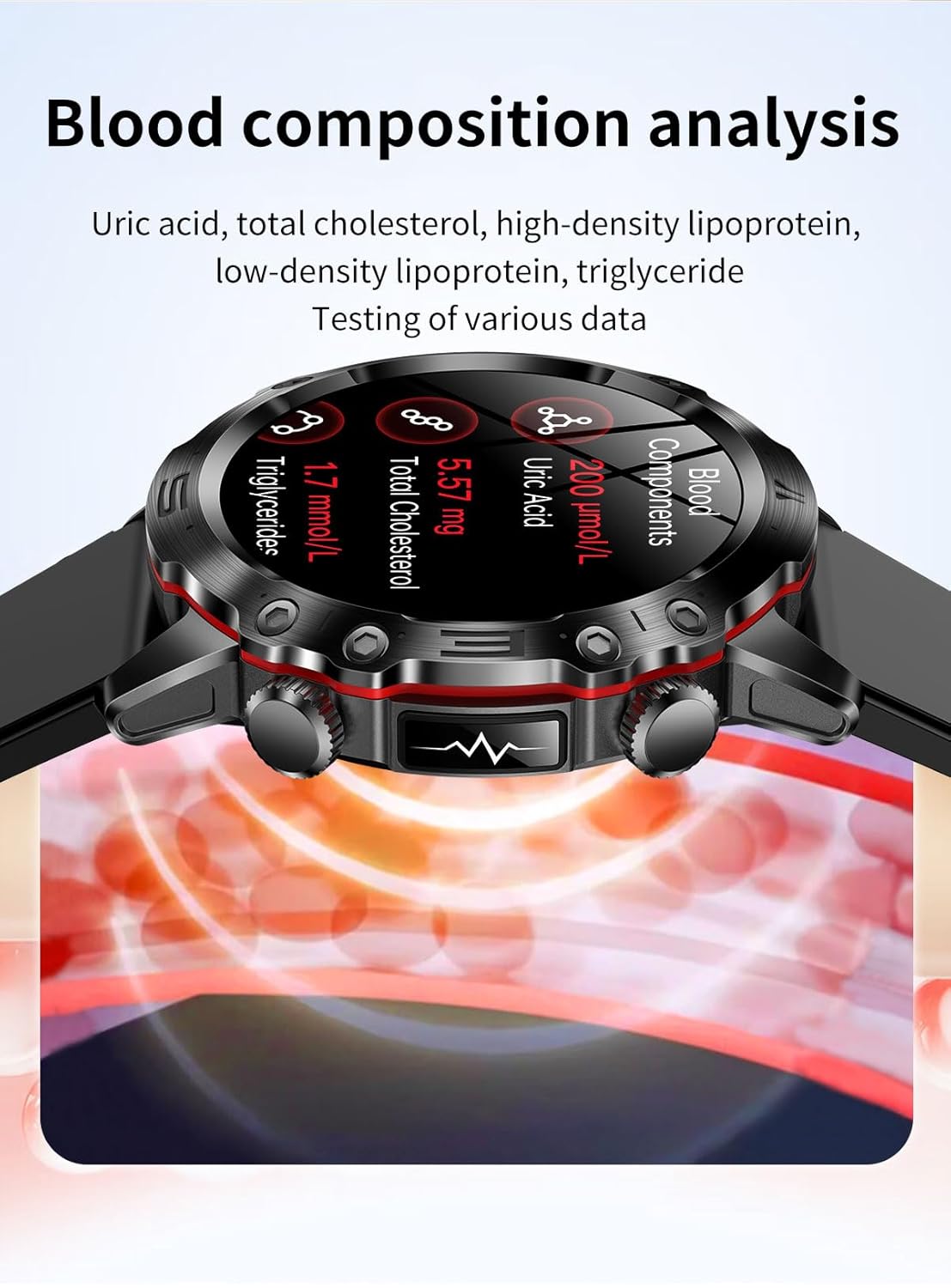
Şekil 8: Blood composition analysis screen showing uric acid, total cholesterol, and triglyceride levels.
- Kadın Sağlığı Takibi: Track menstrual cycles and predict fertile windows through the dedicated feature in the companion app.
- HRV (Heart Rate Variability) & Stress Monitoring: The watch monitors HRV to assess stress levels. View trends and insights in the app.
4. Spor Modları
The ET482 supports multiple sports modes to track your workouts. Access the 'Sports' app on your watch, select your activity (e.g., running, cycling, walking), and start tracking. The watch will record data such as duration, distance, calories burned, and heart rate.

Şekil 9: The smartwatch interface showing active sports tracking with real-time data.
5. Uyku Takibi
Wear your smartwatch to bed to automatically track your sleep patterns, including deep sleep, light sleep, and awake times. View Yardımcı uygulamada ayrıntılı uyku analizi.
6. SOS Acil Durum Çağrısı
Configure emergency contacts in the companion app. In an emergency, you can activate the SOS function (e.g., by long-pressing a specific button) to send an alert with your location to your designated contacts.
7. Diğer Özellikler
- Müzik Kontrolü: Akıllı telefonunuzdaki müzik çalmayı doğrudan saatinizden kontrol edin.
- Sesli Asistan: Access your phone's voice assistant through the smartwatch.
- Oyunlar: The watch includes some pre-installed games.
- El feneri: Use the watch screen as a temporary flashlight.
Bakım
1. Temizlik
Cilt tahrişini önlemek ve cihaz performansını korumak için akıllı saatinizi ve kayışınızı düzenli olarak temizleyin. Yumuşak, tüy bırakmayan bir bez kullanın. Gerekirse,ampBezi az miktarda suyla nemlendirin. Sert kimyasallar veya aşındırıcı maddeler kullanmayın.
2. Suya Dayanıklılık (IP68)
The ET482 smartwatch has an IP68 water resistance rating. This means it is protected against dust ingress and can withstand immersion in water up to 1.5 meters for up to 30 minutes. It is suitable for daily use, such as washing hands, rain, and shallow swimming. However, it is not recommended for hot showers, saunas, or diving, as steam and high water pressure can compromise the seals.
3. Şarj En İyi Uygulamaları
- Sadece verilen manyetik şarj kablosunu kullanın.
- Şarj işlemine başlamadan önce saatin ve kablonun şarj temas noktalarının temiz ve kuru olduğundan emin olun.
- Şarj işlemi sırasında saati aşırı sıcaklıklara maruz bırakmaktan kaçının.
Sorun giderme
If you encounter issues with your ET482 smartwatch, refer to the following common solutions:
| Sorun | Olası Çözüm |
|---|---|
| Saat açılmıyor | Ensure the watch is fully charged. Connect to the charger for at least 30 minutes. If still unresponsive, try a forced restart (refer to Power On/Off section). |
| Akıllı telefonla eşleştirilemiyor |
|
| Yanlış sağlık okumaları |
|
| Pil çabuk bitiyor |
|
Özellikler
| Özellik | Detay |
|---|---|
| Örnek | ET482 |
| Görüntülemek | AMOLED HD Display |
| Pil Kapasitesi | 300 mAh |
| Şarj Yöntemi | Manyetik Şarj |
| Suya Dayanıklılık | IP68 |
| Bağlantı | Bluetooth |
| Uyumlu işletim sistemi | Android 4.4 ve üzeri, iOS 8.2 ve üzeri |
| Ürün Boyutları | 16x10x5 cm |
| Ürün Ağırlığı | 133 gr |
| Özel Özellikler | ECG, Bluetooth Calling, Heart Rate Monitor, Blood Pressure, Blood Oxygen, Non-invasive Blood Glucose, HRV, Female Health Tracking, SOS Emergency Call |
Garanti ve Destek
For warranty information and customer support, please refer to the official NORTH EDGE webWeb sitesini ziyaret edin veya satıcınızla iletişime geçin. Garanti talepleri için satın alma fişinizi satın alma belgesi olarak saklayın.
Daha fazla yardım için şu adresi ziyaret edebilirsiniz: NORTH EDGE brand store on Amazon.