
giriiş
Thank you for choosing the COOAU Automatic Pet Feeder with Camera. This smart feeder is designed to provide convenient and reliable feeding for your pets, whether you are at home or away. Equipped with a high-resolution camera, two-way audio, and remote control capabilities, it helps you monitor your pet's health and ensure they are fed on schedule. Please read this manual thoroughly before use to ensure proper operation and maintenance.
Temel Özellikler
- Wide-angle 3MP Camera & Clear Night Vision: Features a 110-degree wide-angle lens and a 2K (2560*1440) resolution camera. Clearly captures pet movements and expressions, allowing quick detection of changes in their physical condition. Infrared night vision enables clear monitoring even at night.
- Smartphone Compatible, Automatic Feeding, Two-Way Talk: Easy Wi-Fi setup via Bluetooth. Control the feeder remotely from your smartphone. Set up to 20 portions of 10g each per feeding, multiple times a day.
- 4.5L Large Capacity Tank: Stores up to 90 days of food for an adult cat, ideal for travel or business trips.
- Two-Way Audio & Voice Recording: Built-in speaker and microphone for remote communication. Record a 10-second voice message to call your pet at feeding times, reducing separation anxiety.
- Diverse Recording Functions & Detection Notifications: Supports up to 128GB memory card for 24-hour continuous recording and motion detection recording. Receive smartphone notifications when your pet is detected, allowing real-time monitoring of meal scenes.
- Sağlık Yönetimi: Combine feeding records and detection notifications to understand your pet's eating patterns and create appropriate feeding plans, ideal for managing pet weight.
- Çift Güç Kaynağı: Operates with AC power and backup D-cell batteries (3x D-cell batteries, sold separately) to ensure continuous feeding during power outagee.
- Detachable and Washable Parts: All parts except the main unit are detachable and easily washable, maintaining a clean feeding environment and preventing bacterial growth.
- 2 Yıl Üretici Garantisi: Provides peace of mind with a comprehensive warranty.

Image: COOAU Automatic Pet Feeder with Camera.
Paket İçeriği
Lütfen paketinizde aşağıdaki tüm öğelerin bulunduğundan emin olun:
- Automatic Feeder Main Unit
- Tray (Stainless Steel Bowl included)
- Güç kablosu
- AC Adaptörü
- kurutucu
- Devrilme Önleyici Braket
- Vida Seti
- Kullanım Kılavuzu

Resim: Paket içerisinde bulunan tüm bileşenler.
Kurmak
1. Güç Kaynağı
The feeder supports dual power options: AC power and backup D-cell batteries. For continuous operation, it is recommended to use both. Batteries are not included and must be purchased separately.
- Connect the AC adapter to the feeder and plug it into a power outlet.
- For backup power, open the battery compartment at the bottom of the feeder and insert 3 D-cell batteries, ensuring correct polarity.

Image: The feeder can be powered by AC adapter or D-cell batteries for backup.
2. SD Kart Kurulumu
A new SD card is required. Please format an old SD card before use.
- Ensure the power is off before installing or removing the SD card.
- Remove the baffle to access the SD card slot.
- Insert the SD card into the slot, paying attention to its orientation.
- Press the SD card gently to secure it, then push again to release and remove.
- Reinsert the baffle at a slight angle and fix it in place until it clicks.
Video: Instructions for installing and removing the SD card.
3. Montaj
Assemble the feeder components as follows:
- Align the food tank with the main unit and gently place it on top.
- Rotate the food tank clockwise until the marks align, securing it in place.
- Place the lid on the food tank and rotate it clockwise to fix it.
- Attach the food tray to the base of the main unit.
Video: Step-by-step guide to assembling the pet feeder.
4. Duvara Montaj (Opsiyonel)
To prevent accidental tipping, you can mount the feeder to a wall using the provided bracket.
- Place the bracket on the desired wall location, confirm the position, and mark it with a pen.
- Drill holes in the wall according to the marks.
- Insert the expansion rubber plugs into the drilled holes.
- Braketi vidalarla sabitleyin.
- Align the grooves on the feeder body with the protrusions on the bracket.
- Slide the feeder downwards onto the bracket to secure it.
Video: Guide to installing the anti-tip bracket for wall mounting.
5. Uygulama Bağlantısı
Connect your feeder to the smartphone app for remote control and monitoring.
- Ensure the feeder is powered on and the blue light is illuminated.
- Long-press the reset button on the feeder until you hear a sound effect, indicating a successful reset.
- Akıllı telefonunuzun Bluetooth özelliğini açın.
- Akıllı Yaşam uygulamasını açın.
- Click the '+' icon in the top right corner to add a device.
- The app should automatically detect the feeder. If not, select 'Add Manually' and choose the pet feeder from the list.
- Follow the on-screen prompts to connect to your Wi-Fi network (2.4GHz or 5GHz).
- Once connected, the app will show 'Connection Successful'.
Video: How to connect the automatic feeder to the smartphone app.
Kullanım Talimatları
1. Setting Feeding Schedule
Use the Smart Life app to set up automated feeding schedules for your pet.
- Open the app and select your pet feeder.
- Navigate to the 'Schedule' section.
- Add new feeding times and specify the number of portions (1 portion = 10g) for each meal.
- Save your settings. The feeder will dispense food automatically at the programmed times.
Image: The app allows you to customize feeding times and portion sizes.
2. Manuel Besleme
You can manually dispense food at any time using the 'Feed' button on the feeder or through the app.
- Yemlikte: Press the 'Feed' button once to dispense one portion of food.
- Uygulama aracılığıyla: In the app, select the 'Feed' option and choose the desired number of portions.
3. Two-Way Audio & Voice Recording
Communicate with your pet remotely and record custom feeding calls.
- İki Yönlü Konuşma: Use the microphone and speaker functions in the app to talk to your pet and hear their responses.
- Ses kaydı: Record a 10-second message that will play automatically during scheduled feeding times to attract your pet.

Image: The two-way audio feature allows you to interact with your pet remotely.
4. Kamera ve Kayıt Fonksiyonları
Monitor your pet with the integrated 3MP camera and record their activities.
- Canlı View: Access a real-time video feed of your pet through the app.
- Gece Görüşü: The camera automatically switches to infrared night vision in low-light conditions for clear monitoring.
- Hareket Algılama: Receive push notifications on your smartphone when motion is detected, allowing you to check on your pet immediately.
- Kayıt Modları: Supports 24-hour continuous recording and motion-activated recording to a micro SD card (up to 128GB).
- Meal Records: The app keeps a record of feeding times and detected activities, helping you track your pet's eating habits.
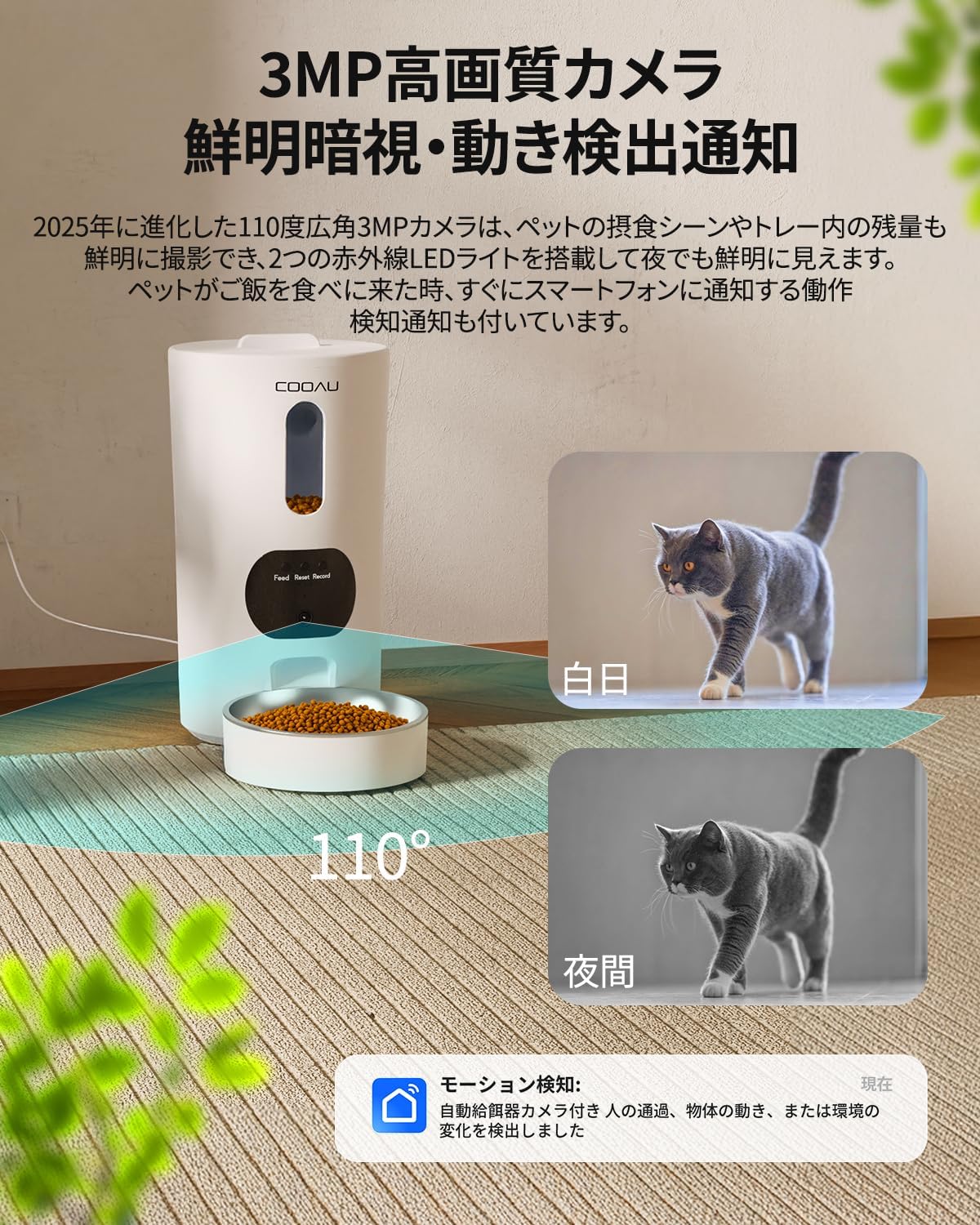
Image: The camera provides clear vision both during the day and at night.
5. Gizlilik Koruması
You can turn the camera on or off as needed for privacy.
- Camera ON/OFF: Use the app to physically close the camera lens when you don't need monitoring, ensuring your privacy.

Image: The camera can be turned off for privacy when not needed.
Bakım
1. Besleyicinin Temizlenmesi
Regular cleaning is essential to maintain hygiene and your pet's health.
- Ayrılabilir Parçalar: All parts except the main unit (food tank, lid, tray, stainless steel bowl, splitter) are detachable and can be hand-washed with water and mild detergent.
- Ana Ünite: The main unit, which contains electronic components, should not be submerged in water. Wipe it clean with a damp bez veya ıslak mendil.
- Kurutma: Ensure all parts are completely dry before reassembling and refilling with food to prevent mold or bacterial growth.

Image: The feeder's components are designed for easy disassembly and cleaning.
2. Kurutucu Maddenin Değiştirilmesi
The desiccant helps keep the food fresh and dry. Replace it periodically.
- The feeder has a desiccant slot in the top cover.
- Check the desiccant regularly and replace it when it changes color or appears saturated.

Image: The desiccant pocket helps maintain food freshness.
Sorun giderme
If you encounter any issues with your COOAU Automatic Pet Feeder, please refer to the following common problems and solutions:
| Sorun | Olası Neden | Çözüm |
|---|---|---|
| Yemlik yem vermiyor. | No food in tank, food jammed, power issue, incorrect schedule. | Check food level. Clear any food blockages. Ensure power supply is stable (AC or batteries). Verify feeding schedule in app. |
| Wi-Fi bağlantısı başarısız. | Incorrect Wi-Fi password, 5GHz network selected (feeder supports 2.4GHz), router too far, Bluetooth off. | Double-check Wi-Fi password. Ensure you are connecting to a 2.4GHz network. Move feeder closer to router. Ensure Bluetooth is enabled on your phone during initial setup. Reset feeder and try again. |
| Camera not working or blurry. | Lens covered, poor lighting, app issue, network problem. | Ensure the camera lens is not physically covered. Check lighting conditions. Restart the app. Verify network connection. |
| Food portions are inconsistent. | Food type/size, feeder mechanism issue. | Ensure food kibble size is appropriate for the feeder. Clean the dispensing mechanism. If issues persist, contact customer support. |
| No sound from two-way audio. | Microphone/speaker muted, volume too low, app permissions. | Check volume settings in the app and on your phone. Ensure app has microphone permissions. Unmute microphone/speaker in the app. |
Özellikler
| Özellik | Şartname |
|---|---|
| Marka | COOAU |
| Örnek | ACF100W |
| Hedef Türler | Köpek, Kedi |
| Önerilen Kullanım | Kapalı |
| Renk | Beyaz |
| Kamera Çözünürlüğü | 3MP (2560*1440) |
| Kamera Açısı | 110 derece |
| Bağlantı | Wi-Fi (2.4GHz/5GHz compatible), Bluetooth |
| Güç Kaynağı | Corded Electric, 3x D-cell batteries (backup, not included) |
| Kapasite | 4.5 Litre |
| Ürün Boyutları (U x G x Y) | 18 cm x 18 cm x 33 cm |
| Bakım Talimatları | Hand Wash (detachable parts) |
| Hafıza Kartı Desteği | 128 GB'a kadar Mikro SD kart |
| UPC | 790864718295 |
Garanti ve Destek
Your COOAU Automatic Pet Feeder with Camera ACF100W comes with a 2 yıllık üretici garantisi satın alma tarihinden itibaren.
Bu garanti, normal kullanım koşullarında malzeme ve işçilik kusurlarını kapsar. Yanlış kullanım, kazalar, yetkisiz değişiklikler veya normal aşınma ve yıpranmadan kaynaklanan hasarları kapsamaz.
For warranty claims, technical support, or any questions regarding your product, please contact COOAU customer service through the retailer where you purchased the product or visit the official COOAU webiletişim bilgileri için site.
Lütfen garanti amaçlı satın alma belgenizi saklayın.