
giriiş
This manual provides detailed instructions for the setup, operation, and maintenance of your TANALAZ K71Pro Portable Karaoke Machine. Please read this manual thoroughly before using the product to ensure proper function and longevity. Keep this manual for future reference.
Ürün Bittiview
Dahil Olan Bileşenler:
- 1 x TANALAZ K71Pro Karaoke Speaker
- 2 x Kablosuz Mikrofon
- 1 x Microphone Base/Holder
- 1 x USB-C Şarj Kablosu
- 1 x Kullanım Kılavuzu
Temel Özellikler:
- Kompakt ve Taşınabilir Tasarım: Measures 3.7 x 3.14 x 3.42 inches, weighing 0.65 lbs, with a hand strap for easy transport.
- Çift Kablosuz Mikrofon: Allows for duet singing with 5 voice-changing effects (original, female, male, monster, baby voice).
- Integrated Microphone Base: Provides organized storage and prevents microphones from falling. Compatible with TANALAZ K8, K21, K32, K79 microphones.
- Bluetooth 5.3 Bağlantısı: Ensures stable and long-distance wireless transmission for audio streaming from smartphones, tablets, and computers.
- Multi-functional Speaker: Can be used as a standalone Bluetooth speaker.
- Vibrant LED Party Lights: Dynamic color-changing lights integrated into the speaker to enhance the user experience.
- Çoklu Oynatma Seçenekleri: Supports Bluetooth, AUX input, and TF Card (MicroSD card, not included) for versatile audio sources.
- Uzun Pil Ömrü: Built-in 1200mAh battery provides 4-6 hours of continuous use.
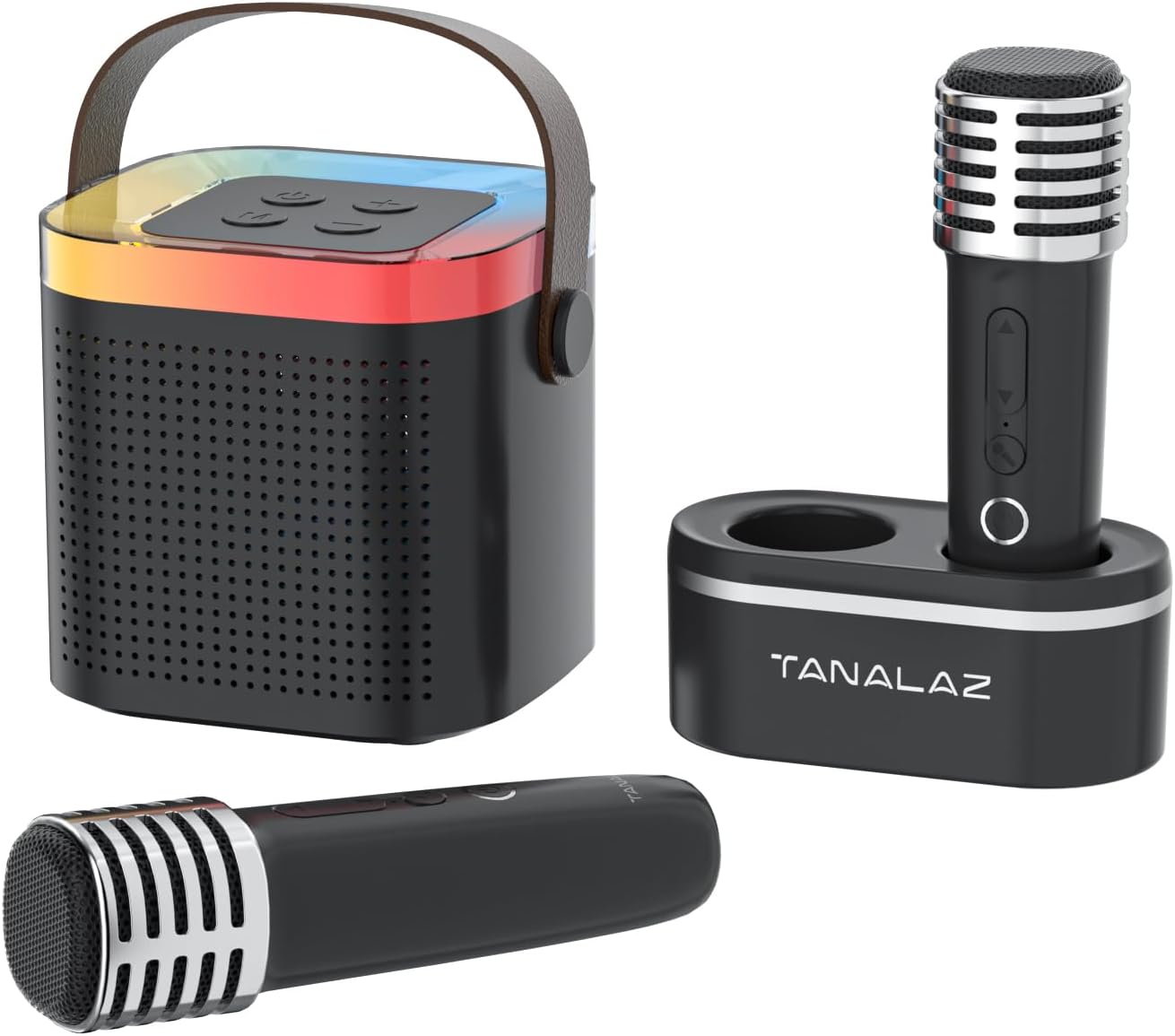
Image: The TANALAZ K71Pro karaoke machine, featuring the main speaker unit, two wireless microphones, and a dedicated microphone base for storage.

Resim: Patlamış bir view illustrating the internal speaker components of the TANALAZ K71Pro, alongside the two wireless microphones and their base.
Kurmak
- Cihazların Şarj Edilmesi:
- Connect the provided USB-C charging cable to the charging port on the karaoke speaker and a suitable USB power adapter (not included).
- Connect the USB-C charging cable to the charging ports on each wireless microphone and a suitable USB power adapter.
- The charging indicator lights will illuminate during charging and turn off or change color when fully charged. Allow sufficient time for a full charge before first use.
- Açma:
- Press and hold the power button on the karaoke speaker until you hear a power-on prompt and the LED lights activate.
- Press and hold the power button on each wireless microphone until they power on.
- Bluetooth Eşleştirme:
- Ensure the karaoke speaker is powered on and in Bluetooth pairing mode (usually indicated by a flashing LED light).
- Akıllı telefonunuzda, tabletinizde veya Bluetooth özellikli diğer cihazınızda Bluetooth ayarlarına gidin.
- Arama "K71Pro" (or similar name) in the list of available devices and select it to pair.
- Eşleştirildikten sonra hoparlörden bir onay sesi duyacaksınız.

Image: The TANALAZ K71Pro speaker demonstrating its wide compatibility and Bluetooth 5.3 connection with a laptop, tablet, and smartphone.
Operasyon
Hoparlör Kontrolleri:
- Güç Düğmesi: Press and hold to turn on/off. Short press to play/pause music.
- Ses Düğmeleri (+/-): Short press to adjust speaker volume.
- Mod Düğmesi: Press to switch between Bluetooth, AUX, and TF Card modes.
- LED Işıklar: The speaker features integrated LED lights that change color automatically.
Mikrofon Kontrolleri:
- Güç Düğmesi: Açmak/kapatmak için basılı tutun.
- Volume/Echo Buttons: Use to adjust microphone volume and echo effect.
- Ses Değiştirici Düğmesi: Short press to cycle through 5 voice effects:
- Orijinal Ses
- Kadın Sesi
- Erkek Sesi
- Canavar Sesi
- bebek sesi

Image: The two wireless microphones highlighting the five available voice-changing effects for enhanced entertainment.
Connecting via AUX/TF Card:
- AUX Girişi: Connect an audio device using a 3.5mm AUX cable (not included) to the AUX port on the speaker. Switch the speaker to AUX mode.
- TF Kartı: Insert a TF (MicroSD) card (not included) with pre-loaded music into the TF card slot on the speaker. Switch the speaker to TF Card mode.
Bakım
- Temizlik: Use a soft, dry cloth to clean the surface of the speaker and microphones. Do not use liquid cleaners or abrasive materials.
- Depolamak: Store the device in a cool, dry place away from direct sunlight and extreme temperatures. Use the microphone base to store microphones securely.
- Pil Bakım: Pil ömrünü uzatmak için, cihazı sık sık tamamen boşaltmaktan kaçının. Cihaz uzun süre kullanılmasa bile düzenli olarak şarj edin.
- Suya Maruz Kalma: Bu cihaz su geçirmez değildir. Suya veya yüksek neme maruz bırakmaktan kaçının.
Sorun giderme
| Sorun | Olası Neden | Çözüm |
|---|---|---|
| Güç yok/Cihaz açılmıyor | Pil seviyesi düşük veya cihaz kapalı. | Charge the speaker and microphones fully. Press and hold the power button to turn on. |
| Bluetooth üzerinden eşleştirilemiyor | Bluetooth not enabled, device too far, or already paired to another device. | Ensure Bluetooth is enabled on your device. Move closer to the speaker. Disconnect from other devices and try pairing again. |
| Hoparlörden ses gelmiyor | Ses seviyesi çok düşük, yanlış mod veya cihaz bağlı değil. | Increase speaker volume. Ensure correct mode (Bluetooth, AUX, TF Card) is selected. Verify successful Bluetooth pairing or cable connection. |
| Mikrofon çalışmıyor | Microphone off, low battery, or volume too low. | Turn on the microphone. Charge the microphone. Increase microphone volume. |
| Ses değiştirici çalışmıyor | Yanlış tuş basımı. | Ensure you are short-pressing the voice changer button to cycle through effects. |
Özellikler
- Model Numarası: K71Pro
- Marka: TANALAZ
- Boyutlar: 3.7 x 3.14 x 3.42 inches (Speaker)
- Ağırlık: 0.65 lbs (Speaker)
- Bağlantı: Bluetooth 5.3, AUX, TF Kartı
- Konuşmacı Sayısı: 1
- Pil Kapasitesi: 1200mAh (Hoparlör)
- Pil Ömrü: 4-6 hours (Speaker)
- Şarj Portu: USB Tip C
- Uyumlu Cihazlar: Smartphones, Tablets, Laptops, Televisions
- Dahil Bileşenler: Speaker, 2 Wireless Microphones, Microphone Base, USB-C Cable, User Manual

Image: Detailed dimensions of the TANALAZ K71Pro karaoke speaker and wireless microphone.
Garanti ve Destek
For warranty information and customer support, please refer to the contact details provided with your purchase or visit the official TANALAZ website. Herhangi bir garanti talebi için satın alma belgeniz olarak satın alma makbuzunuzu saklayın.
For further assistance, please contact TANALAZ customer service.