
Della TL-9K1VB-19S-I+O
DELLA Vario Series 9000 BTU Mini Split Air Conditioner User Manual
Model: TL-9K1VB-19S-I+O
1. Giriş
This user manual provides detailed instructions for the installation, operation, and maintenance of your DELLA Vario Series 9000 BTU Mini Split Air Conditioner. Please read this manual thoroughly before installation and use to ensure proper function and safety. Keep this manual for future reference.
2. Güvenlik Bilgileri
Always adhere to local and national electrical codes. Professional installation is mandatory for this system. Do not attempt to install or service the unit yourself unless you are a qualified technician. Disconnect power before performing any maintenance or cleaning.
- Elektrik çarpmasını önlemek için topraklamanın uygun olduğundan emin olun.
- Hava giriş ve çıkışlarını kapatmayın.
- Çocukları ve evcil hayvanları dış üniteden uzak tutun.
- If unusual sounds, smells, or smoke occur, immediately turn off the unit and disconnect power. Contact qualified service personnel.
3. Kutuda Neler Var?
Kuruluma başlamadan önce tüm bileşenlerin mevcut olduğundan emin olun:
- 1 x Mini-Split Air Conditioner (Indoor Unit)
- 1 x Mini-Split Air Conditioner (Outdoor Unit)
- Uzaktan kumanda
- Installation Kit (Standard size 1/4" & 3/8" outer dimension copper pipes, drain pipe, wall sleeve, plasticine putty, screws, anchors, bracket template)
- Kullanım Kılavuzu (bu belge)

Image: All components included in the DELLA Vario Series Mini Split Air Conditioner package, including indoor unit, outdoor unit, remote control, and various installation accessories.
4. Kurulum ve Kurulum
This DELLA Mini Split AC system requires professional installation. It is not designed for DIY installation. Line-set vacuuming is required during installation. Any alteration of line-set length requires adjusting freon levels. Consult a certified HVAC technician for proper installation to ensure optimal performance and to maintain warranty validity.
4.1 Kurulum Öncesi Kontroller
- Ensure the installation area meets space and electrical requirements.
- Verify power supply (115V) and maximum fuse size (25A).
- İç ünitenin drenajının düzgün olduğundan emin olun.
4.2 Adet Boyutlar

Image: Detailed dimensions for both the indoor and outdoor units of the DELLA Vario Series Mini Split Air Conditioner, including length, width, and height measurements.
5. Kullanım Talimatları
Your DELLA Vario Series Mini Split Air Conditioner offers multiple modes and smart features for optimal comfort and energy efficiency.
5.1 Uzaktan Kumanda İşlevleri
The included remote control allows full command over your unit. Familiarize yourself with its buttons and their functions:
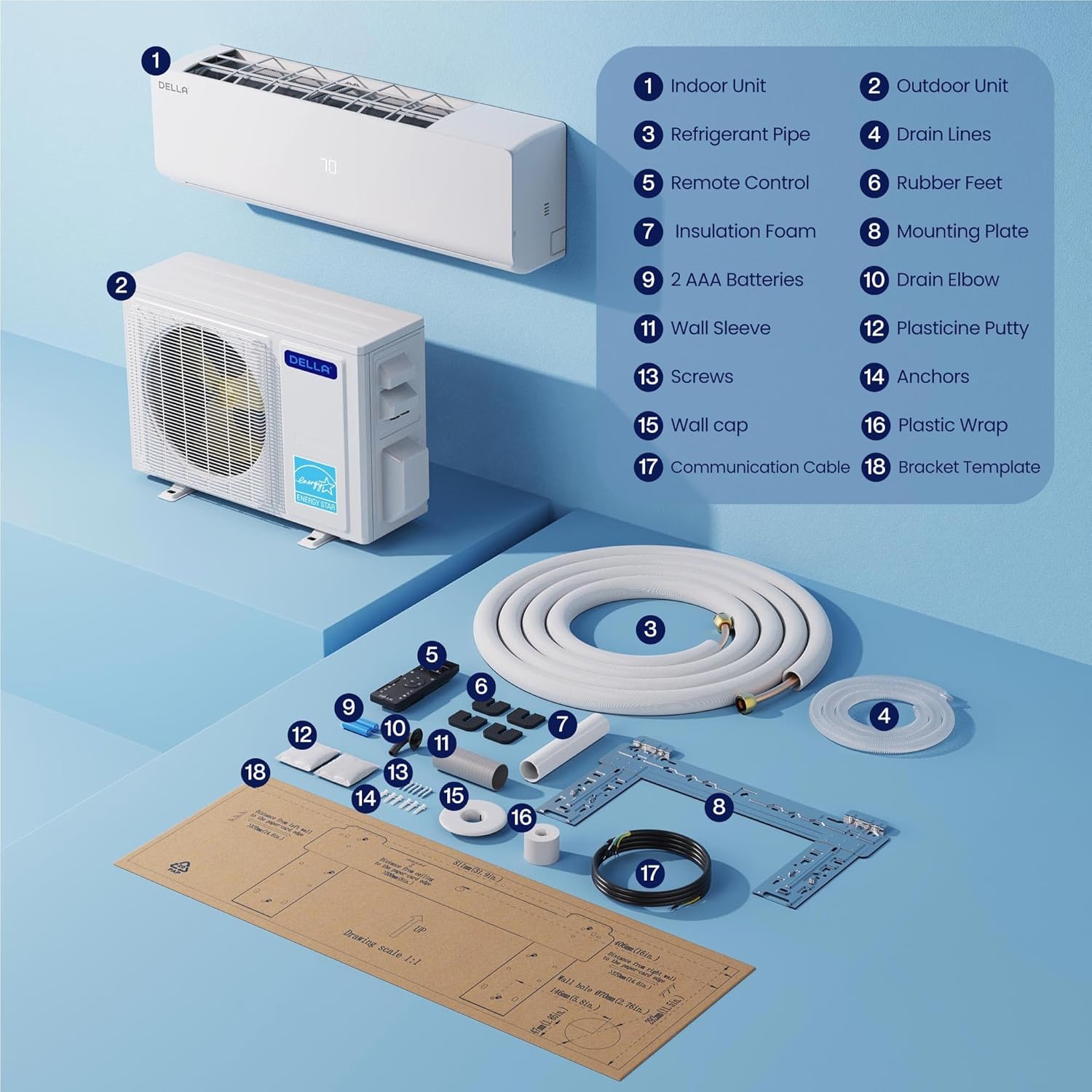
Image: A detailed diagram of the DELLA Mini Split remote control, highlighting various buttons and their corresponding functions such as mode selection, fan speed, temperature adjustment, and special features.
- Açık/Kapalı: Üniteyi açar veya kapatır.
- Mod: Cycles through Cool, Heat, Dry (Dehumidify), Fan Only, and Auto modes.
- Sıcaklık Artışı/Azalışı: İstenilen sıcaklığı ayarlar.
- Fan Hızı: Fan hızını seçer (Sessiz, Düşük, Orta Düşük, Orta, Orta Yüksek, Yüksek, Turbo).
- Airflow (Swing): Controls vertical and horizontal louver movement for optimal air distribution.
- Hissediyorum Modu: Uzaktan kumanda ile oda sıcaklığını algılayarak hassas konfor sağlar.
- Uyku modu: Rahat bir uyku ve enerji tasarrufu için sıcaklığı ve fan hızını ayarlar.
- Zamanlayıcı: Cihazın açılıp kapanması için belirli bir zaman ayarlar.
- EKO Modu: Optimizes operation for maximum energy efficiency.
5.2 Smart App Control (Della+ App)
Control your DELLA Mini Split from anywhere using the Della+ app, compatible with Google Assistant and Alexa. The app provides advanced features including scheduling, geo-location, and detailed control over modes and settings.
Video: Demonstration of the Della+ mobile application interface, showcasing features like mode selection, fan speed adjustment, airflow control, scheduling, and timer settings for the mini split air conditioner.
- Uzaktan kumanda: Adjust settings from your smartphone.
- Planlama: Program daily or weekly operation schedules.
- Coğrafi Konum: Automatically adjust settings based on your proximity to home.
- Ses Kontrolü: Eller serbest kullanım için Alexa veya Google Asistan ile entegre edin.

Image: Screenshots of the Della+ app showing various control screens, including temperature setting, mode selection, timer functions, and smart home integration options.
6. Bakım
Regular maintenance ensures the longevity and efficient operation of your DELLA Mini Split Air Conditioner.
6.1 Filtre Temizleme
Clean the air filters regularly (every 2-4 weeks, depending on usage) to maintain air quality and efficiency. Refer to the detailed instructions in the full user manual (PDF) for filter removal and cleaning procedures.
6.2 Dış Ünite Temizliği
Keep the outdoor unit clear of debris, leaves, and other obstructions. Periodically clean the coils with a soft brush or vacuum cleaner. Ensure proper drainage from the outdoor unit.
6.3 Kendi Kendini Temizleme Fonksiyonu
The unit features a PureClean tech self-clean function that stops dust buildup and defrosts the indoor unit, keeping your air fresher with advanced sterilization. Activate this function via the remote control or Della+ app as needed.
7. Sorun Giderme
Müşteri desteğiyle iletişime geçmeden önce,view Aşağıdaki yaygın sorunlar ve çözümleri:
| Sorun | Olası Neden | Çözüm |
|---|---|---|
| Ünite açılmıyor. | No power, tripped circuit breaker, remote control batteries dead. | Güç kaynağını kontrol edin, devre kesiciyi sıfırlayın, uzaktan kumandanın pillerini değiştirin. |
| Yetersiz soğutma/ısıtma. | Kirli hava filtreleri, tıkalı dış ünite, yanlış mod/sıcaklık ayarı, düşük soğutucu akışkan. | Clean filters, clear obstructions, verify settings, contact technician for refrigerant check. |
| Olağandışı gürültü. | Gevşek parçalar, fan tıkanıklığı, normal çalışma sesleri (örneğin, soğutucu akışı). | Inspect for loose parts, clear obstructions. If persistent or loud, contact technician. |
For issues not listed here or if solutions do not resolve the problem, please contact DELLA customer support.
8. Özellikler
| Özellik | Detay |
|---|---|
| Marka Adı | Della |
| Model Numarası | TL-9K1VB-19S-I+O |
| Soğutma Kapasitesi | 9000 BTU/saat |
| Isıtma Kapasitesi | 10000 BTU/saat |
| SEER2 Derecelendirmesi | 19 SEER2 |
| Güç Kaynağı | 115V / 60Hz / 1PH |
| Maksimum Giriş Gücü | 750 watt |
| Ürün Ağırlığı | 19.8 pound (İç Ünite) |
| Product Dimensions (Indoor) | 31.94 x 8 x 11.5 inç |
| Kapsama Alanı | 400 metrekareye kadar |
| Gürültü Seviyesi | Ultra silent at only 28 dBa |
| Özel Özellikler | Dehumidifier, Fast Cooling, Remote Control, WiFi Enabled, 4D Air Flow, I Feel Mode, 24 Hour Timer, Sleep Mode, ECO Energy Saving Mode, Multiple Fan Speeds, Turbo Function, PureClean Tech |
9. Garanti ve Destek
DELLA offers a limited lifetime warranty for this product, ensuring unmatched support and peace of mind. For any inquiries or technical assistance, please contact DELLA customer support.
- Müşteri Desteği: Available for technical assistance.
- İade: 30 günlük kolay iade politikası.

Image: Graphic illustrating DELLA's lifetime coverage, highlighting best-in-class support and no additional costs.
Daha detaylı bilgi için lütfen resmiyete başvurun Kullanım Kılavuzu (PDF).
Ask a question about this manual
Ask about setup, troubleshooting, compatibility, parts, safety, or missing instructions. Manuals+ will review the question and use this page’s manual context to help answer it.