
1. Giriş
This manual provides essential information for setting up, operating, maintaining, and troubleshooting your OnePlus Nord CE5 smartphone. Please read this guide thoroughly to ensure optimal performance and longevity of your device.
2. Kutuda Neler Var?
Upon unboxing your OnePlus Nord CE5, verify that all the following items are included:
- OnePlus Nord CE5 Akıllı Telefon
- Telefon Kılıfı
- Güç Adaptörü
- SIM Tepsisi Çıkarıcı
- Ekran Koruyucu (önceden uygulanmış veya kutuda)
- USB Kablosu (Tip-C)

Image: Contents of the OnePlus Nord CE5 retail box.
3. Cihaz Bittiview
Familiarize yourself with the physical components of your OnePlus Nord CE5.
3.1 Ön View

Resim: Ön view of the OnePlus Nord CE5, highlighting the display and front camera.
The front of the device features the 6.77-inch AMOLED display and the 16 MP front-facing camera.
3.2 Arka View

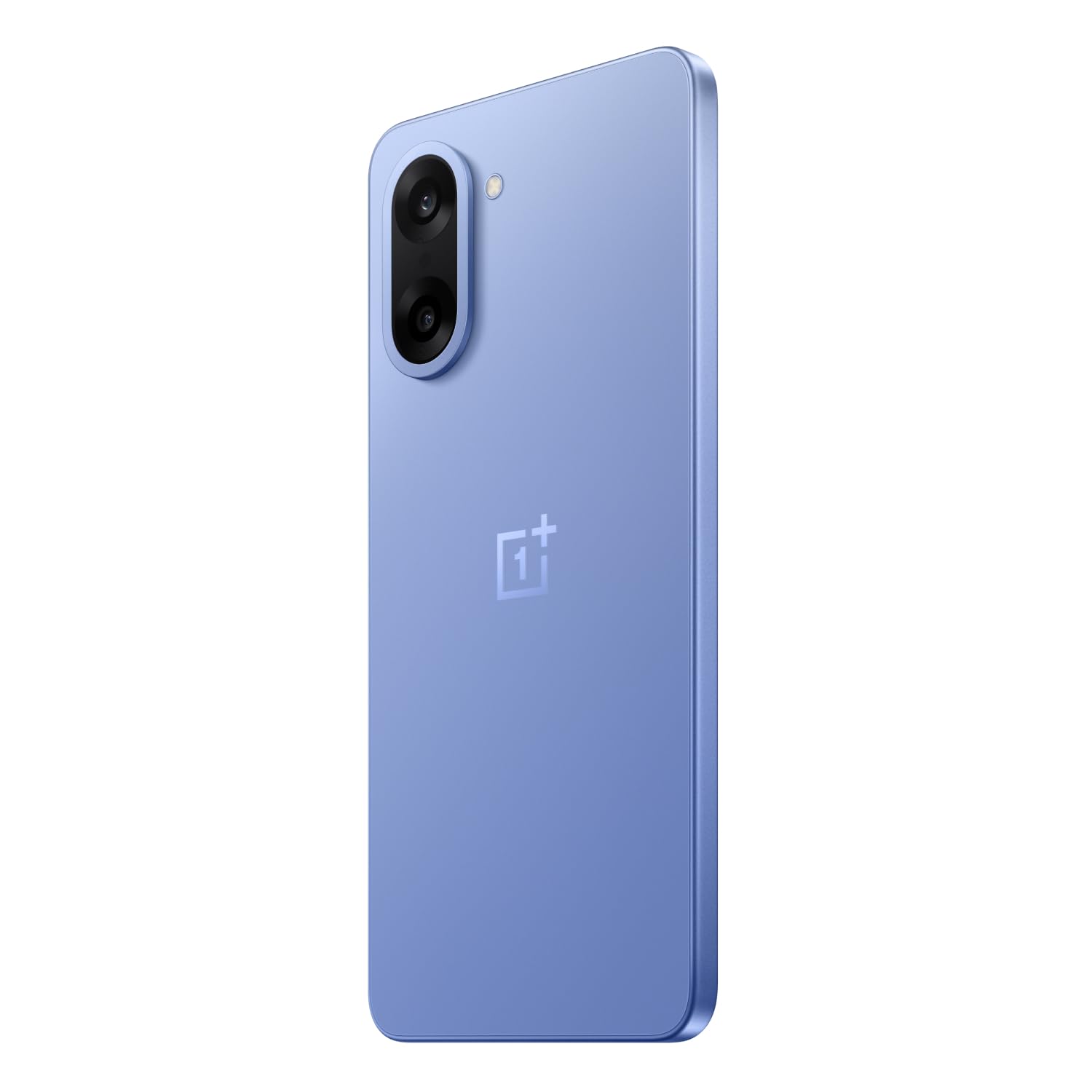
Resim: Arka view of the OnePlus Nord CE5 in Nexus Blue, featuring the dual camera system and OnePlus branding.
The rear panel houses the 50 MP main camera with OIS and an 8 MP ultra-wide angle lens, along with the LED flash.
3.3 Taraf View
Resim: Yan view of the OnePlus Nord CE5, illustrating the placement of the power button and volume controls.
The side of the device includes the power button and volume control buttons. The SIM card tray is also located on one of the sides.
4. Kurulum
4.1 SIM Kartların Takılması
- Cihazınızın yan tarafında bulunan SIM kart tepsisini bulun.
- SIM kart tepsisi çıkarma aracını tepsinin yanındaki küçük deliğe yerleştirin ve tepsi dışarı çıkana kadar sıkıca bastırın.
- Place your Nano SIM cards into the designated slots on the tray. Ensure the gold contacts face downwards.
- SIM tepsisini yerine oturana kadar dikkatlice tekrar takın.
4.2 İlk Güç Açma
Press and hold the power button located on the side of the device until the OnePlus logo appears. Follow the on-screen instructions to complete the initial setup, including language selection, Wi-Fi connection, and Google account setup.
4.3 Cihazı Şarj Etme
Connect the USB Type-C cable to the charging port at the bottom of the phone and the other end to the provided power adapter. Plug the adapter into a power outlet. The device supports 80W SUPERVOOC fast charging.
5. Cihazınızın Çalıştırılması
5.1 Görüntüleme ve Gezinme
The OnePlus Nord CE5 features a 6.77-inch 120Hz AMOLED display with Ultra HDR. Navigate the OxygenOS 15 interface using touch gestures. The Aqua Touch feature allows for confident swiping even with wet or oily fingers.
5.2 Pil Yönetimi
Your device is equipped with a massive 7100mAh battery. To optimize battery life:
- Utilize the 80W SUPERVOOC charger for rapid charging.
- Enable Bypass Charging during extended gaming sessions to reduce battery stress and heat.
- Ekran parlaklığını ve yenileme hızını gerektiği gibi ayarlayın.
- Kullanılmayan arka plan uygulamalarını kapatın.

Image: Illustration of the 7100mAh battery and 80W SUPERVOOC charging capability.

Image: Explanation of Bypass Charging, which directs power to the phone's system instead of the battery during use.
5.3 Kamera Kullanımı
Cihazda çok yönlü bir kamera sistemi bulunuyor:
- Arka Kamera: 50 MP Sony main sensor with Optical Image Stabilization (OIS) and an 8 MP ultra-wide angle lens. Supports 4K video recording at 60 FPS.
- Ön Kamera: Selfie ve görüntülü görüşmeler için 16 MP sensör.
Open the Camera app to access various modes, including Photo, Video, Portrait, Night, and more. Tap on the screen to focus and use the zoom controls for magnification.

Resim: Ayrıntılı view of the OnePlus Nord CE5's dual rear camera setup.

Image: The device's capability to record 4K video at 60 frames per second.
5.4 Performans ve Oyun
The OnePlus Nord CE5 is powered by the MediaTek Dimensity 8350 Apex processor, offering high performance for demanding applications and gaming. The device supports gaming at up to 120 FPS for a smooth experience.

Image: The MediaTek Dimensity 8350 Apex processor, emphasizing its performance capabilities.

Image: Gaming experience on the OnePlus Nord CE5 at 120 frames per second.
5.5 Yapay Zeka Özellikleri
The OnePlus Nord CE5 integrates various AI-powered features to enhance user experience:
- Yapay Zeka Kamerası: Includes AI Eraser for removing unwanted objects, AI Perfect Shot for optimal photo capture, AI Reflection Remover, and AI Reframe for improved composition.
- AI Productivity: Features AI VoiceScribe for in-app call summaries and real-time translation, AI Translation for global communication, and AI Call Assistant for in-call translation and summaries.
- Google İkizler: A personal AI assistant for writing, planning, learning, and more.

Image: Demonstration of AI Camera features, showing an object removed from a photo.
Image: AI VoiceScribe interface for call summaries and translation.
5.6 Open Canvas ile Çoklu Görev
The Open Canvas feature allows for enhanced split-screen multitasking, extending apps beyond the physical display. This includes flexible resizing, screencap for split-screen, drag-and-drop sharing, and refreshed floating windows.

Image: Open Canvas feature showing two applications running side-by-side on the display.
6. Bakım
6.1 Yazılım Güncellemeleri
Cihazınızın en son özelliklere, güvenlik yamalarına ve performans iyileştirmelerine sahip olduğundan emin olmak için yazılım güncellemelerini düzenli olarak kontrol edin ve yükleyin. Settings > About device > OxygenOS güncellemeleri kontrol etmek için.
6.2 Cihazınızı Temizleme
Use a soft, lint-free cloth to clean the screen and body of your phone. Avoid using harsh chemicals or abrasive materials. For the charging port and speaker grilles, use a soft brush to gently remove dust.
6.3 Depolama Yönetimi
Periyodik olarak yenidenview your device's storage to free up space. Delete unnecessary files, uninstall unused apps, and clear cache data. You can check storage usage in Ayarlar > Depolama.
6.4 Soğutma Sistemi
The device features a 7041mm² VC cooling system to manage heat during intensive use. To ensure optimal cooling, avoid blocking the phone's vents (if any) and do not use the device in direct sunlight for extended periods.

Resim: Dahili view gösteriasing the 7041mm² VC cooling system for heat dissipation.
7. Sorun Giderme
This section addresses common issues you might encounter with your OnePlus Nord CE5.
7.1 Cihaz Açılmıyor
- Pilin şarjlı olduğundan emin olun. Cihazı şarj cihazına bağlayın ve tekrar açmayı denemeden önce birkaç dakika bekleyin.
- Yeniden başlatmaya zorlamak için güç düğmesini en az 10-15 saniye basılı tutun.
7.2 Uygulamaların Çökmesi veya Donması
- Sorunlu uygulamanın önbelleğini ve verilerini şu şekilde temizleyin: Ayarlar > Uygulamalar > [Uygulama Adı] > Depolama > Önbelleği temizle/Verileri temizle.
- Uygulamayı Google Play Store'dan en son sürümüne güncelleyin.
- Cihazınızı yeniden başlatın.
7.3 Zayıf Pil Ömrü
- Pil kullanımını kontrol edin Ayarlar > Pil güç tüketen uygulamaları belirlemek için.
- Ekran parlaklığını azaltın ve ekran zaman aşımını daha kısa bir değere ayarlayın.
- Kullanmadığınız zaman Wi-Fi, Bluetooth ve GPS'i devre dışı bırakın.
- Ensure background app refresh is limited for non-essential apps.
7.4 Ağ Bağlantı Sorunları
- Uçak Modunu açıp kapatın.
- Cihazınızı yeniden başlatın.
- SIM kartınızın doğru şekilde takılıp takılmadığını kontrol edin.
- Ağ ayarlarını şu şekilde sıfırlayın: Settings > System settings > Reset phone > Reset Wi-Fi, mobile & Bluetooth.
8. Özellikler
Key technical specifications for the OnePlus Nord CE5:
| Özellik | Şartname |
|---|---|
| Marka | OnePlus |
| Örnek | Nord CE5 |
| İşletim Sistemi | Android 15, OxygenOS 15 |
| İşlemci | MediaTek Dimensity 8350 Apex (3.35 GHz) |
| Veri deposu | 8 GB |
| Dahili Depolama | 128 GB |
| Görüntülemek | 6.77 Inches AMOLED, 2392 x 1080 Pixels, 120Hz Refresh Rate |
| Arka Kamera | 50 MP (Main) + 8 MP (Ultra-wide), OIS, 4K 60 FPS Video |
| Ön Kamera | 16 MP |
| Pil Kapasitesi | 7100 mAh |
| Şarj etme | 80W SÜPERVOOC |
| SIM Kart Türü | Çift Nano SIM |
| Bağlantı | 5G, Bluetooth, USB Type-C, Wi-Fi |
| Biyometrik Güvenlik | Parmak İzi Tanıma |
| Boyutlar | 16.4 x 7.6 x 0.8 Santimetre |
| Ağırlık | 199 Gram |
| Suya Dayanıklılık | Su geçirmez |
9. Garanti ve Destek
9.1 Garanti Bilgileri
Your OnePlus Nord CE5 comes with a 1 Yıl Üretici Garantisi from the date of purchase. This warranty covers manufacturing defects. Additionally, OnePlus offers a Ömür Boyu Ekran Garantisi for industry-wide green line issues. Please retain your proof of purchase for warranty claims.

Image: Lifetime Display Warranty information.
9.2 Müşteri Desteği
For technical assistance, service, or warranty inquiries, please contact OnePlus Customer Service:
- İletişim Numarası: 1800 102 8411
- WhatsApp: +91-9289606888
- Üretici: OPPO Mobiles India Private Limited, PLOT-NO.1, SECTOR ECOTECH-VII, GREATER, NOIDA, UTTAR PRADESH, India-201306