
giriiş
This manual provides detailed instructions for the installation, operation, and maintenance of the SENSORWORX SWX-852-2-WH Wireless Remote Light Switch. This device is designed to provide manual control of wirelessly controlled lighting systems, acting as a companion switch to compatible SENSORWORX wireless load controllers.
The SWX-852-2-WH is a line-powered wall station that simplifies multi-way switching configurations by reducing wiring complexity and installation time. It communicates wirelessly using an encrypted 915 MHz proprietary protocol, offering reliable operation within specified ranges.
Güvenlik Bilgileri
UYARI: Elektrik çarpması riski. Yanlış kurulum ciddi yaralanmalara veya ölüme yol açabilir.
- Always turn off power at the circuit breaker or fuse box before installing, servicing, or removing the device.
- Kurulum, tüm ulusal ve yerel elektrik yönetmeliklerine uygun olarak, yetkili bir elektrikçi tarafından yapılmalıdır.
- Bu cihazı belirtilen yük kapasitesini aşan yüklerle kullanmayın.
- Tüm kablo bağlantılarının güvenli ve düzgün bir şekilde yalıtıldığından emin olun.
- Bu cihaz yalnızca iç mekanda kullanıma yöneliktir.
Paket İçeriği
Kuruluma başlamadan önce tüm bileşenlerin mevcut olduğundan emin olun:
- SENSORWORX SWX-852-2-WH Wall Switch Sensor
- Tel İlanlar
- Montaj Vidaları
- Tel Somunlar
- Kullanım Kılavuzu (bu belge)
Özellikler
| Özellik | Şartname |
|---|---|
| Örnek | SWX-852-2-WH |
| Çalışma Modu | AÇIK KAPALI |
| Güncel Derecelendirme | 1 Amps |
| Çalışma Hacmitage | 120-277V (Line Powered) |
| İletişim Türü | Single Pole Single Throw (SPST) |
| Bağlayıcı Türü | Kıvrım |
| Anahtar Türü | Sensor (Remote) |
| terminal | Tel İlanlar |
| Malzeme | Plastic (Housing), Silver (Contact) |
| Boyutlar (U x G x Y) | 1.39 x 1.68 x 2.74 inç |
| Montaj Tipi | Surface Mount (in standard wallbox) |
| Devre tipi | 1-way, 3-way, 4-way (with compatible controllers) |
| Çalışma Sıcaklığı | 32°F ila 122°F (0°C ila 50°C) |
| Nem | % 0-95 Yoğuşmasız |
| Kablosuz İletişim Kuralı | Encrypted 915 MHz Proprietary |
| kablosuz Menzil | ~80 feet line of sight, ~40 feet through obstructions |
| Sertifikalar | UL Listed, RoHS Compliant, BAA Compliant, BABA Compliant, TAA Compliant |
| Ürün Ağırlığı | 3.88 Ons |
Kurulum ve Yükleme
The SENSORWORX SWX-852-2-WH is designed for straightforward installation in a standard single-gang wallbox, requiring less than 1 inch of mounting depth.
1. Kablolama
- Gücü kapatın: Before starting, ensure power to the circuit is OFF at the circuit breaker.
- Kabloları tanımlayın: The SWX-852-2-WH is line-powered and requires connection to line (hot) and neutral wires. It does not directly switch the load.
- Kabloları bağlayın: Use the provided wire nuts to connect the switch's wire leads to the corresponding building wiring (Line, Neutral). Consult local electrical codes for proper wiring practices.
- Anahtarı takın: Carefully place the switch into the wallbox, ensuring wires are not pinched. Secure the switch to the wallbox using the provided mounting screws.
- Install wallplate: Attach a standard decorative wallplate (not included) over the switch.
- Gücü geri yükleyin: Devre kesiciden elektriği tekrar açın.
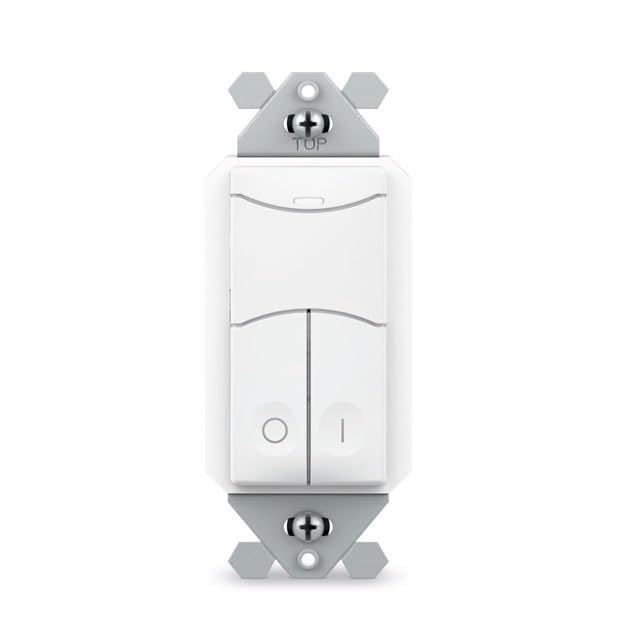
Image: SENSORWORX SWX-852-2-WH Wireless Remote Light Switch. This image shows the front view of the white wall switch, illustrating its compact design for easy installation.
2. Pairing with Wireless Controller
The SWX-852-2-WH must be paired with a compatible SENSORWORX wireless load controller (e.g., SWX-950 series power pack, SWX-851 wireless wall switch, or SWX-874-ELV dimmer) to function. The pairing process is quick and typically takes approximately 3 seconds per device.
- Gücün açık olduğundan emin olun for both the SWX-852-2-WH and the target wireless load controller.
- Eşleştirme modunu başlat on the wireless load controller according to its specific instructions. This usually involves pressing and holding a button on the controller.
- Activate pairing on SWX-852-2-WH: Press and hold the designated button on the SWX-852-2-WH (refer to the specific button layout on your device) until an indicator light confirms pairing mode.
- Confirm pairing: Both devices should provide visual feedback (e.g., LED flashes) to indicate successful pairing. Refer to the controller's manual for specific confirmation signals.
For multi-way switching, additional SWX-852-2-WH units can be paired to the same wireless load controller.
Kullanım Talimatları
Once installed and paired, the SWX-852-2-WH operates as a remote control for the linked SENSORWORX wireless load controller.
- AÇIK/KAPALI Kontrolü: Press the top button to turn the connected lights ON. Press the bottom button to turn the connected lights OFF.
- Dimming Control (if paired with a dimmer): If paired with a compatible SENSORWORX wireless dimmer (e.g., SWX-874-ELV), the buttons may also provide dimming functionality. Typically, holding the ON button will brighten lights, and holding the OFF button will dim lights. Refer to the dimmer's manual for specific dimming operations.
- Çok Yönlü Kontrol: In multi-way setups, any paired SWX-852-2-WH switch can control the same lighting load.
Bakım
The SENSORWORX SWX-852-2-WH is designed for long-term, maintenance-free operation. Follow these guidelines for optimal performance:
- Temizlik: To clean the surface of the switch, use a soft, damp Aşındırıcı temizleyiciler, çözücüler veya sert kimyasallar kullanmayın, çünkü bunlar cilaya zarar verebilir.
- Kullanıcı Tarafından Bakımı Yapılabilecek Parça Yok: Anahtarın içinde kullanıcı tarafından onarılabilecek hiçbir parça bulunmamaktadır. Cihazı açmaya veya onarmaya çalışmayın.
- Çevresel Koşullar: Hasarı önlemek için çalışma ortamının belirtilen sıcaklık ve nem aralıklarında kalmasını sağlayın.
Sorun giderme
If you experience issues with your SENSORWORX SWX-852-2-WH, consult the following troubleshooting guide:
| Sorun | Olası Neden | Çözüm |
|---|---|---|
| Switch does not respond to presses. | Anahtara güç gelmiyor. Not properly paired with a controller. Controller is out of range or powered off. | Verify power at the circuit breaker and wiring connections. Re-attempt the pairing process with the wireless load controller. Ensure the wireless load controller is powered on and within range (~40 feet through obstructions). |
| Lights do not turn ON/OFF or dim correctly. | Incorrect pairing. Incompatible controller. Parazit yapmak. | Confirm successful pairing with the correct SENSORWORX wireless load controller. Ensure the controller is compatible with the SWX-852-2-WH and supports the desired functionality (e.g., dimming). Minimize sources of wireless interference (e.g., large metal objects, other 900 MHz devices). |
| Aralıklı operasyon. | Zayıf kablosuz sinyal. Çevresel faktörler. | Relocate the wireless load controller or the SWX-852-2-WH to improve signal strength. Ensure no new obstructions have been introduced. Check for extreme temperatures or humidity outside of specified operating conditions. |
If troubleshooting steps do not resolve the issue, please contact SENSORWORX customer support.
Garanti ve Destek
The SENSORWORX SWX-852-2-WH Wireless Remote Light Switch comes with a 5 yıllık garanti from the date of purchase, covering defects in materials and workmanship under normal use. This warranty is valid only for products purchased from authorized SENSORWORX distributors.
For technical support, warranty claims, or further assistance, please visit the official SENSORWORX website or contact their customer service department. Please have your product model number (SWX-852-2-WH) and proof of purchase available when contacting support.
SENSORWORX products are proudly Made in the USA and comply with UL, RoHS, BAA, BABA, and TAA standards, ensuring high quality and reliability.