
giriiş
This manual provides essential information for the safe and efficient use of your SUPVAN T50M Pro Label Maker. Please read these instructions carefully before operating the device and retain them for future reference.
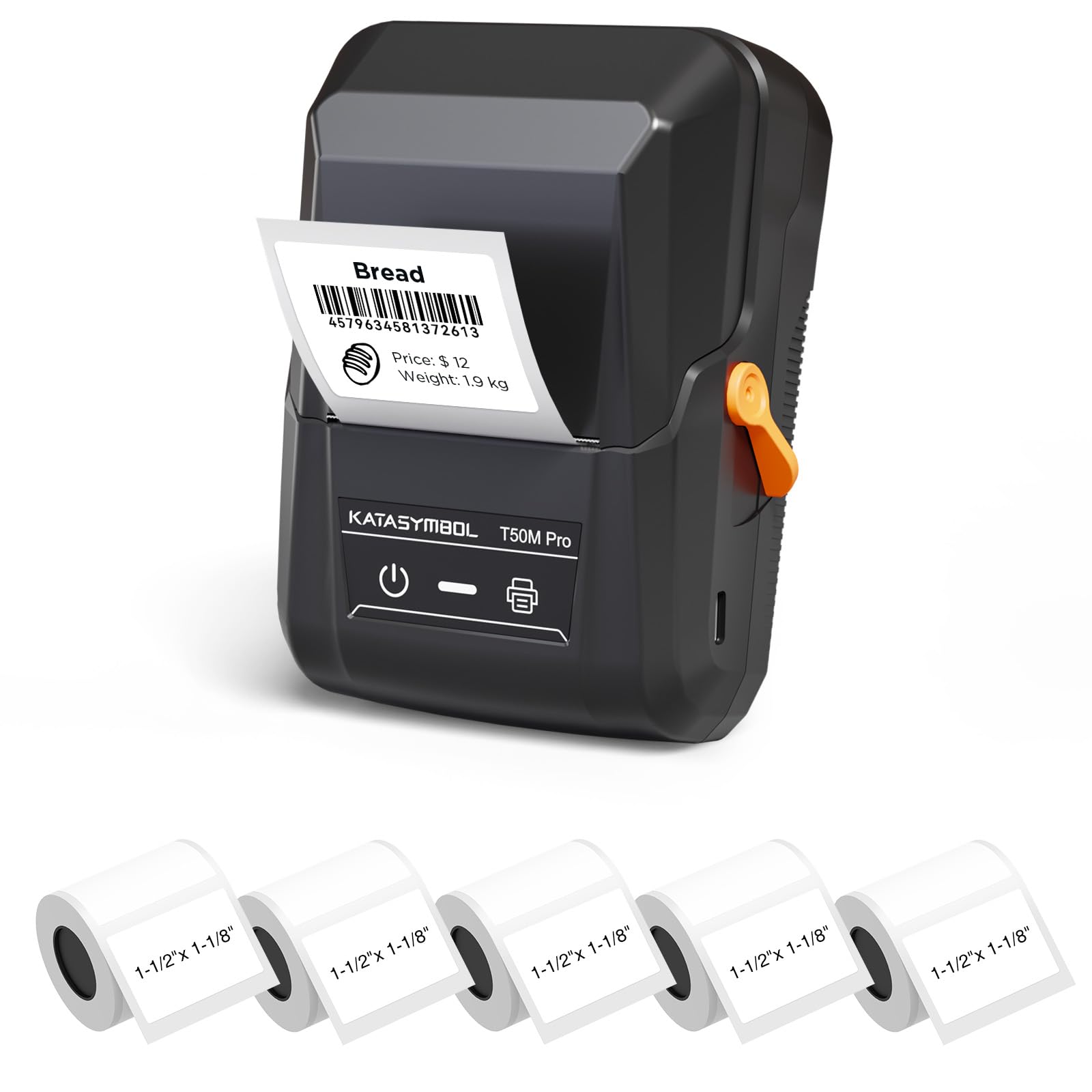
Image: The SUPVAN T50M Pro Label Maker, a compact thermal printer.
Paket İçeriği
Paketinizde tüm öğelerin mevcut olduğundan emin olun:
- SUPVAN T50M Pro Label Maker
- 5 rolls of 1.57'' × 1.18'' (40mm × 30mm) white labels (250 labels/roll)
- USB Cable (for charging and connectivity)
- Kullanım Kılavuzu (bu belge)
Kurulum Kılavuzu
1. Cihazın Şarj Edilmesi
Before first use, fully charge the label maker using the provided USB cable. The device features a 1200 mAh built-in rechargeable battery, offering extended use on a single charge.
2. Etiket Rulosunun Takılması
The T50M Pro uses thermal paper, eliminating the need for ink or toner. Follow these steps to install a label roll:
- Etiket bölmesinin kapağını açın.
- Etiket rulosunu baskılı yüzeyi yukarı bakacak şekilde yerleştirin.
- Ensure the label edge is aligned with the printer's feed mechanism.
- Close the cover. The device's Smart RFID Auto-Detection will recognize the label size automatically.

Image: Illustration of loading thermal paper into the label maker. The device uses thermal printing technology, requiring no ink or toner.
3. Uygulama Kurulumu ve Bağlantısı
Download the official SUPVAN app from your device's app store. The app provides all editing functions and is free to use.
- Etiket yazıcısını açın.
- Open the SUPVAN app on your smartphone or tablet.
- Follow the in-app instructions to connect to your T50M Pro via Bluetooth or USB.
Kullanım Talimatları
1. Uygulama ile Etiket Oluşturma
The SUPVAN app offers a comprehensive suite of editing tools:
- Metin Düzenleme: Choose from over 40 fonts.
- Image & Picture Integration: Add custom images and logos.
- Şablonlar: Access over 140 free, constantly updated templates for various uses.
- Otomatik Etiket Boyutu Tanıma: The app automatically detects the loaded label size, reducing errors.

Image: The SUPVAN app's editing interface, demonstrating font choices, image integration, and automatic label size detection.

Image: A selection of over 140 free templates available within the SUPVAN app, suitable for diverse labeling needs.
2. Etiketleri Yazdırma
After designing your label in the app, select the "Print" option. Ensure the label maker is connected and has sufficient battery. The T50M Pro supports various label styles and sizes, printing 3/4 to 2-inch wide labels.

Resim: Eskiamples of labels created with the T50M Pro, including address labels, price tags, and decorative labels, demonstrating support for various styles.

Image: A visual comparison highlighting the high-quality image output from the SUPVAN T50M Pro's app compared to other label makers.
3. Ortak Uygulamalar
The SUPVAN T50M Pro is suitable for a wide range of labeling tasks:
- Küçük İşletme: Shipping addresses, product information, QR codes, brand logos.
- Ofis ve Okul: İsim tags, folder labels, documentation, asset taggitti.
- Ev Organizasyonu: Pantry labels, storage bins, personal items.

Image: Demonstrates diverse uses for the label maker, such as labeling containers in a pantry, creating product labels, printing shipping labels, and organizing school supplies.
Bakım
1. Baskı Kafasını Temizleme
En iyi baskı kalitesini sağlamak için termal baskı kafasını düzenli olarak temizleyin. Yumuşak, tüy bırakmayan bir bez kullanarak hafifçe silin.ampened with isopropyl alcohol. Do not use abrasive cleaners or sharp objects.
2. Pil Bakımı
Recharge the device when the battery indicator is low. Avoid fully discharging the battery frequently to prolong its lifespan. Store the device in a cool, dry place when not in use for extended periods.
3. Etiket Saklama
Store label rolls in a cool, dry place away from direct sunlight and heat to prevent degradation of the thermal material.
Sorun giderme
1. Cihaz Açılmıyor
- Cihazın tamamen şarj olduğundan emin olun. USB kablosunu kullanarak bir güç kaynağına bağlayın.
- Güç düğmesini birkaç saniye basılı tutun.
2. Printing Issues (Blank or Faint Prints)
- Check if the label roll is installed correctly with the printing surface facing up.
- Ensure the label roll is not empty.
- Bakım bölümünde açıklandığı gibi yazıcı kafasını temizleyin.
- Verify that the label type is compatible with the T50M Pro.
3. Uygulama Bağlantı Sorunları
- Mobil cihazınızda Bluetooth'un etkinleştirildiğinden emin olun.
- Make sure the label maker is turned on and within range.
- Restart both the label maker and the app.
- Sorun devam ederse, uygulamayı yeniden yüklemeyi deneyin.
4. Label Misalignment
- Ensure the label roll is properly seated and aligned in the compartment.
- The Smart RFID Auto-Detection should prevent most misalignment issues; if not, try re-seating the roll.
Özellikler
| Özellik | Detay |
|---|---|
| Model Adı | T50M Pro |
| Marka | SÜPVAN |
| Baskı Teknolojisi | Termal |
| Bağlantı Teknolojisi | USB, Bluetooth |
| Donanım Arayüzü | USB |
| Yazıcı Çıktısı | Monochrome (Black Ink Color) |
| Maksimum Medya Boyutu | 1.57'' × 1.18'' (40mm × 30mm) - 3/4 to 2-inch wide labels supported |
| Özel Özellik | Portable, Smart RFID Auto-Detection, BPA-free labels |
| Pil | 1200 mAh dahili şarj edilebilir pil |
| Boyutlar | Yaklaşık 5" x 3.7" x 2.3" |
| Ağırlık | Yaklaşık. 0.6 lb |
| Dahil Bileşenler | Label Maker, Labels, USB Cable |

Image: The compact design of the T50M Pro, highlighting its portability, lightweight nature, and 1200 mAh rechargeable battery.
Garanti ve Destek
Garanti Bilgileri
For detailed warranty information, please refer to the warranty card included with your product or visit the official SUPVAN webSite. Garanti şartları ve koşulları bölgeye ve perakendeciye göre değişiklik gösterebilir.
Müşteri Desteği
If you encounter any issues or have questions regarding your SUPVAN T50M Pro Label Maker, please contact SUPVAN customer support through their official webÜrünün satın alındığı site veya perakendeci.
Ayrıca ziyaret edebilirsiniz SUPVAN Mağazası Amazon'da Ek ürün bilgileri ve destek kaynakları için.