
1. Giriş
Thank you for choosing the Novodesk AZ5130 6-in-1 Automatic Vacuum Sealer Machine. This manual provides essential information for the safe and efficient operation, maintenance, and troubleshooting of your new appliance. Please read these instructions thoroughly before first use and retain them for future reference.

Image 1.1: The Novodesk AZ5130 Vacuum Sealer in operation, sealing food for preservation.
2. Önemli Güvenlik Talimatları
Elektrikli aletleri kullanırken yangın, elektrik çarpması ve kişilerin yaralanma riskini azaltmak için her zaman aşağıdakiler de dahil olmak üzere temel güvenlik önlemlerine uyulmalıdır:
- Cihazı kullanmadan önce tüm talimatları okuyun.
- Do not operate the appliance with a damaged power cord or plug. If the cord or plug is damaged, contact customer support for assistance.
- Cihazı, elektrik kablosunu veya fişini suya veya başka sıvılara batırmayın.
- Bu cihaz, fiziksel, duyusal veya zihinsel yetenekleri kısıtlı olan veya deneyim ve bilgi eksikliği bulunan kişiler (çocuklar dahil) tarafından, güvenliklerinden sorumlu bir kişi tarafından cihazın kullanımıyla ilgili olarak gözetim veya talimat sağlanmadığı sürece kullanılmak üzere tasarlanmamıştır.
- Herhangi bir cihazın çocuklar tarafından veya çocukların yakınında kullanılması durumunda yakın gözetim gereklidir.
- Kullanılmadığında ve temizlemeden önce fişini prizden çekin. Parçaları takıp çıkarmadan ve cihazı temizlemeden önce soğumasını bekleyin.
- Üretici tarafından tavsiye edilmeyen aparatları kullanmayınız.
- Açık havada kullanmayınız.
- Sıcak gazlı veya elektrikli ocakların üzerine veya yakınına, ya da ısıtılmış fırına koymayın.
- Always ensure the lid is properly latched before operating.
- Use only vacuum sealer bags designed for vacuum sealing.
3. Paket İçeriği
Carefully unpack your Novodesk AZ5130 Vacuum Sealer and check that all items are present and in good condition. If any items are missing or damaged, please contact customer support.
- 1 x Novodesk AZ5130 Vacuum Sealer Machine
- 1 x Güç Kablosu
- 1 x Vacuum Hose (for external vacuuming)
- 2 x Sealing Foam Gaskets (replacement)
- 6 x Pre-cut Vacuum Bags (3.9" x 7.8")
- 6 x Pre-cut Vacuum Bags (7.8" x 11.8")

Image 3.1: All components included in the Novodesk AZ5130 Vacuum Sealer package.
4. Ürün Bittiview
Familiarize yourself with the various parts and functions of your vacuum sealer.

Image 4.1: Control panel and function buttons of the vacuum sealer.
Kontrol Paneli Fonksiyonları:
- Process Indicator Light: Illuminates to show operating status.
- Kuru mod: For vacuum sealing dry foods like nuts and grains.
- Nemli Mod: For vacuum sealing foods with a small amount of liquid.
- Darbe Fonksiyonu: Allows manual control of the vacuum process, ideal for fragile foods.
- Seal Function: Vakumlamadan torbaları kapatır.
- Durdurma düğmesi: Mevcut işlemi durdurur.
Image 4.2: Internal components of the vacuum sealer.
Temel Bileşenler:
- Vakum Odası: Torbanın içindeki havanın boşaltıldığı bölge.
- Silicone Strip: Helps create a tight seal.
- Sızdırmazlık şeridi: Heats to create the bag seal (4mm wide).
- Foam Seal Ring: Ensures proper vacuum.
- Cover Slaps: Prevents the vacuum bag from coming out of the vacuum chamber.
- External Sliding Cutter: Integrated cutter for custom bag sizes.
- External VAC Port: For connecting the vacuum hose to jars and containers.
5. Kurulum
Before first use, ensure the appliance is clean and dry. Place the vacuum sealer on a flat, stable surface.
İlk Kurulum Adımları:
- Connect the power cord to the appliance and then to a suitable electrical outlet.
- Prepare your vacuum bag with food, ensuring the open end is clean and dry. Leave at least 2-3 inches of space between the food and the top of the bag.
6. Kullanım Talimatları
6.1. Basic Vacuum Sealing (Dry & Moist Modes)
Follow these steps for standard vacuum sealing of food bags:
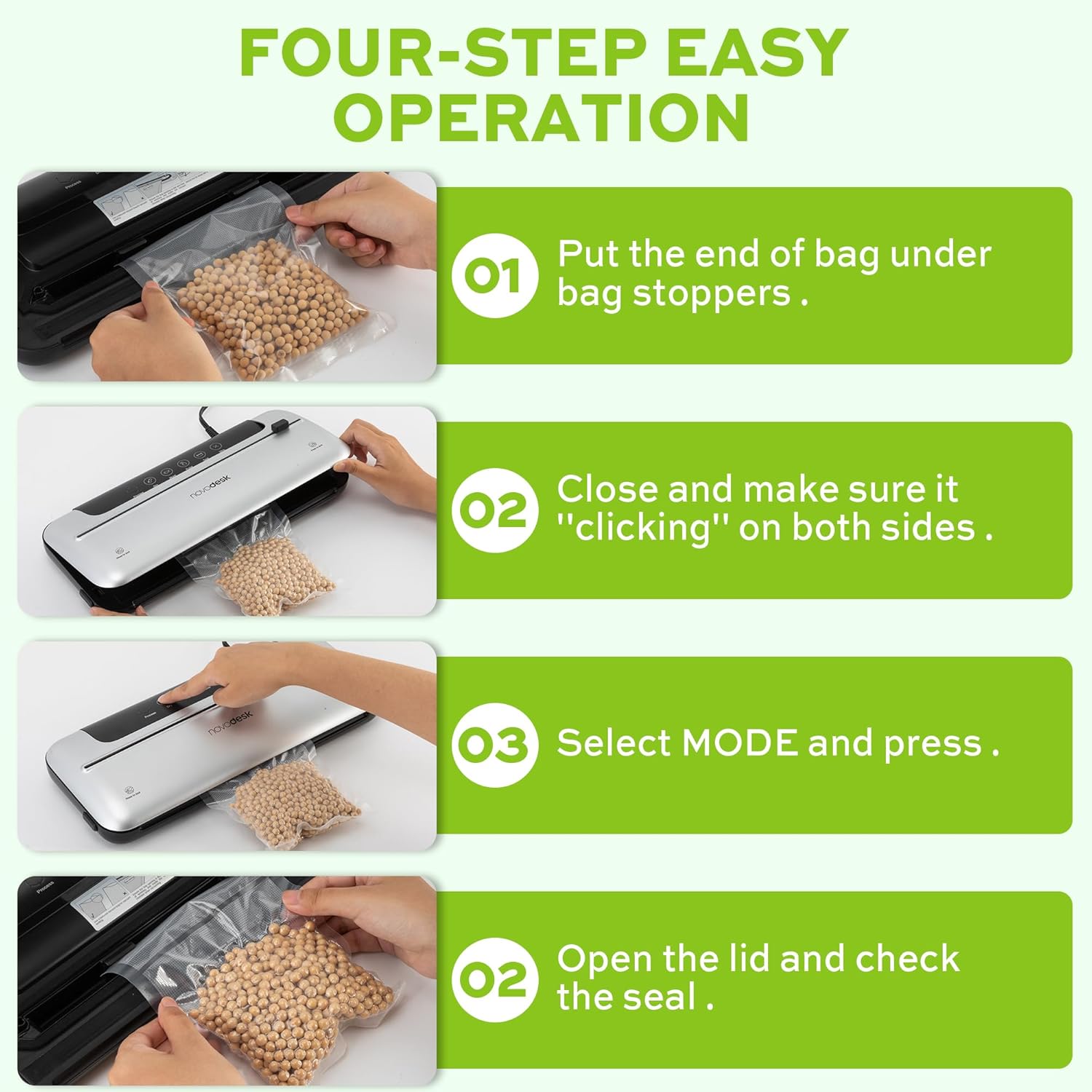
Image 6.1: Four-step easy operation for vacuum sealing.
- Çantayı Hazırlayın: Place the open end of the vacuum bag under the bag stoppers, ensuring it is flat and centered within the vacuum chamber.
- Kapağı kapat: Firmly close the lid of the vacuum sealer. Press down on both sides until you hear a "clicking" sound, indicating that the lid is securely latched.
- Mod seç: Choose the appropriate mode for your food:
- Basın Kuru button for dry foods.
- Basın Nemli button for moist foods.
- Mührü kontrol edin: Once the process is complete and the indicator light turns off, open the lid and remove the sealed bag. Inspect the seal to ensure it is airtight.
6.2. Nabız Fonksiyonu
The Pulse function provides manual control over the vacuum process, which is ideal for delicate or fragile foods that could be crushed by full vacuum pressure.
- Follow steps 1 and 2 from "6.1. Basic Vacuum Sealing".
- Basılı tutun Nabız Düğmeye basın. Makine süpürmeye başlayacaktır.
- Serbest bırak Nabız button when the desired vacuum level is reached.
- Basın Fok torbayı kapatmak için kullanılan düğme.
- Kapağı açın ve kapalı poşeti çıkarın.
6.3. Seal Only Function
Use the Seal function to create a seal without vacuuming, useful for making custom-sized bags from a roll or resealing snack bags.
- Torbanın açık ucunu sızdırmazlık şeridinin üzerine yerleştirin.
- Kapağı tık sesi gelene kadar sıkıca kapatın.
- Basın Fok düğmesine basın. Makine torbayı ısıtacak ve kapatacaktır.
- Once the sealing process is complete, open the lid and remove the sealed bag.
6.4. External Vacuum Function (for Jars/Containers)
Your vacuum sealer includes an external vacuum hose for use with compatible vacuum-sealable jars, containers, and wine stoppers.

Image 6.2: Using the external vacuum system with various containers.
- Prepare your vacuum-sealable jar or container with food. Ensure the lid is properly placed.
- Insert one end of the vacuum hose into the external VAC port on the vacuum sealer.
- Insert the other end of the vacuum hose into the port on your vacuum-sealable jar or container.
- Close the lid of the vacuum sealer (no bag needed inside).
- Basın External VAC button (if available, otherwise use Dry/Moist mode to activate vacuum pump). The machine will begin to remove air from the container.
- Once the vacuum process is complete, remove the hose. The container should now be sealed.
6.5. Using the External Sliding Cutter
The integrated sliding cutter allows you to create custom-sized bags from a roll of vacuum sealer material.
- Place the vacuum bag roll across the cutting area.
- Slide the cutter blade across the bag material to achieve the desired length.
7. Bakım ve Temizlik
Vakumlu paketleme makinenizin uzun ömürlü olmasını ve optimum performans göstermesini sağlamak için düzenli temizlik ve bakım yapmanız gerekir.
Temizlik Talimatları:
- Temizlemeden önce mutlaka cihazın fişini çekin.
- Makinenin dış yüzeyini yumuşak bir bezle silin.amp bezle silin. Aşındırıcı temizleyiciler veya çözücüler kullanmayın.
- Vakum haznesini ve sızdırmazlık şeridi alanını ad ile temizleyin.amp cloth. Ensure no food particles or liquids remain.
- The foam seal rings can be removed for cleaning if necessary. Wash with mild soap and water, rinse thoroughly, and allow to air dry completely before reinserting.
- Cihazı saklamadan veya tekrar kullanmadan önce tüm parçaların tamamen kuru olduğundan emin olun.
Depolamak:
Store the vacuum sealer in a clean, dry place. For best results, store with the lid unlatched to prevent compression of the foam seal rings, which can affect sealing performance over time.
8. Sorun Giderme
Vakumlu paketleme makinenizde sorun yaşarsanız, aşağıdaki yaygın sorunlara ve çözümlere bakın:
| Sorun | Olası Neden | Çözüm |
|---|---|---|
| Makine açılmıyor. | Güç kaynağı yok. | Check if the power cord is securely plugged into the outlet and the machine. Test the outlet with another appliance. |
| Makine vakumluyor ama kapatmıyor. | Sealing strip or foam gasket is dirty/damaged. Bag is not positioned correctly. | Clean the sealing strip and foam gaskets. Ensure the bag is flat and centered over the sealing strip. Replace gaskets if damaged. |
| Makine mühürlüyor ama vakumlamıyor. | Lid not properly latched. Foam gaskets are dirty or worn. Bag has holes or is not suitable. | Ensure the lid is firmly closed and latched on both sides. Clean or replace foam gaskets. Use proper vacuum sealer bags and check for damage. |
| Vakum zayıf veya tutarsızdır. | Foam gaskets are dirty or worn. Too much liquid in the bag (for Dry mode). | Clean or replace foam gaskets. Use Moist mode for foods with liquid, or pre-freeze liquids. |
| Poşet kapatma sırasında eriyor. | Sealing time too long (unlikely for automatic models). | Ensure you are using appropriate vacuum sealer bags. If issue persists, contact customer support. |
If the problem persists after attempting these solutions, please contact Novodesk customer support for further assistance.
9. Özellikler
| Marka | Novodesk |
| Model Numarası | AZ5130 |
| Güç / Güçtage | 120 watt |
| Cilttage | 120V |
| Malzeme | Akrilonitril Bütadien Stiren (ABS) |
| Ürün Ağırlığı | 980 g (2.16 Pound) |
| Renk | Gümüş rengi |
| Çalışma Modu | Otomatik |
| Maksimum Emiş Gücü | 75KPa |
| Sızdırmazlık Şeridi Genişliği | 4mm |
10. Garanti ve Destek
Novodesk products are manufactured to high-quality standards. For information regarding warranty coverage, product support, or to purchase replacement parts, please refer to the warranty card included with your product or visit the official Novodesk website. If you have any questions or require assistance, please contact Novodesk customer service.