
1. Giriş
The CIO NovaPort SLIM QUAD for DESK 67W is an ultra-thin, high-performance USB charger designed for desktop use. It features a compact form factor and offers versatile charging capabilities for a wide range of devices, from laptops to smartphones and gaming consoles. Equipped with CIO's proprietary NovaIntelligence and NovaSafety2.0 technologies, it ensures optimal power distribution and enhanced safety during charging.

Figure 1: NovaPort SLIM QUAD charger in white and black, showcasing its compact design and four charging ports (3x USB-C, 1x USB-A).
2. Güvenlik Bilgileri
Please read all safety instructions carefully before using this product to prevent injury or damage to the device.
- Şarj cihazını suya, neme veya aşırı sıcaklıklara maruz bırakmayın.
- Şarj cihazınızı düşürmekten veya sert darbelere maruz bırakmaktan kaçının.
- Do not disassemble, modify, or attempt to repair the charger yourself. Contact qualified service personnel for assistance.
- Ensure the power cable is fully inserted into the wall outlet and the charger.
- Yıldırımlı havalarda veya uzun süre kullanılmayacaksa şarj cihazını fişten çekin.
- Çocukların erişemeyeceği yerde saklayınız.
- The charger may become warm during operation, especially under heavy load. This is normal. Ensure adequate ventilation.
3. Kurulum
Follow these steps to set up your NovaPort SLIM QUAD charger:
- Güç Kablosunu Bağlayın: Insert the included 1.5m power cable (figure-8 type) into the charger's power input port.
- Bir Çıkışa Takın: Connect the other end of the power cable to a standard AC wall outlet (100-240VAC, 50/60Hz). The charger features a salıncak fişi for flexible placement, allowing it to fit in narrow spaces or behind furniture.
- Cihazlarınızı Bağlayın: Use appropriate USB-C or USB-A cables (not included) to connect your devices to the available charging ports on the NovaPort SLIM QUAD.

Figure 2: The swing plug allows for flexible positioning in tight spaces, such as behind furniture or desks.
4. Kullanım Talimatları
The NovaPort SLIM QUAD is designed for simple and efficient charging.
4.1. Multi-Device Charging
This charger features three USB Type-C ports and one USB Type-A port, allowing you to charge up to four devices simultaneously. The total output can reach up to 65W when multiple devices are connected.

Figure 3: Simultaneous charging of multiple devices, including a laptop, smartphone, smartwatch, and earbuds.
4.2. NovaIntelligence Technology
The NovaPort SLIM QUAD incorporates NovaIntelligence technology, which automatically adjusts power distribution to connected devices. This means you do not need to worry about which port to use for specific devices; the charger will optimize the output for the fastest possible charging.

Figure 4: NovaIntelligence automatically allocates optimal power to each connected device.
4.3. Rapid Charging Quick Reference
Refer to the table below for detailed output specifications when charging one or more devices.
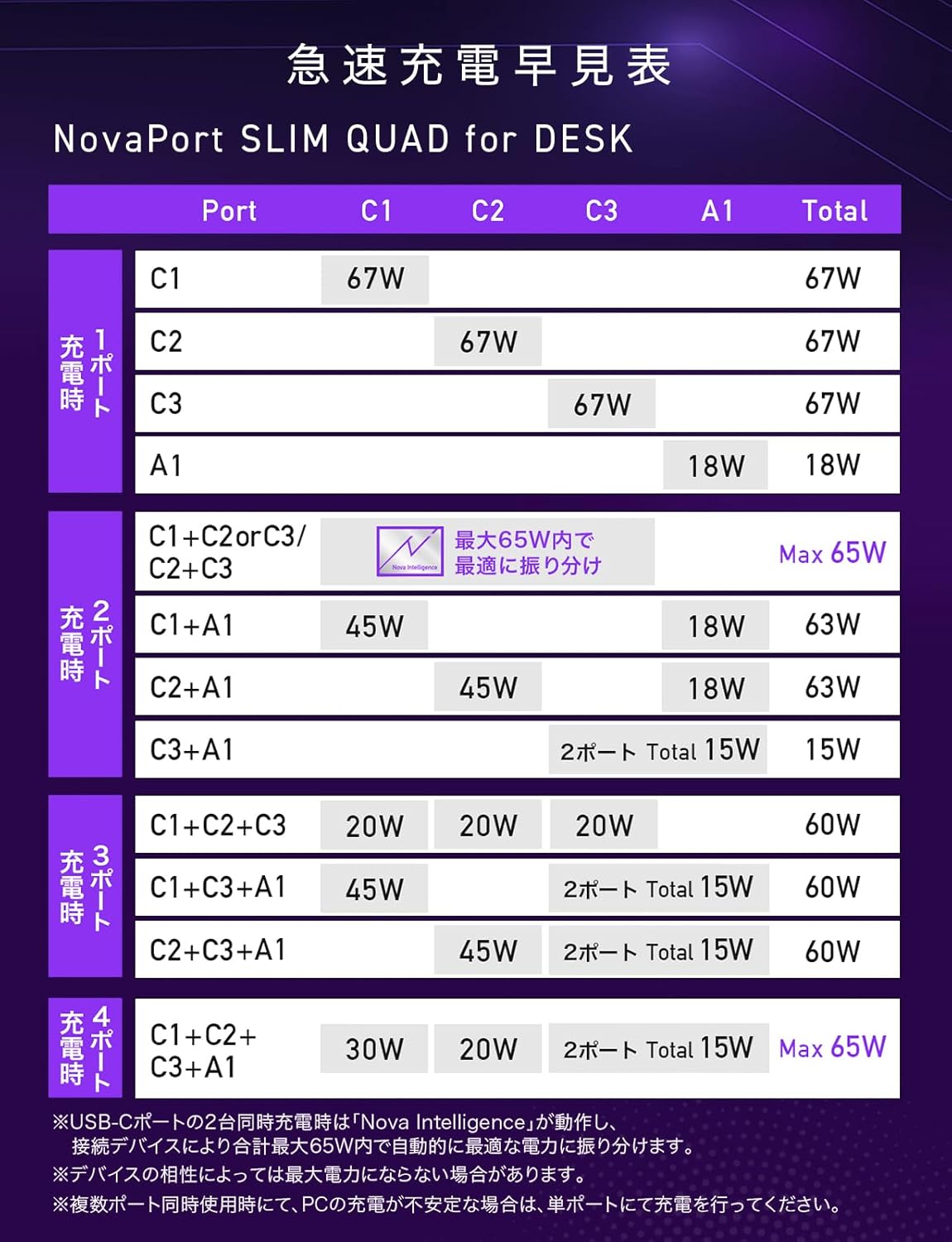
Figure 5: Rapid Charging Quick Reference Table for NovaPort SLIM QUAD, showing power output configurations.
Note: Maximum output may not be achieved for all devices due to compatibility. For PC charging, verify the required voltage ve netage with your PC manufacturer.
5. Bakım
To ensure the longevity and optimal performance of your NovaPort SLIM QUAD charger, follow these maintenance guidelines:
- Temizlik: Temizlemeden önce şarj cihazını prizden ve tüm cihazlardan çıkarın. Yüzeyi silmek için yumuşak ve kuru bir bez kullanın. Sıvı temizleyiciler veya aerosoller kullanmayın.
- Depolamak: Şarj cihazını doğrudan güneş ışığından ve aşırı sıcaklıklardan uzak, serin ve kuru bir yerde saklayın.
- Kaymaz Taban: The charger features an anti-slip silicone base to prevent accidental movement and protect your desk surface.
- Çizilmeye Dayanıklı Kaplama: The surface material has a textured finish designed to resist minor scratches, helping to maintain its appearance over time.

Figure 6: The anti-slip silicone base ensures stability and protects surfaces.
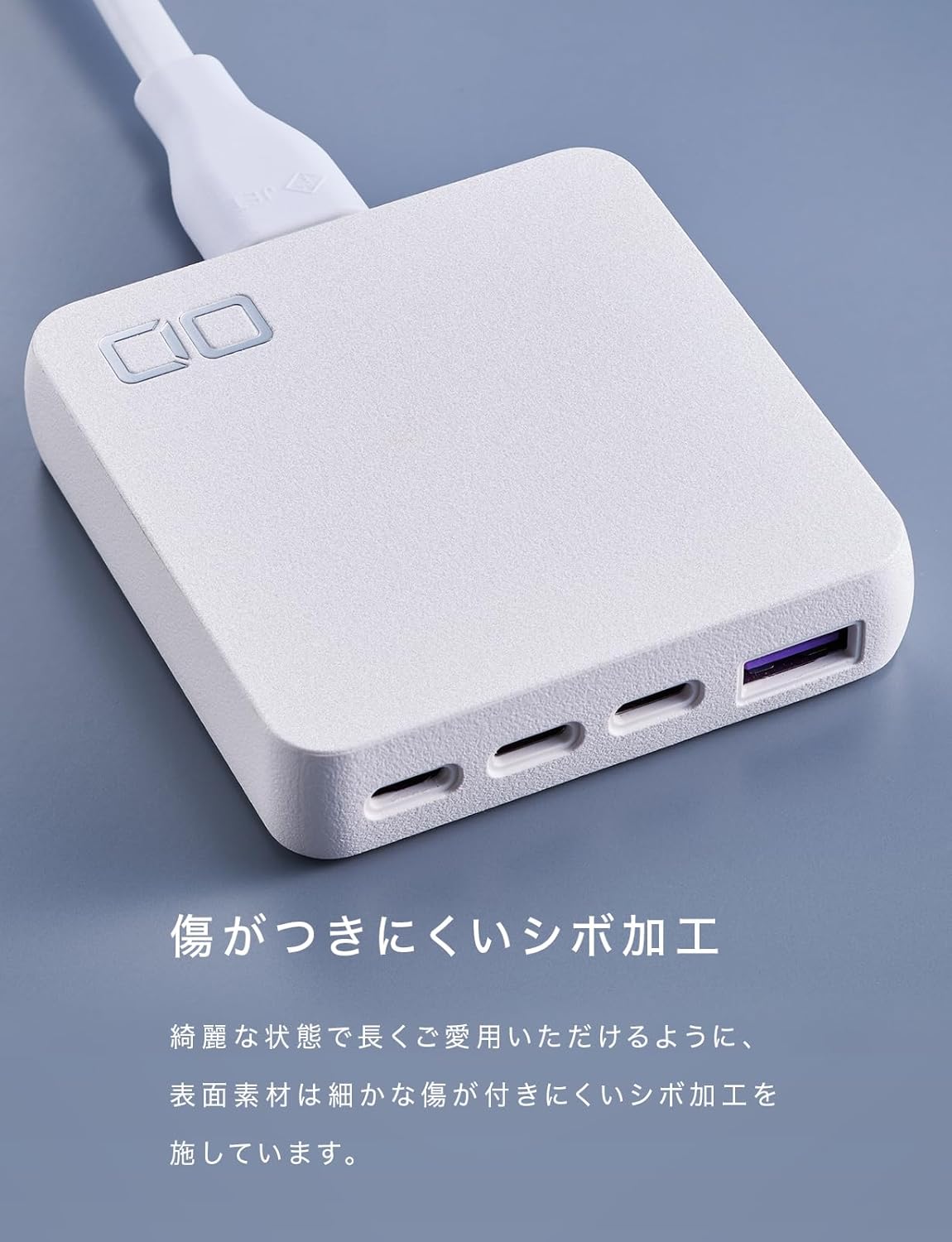
Figure 7: The textured finish helps prevent scratches and maintain the charger's aesthetic.
6. Sorun Giderme
If you encounter issues with your NovaPort SLIM QUAD, refer to the following common problems and solutions:
- Cihaz şarj olmuyor veya yavaş şarj oluyor:
- Ensure the charger is properly connected to a power outlet.
- Check that the charging cable is securely connected to both the charger and your device.
- Verify that your device and cable support the charging standards (PD3.0, QC4.0+, PPS) and power output of the charger.
- If charging multiple devices, the power is distributed. For maximum speed on a single device, try charging it alone.
- Şarj cihazı sıcak hissediliyor:
- It is normal for the charger to become warm during operation, especially when charging multiple devices or high-power devices like laptops.
- Şarj cihazının yeterli havalandırmaya sahip olduğundan ve üzerinin örtülmediğinden emin olun.
- The NovaSafety2.0 technology monitors product temperature and automatically adjusts power to prevent overheating.
- Power output fluctuates or devices disconnect briefly when a new device is connected:
- This is a normal behavior for multi-port chargers with intelligent power distribution (NovaIntelligence). When a new device is connected, the charger performs a 're-handshake' to re-evaluate and redistribute power optimally among all connected devices. This may cause a brief interruption in charging for other devices.
- PC charging is unstable with multiple devices:
- If you experience unstable charging for your laptop when other devices are also connected, try charging the laptop on a single, dedicated USB-C port for optimal performance.
7. Özellikler
Below are the detailed technical specifications for the CIO NovaPort SLIM QUAD for DESK 67W charger.

Şekil 8: Ayrıntılı ürün özellikleri.
| Özellik | Detay |
|---|---|
| Model Numarası | CIO-G67W3C1AD-S |
| Giriş | 100-240VAC, 50/60Hz, 1.5A |
| USB Bağlantı Noktaları | 3 x USB Type-C, 1 x USB Type-A (Total 4 ports) |
| USB-C Output (C1/C2/C3) | 5V=3A / 9V=3A / 12V=3A / 15V=3A / 20V=3.35A (Max 67W) PPS:5-11V=5A |
| USB-A Çıkışı | 5V=3A / 9V=2A / 12V=1.5A (Max 18W) |
| Multi-Port Output (ExampTHE) | USB-(C1+C2/C1+C3/C2+C3): 30W+30W or 45W+20W or 20W+45W (Max 65W) USB-(C1+A/C2+A): 45W+18W (Max 63W) USB-(C1+C2+C3): 20W+20W+20W (Max 60W) USB-(C1+C2+A): 20W+20W+18W (Max 58W) USB-(C1/C2+(C3+A)): 45W+15W (Max 60W) USB-(C3+A): 5V=3A (Max 15W) USB-(C1+C2+(C3+A)): 30W+20W+15W (Max 65W) |
| Desteklenen Hızlı Şarj | PD3.0 / QC4.0+ / PPS |
| Boyutlar | Yaklaşık. 70 x 72 x 16.8 mm |
| Ağırlık | Yaklaşık 136 gr |
| Dahil Edilen Kablo Uzunluğu | 1.5 metre |
| Included Cable Weight | Yaklaşık 100 gr |
| Renk | White (This variant) |
| Özellikler | Multi-device charging, Lightweight design, High-speed charging, NovaIntelligence, NovaSafety2.0 |
8. Garanti ve Destek
For warranty information and customer support, please refer to the documentation included with your product or visit the official CIO website. The included accessories are an instruction manual (Japanese/English) and a 1.5m power cord.
Destek için iletişim bilgileri genellikle üreticinin web sitesinde bulunabilir. websitede veya ürün ambalajında yer almamaktadır.