
FiiO M21
FiiO M21 Taşınabilir Müzik Çalar Kullanım Kılavuzu
Modeli: M21
1. Giriş
Thank you for choosing the FiiO M21 Portable Music Player. This manual provides essential information for setting up, operating, and maintaining your device. Please read it thoroughly before use to ensure optimal performance and longevity of your M21 player.
The FiiO M21 is a high-fidelity portable music player featuring an Android 13 operating system, powered by a Snapdragon 680 processor. It incorporates four CS43198 DAC chips and a fully balanced 2-stage amplification design to deliver exceptional audio quality. With dual Type-C ports, versatile power supply modes, and a compact HD screen, the M21 is designed for audiophiles seeking a premium portable listening experience.
2. Ürün Bittiview
2.1. Paket İçeriği
- FiiO M21 Portable Music Player
- USB C Tipi Kablo
- Protective Case (Retro cassette-style)
- Hızlı Başlangıç Kılavuzu
- Garanti Kartı
2.2. Düğmeler ve Bağlantı Noktaları
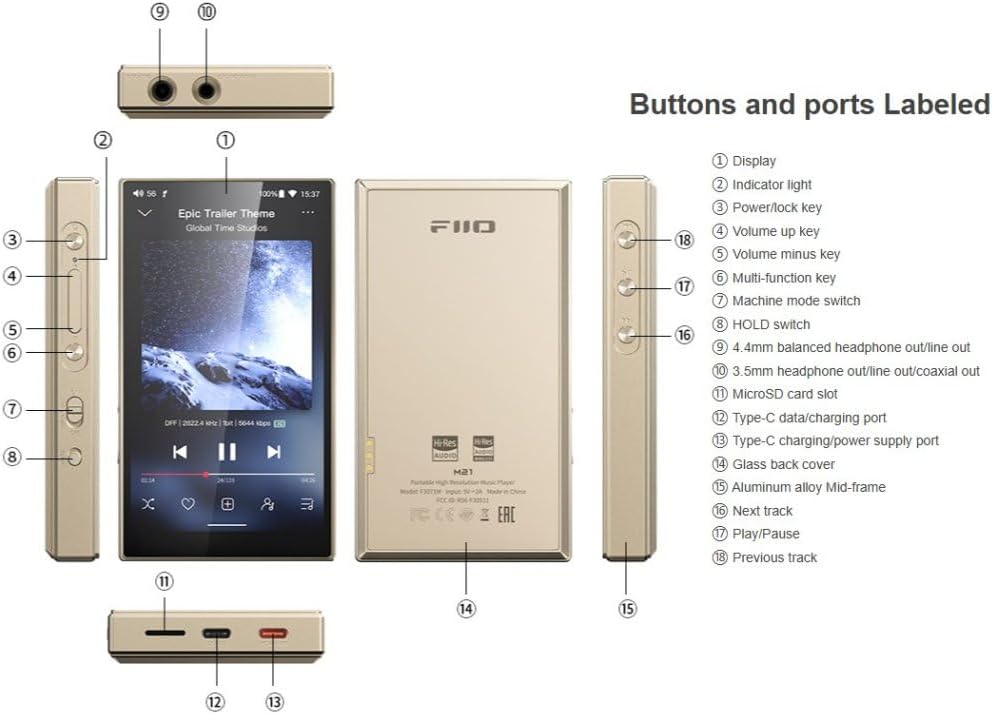
Şekil 2.2.1: FiiO M21 with labeled buttons and ports for easy identification.
This image displays the FiiO M21 from multiple angles, highlighting its various buttons, ports, and features. Key components are numbered and correspond to a legend for easy identification. These include the display, indicator light, power/lock key, volume up/minus keys, multi-function key, machine mode switch, HOLD switch, 3.5mm headphone/line out, 4.4mm balanced headphone/line out/coaxial out, microSD card slot, Type-C data/charging port, Type-C charging/power supply port, glass back cover, aluminum alloy mid-frame, next track, play/pause, and previous track buttons.
- Görüntülemek: 4.7-inch compact HD screen.
- Güç/Kilit Tuşu: Used to power on/off the device and lock/unlock the screen.
- Volume Up/Minus Keys: Ses çıkışı ses düzeyini ayarlayın.
- Çok Fonksiyonlu Tuş: Programmable key for various functions.
- Machine Mode Switch: Farklı çalışma modları arasında geçiş yapar.
- BASTIRMA Düğmesi: Kazara tuşlara basılmasını önler.
- 3.5mm Headphone/Line Out: Standard single-ended audio output.
- 4.4mm Balanced Headphone/Line Out/Coaxial Out: Balanced audio output and digital coaxial output.
- MicroSD Kart Yuvası: Genişletilebilir depolama için.
- Type-C Data/Charging Port: Veri aktarımı ve şarj için.
- Type-C Charging/Power Supply Port: Dedicated port for external power supply, especially for Desktop Mode.
- Sonraki Parça/Önceki Parça: Navigation buttons for music playback.
- Oynat/Duraklat: Müzik çalmayı kontrol edin.
2.3. Temel Özellikler
- İşlemci: Qualcomm Snapdragon 680 (6nm process) for superior performance and power efficiency.
- İşletim Sistemi: Android 13 with 4GB RAM + 64GB internal storage.
- DAC'ler: 4x CS43198 DACs with 4-channel, 8-path fully differential output design.
- Ampaçıklama: Fully balanced 2-stage amplifikasyon (cilttage and current boost).
- Çıkış Gücü: 950mW high output power.
- Çift Tip-C Bağlantı Noktası: Separate ports for data/charging and dedicated power supply.
- Desktop/Portable Dual Power Supply Modes: Extends battery lifespan by operating on external power in Desktop Mode.
- Ses Çıkışları: Dual 3.5mm + 4.4mm headphone/LO outputs with independent line ampLifikasyon devreleri.
- Dijital Çıkış: Supports SPDIF and USB Audio output with reduced jitter.
- Bağlantı: Bluetooth (LDAC supported) and Wi-Fi.
- Görüntülemek: 4.7 inç HD ekran.
- Tasarım: Retro cassette-style protective case included.
3. Kurulum
3.1. İlk Şarj
Before first use, fully charge your FiiO M21. Connect the provided USB Type-C cable to the Type-C data/charging port on the device and the other end to a USB power adapter (5V/2A recommended) or a computer's USB port. The indicator light will show charging status and turn off when fully charged.
3.2. Açma/Kapama
- Açmak İçin: Press and hold the Power/Lock key until the FiiO logo appears on the screen.
- Kapatmak İçin: Press and hold the Power/Lock key until a power-off menu appears. Select "Power off" to shut down the device.
- Ekran Kilidi/Kilidi Açma: Briefly press the Power/Lock key to lock or unlock the screen.
3.3. MicroSD Kart Takma
The FiiO M21 supports expandable storage via a MicroSD card. Locate the MicroSD card slot on the side of the device. Gently insert the MicroSD card into the slot until it clicks into place. To remove, push the card inwards until it springs out.
3.4. İlk Kurulum Sihirbazı
Upon first power-on, the device will guide you through an initial setup wizard. This includes selecting your language, connecting to Wi-Fi, and setting up your Google account (optional, for app downloads). Follow the on-screen prompts to complete the setup.
4. Kullanım Talimatları
4.1. Temel Gezinme
The FiiO M21 runs on Android 13, offering a familiar smartphone-like interface. Use touch gestures (tap, swipe, pinch) to navigate through menus, apps, and settings.
4.2. Müzik Çalma
- Yerel Müzik: Müzik transferi files to the internal storage or MicroSD card. Use the pre-installed music player app to browse and play your local library.
- Yayın Hizmetleri: Connect to Wi-Fi and download your preferred music streaming apps (e.g., Spotify, Apple Music, Tidal) from the Google Play Store or FiiO Market.
- Ses Kontrolü: Use the Volume Up/Minus keys on the side of the device to adjust playback volume.
- Oynatma Kontrolleri: Use the physical Next Track, Previous Track, and Play/Pause buttons for quick control.

Şekil 4.2.1: FiiO M21 displaying its music playback interface.
This image shows the FiiO M21's front display, actively playing music. The screen displays album art, track information, playback progress, and on-screen controls for play/pause, skip, and other functions. The device's sleek design and high-resolution display are visible, emphasizing its primary function as a dedicated music player.
4.3. Connecting Headphones/External Devices
- Kablolu Kulaklıklar: Connect your headphones to either the 3.5mm single-ended output or the 4.4mm balanced output, depending on your headphone's connector.
- Bluetooth Kulaklıklar: Go to Settings > Connected devices > Bluetooth, turn on Bluetooth, and pair with your Bluetooth headphones. The M21 supports high-quality codecs like LDAC.
- Hat Çıkışı: The 3.5mm and 4.4mm ports can also function as Line Out for connecting to external amplifiers or speakers. Select the appropriate mode in the settings.
- Koaksiyel Çıkış: Use the 4.4mm port for digital coaxial output to compatible DACs or receivers.
4.4. Desktop Mode
The M21 features a patented Desktop Mode. When activated, the device operates entirely on external power connected to the dedicated Type-C power supply port, bypassing the internal battery. This extends battery lifespan and is ideal for prolonged use as a desktop source.
- Connect a stable 5V/2A (or higher) power adapter to the dedicated Type-C power supply port.
- The device will automatically detect Desktop Mode or prompt you to activate it.
4.5. Sistem Ayarları
Access the system settings by swiping down from the top of the screen and tapping the gear icon, or by finding the "Settings" app. Here you can configure Wi-Fi, Bluetooth, display, sound, battery, storage, and other Android system options.
5. Bakım
- Temizlik: Cihazı temizlemek için yumuşak, kuru ve tüy bırakmayan bir bez kullanın. Sıvı temizleyiciler veya aerosoller kullanmayın.
- Depolamak: Cihazı serin, kuru ve doğrudan güneş ışığından, aşırı sıcaklıklardan ve nemden uzak bir yerde saklayın.
- Pil Bakım: Pil ömrünü uzatmak için pili sık sık tamamen boşaltmaktan kaçının. Uzun süre saklayacaksanız, pili yaklaşık %50-60 oranında şarj edin.
- Yazılım Güncellemeleri: Regularly check for and install system updates to ensure optimal performance and security. Updates can usually be found in System Settings > About device > System update.
- Düşme ve Darbelerden Kaçının: The device contains sensitive electronic components. Protect it from physical shocks.
6. Sorun Giderme
| Sorun | Olası Neden | Çözüm |
|---|---|---|
| Cihaz açılmıyor. | Pil zayıf; Sistem çöktü. | Charge the device for at least 30 minutes. Press and hold the Power/Lock key for 10 seconds to force restart. |
| Ses çıkışı yok. | Volume too low; Incorrect output selected; Headphone connection issue. | Increase volume. Check if headphones are properly connected. Verify output mode (headphone/line out) in settings. Try different headphones. |
| Wi-Fi/Bluetooth'a bağlanılamıyor. | Wi-Fi/Bluetooth off; Out of range; Network issue. | Ensure Wi-Fi/Bluetooth is enabled in settings. Move closer to the router/device. Restart the M21 and the router/Bluetooth device. |
| Device freezes or lags. | Çok fazla uygulama çalışıyor; Depolama alanı yetersiz; Yazılım hatası. | Close background apps. Free up storage space. Restart the device. Check for system updates. |
| MicroSD kart tanınmıyor. | Card not inserted correctly; Incompatible card; Corrupted card. | Reinsert the card. Ensure the card is formatted correctly (FAT32/exFAT). Try a different MicroSD card. |
7. Özellikler
| Özellik | Detay |
|---|---|
| Model Adı | M21 |
| Marka | Fiio |
| İşletim Sistemi | Android 13 |
| İşlemci | Qualcomm Aslanağzı 680 |
| DAC Çipleri | 4 adet CS43198 |
| Bellek Depolama Kapasitesi | 64 GB (Dahili) |
| Ekran Boyutu | 4.7 inç |
| Bağlantı Teknolojisi | Bluetooth, Wi-Fi |
| Özel Özellik | Yüksek Çözünürlüklü Ses |
| Ürün Ağırlığı | 15.8 ons |
| Paket Boyutları | 6.3 x 4.33 x 2.36 inç |
| Piller | 1 adet 9V pil gereklidir. (dahil) |
| Dahil Bileşenler | Kablo |
| Renk | Koyu mavi |
| Üretici | Fiio |
| Menşei ülke | Çin |
8. Garanti ve Destek
FiiO products typically come with a limited warranty. For specific warranty terms, duration, and conditions, please refer to the warranty card included in your product package or visit the official FiiO webSite. Satın alma belgenizi garanti talepleriniz için saklayın.
For technical support, troubleshooting assistance beyond this manual, or service inquiries, please contact FiiO customer support through their official website or authorized distributors. You can find contact information and FAQs on the FiiO Resmi Webalan.
Ask a question about this manual
Ask about setup, troubleshooting, compatibility, parts, safety, or missing instructions. Manuals+ will review the question and use this page’s manual context to help answer it.