
Posture FI2211LB
Posture Smart Body Composition Scale (Model FI2211LB)
Kullanıcı Kılavuzu
1. Giriş
This manual provides essential instructions for the safe and effective use of your Posture Smart Body Composition Scale, Model FI2211LB. This digital scale is designed to measure body weight and analyze various body composition metrics using advanced 8-electrode technology. Please read this manual thoroughly before first use and retain it for future reference.
2. Güvenlik Bilgileri
- Kalp pili veya başka bir vücut cihazınız varsa bu cihazı kullanmayın.
- Hamileyseniz bu cihazı kullanmayın.
- The scale is intended for household use only. It is not intended for medical diagnosis or treatment.
- Ölçeği her zaman sert ve düz bir yüzeye yerleştirin. Halı gibi yumuşak yüzeylerde kullanmak doğruluğu etkileyebilir.
- Yüzey ıslakken kaygan olabilir. Üzerine basmadan önce yüzeyin kuru olduğundan emin olun.
- Do not jump on the scale or use it for purposes other than weighing.
- Keep the scale away from extreme temperatures, direct sunlight, and damp ortamlar.
- Çocukların erişemeyeceği yerde saklayınız.
3. Paket İçeriği
- Posture Smart Body Composition Scale (Model FI2211LB)
- Retractable Handle with 8 Electrodes
- 4 x AA Pil
- Kullanım Kılavuzu (bu belge)
4. Ürün Özellikleri
- 8-Electrode Technology: Provides comprehensive body composition analysis by sending a safe, low-level electrical current through the body via both feet and hands.
- 28 Body Composition Measurements: Tracks metrics such as body weight, body fat percentage, BMI, muscle mass, bone mass, water weight, and more.
- Yüksek Hassasiyetli Sensörler: Utilizes advanced sensor technology for accurate and reliable measurements.
- Temizle LED Ekran: Features a bright, easy-to-read LED screen for instant weight and key data display.
- Sesli Komut Fonksiyonu: Announces measurement results automatically after each use for convenience.
- Bluetooth Bağlantısı: Seamlessly connects to the Fitdays mobile application for data synchronization and tracking.
- Uygulama Entegrasyonu: Compatible with popular health apps including Apple Health, Google Fit, Samsung Health, and Fitbit.
- Large Platform Design: Provides a stable and comfortable weighing experience.
5. Kurulum
5.1 Pil Kurulumu
- Terazinin alt tarafındaki pil bölmesini açın.
- 4 adet AA pili, doğru kutuplara (+/-) dikkat ederek takın.
- Pil bölmesini sıkıca kapatın.
5.2 Uygulama İndirme ve Eşleştirme
The Posture Smart Scale uses the Fitdays app to track and analyze your body composition data. Ensure your smartphone's Bluetooth is enabled.
- Download the "Fitdays" app from the Apple App Store or Google Play Store.
- Bir hesap oluşturun ve kişisel profilinizi kurun.file (gender, age, height, etc.). This information is crucial for accurate body composition calculations.
- Step onto the scale briefly to activate it. The LED display will light up.
- Open the Fitdays app. The app will automatically detect and pair with the scale via Bluetooth. Follow any on-screen prompts to confirm the connection.
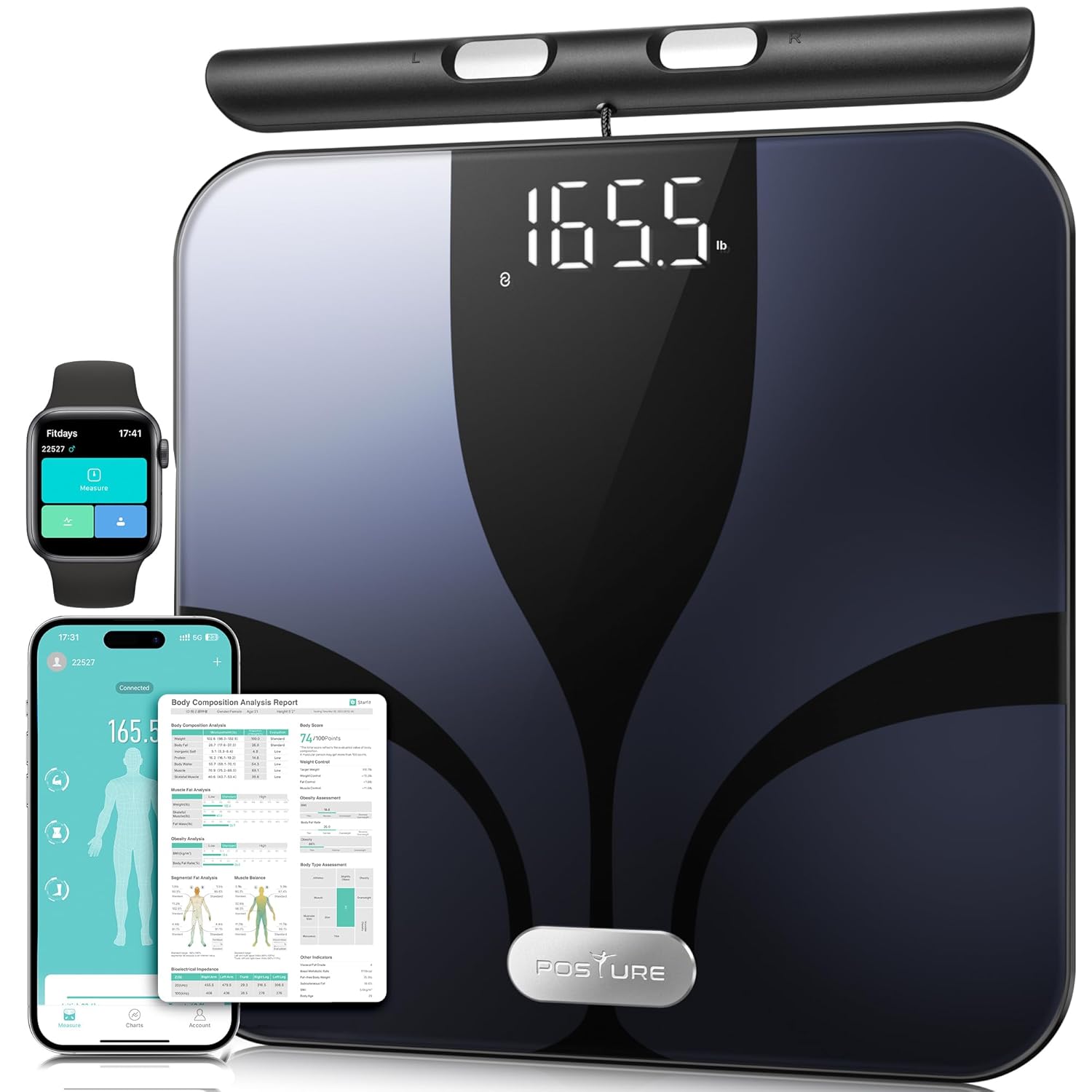
Figure 1: Posture Smart Body Composition Scale with connected mobile and smartwatch applications.
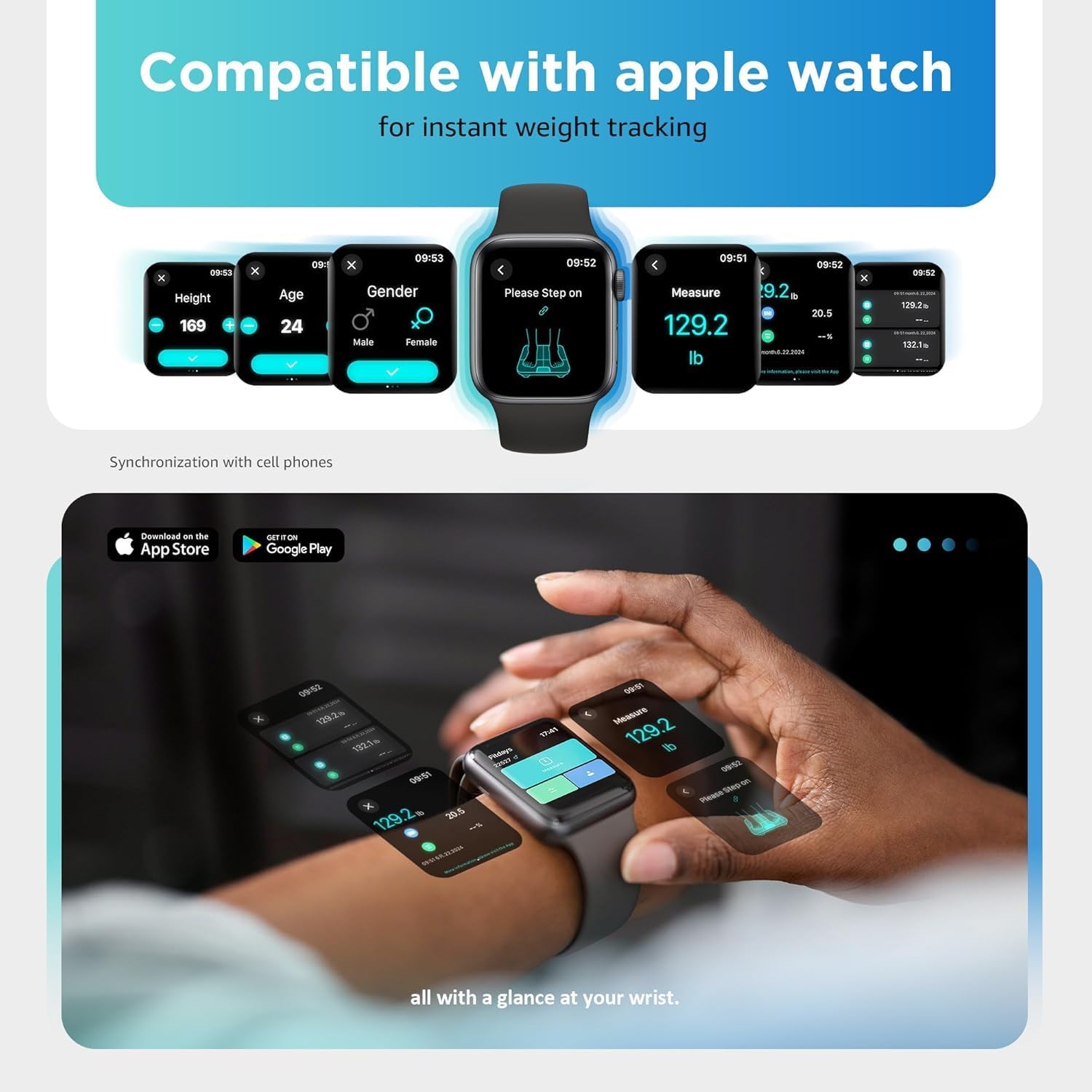
Figure 2: Smartwatch interface showing instant weight tracking, compatible with the Posture scale.
6. Kullanım Talimatları
6.1 Bir Ölçüm Yapma
- Ölçeği sert, düz ve sabit bir yüzeye yerleştirin.
- Ensure your feet are bare and clean.
- Step onto the scale with both feet, positioning them on the electrode pads.
- Grasp the retractable handle with both hands, ensuring your palms are in full contact with the handle electrodes. Hold the handle at approximately a 45-degree angle, keeping your arms slightly away from your body to avoid interference.
- Stand still until the measurement is complete. The LED display will show your weight, body fat, and BMI. The voice prompt function will announce the results.
- Your data will automatically synchronize with the Fitdays app on your paired smartphone.

Figure 3: Proper posture and hand placement for accurate 8-electrode body composition measurement.
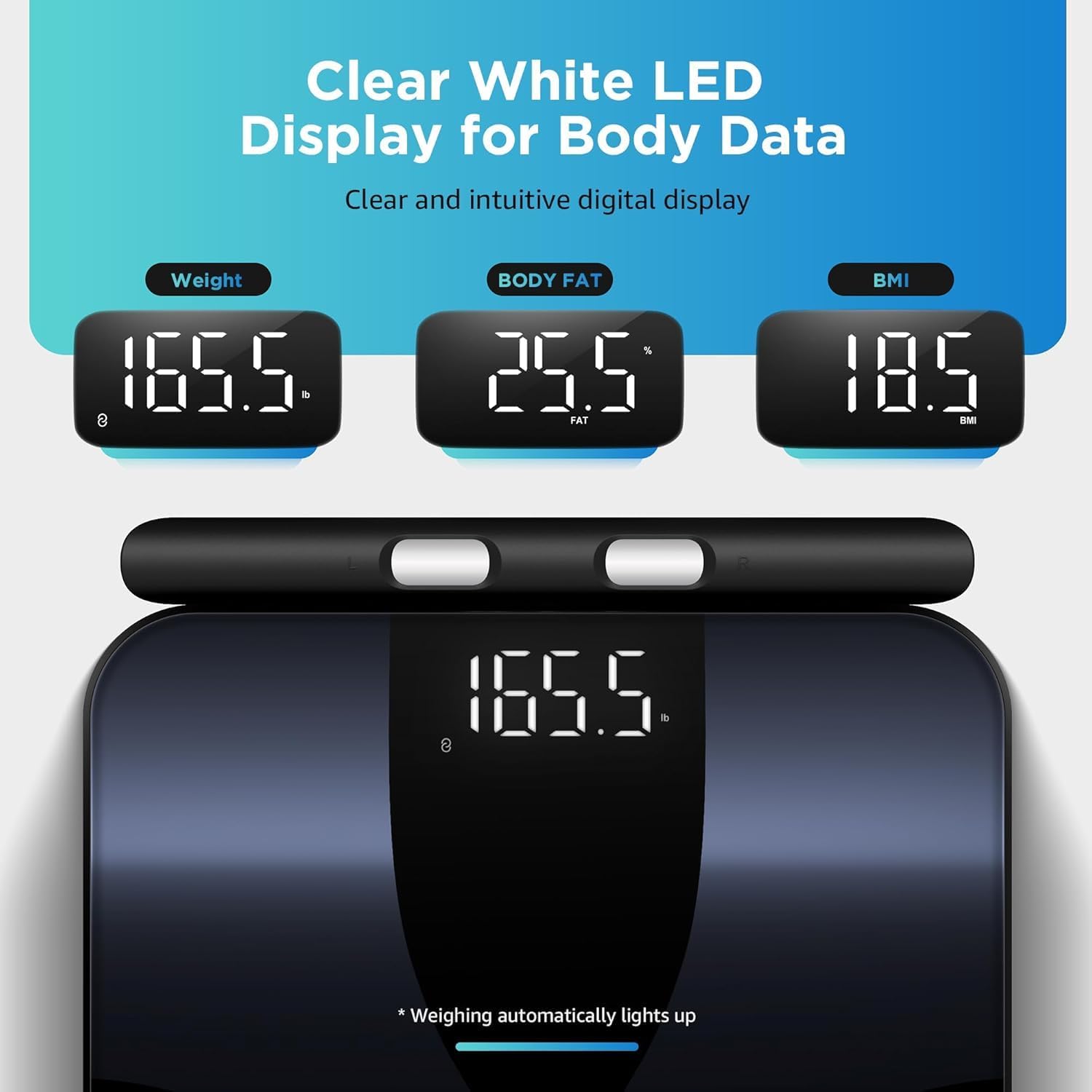
Figure 4: Clear white LED display showing weight, body fat percentage, and BMI readings.
6.2 Consistent Measurements
For the most consistent and comparable results, it is recommended to take measurements:
- At the same time each day (e.g., in the morning before eating or drinking).
- Under similar conditions (e.g., after using the restroom).
- Without clothing, or with minimal, consistent clothing.
7. Ölçümlerinizi Anlamak
The Posture Smart Scale provides 28 different body composition metrics. These metrics are calculated based on your bio-electrical impedance analysis (BIA) data and your profile information (age, gender, height). The Fitdays app offers detailed explanations and historical tracking for each metric.

Figure 5: Visual representation of the 28 body composition metrics measured by the scale, including BMI, body fat, muscle rate, and more.
Key Metrics Include:
- Ağırlık: Toplam vücut kütleniz.
- BMI (Vücut Kitle İndeksi): Boy ve kiloya göre vücut yağının ölçüsü.
- Vücut Yağ Yüzdesitage: Vücut ağırlığının toplam ağırlığa oranı.
- Kas Kütlesi: Vücudunuzdaki toplam kas ağırlığı.
- Su Ağırlığı: YüzdetagVücudunuzdaki su.
- Kemik Kütlesi: Vücudunuzdaki toplam kemik minerali ağırlığı.
- Visseral Yağ: Karın bölgesindeki organların etrafında biriken yağ.
- Deri Altı Yağ: Yağ, doğrudan derinin altında depolanır.
- BMR (Bazal Metabolizma Hızı): The number of calories your body needs to function at rest.
- Protein: YüzdetagVücudunuzdaki protein miktarı.
- Vücut Yaşı: An estimation of your body's biological age.
- Skeletal Muscle Rate: Yüzdetage of skeletal muscle in your body.
- Left/Right Arm/Leg Mass & Fat: Detailed segmental analysis of body composition.
8. App Integration and Data Tracking
The Fitdays app is your central hub for all body composition data. It provides comprehensive charts, trends, and insights to help you monitor your health journey.
- Tarihsel veri: View your measurements over time with daily, weekly, monthly, and yearly trends.
- Kullanıcı yönetimi: Add multiple users to the app, allowing each family member to track their individual progress.
- Hedef Belirleme: Kişisel sağlık hedefleri belirleyin ve bu hedeflere doğru ilerlemenizi takip edin.
- Third-Party App Sync: The Fitdays app can synchronize data with other popular health platforms:
- Elma Sağlığı
- Google Uygun
- Samsung Sağlık
- Uygunbit

Figure 6: Fitdays app displaying historical data and trends for various body metrics.

Figure 7: The Fitdays app integrates with major health platforms for comprehensive data management.
9. Bakım ve Özen
- Temizlik: Ölçek yüzeyini reklamla silinamp Bez ve hafif deterjan kullanın. Aşındırıcı temizleyiciler kullanmayın ve kireci suya batırmayın.
- Depolamak: Tartıyı serin ve kuru bir yerde saklayın. Kullanılmadığı zamanlarda üzerine ağır nesneler koymaktan kaçının.
- Pil Değişimi: If the display shows a low battery indicator or becomes dim, replace all four AA batteries simultaneously.
- Kalibrasyon: If the scale is moved or stored vertically, it may require recalibration. Step on the scale briefly to turn it on, then step off and wait for it to display "0.0" before taking a measurement.
10. Sorun Giderme
| Sorun | Olası Neden | Çözüm |
|---|---|---|
| Terazi açılmıyor. | Piller bitmiş veya yanlış takılmış. | Pil kutuplarını kontrol edin veya pilleri değiştirin. |
| Yanlış ağırlık ölçümleri. | Scale on soft surface; not calibrated; inconsistent measurement conditions. | Place on hard, flat surface. Step on, then off, wait for "0.0" before weighing. Ensure consistent measurement times and conditions. |
| Body composition data not displayed or inconsistent. | Feet/hands not bare or fully contacting electrodes; profile incomplete in app; inconsistent measurement conditions. | Ensure bare feet and hands make full contact with all 8 electrodes. Complete your profile in the Fitdays app. Maintain consistent measurement conditions. |
| Bluetooth bağlantı sorunları. | Bluetooth off on phone; app not open; scale not activated; interference. | Ensure phone Bluetooth is on. Open Fitdays app. Step on scale to activate. Move closer to the scale. Restart phone/app. |
| Voice prompt not working. | Feature disabled in app; low battery. | Check app settings to ensure voice prompt is enabled. Replace batteries. |
11. Özellikler
- Modeli: FI2211LB
- Marka: Duruş
- Boyutlar: 13.1 x 12 x 1.3 inç (33.3 x 30.5 x 3.35 cm)
- Ağırlık Kapasitesi: 400 lbs'ye (180 kg) kadar
- Güç Kaynağı: 4 x AA Pil (dahil)
- Görüntülemek: NEDEN OLMUŞ
- Bağlantı: Bluetooth
- Vücut Kompozisyonu Ölçümleri: 28
- Elektrotlar: 8 (4 on platform, 4 on retractable handle)
12. Garanti ve Destek
Posture products are manufactured with high-quality standards. For warranty information and customer support, please refer to the contact details provided with your purchase or visit the official Posture website. Please have your model number (FI2211LB) and purchase date available when contacting support.
For additional assistance, you may also refer to the Fitdays app's help section.
Ask a question about this manual
Ask about setup, troubleshooting, compatibility, parts, safety, or missing instructions. Manuals+ will review the question and use this page’s manual context to help answer it.