
Q58-MAX Q58-MAX
Q58-Max Motorcycle Helmet Intercom User Manual
Bluetooth Headset with LCD Display and Music Sharing
1. Giriş
This user manual provides detailed instructions for the Q58-Max Motorcycle Helmet Intercom. This device is designed to enhance your riding experience by providing seamless communication, music playback, and navigation audio directly within your helmet. Please read this manual thoroughly before using the product to ensure proper operation and safety.

Image: The Q58-Max helmet headset shown in use by two riders on motorcycles, highlighting its primary function for communication and entertainment during rides.
2. Paket İçeriği
Lütfen aşağıda listelenen tüm öğelerin paketinizde yer aldığından emin olun:
- 1 x Q58-Max Host Unit
- 1 x 2-in-1 Earphone/Soft Microphone
- 1 x Charging Cable (USB C)
- 1 x Back Clip Base
- 1 x Adhesive Clip Base
- 2 x Speaker + Velcro Stickers

Resim: Ayrıntılı view of the Q58-Max intercom unit separated from its mounting base, illustrating the main components included in the package.
3. Temel Özellikler
- Bluetooth 5.3 Dual Chip: Ensures stable connection and high-quality sound.
- 2 Riders 300m Intercom: Supports communication between two riders up to 300 meters apart.
- Müzik Paylaşımı: Share music with another rider during intercom communication.
- IPX6 Su geçirmez: Çeşitli hava koşullarına dayanacak şekilde tasarlanmıştır.
- Sesli Asistan: Activate your smartphone's voice assistant for hands-free control.
- Aydınlatma İşlevi: Double-click the voice assistant button to turn on the integrated flashlight.
- Mikro SD Kart Desteği: Expandable storage for music playback (supports 4-32GB, SD card not included).
- Stereo FM Radyo: Built-in FM radio for listening to broadcasts.
- Büyük Kapasiteli Pil: 1000mAh battery with high voltage chip for fast charging and extended use.
- CVC+DSP True Noise Reduction: Advanced noise cancellation for clear audio.
- LCD Large Digital Display: Provides clear information on device status, FM frequency, and more.
- EQ Personalized Sound: Professional acoustic laboratory tuning with 6 preset sound effects (Natural, Rock, Classical, Jazz, Rural, Popular).
- Çoklu Sahne Miksajı: Dual DSP audio multiprocessing supports mixing intercom with music, navigation, or phone calls.
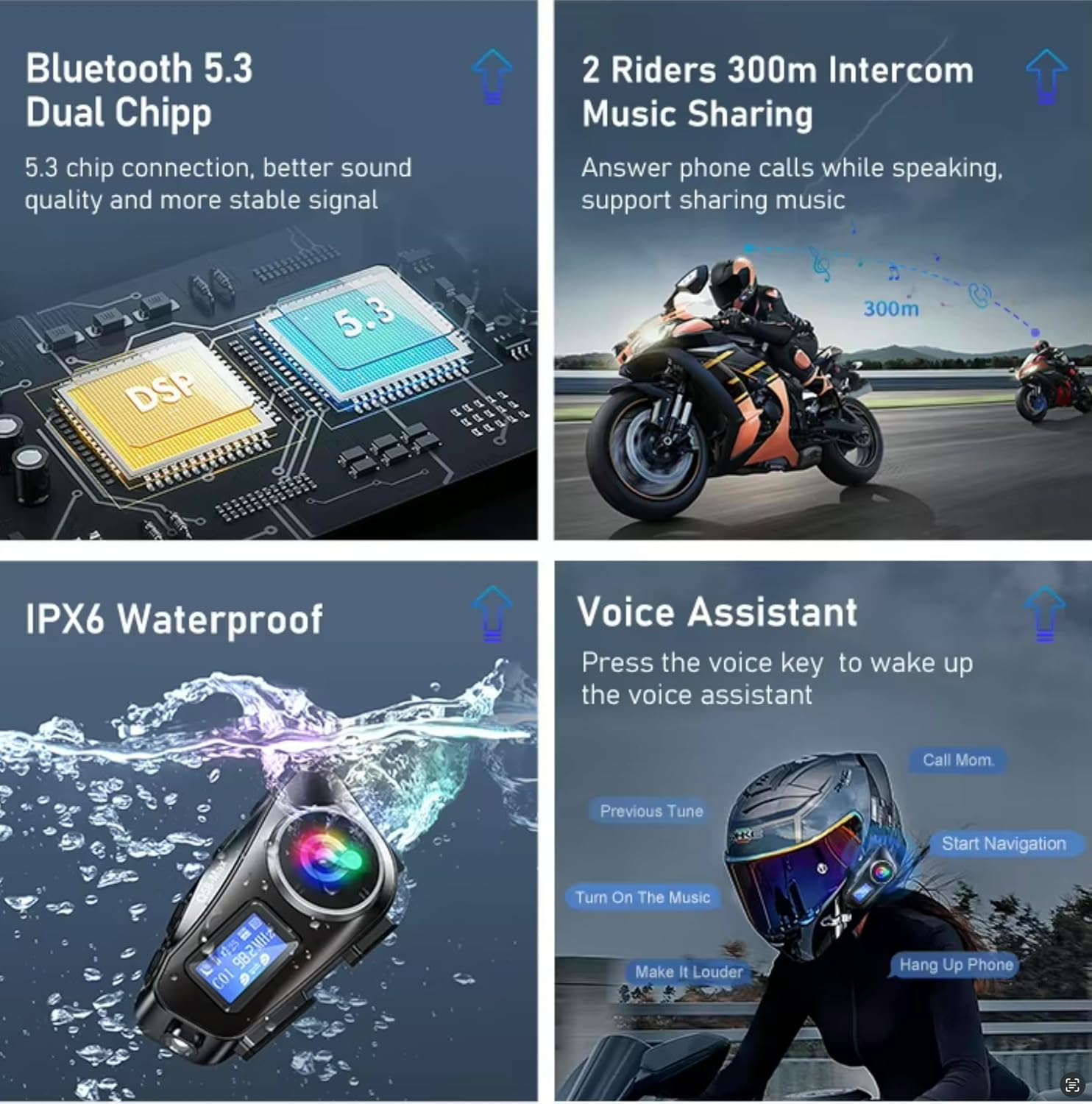
Image: Visual representation of key features including Bluetooth 5.3 dual chip, 2-rider intercom with music sharing, IPX6 waterproofing, and voice assistant functionality.

Image: Visual representation of additional features such as the integrated flashlight, Micro SD card slot, FM radio, and the large capacity battery.

Image: Illustration of the EQ personalized sound settings with various presets and the multi-scene mixing capability for simultaneous audio sources.

Image: Depiction of two riders enjoying the music sharing feature while riding their motorcycles.
4. Kontroller ve Göstergeler
Familiarize yourself with the buttons and ports on your Q58-Max unit:

Image: A detailed diagram of the Q58-Max unit, clearly labeling each button, port, and indicator for easy identification and understanding of its functions.
- Mod tuşu: Switches between Bluetooth mode, Micro SD Card mode, FM Radio mode, On/Off Illumination, and EQ Sound settings.
- İnterkom Düğmesi: Initiates and ends intercom communication.
- Previous Song/Volume Down: Önceki şarkıya geçmek için kısa basın, sesi azaltmak için uzun basın.
- Next Song/Volume Up: Sonraki şarkıya geçmek için kısa basın, sesi artırmak için uzun basın.
- Power On/Off / Play Pause / Answer Hangup: Multi-function button for power, media control, and call management.
- Voice Assistant / Music Sharing: Activates voice assistant or initiates music sharing.
- Illuminated Lamp: Entegre el feneri.
- LCD Ekran: Shows current mode, battery status, FM frequency, and other information.
- Mikro SD Kart Yuvası: For inserting a Micro SD card for local music playback.
- Şarj Portu: Cihazı şarj etmek için USB-C bağlantı noktası.
- Speaker/Microphone Connector: Port for connecting the earphone/microphone assembly.
5. Kurulum ve Kurulum
5.1 Cihazı Şarj Etme
Before first use, fully charge the Q58-Max unit. Connect the provided USB-C charging cable to the charging port on the unit and a USB power source (e.g., computer, wall adapter). The LCD display will indicate charging status.
5.2 Kaska Montaj
The Q58-Max can be mounted using either the back clip base or the adhesive clip base, depending on your helmet type and preference.
- Konum seç: Select a suitable flat surface on the side of your helmet, typically on the left side, where the unit will not obstruct vision or movement.
- Install Clip Base:
- Back Clip Base: Slide the clip between the helmet shell and the inner padding. Ensure it is securely fastened.
- Adhesive Clip Base: Clean the helmet surface thoroughly. Peel off the protective film from the adhesive base and firmly press it onto the chosen location for at least 30 seconds. Allow 24 hours for the adhesive to fully cure before attaching the unit.
- Ana Üniteyi Takın: Slide the Q58-Max host unit onto the installed clip base until it clicks securely into place.
- Install Speakers and Microphone:
- Attach the speakers inside the helmet's ear pockets using the Velcro stickers. Ensure they are positioned directly over your ears for optimal sound.
- Position the microphone in front of your mouth, ensuring it is close enough to pick up your voice clearly but not obstructing your vision or comfort.
- Connect the speaker/microphone cable to the corresponding port on the Q58-Max unit.

Image: An illustration showing the Q58-Max unit mounted on a full-face helmet, with examples of other compatible helmet types such as off-road, barefaced, half-helmet, and vintage armor.
5.3 İlk Eşleştirme (Bluetooth)
- Güç Açık: Press and hold the Power On/Off button until the LCD display lights up and you hear a power-on prompt.
- Eşleştirme Moduna Girin: The device will automatically enter Bluetooth pairing mode. The Bluetooth icon on the LCD display will flash.
- Telefonunuzda Bluetooth'u etkinleştirin: Akıllı telefonunuzda Bluetooth ayarlarına gidin ve yeni cihazları arayın.
- Select "Q58-Max": From the list of available devices, select "Q58-Max" to connect.
- Onay: Once paired, the Bluetooth icon on the LCD display will stop flashing and remain solid. You will hear a confirmation tone.
6. Kullanım Talimatları
6.1 Güç Açma/Kapatma
- Güç Açık: Press and hold the Power On/Off button for approximately 3 seconds.
- Kapat: Press and hold the Power On/Off button for approximately 3 seconds until the display turns off.
6.2 Ses Ayarı
- Sesi arttır: Long press the "Next Song/Volume Up" button.
- Sesi Azalt: Long press the "Previous Song/Volume Down" button.
6.3 Music Playback (Bluetooth/Micro SD)
- Oynat/Duraklat: Güç Açma/Kapama düğmesine kısa basın.
- Sonraki Şarkı: Short press the "Next Song/Volume Up" button.
- Önceki Şarkı: Short press the "Previous Song/Volume Down" button.
- Switch Source (Bluetooth/SD Card): Short press the Mode Key to cycle through available audio sources.
6.4 Telefon Görüşmeleri
- Cevap Çağrısı: Short press the Power On/Off button when a call comes in.
- Çağrı Sonu: Short press the Power On/Off button during a call.
- Çağrıyı Reddet: Long press the Power On/Off button when a call comes in.
- Son Numarayı Tekrar Ara: Double-click the Power On/Off button.
6.5 İnterkom İletişimi
To use the intercom function, two Q58-Max units must be paired with each other.
- İki Ünitenin Eşleştirilmesi:
- Her iki ünitenin de kapalı olduğundan emin olun.
- On both units, press and hold the Intercom Button and the Power On/Off button simultaneously until the intercom indicator lights flash rapidly.
- The units will automatically search and pair with each other. Once connected, the intercom indicator lights will become solid.
- Intercom'u Başlat: Short press the Intercom Button on either paired unit.
- İnterkom Sonu: Short press the Intercom Button again.
- Music Sharing (during Intercom): While in intercom mode, short press the Voice Assistant / Music Sharing button to share music with the connected rider.
6.6 FM Radyo
- FM Moduna Girin: Short press the Mode Key until "FM" is displayed on the LCD.
- Auto Scan/Store Channels: In FM mode, click the Power On/Off button once to automatically scan and store available FM stations.
- Döviz Bürosu: Short press the "Next Song/Volume Up" or "Previous Song/Volume Down" buttons to switch between stored stations.
6.7 Sesli Asistan
- Etkinleştir: Short press the Voice Assistant / Music Sharing button to activate your smartphone's voice assistant (e.g., Siri, Google Assistant).
- Komutunuzu komuttan sonra söyleyin.
6.8 El Feneri Fonksiyonu
- Açma/Kapatma: Double-click the Voice Assistant / Music Sharing button to toggle the integrated flashlight.
6.9 Ekolayzır Ses Ayarları
- Cycle EQ Modes: Short press the Mode Key repeatedly until "EQ" is displayed, then use the "Next Song/Volume Up" or "Previous Song/Volume Down" buttons to cycle through the 6 preset sound effects (Natural, Rock, Classical, Jazz, Rural, Popular).
7. Bakım ve Özen
- Temizlik: Üniteyi yumuşak, damp bez. Sert kimyasallar veya aşındırıcı temizleyiciler kullanmayın.
- Depolamak: Cihazı kullanmadığınız zamanlarda serin ve kuru bir yerde saklayın. Aşırı sıcaklıklardan kaçının.
- Şarj: Pil sağlığını korumak için, sık kullanmasanız bile pili düzenli olarak şarj edin.
- Suya Dayanıklılık: While IPX6 waterproof, avoid submerging the device in water. Ensure the charging port cover is securely closed during wet conditions.
8. Sorun Giderme
| Sorun | Olası Neden | Çözüm |
|---|---|---|
| Cihaz açılmıyor. | Pil zayıf. | Cihazı tamamen şarj edin. |
| Telefonla eşleştirilemiyor. | Cihaz eşleştirme modunda değil; telefonda Bluetooth kapalı; çok fazla cihaz eşleştirilmiş. | Ensure device is in pairing mode (flashing Bluetooth icon). Turn phone's Bluetooth off and on. Delete old Bluetooth connections on your phone. |
| İnterkom bağlantısı kurulmuyor. | Cihazlar interkom eşleştirme modunda değil; menzil dışında. | Ensure both units are in intercom pairing mode. Move closer to the other unit (within 300m). |
| Hoparlörlerden ses gelmiyor. | Volume too low; speakers not connected properly; faulty speakers. | Increase volume. Check speaker connection to the unit. Test with another audio source if possible. |
| Mikrofon sesi algılamıyor. | Microphone not positioned correctly; faulty microphone. | Adjust microphone position closer to your mouth. Ensure it's securely connected. |
| FM radio static/poor reception. | Zayıf sinyal; parazit. | Try auto-scanning channels again. Move to an area with better signal. |
9. Teknik Özellikler
- Model Adı: Q58-MAX
- Marka: Q58-MAX
- Bağlantı Teknolojisi: Bluetooth, FM, RF
- Kablosuz İletişim Teknolojisi: Bluetooth for streaming / Radio Frequency for Intercom
- Bluetooth Sürümü: 5.3
- İnterkom Aralığı: Up to 300m (2 riders)
- Kulaklık girişi: USB C (for charging and data)
- Form Faktörü: Over Ear (speakers)
- Renk: Siyah
- Malzeme: Plastik
- Pil Kapasitesi: 1000mAh
- Suya Dayanıklılık: IPX6
- Mikro SD Kart Desteği: 4-32GB (card not included)
- Yaş Aralığı (Açıklama): Yetişkin
10. Garanti ve Destek
The Q58-Max Motorcycle Helmet Intercom comes with a standard manufacturer's warranty. Please refer to the warranty card included in your package for specific terms and conditions. For technical support, troubleshooting assistance, or warranty claims, please contact the retailer or manufacturer's customer service through the contact information provided with your purchase.
For the latest information and support, please visit the official Q58-MAX website (if available) or contact your point of purchase.
Ask a question about this manual
Ask about setup, troubleshooting, compatibility, parts, safety, or missing instructions. Manuals+ will review the question and use this page’s manual context to help answer it.