
1. Önemli Güvenlik Talimatları
Please read these instructions carefully before using the Audizio Canzo DAB+ Internet Radio. Keep this manual for future reference.
- Yangın veya elektrik çarpmasını önlemek için cihazı yağmur veya neme maruz bırakmayın.
- C'yi açmayınasing. İçerisinde kullanıcı tarafından bakımı yapılabilecek parça bulunmamaktadır. Tüm bakımlar için yetkili personele başvurun.
- Yalnızca cihazla birlikte verilen güç adaptörünü kullanın.
- Ünitenin çevresinde yeterli havalandırma olduğundan emin olun. Havalandırma açıklıklarını kapatmayın.
- Üniteyi ısı kaynaklarının yakınına veya doğrudan güneş ışığına maruz bırakmayın.
- Clean the unit only with a dry, soft cloth. Do not use liquid cleaners.
2. Ürün Bittiview
The Audizio Canzo is a versatile DAB+ Internet Radio designed for high-quality audio reception and playback. It features multiple connectivity options including Wi-Fi, Bluetooth 5.3, AUX, and USB, along with a remote control for convenient operation. The elegant wooden finish and clear display make it suitable for various home environments.
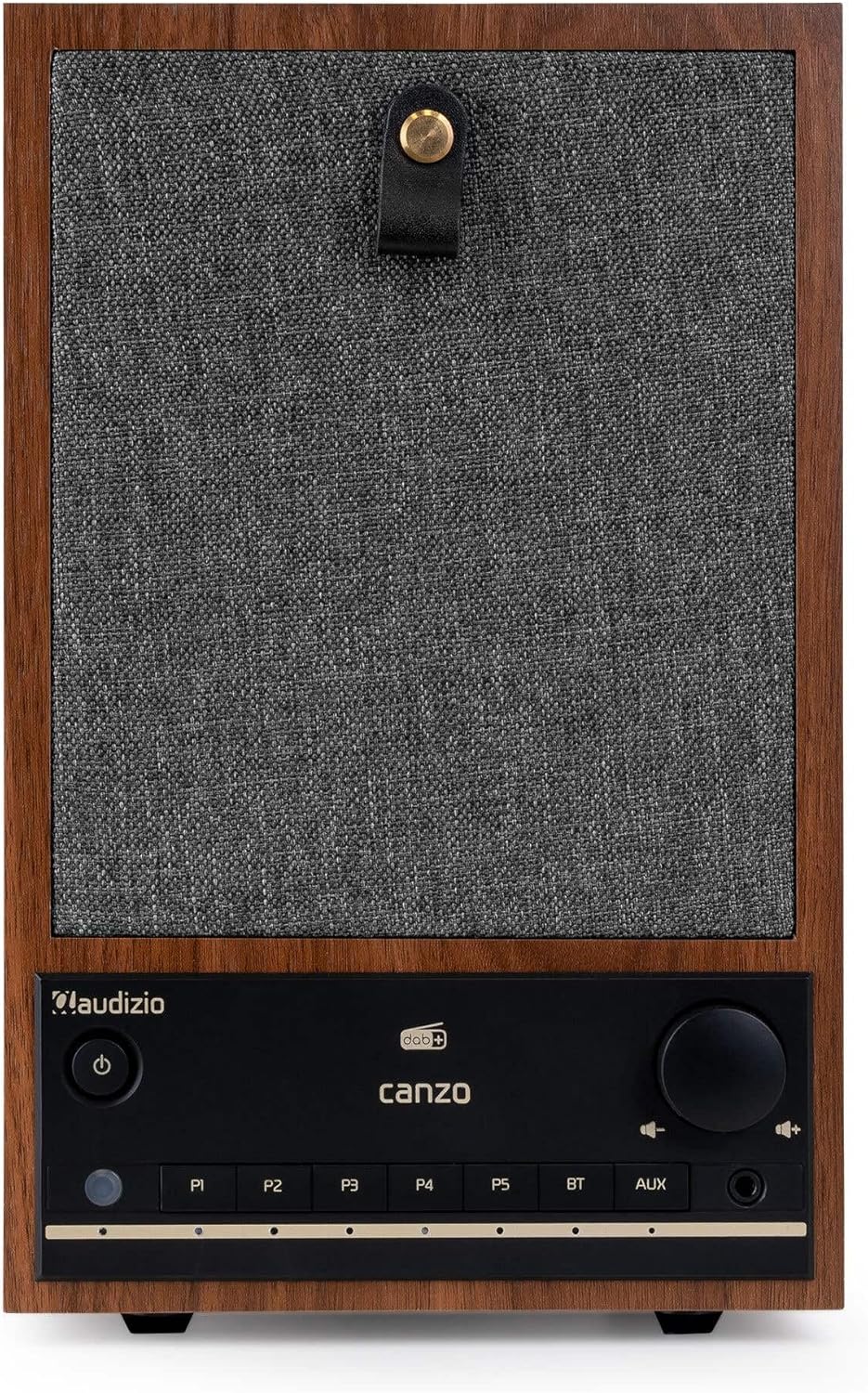
Şekil 2.1: Ön view of the Audizio Canzo DAB+ Internet Radio in walnut finish.

Şekil 2.2: Ön view with speaker grille removed, highlighting the speaker, display, and control panel.
3. Kutuda Neler Var?
Kutuyu dikkatlice açın ve tüm eşyaların mevcut olduğundan emin olun:
- Audizio Canzo DAB+ Internet Radio
- Güç Adaptörü
- Uzaktan kumanda
- Hızlı Başlangıç Kılavuzu
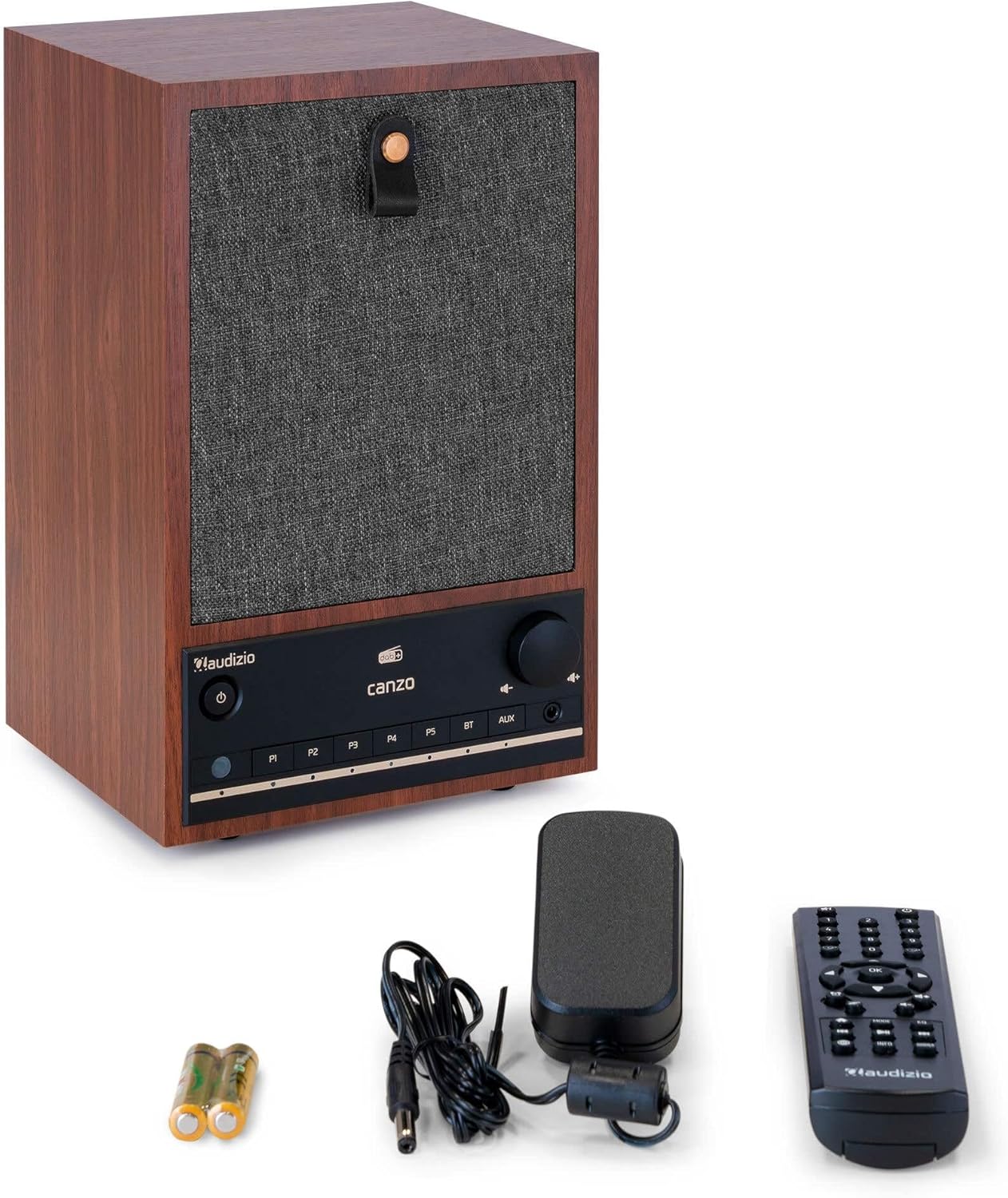
Figure 3.1: Audizio Canzo radio with its accessories.
4. Kurulum
4.1 Gücün Bağlanması
- Güç adaptörünün DC fişini prize takın. DC'DE port on the back of the radio.
- Güç adaptörünü standart bir duvar prizine (220V) takın.
- Çevir AÇIK/KAPALI switch on the back of the unit to the ON konum.
4.2 Anten Bağlantısı
For optimal DAB+ and FM reception, extend the telescopic antenna located on the back of the unit. Adjust its position for the best signal.

Figure 4.1: Rear panel with power input, audio ports, USB, LAN, and antenna.
4.3 İlk Güç Açma ve Ağ Kurulumu
- Basın Güç button on the front panel or remote control to turn on the radio.
- The display will show the Audizio logo and then guide you through the initial setup wizard.
- Tercih ettiğiniz dili seçin.
- The radio will prompt you to connect to a network. Choose Wifi or Yerel Ağ.
- Wi-Fi için: Select your Wi-Fi network from the list and enter the password using the navigation buttons and OK düğme.
- For LAN: Yönlendiricinizden bir Ethernet kablosunu şuraya bağlayın: Yerel Ağ port on the back of the radio. The connection should be established automatically.
- Once connected, the radio will update the time and date automatically.
5. Kullanım Talimatları
5.1 Temel Kontroller
The front panel features a power button, preset buttons (P1-P5), Bluetooth (BT) and AUX input buttons, a volume knob, and navigation controls. The remote control provides full access to all functions.
5.2 Mod Seçimi
Basın MOD button on the radio or remote control to cycle through available modes: Internet Radio, DAB+, FM, Bluetooth, AUX, and USB Playback.
5.3 İnternet Radyosu
- Seçme İnternet Radyosu mod.
- İstasyonları konum, tür veya arama kriterlerine göre incelemek için gezinme düğmelerini kullanın.
- Basmak OK bir istasyon seçmek için.
- Bir istasyonu ön ayar olarak kaydetmek için, aşağıdaki düğmelerden birine basılı tutun. P1-P5 buttons until the display confirms.
5.4 DAB+ Radyo
- Seçme DAB+ mod.
- Radyo, mevcut DAB+ istasyonlarını otomatik olarak tarayacaktır.
- Use the navigation buttons to scroll through the list of found stations.
- Basmak OK bir istasyon seçmek için.
- Bir istasyonu ön ayar olarak kaydetmek için, aşağıdaki düğmelerden birine basılı tutun. P1-P5 düğmeler.
5.5 FM Radyo
- Seçme FM mod.
- Basılı tutun Tarama button (usually on the remote or via menu) to auto-scan for FM stations.
- Use the navigation buttons to tune manually or select from scanned stations.
- Bir istasyonu ön ayar olarak kaydetmek için, aşağıdaki düğmelerden birine basılı tutun. P1-P5 düğmeler.
5.6 Bluetooth Oynatma
- Seçme Bluetooth mode. The radio will enter pairing mode, indicated on the display.
- Akıllı telefonunuzda veya tabletinizde Bluetooth'u etkinleştirin ve kullanılabilir cihazları arayın.
- Select "Audizio Canzo" from the list to pair.
- Eşleştirme tamamlandıktan sonra, cihazınızdaki sesleri radyo üzerinden çalabilirsiniz.
5.7 AUX Girişi
- Harici bir ses cihazını (örneğin, MP3 çalar) bağlayın. AUX IN port on the back of the radio using a 3.5mm audio cable.
- Seçme Yardımcı mod.
- Audio from the connected device will now play through the radio.
5.8 USB Oynatma
- Ses içeren bir USB flash sürücü takın files içine USB OYNATMA port on the back of the radio.
- Seçme USB mod.
- Use the navigation buttons to browse and select audio files oynatma için.
5.9 Alarm Saati ve Uyku Zamanlayıcısı
- Alarm: Access the Alarm settings via the menu. Set up to two alarms with desired time, source (buzzer, radio), and volume.
- Uyku Zamanlayıcısı: Access the Sleep Timer settings via the menu. Set a duration (e.g., 15, 30, 60 minutes) after which the radio will automatically turn off.
- Uyuklama: Alarm çaldığında, tuşuna basın. Kestirmek button on the remote or radio to temporarily silence it.
6. Bakım
6.1 Temizlik
To clean the radio, use a soft, dry, lint-free cloth. Do not use abrasive cleaners, waxes, or solvents as they may damage the finish or internal components.
6.2 Depolama
Cihazı uzun süre saklayacaksanız, elektrik prizinden çıkarın ve doğrudan güneş ışığından ve aşırı sıcaklıklardan uzak, serin ve kuru bir yerde saklayın.
7. Sorun Giderme
| Sorun | Olası Neden | Çözüm |
|---|---|---|
| Güç yok | Power adapter not connected; ON/OFF switch is OFF. | Ensure power adapter is securely connected and ON/OFF switch is ON. |
| Ses yok | Ses seviyesi çok düşük; yanlış kaynak seçildi; kulaklık takılı. | Sesi artırın; doğru giriş modunu seçin; kulaklıkları çıkarın. |
| Wi-Fi'ye bağlanılamıyor | Yanlış şifre; yönlendirici çok uzakta; ağ sorunu. | Wi-Fi şifresini doğrulayın; radyo cihazını yönlendiriciye daha yakın bir yere taşıyın; yönlendiriciyi yeniden başlatın. |
| Zayıf DAB+/FM alımı | Anten uzatılmamış; sinyal alanı zayıf. | Fully extend and adjust the telescopic antenna; try repositioning the radio. |
| Uzaktan kumanda çalışmıyor | Batteries depleted; obstruction between remote and radio. | Replace remote control batteries; ensure clear line of sight to the radio's sensor. |
8. Özellikler
| Özellik | Şartname |
|---|---|
| Model Numarası | Canzo |
| Ürün Boyutları | 22.5x20.5x34 cm |
| Ürün Ağırlığı | 2.9 Kilogram |
| Renk | Ceviz |
| Ekran Boyutu | 2.4 inç |
| Bağlantı Teknolojisi | Aux, Bluetooth, Wi-Fi, LAN |
| Bluetooth Sürümü | 5.3 |
| Desteklenen Radyo Bantları | DAB+, FM, İnternet Radyosu |
| Güç Kaynağı | Kablolu Elektrikli (220 Volt) |
| Özel Özellikler | Integrated Clock, Sleep Timer, Alarm, Remote Control, Preset Stations |
| Uyumlu Cihazlar | Smartphone, Tablet, Headphones, MP3 Player, USB Storage Device |
9. Garanti ve Destek
Garanti bilgileri ve teknik destek için lütfen ürününüzle birlikte verilen garanti kartına bakın veya satıcınızla iletişime geçin. Garanti talepleriniz için satın alma belgenizi saklayın.