giriiş
This manual provides detailed instructions for the assembly, operation, and maintenance of your Generic L-Shaped Desk D7456963245. Please read all instructions carefully before beginning assembly and retain this manual for future reference.
Güvenlik Bilgileri
- Montajdan önce tüm parçaların mevcut olduğundan emin olun.
- Çizilmeleri önlemek için yumuşak ve temiz bir yüzey üzerinde monte edin.
- Montaj sırasında vidaları aşırı sıkmayın.
- Küçük parçaları çocuklardan uzak tutun.
- Do not exceed the desk's weight capacity.
- For electrical components (charging station, LED lights), ensure proper power supply and avoid liquid contact.
Paket İçeriği
Your desk is shipped in two packages. Please verify all components are present before starting assembly.
Refer to the included parts list diagram in your physical manual for identification of all hardware and furniture panels.
Kurulum ve Montaj
Assembly is required for this L-shaped desk. Follow the numbered steps carefully. It is recommended to have two people for assembly.
Adım 1: Parçaları Paketinden Çıkarın ve Tanımlayın
Carefully unpack all components and lay them out on a soft, clean surface. Identify each part using the provided hardware and panel lists.

Resim: Overall dimensions of the L-shaped desk, including the main desktop, integrated bookshelf, drawers, and side shelving unit. Dimensions are provided in inches.
Step 2: Assemble the Main Desk Frame
Follow the diagram in your physical manual to connect the main desktop panels and support legs. Ensure all cam locks and screws are securely fastened without overtightening.
Step 3: Install Drawers and Shelving
Install the drawer slides onto the designated panels. Assemble the drawers according to the instructions and insert them. Attach the bookshelf and side shelving units to the main desk frame.

Resim: Ön tarafa bakan view of the fully assembled L-shaped desk, highlighting the spacious desktop, three storage drawers, and various open shelves for organization.
Step 4: Connect the Charging Station and LED Lights
The charging station is pre-installed. Connect its power cord to a wall outlet. For the LED lights, insert the light strip into the designated groove and connect it to the power source. Use the provided remote control to operate the LED lights.

Resim: The L-shaped desk set up with a computer, demonstrating the integrated power outlets with USB ports, the pegboard for accessories, and the LED lighting feature. A remote control for the LED lights is also pictured.

Resim: A detailed graphic illustrating the specifications of the integrated power strip, including three 110V/12A AC outlets, two 5V/2A USB ports, and the length of the power cord (4.92 feet).
Kullanım Talimatları
Şarj İstasyonunu Kullanma
The desk includes a pre-installed charging station with 3 AC power outlets and 2 USB ports. Plug the desk's power cord into a standard wall outlet. You can then plug in your devices such as laptops, monitors, and smartphones directly into the desk's integrated outlets.
LED Işıkların Çalıştırılması
The LED lights are controlled by a remote control. Point the remote at the LED receiver to turn the lights on/off, change colors (16 available), and adjust brightness or modes.
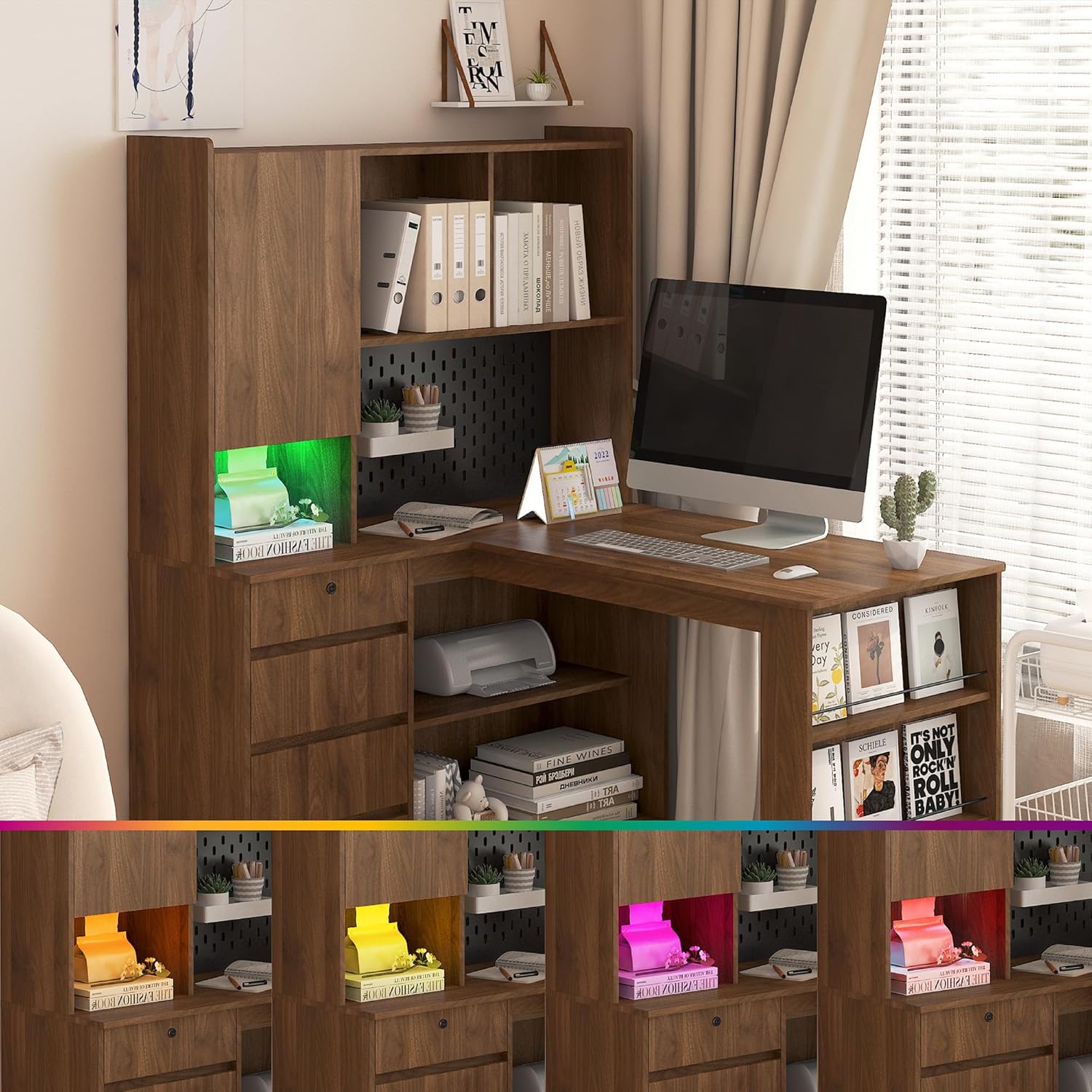
Resim: The L-shaped desk with its integrated LED lighting system displaying a range of colors, demonstrating the customizable ambient light feature.
Bakım
- Temizlik: Masanın yüzeyini yumuşak bir bezle silin.amp Bez. Sert kimyasallardan veya aşındırıcı temizleyicilerden kaçının.
- Sıkma: Sağlamlığı sağlamak için tüm vidaları ve bağlantı elemanlarını periyodik olarak kontrol edin ve sıkın.
- Dökülmeler: Ahşap yüzeyine zarar gelmemesi için dökülen sıvıları hemen temizleyin.
Sorun giderme
- Issue: Desk wobbles after assembly.
- Çözüm: Ensure all screws and fasteners are fully tightened. Check that the desk is on a level surface. Adjust leg levelers if present.
- Issue: Charging station not working.
- Çözüm: Verify the desk's main power cord is securely plugged into a functional wall outlet. Check if the wall outlet itself is working by plugging in another device.
- Issue: LED lights not responding to remote.
- Çözüm: Ensure the remote has working batteries. Point the remote directly at the LED receiver. Check that the LED light strip is properly connected to its power source.
- Issue: Missing parts during assembly.
- Çözüm: Review the package contents list. If parts are genuinely missing, contact customer support with your model number and a description of the missing parts.
Özellikler
| Özellik | Detay |
|---|---|
| Model Numarası | D7456963245 |
| Marka | Genel |
| Şekil | L şekli |
| Ürün Boyutları (D x G x Y) | 46.06"D x 55.9"G x 62.79"Y |
| Malzeme Türü | Mühendislik Ahşap |
| Ürün Ağırlığı | 138 Pound |
| Özel Özellik | Storage, Charging Station, LED Light |
| Gerekli Montaj | Evet |
| Şarj istasyonu | 3 AC Outlets (110V/12A), 2 USB Ports (5V/2A), 4.92 ft Power Cord |
Garanti Bilgileri
Please refer to the warranty card included in your package for specific warranty terms and conditions. Generally, products are covered against manufacturing defects for a limited period from the date of purchase. Keep your proof of purchase for warranty claims.
Müşteri Desteği
For assistance with assembly, missing parts, or any other inquiries, please contact our customer support team. Refer to the contact information provided in your product packaging or on the retailer's webalan.
When contacting support, please have your model number (D7456963245) and purchase date ready.