
1. Giriş
The ANBERNIC RG34XXSP is a portable retro handheld game console designed for an immersive gaming experience. Featuring a flip design, a 3.4-inch IPS screen, and a powerful H700 quad-core processor, it supports a wide range of classic game formats. This manual provides essential information for setting up, operating, and maintaining your device.
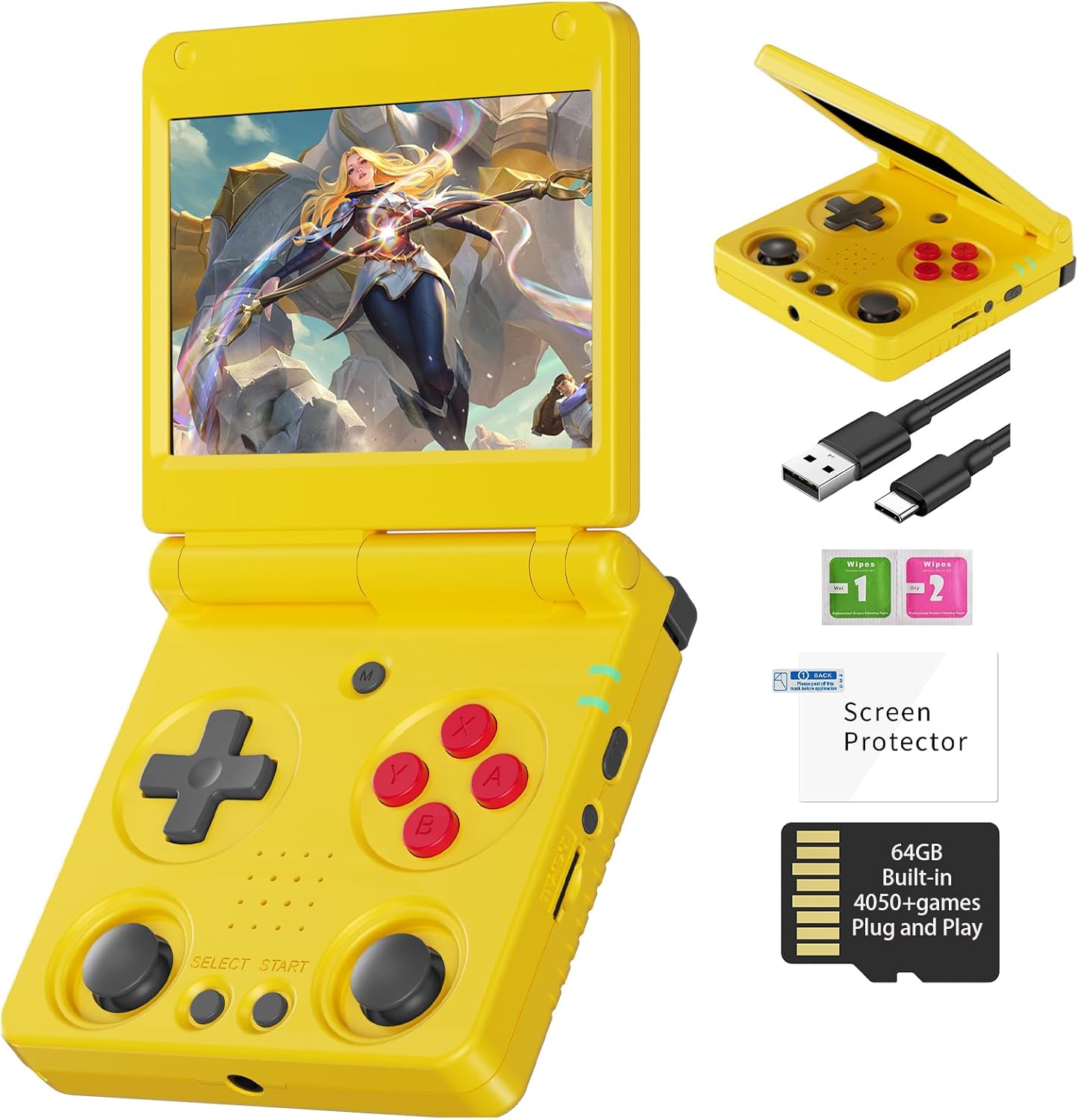
Image 1.1: The ANBERNIC RG34XXSP Retro Handheld Game Console in yellow.
2. Güvenlik Bilgileri
- Cihazı su ve nemden uzak tutunuz.
- Aşırı sıcaklıklardan ve doğrudan güneş ışığından kaçının.
- Cihazı kendiniz sökmeye veya onarmaya çalışmayın. Yardım için müşteri desteğine başvurun.
- Use only the provided charging cable or a certified USB Type-C charger.
- Küçük parçalar içerdiği için küçük çocukların erişemeyeceği yerde saklayın.
- Prolonged use at high volume may cause hearing damage.
3. Paket İçeriği
Paketin içinde tüm öğelerin mevcut olduğundan emin olun:
- RG34XXSP Game Console
- USB Şarj Kablosu
- Ekran Koruyucu
- Kullanıcı Kılavuzu
- Hediye Kutusu

Image 3.1: Included accessories with the RG34XXSP console.
4. Cihaz Düzeni
Familiarize yourself with the buttons, ports, and features of your RG34XXSP console.
Image 4.1: Detailed diagram of the RG34XXSP console layout.
- Yön Düğmesi: Directional input for navigation and gameplay.
- Oyun Tuşları (A, B, X, Y): Birincil işlem düğmeleri.
- Sol/Sağ Joystick'ler: Analog input for movement and camera control in supported games.
- SEÇ/BAŞLAT Düğmeleri: Game-specific functions, menu navigation.
- MENÜ Düğmesi: Accesses the console's main menu or in-game options.
- Güç anahtarı: Konsolu açar/kapatır.
- Gösterge Işığı: Cihazın güç ve şarj durumunu gösterir.
- TF1/INT. Yuva: Main TF card slot for system and games.
- TF2/EXT. Yuva: Secondary TF card slot for additional storage.
- Ses Açma/Kapama Düğmeleri: Sesi ayarlar.
- OTG/USB Bağlantı Noktası: For connecting external devices or charging.
- HDMI Bağlantı Noktası: Connects to a TV or external display.
- L1/L2/R1/R2 Omuz Düğmeleri: Additional action buttons, typically used for triggers or modifiers.
5. Kurulum
- Unpack the Console: Carefully remove the RG34XXSP console and all accessories from its packaging.
- Konsolu şarj edin: Connect the provided USB Type-C cable to the console's charging port and a compatible USB power adapter (not included). Charge the console until the battery indicator shows full. The 3300mAh Li-Polymer battery provides approximately 7-8 hours of gameplay on a full charge.
- TF Kartını Takın: The console comes with a 64GB TF card pre-installed in the TF1/INT. slot. This card contains the operating system and pre-loaded games. If you wish to expand storage, insert an additional TF card (up to 512GB) into the TF2/EXT. slot.
- Güç Açık: Open the console by flipping the upper cover. The magnetic suction function will hold it open. Press and hold the Power Key until the screen illuminates.
- Initial Navigation: Upon startup, use the D-Pad or joysticks to navigate the main menu. Press the 'A' button to select options and 'B' to go back.
6. Kullanım Talimatları
6.1 Temel İşlemler
- Açma/Kapatma: Press and hold the Power Key to turn the console on or off.
- Uyku modu: Closing the console's lid will activate sleep mode, thanks to the built-in Hall switch chip. Opening the lid will resume operation.
- Ses Ayarı: Use the VOL+/- buttons on the side of the console.
- Menü Navigasyonu: Use the D-Pad or joysticks to move through menu options. Press 'A' to confirm, 'B' to cancel or go back.
6.2 Oyun Oynama
- From the main menu, navigate to the desired emulator or game list.
- Select a game using the 'A' button.
- Once the game loads, use the D-Pad, joysticks, and game keys (A, B, X, Y, L1, L2, R1, R2) to play. Refer to the game's specific controls if available.
- To exit a game or access in-game options, press the MENU button.
6.3 In-Game Menu Shortcuts
The RG34XXSP supports various in-game shortcuts for enhanced control:
- Menü: Accesses the in-game menu.
- Menu + R2: Hızlı İleri.
- Menu + L2: Slow Motion.
- Menu + R1: Save State.
- Menu + L1: Load State.
- Menu + Y: Display Frame Rate.
- Menu + B: Ekran görüntüsü.
- Menu + X: Duraklama.
- Menu + START: Quit Game.
- Menu + VOL+: Adjust Brightness.
- Menu + Left/Right Direction: Select Save State Slot.
7. Oyun Yönetimi
The RG34XXSP supports over 30 game formats. You can add more games by transferring compatible ROM files to the TF card. The console supports dual card slots and TF card expansion up to 512GB.
7.1 Oyun Ekleme
- Konsolu kapatın.
- Carefully remove the TF card (TF1/INT. or TF2/EXT.) from its slot.
- Insert the TF card into a computer's card reader.
- Locate the appropriate emulator folder (e.g., 'GBA', 'PS1', 'PSP') on the TF card.
- Copy your game ROM files into the respective folders. Ensure the ROMs are in compatible formats.
- Safely eject the TF card from your computer and reinsert it into the console.
- Power on the console. The new games should now appear in the corresponding emulator's game list.
The console is compatible with third-party software like RixeIHK, which allows for one-click game downloads and management.

Image 7.1: Supported game formats and console models.
8. Bağlantı
The RG34XXSP offers multiple connectivity options for enhanced gaming and entertainment.
8.1 Wi-Fi ve Bluetooth
- Wi-Fi (2.4G/5G 802.11a/b/g/n/ac): Connect to a wireless network for online multiplayer games, streaming, and system updates.
- Bluetooth (Bluetooth 4.2): Connect wireless controllers or other Bluetooth-enabled accessories.
8.2 TV Output (HDMI)
Connect your RG34XXSP to a TV or monitor using an HDMI cable (not included) for a larger screen gaming experience. This mode is ideal for family gatherings or parties.

Image 8.1: RG34XXSP connected to a TV for screen casting.
8.3 Harici Kontrol Cihazları
The console supports 2.4G wireless controllers and wired controllers, as well as Bluetooth controllers, for versatile gameplay options.
9. Bakım
- Temizlik: Konsolun dış yüzeyini temizlemek için yumuşak, kuru bir bez kullanın. Sıvı temizleyiciler veya aşındırıcı malzemeler kullanmayın.
- Ekran Bakımı: Apply the included screen protector to prevent scratches. Clean the screen with a microfiber cloth.
- Depolamak: When not in use, close the console's lid to protect the screen. Store in a cool, dry place away from direct sunlight.
- Pil: To prolong battery life, avoid fully discharging the battery frequently. Charge regularly, even if not in active use.
10. Sorun Giderme
- Console not turning on: Ensure the battery is charged. Connect the charger and try again. If the issue persists, perform a hard reset by pressing the reset button (if available) or holding the power button for an extended period.
- Oyunlar yüklenmiyor: Verify that the TF card is properly inserted. Check if the game ROM file is in a supported format and placed in the correct emulator folder.
- Ekran sorunları (titreme, görüntü olmaması): Ensure the console is fully open and the screen connection is stable. If connected to a TV, check the HDMI cable and TV input.
- Ses sorunları: Check the volume level using the VOL+/- buttons. Ensure headphones are properly connected if in use.
- Kontroller yanıt vermiyor: Restart the console. If using external controllers, ensure they are properly paired via Bluetooth or connected via USB.
11. Özellikler
| Özellik | Detay |
|---|---|
| Model Numarası | RG34XXSP |
| Boyutlar | 3.45"U x 2.49"G x 0.71"Y |
| Ağırlık | 0.28 Kilogram (9.9 ons) |
| Ekran Boyutu | 3.4 Inches IPS Full Viewing Angle, OCA Full Lamination |
| Ekran Çözünürlüğü | 720*480 |
| İşlemci | H700 Quad-core ARM Cortex-A53, 1.5GHz |
| Grafik işlemcisi | Çift çekirdekli G31 MP2 |
| Veri deposu | LPDDR4 2GB |
| Depolamak | 64GB TF/MicroSD (expandable up to 512GB) |
| İşletim Sistemi | Linux 64-bit |
| Wifi | 2.4G/5G 802.11a/b/g/n/ac |
| Bluetooth | Bluetooth 4.2 |
| Pil | 3300mAh Li-Polymer, up to 8 hours battery life |
| Şarj etme | USB Type-C (5V/1.5A, supports C2C charger) |
| Bağlantı | HDMI Output, USB OTG |
| Denetleyici Türü | Joystick, D-Pad, Buttons |
| Malzeme | Plastik |
| Önerilen Yaş | 15 yaş ve üzeri |
12. Resmi Ürün Videosu
Video 12.1: Ürünün resmi video gösterimiasing the ANBERNIC RG34XXSP handheld gaming console and its features.
13. Garanti ve Destek
For warranty information, technical support, or service inquiries, please refer to the warranty card included in your package or contact the retailer where you purchased the product. You may also visit the official ANBERNIC webDaha fazla yardım ve güncel destek kaynakları için siteyi ziyaret edin.
Herhangi bir garanti talebiniz için lütfen satın alma belgenizi saklayın.