
1. Giriş
Thank you for choosing the Havit Gamenote KB904L Magnetic Switch Mechanical Keyboard. This manual provides essential information for setting up, operating, maintaining, and troubleshooting your new keyboard. Please read it thoroughly to ensure optimal performance and longevity of your device.
2. Güvenlik Bilgileri
- Klavyenizi sıvılardan ve aşırı nemden uzak tutun.
- Klavyeyi aşırı sıcaklıklara maruz bırakmaktan kaçının.
- Klavyeyi sökmeye veya üzerinde değişiklik yapmaya çalışmayın, çünkü bu garantiyi geçersiz kılabilir ve hasara neden olabilir.
- Bağlantı için yalnızca verilen USB kablosunu kullanın.
- Clean the keyboard with a soft, dry cloth.
3. Paket İçeriği
Lütfen paketi aşağıdaki öğeler açısından kontrol edin:
- Havit Gamenote KB904L Mechanical Keyboard
- USB-C - USB-A Kablosu
- Tuş kapağı sökme aparatı (dahil olabilir)
- Anahtar Sökme Aleti (dahil olabilir)
- Kullanım Kılavuzu (bu belge)
4. Kurulum
4.1 Klavyenin Bağlanması
- Locate the USB-C port on the back or side of the Havit Gamenote KB904L keyboard.
- Verilen kablonun USB-C ucunu klavyeye bağlayın.
- Kablonun USB-A ucunu bilgisayarınızdaki uygun bir USB portuna takın.
- Klavyeniz işletim sisteminiz tarafından otomatik olarak tanınacaktır. Temel işlevler için genellikle ek sürücülere gerek duyulmaz.

Image: The Havit Gamenote KB904L keyboard shown with its detachable USB-C cable, illustrating the connection point.
5. Kullanım Talimatları
5.1 Temel Klavye İşlevleri
The Havit Gamenote KB904L functions as a standard mechanical keyboard. All keys perform their labeled functions. For special characters and secondary functions, use the Shift key as usual.
5.2 RGB Aydınlatma Kontrolü
The keyboard features customizable RGB backlighting. Use the Function (Fn) key in combination with specific keys to adjust lighting effects and brightness.
- Fn + [Tuş]: Specific key combinations will cycle through various RGB lighting modes, adjust brightness, or change color patterns. Refer to the keycaps for printed legends indicating lighting controls (e.g., Fn + F1-F12, or dedicated lighting keys).
- Parlaklık Ayarı: Typically, Fn + Up/Down arrow keys or similar combinations control brightness.
- Hız Ayarı: Some lighting effects allow speed adjustment via Fn + Left/Right arrow keys or similar.
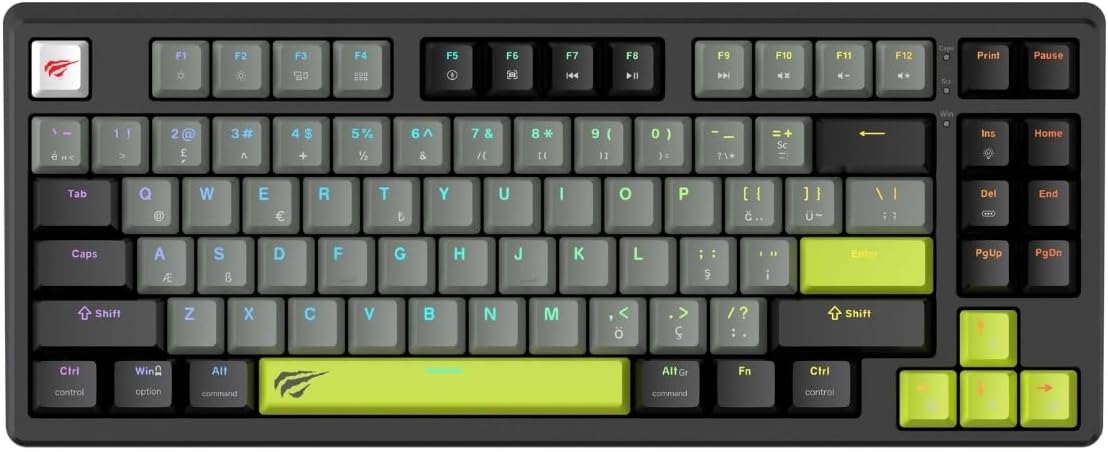
Resim: Tam bir view Havit Gamenote KB904L klavyesinin özelliklerini sergiliyor.asing its layout and potential RGB lighting.
5.3 Magnetic Switches & Rapid Trigger
The KB904L utilizes magnetic switches, which allow for adjustable actuation points and the Rapid Trigger feature.
- Ayarlanabilir Çalıştırma: Magnetic switches allow you to customize how deep a key needs to be pressed before it registers an input. This can be configured via the keyboard's dedicated software (if available) or specific onboard commands.
- Hızlı Tetikleyici: This feature allows a key to reset instantly when it begins to move upwards, enabling faster, more responsive repeated presses without needing to release the key fully. This is particularly beneficial for gaming. Configuration for Rapid Trigger is typically done through the keyboard's software.
5.4 Çalışırken Değiştirilebilir Tasarım
The Havit Gamenote KB904L features a hot-swappable design, allowing you to change the mechanical switches without soldering. This enables customization of typing feel and sound.
- Anahtar Uyumluluğu: Ensure replacement switches are compatible with the keyboard's socket type (e.g., 3-pin or 5-pin, depending on the specific model's design).
- Anahtar Çektirmenin Kullanılması: Gently use the provided switch puller to remove existing switches. Align the puller's prongs with the clips on the switch and squeeze firmly while pulling upwards.
- Yeni Anahtarların Kurulumu: Align the pins of the new switch with the holes on the PCB. Press down firmly until the switch clicks into place. Ensure pins are not bent during installation.

Resim: Açılı bir view of the Havit Gamenote KB904L keyboard, illustrating the individual keycaps and the underlying switch structure, relevant for hot-swapping.
5.5 8kHz Polling Rate
The keyboard operates at an 8kHz polling rate, meaning it reports inputs to your computer 8000 times per second. This significantly reduces input latency, providing an extremely responsive experience, especially critical for competitive gaming.
6. Bakım
6.1 Klavyeyi Temizleme
- Genel Temizlik: Use a soft, dry, lint-free cloth to wipe down the keycaps and chassis.
- Toz Giderimi: Use compressed air to blow away dust and debris from between the keycaps.
- Deep Cleaning (Keycaps): For stubborn dirt, you can carefully remove keycaps using a keycap puller and clean them with mild soap and water. Ensure they are completely dry before reattaching.

Görüntü: Yukarıdan aşağıya doğru net bir görünüm. view of the Havit Gamenote KB904L keyboard, useful for illustrating areas to clean.
6.2 Anahtarların Değiştirilmesi
As mentioned in the operating section, the hot-swappable design allows for easy switch replacement. Always ensure the keyboard is disconnected from the computer before attempting to remove or install switches.
- Use the switch puller to carefully remove the desired switch.
- Insert the new switch, ensuring its pins align correctly with the PCB sockets.
- Press down gently but firmly until the switch is fully seated.
7. Sorun Giderme
- Klavye Yanıt Vermiyor:
- USB kablosunun hem klavyeye hem de bilgisayara güvenli bir şekilde bağlandığından emin olun.
- Klavyeyi bilgisayarınızdaki farklı bir USB portuna bağlamayı deneyin.
- Sistemle ilgili bir sorun olup olmadığını anlamak için klavyeyi başka bir bilgisayarda deneyin.
- Bilgisayarınızı yeniden başlatın.
- RGB Aydınlatma Çalışmıyor:
- Fn tuş kombinasyonlarını kullanarak aydınlatmanın kapalı olup olmadığını veya minimum parlaklığa ayarlanıp ayarlanmadığını kontrol edin.
- Ensure any keyboard software is running correctly and not conflicting.
- Belirli Tuşlar Kaydedilmiyor:
- If the keyboard is hot-swappable, carefully remove and re-seat the problematic switch. Ensure its pins are not bent.
- Clean around the keycap and switch to remove any debris.
- If possible, swap the problematic switch with a known working switch from another key to determine if the issue is with the switch or the PCB socket.
- Keyboard Lag or Input Delay:
- Aynı USB hub'ına başka yüksek bant genişliği gerektiren USB cihazlarının bağlı olmadığından emin olun.
- Try connecting to a different USB port, preferably a USB 3.0 or higher port.
- Check for any background processes on your computer that might be consuming excessive CPU resources.
8. Özellikler
| Özellik | Tanım |
|---|---|
| Örnek | KB904L |
| Marka | Havıt |
| Klavye Türü | Mechanical, Magnetic Switch |
| Anket Oranı | 8 kHz |
| Arka aydınlatma | RGB |
| Temel Özellikler | Magnetic Switches, Rapid Trigger, Hot-Swappable Design |
| Önerilen Kullanım | Oyun |
9. Garanti ve Destek
The Havit Gamenote KB904L Mechanical Keyboard comes with a 2 yıllık distribütör garantisiLütfen garanti talepleriniz için satın alma belgenizi saklayın.
For technical support, warranty inquiries, or further assistance, please contact your local Havit distributor or visit the official Havit webDestek kaynakları için site.
Not: Garanti şartları ve koşulları bölgeye göre değişiklik gösterebilir.