
1. Giriş
This manual provides essential instructions for the safe and effective use of your Hello Kitty Kuromi Wireless Bluetooth Earbuds. Please read this manual thoroughly before using the product and retain it for future reference.
2. Paket İçeriği
Paketin içinde tüm öğelerin mevcut olduğundan emin olun:
- Hello Kitty Kuromi Wireless Bluetooth Earbuds (2)
- Rotating Charging Case
- USB kablosu
- Kullanım Kılavuzu (bu belge)
3. Ürün Bittiview
3.1 Bileşenler
The Hello Kitty Kuromi Wireless Bluetooth Earbuds system consists of two earbuds and a rotating charging case. The charging case features a unique flip-face design, allowing you to change Kuromi's expression.
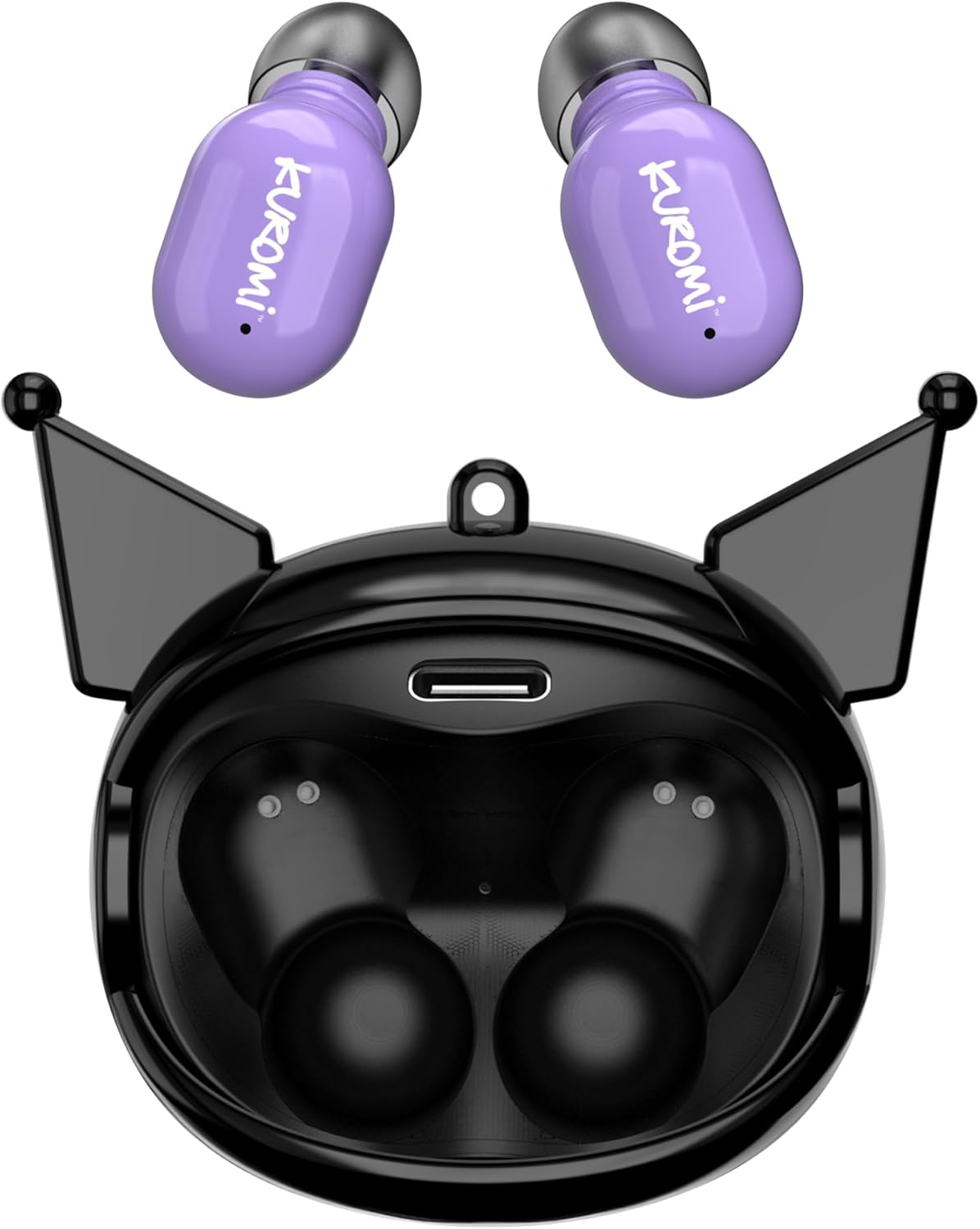
This image displays the two purple Kuromi wireless earbuds positioned above their open black charging case. The charging case features the Kuromi character design with pointed ears and an open compartment for the earbuds, revealing the charging contacts and a USB-C port.

The closed black charging case is shown, featuring Kuromi's default facial expression with a pink skull on her forehead and a neutral mouth.

The closed black charging case displays Kuromi's winking facial expression, with one eye closed and a small pink heart near her mouth.

The closed black charging case features Kuromi's heart-eyes facial expression, with two pink hearts replacing her eyes and an open-mouthed smile.
3.2 Kontroller
The earbuds feature touch controls for various functions. Specific touch gestures may vary; refer to the 'Operating Instructions' section for details.
4. Kurulum
4.1 İlk Şarj
İlk kullanımdan önce kulaklıklarınızı ve şarj kutusunu tamamen şarj edin.
- Connect the provided USB cable to the charging port on the case and to a compatible USB power source.
- Her iki kulaklığı da şarj kutusuna yerleştirin. Doğru şekilde oturduklarından emin olun.
- The charging indicator lights (if present) will illuminate to show charging status. A full charge typically takes approximately 1 hour.
4.2 Bluetooth Eşleştirme
Kulaklığınızı bir cihaza bağlamak için:
- Kulaklıkların şarjının dolu olduğundan ve şarj kutusundan çıkarıldığından emin olun. Otomatik olarak eşleştirme moduna geçmeleri gerekir.
- Cihazınızda (akıllı telefon, tablet vb.) Bluetooth’u etkinleştirin.
- Arama mevcut Bluetooth cihazları.
- Select "HKTWSRKU" or a similar name from the list of devices.
- Bağlantı kurulduktan sonra, kulaklıklar başarılı eşleştirmeyi gösterecektir (örneğin, sesli uyarı veya LED renginin değişmesi).
- Kulaklıklar, cihazda Bluetooth etkinse, kutudan çıkarıldığında son eşleştirilen cihaza otomatik olarak yeniden bağlanacaktır.
5. Kullanım Talimatları
5.1 Güç Açma/Kapatma
- Güç Açık: Kulaklıkları şarj kutusundan çıkarın. Otomatik olarak açılacaklardır.
- Kapat: Place the earbuds back into the charging case. They will power off and begin charging automatically.
5.2 Müzik Oynatma
Use the touch controls on the earbuds:
- Oynat/Duraklat: Her iki kulaklığa da bir kez dokunun.
- Sonraki Parça: Sağ kulaklığa iki kez dokunun.
- Önceki parça: Sol kulaklığa iki kez dokunun.
- Ses Kontrolü: Volume is typically controlled via your connected device.
5.3 Çağrı Yönetimi
Dahili mikrofon, eller serbest görüşme imkanı sağlar:
- Cevap Çağrısı: Tap once on either earbud when a call comes in.
- Çağrı Sonu: Tap once on either earbud during a call.
- Çağrıyı Reddet: Press and hold either earbud for approximately 2 seconds.
5.4 Flip-Face Feature
The charging case features a rotating mechanism to change Kuromi's facial expression. Gently rotate the front panel of the case to cycle through the available expressions.
6. Şarj Etme
6.1 Kulaklıkları Şarj Etme
Place the earbuds into the charging case. They will automatically begin to charge from the case's internal battery.
6.2 Kılıfın Şarj Edilmesi
When the charging case battery is low, connect it to a power source using the provided USB cable. The case's indicator lights will show charging status. A full charge for the case typically takes about 1 hour.
7. Bakım ve Özen
- Temizlik: Kulaklıkları ve şarj kutusunu temizlemek için yumuşak, kuru bir bez kullanın. Sert kimyasallar veya aşındırıcı malzemeler kullanmayın.
- Depolamak: Kulaklıkları kullanmadığınız zamanlarda korumak ve şarjlarının dolu kalmasını sağlamak için şarj kutusunda saklayın. Aşırı sıcaklıklardan kaçının.
- Suya Maruz Kalma: Bu kulaklıklar su geçirmez değildir. Suya veya aşırı neme maruz bırakmaktan kaçının.
- Darbe: Handle the earbuds and case with care to prevent damage from drops or impacts.
8. Sorun Giderme
Sorunlarla karşılaşırsanız, aşağıdaki tabloya bakın:
| Sorun | Olası Çözüm |
|---|---|
| Kulaklıklar eşleşmiyor | Kulaklıkların şarjının dolu olduğundan emin olun. Cihazınızda Bluetooth'u kapatıp tekrar açın. Bluetooth ayarlarınızdan cihazı unutun ve yeniden eşleştirin. |
| Kulaklıklardan ses gelmiyor | Cihazın ses seviyesini kontrol edin. Kulaklıkların bağlı olduğundan emin olun. Farklı ses dosyaları çalmayı deneyin. |
| Kulaklıklar şarj olmuyor | Ensure earbuds are correctly seated in the case. Check if the charging cable is securely connected to the case and power source. |
| Mikrofon çalışmıyor | Ensure earbuds are properly connected. Check microphone permissions on your device. |
9. Özellikler
Key technical details for the Hello Kitty Kuromi Wireless Bluetooth Earbuds:
| Özellik | Detay |
|---|---|
| Model Adı | Wireless Earbuds (HKTWSRKU) |
| Bağlantı Teknolojisi | Bluetooth 5.3 |
| Pil Ömrü (Oynatma Süresi) | Up to 4 Hours per charge |
| Şarj Süresi | Yaklaşık 1 Saat |
| Kontrol Yöntemi | Dokunmak |
| Kulak Yerleşimi | Kulakta |
| Özel Özellik | Rotating Charging Case with Flip-Face Feature |
| Dahil Bileşenler | Rotating Charging Case, USB Cable, User Manual |
| Üretici | Güney Telekom |
| Ürün Ağırlığı | 3.52 ons |
10. Garanti Bilgileri
For warranty details, please refer to the documentation included with your purchase or contact the retailer where the product was acquired. Warranty terms and conditions may vary by region and retailer.
11. Destek
If you require further assistance or have questions not covered in this manual, please contact the manufacturer or your retailer's customer support. Keep your purchase receipt and product model number (HKTWSRKU) available when seeking support.