
giriiş
This manual provides essential instructions for the setup, operation, and maintenance of your KKB 4G LTE Cellular Solar Security Camera. Designed for remote monitoring in areas without Wi-Fi access, this camera utilizes 4G LTE connectivity and solar power for continuous operation. Please read this manual thoroughly before using the product to ensure proper functionality and safety.
Kutuda Neler Var?
- 1 x KKB 4G LTE Security Camera
- 1 x 5W Güneş Paneli
- 1 x Şarj Kablosu
- 1 x Kullanım Kılavuzu
- Installation Accessories (screws, wall anchors, mounting bracket)
Ürün Bittiview
Temel Özellikler
- 4G LTE Bağlantısı: Operates independently without Wi-Fi, ideal for remote locations.
- Güneş Enerjili: Equipped with a 10400mAh rechargeable battery and a 5W solar panel for 365-day operation.
- 2K HD Çözünürlük: Provides clear, crisp video footage.
- 355° Yatay ve 90° Dikey Hareket: Offers comprehensive coverage and remote control via the iCam365 app.
- Renkli Gece Görüşü: Düşük ışık koşullarında gelişmiş görüş.
- 2 Yönlü Ses: Gerçek zamanlı iletişime olanak tanır.
- Pir hareket sensörü: Advanced detection minimizes false alarms.
- IP65 Hava Koşullarına Dayanıklı: Çeşitli hava koşullarında dış mekan kullanımına uygun, dayanıklı tasarım.
- Dahili SIM Kart: Comes with a pre-installed SIM card and trial data plan.
Kamera Bileşenleri
The KKB 4G LTE Cellular Solar Security Camera consists of the main camera unit and a separate solar panel. The camera features a lens, infrared LEDs for night vision, a PIR motion sensor, a microphone, and a speaker for two-way audio. The solar panel connects to the camera to provide continuous power.
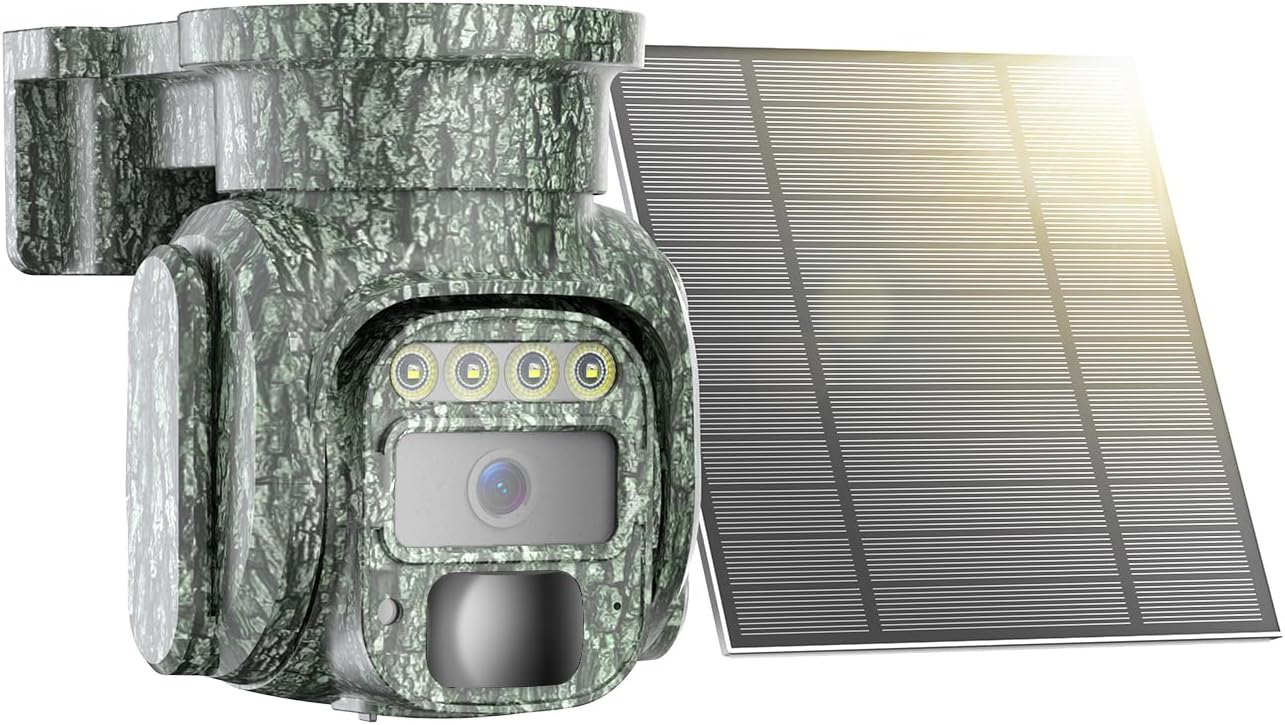
Image: The KKB 4G LTE Cellular Solar Security Camera with its accompanying solar panel.

Görsel: Akıllı telefon uygulaması aracılığıyla kontrol edilebilen kameranın 355 derece yatay ve 90 derece dikey hareket kabiliyetini gösteren illüstrasyon.
Kurmak
- İlk Şarj: Before first use, fully charge the camera's internal battery using the provided charging cable. This ensures the camera has sufficient power to begin operation, especially if solar charging is limited initially.
- SIM Card & MicroSD Card Installation: The camera comes with a built-in SIM card. Ensure it is activated according to the instructions provided with the camera. If using local storage, insert a MicroSD card (up to 128GB, not included) into the designated slot.
- App Download and Account Creation: Download the "iCam365" app from your smartphone's app store (Android or iOS). Follow the in-app instructions to create an account and register your camera.
- Kamera Eşleştirme: Power on the camera. Open the iCam365 app and follow the prompts to add your new device. This typically involves scanning a QR code on the camera or packaging.
- Mounting the Camera and Solar Panel: Güneş panelinin en uygun güneş ışığına maruz kalmasını sağlayan ve temiz bir ortam sunan bir yer seçin. view for the camera. Use the included installation accessories to securely mount both units. Ensure the solar panel is angled to receive maximum direct sunlight throughout the day.

Image: The KKB 4G LTE Cellular Solar Security Camera connected to its solar panel, ready for outdoor installation.
Kullanım Talimatları
- Canlı View ve Pan/Tilt Kontrolü: Open the iCam365 app. Select your camera to access the live video feed. Use the on-screen controls to remotely pan (355°) and tilt (90°) the camera lens to adjust your viewaçı.
- İki Yönlü Ses: canlı iken view, tap the microphone icon in the app to speak through the camera's speaker. Tap the speaker icon to listen to audio from the camera's location.
- Hareket Algılama ve Uyarılar: The camera's PIR motion sensor detects movement. When motion is detected, the camera will record video and send instant notifications to your smartphone via the iCam365 app. Sensitivity settings can be adjusted in the app to minimize false alarms.
- Gece Görüş Modları: The camera automatically switches to night vision in low light. It supports both color night vision and infrared night vision for clear visibility in the dark.
- Video Kaydetme ve Oynatma: Recorded videos are saved to the installed MicroSD card or to the cloud (subscription may be required). Access and playback recorded footage directly through the iCam365 app.
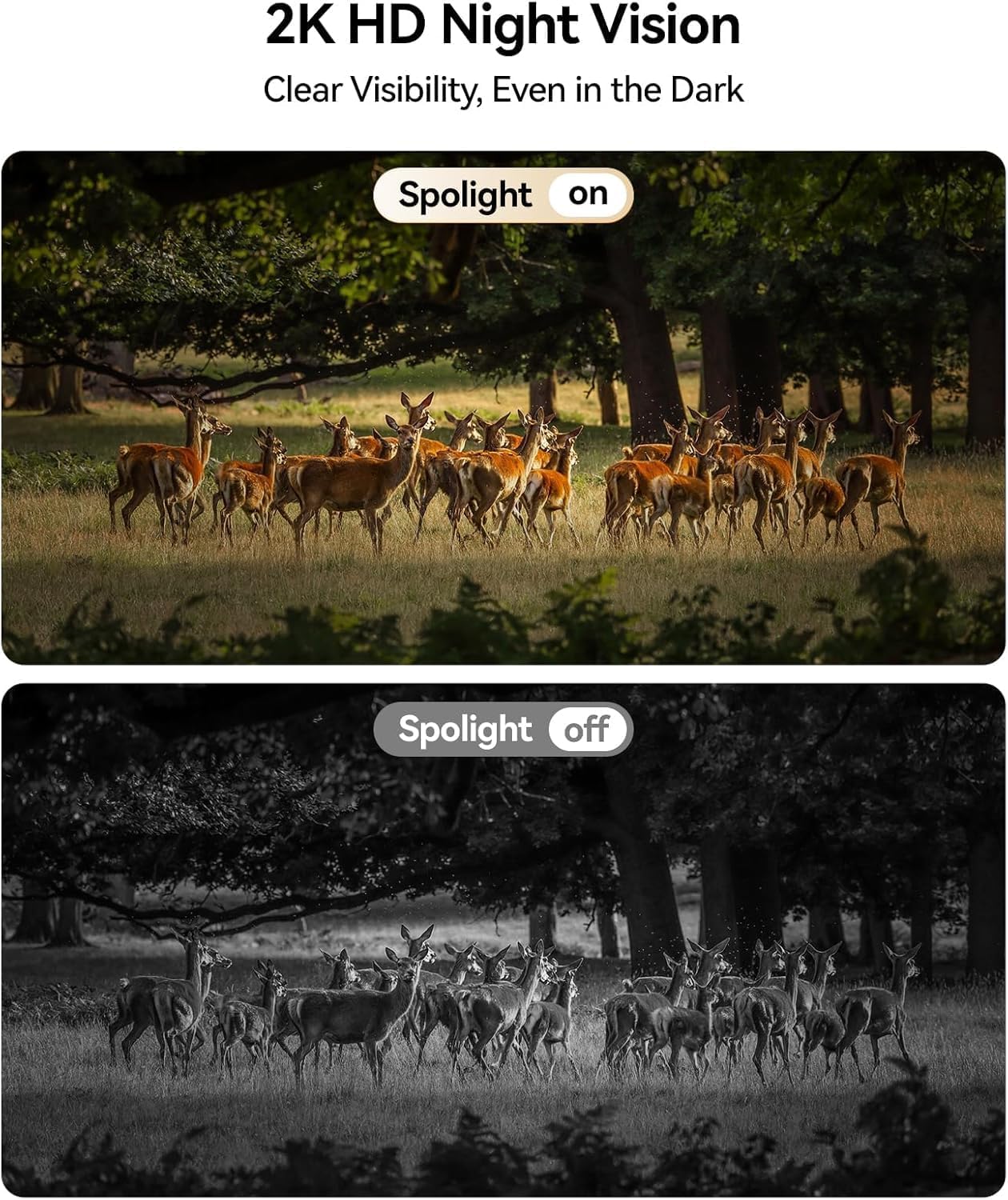
Image: Comparison of daytime and 2K HD night vision footage from the KKB camera, demonstrating clear visibility in darkness.

Image: The camera's intelligent tracking feature detecting a person and sending an instant notification to a smartphone.
Bakım
- Güneş Panelinin Temizlenmesi: Regularly clean the surface of the solar panel to remove dust, dirt, and debris. A clean panel ensures maximum sunlight absorption and efficient battery charging.
- Pil Yönetimi: While solar-powered, extreme weather or prolonged periods of low sunlight may affect battery levels. Monitor battery status via the app and manually charge if necessary.
- Donanım Yazılımı Güncellemeleri: Periodically check the iCam365 app for available firmware updates. Keeping your camera's firmware up-to-date ensures optimal performance, security, and access to new features.

Image: The KKB camera demonstrating its IP65 waterproof rating, suitable for all weather conditions.
Sorun giderme
| Sorun | Olası Neden | Çözüm |
|---|---|---|
| No 4G Signal | Poor cellular coverage in the area. | Relocate the camera to an area with better 4G signal strength. Check with your cellular provider for coverage maps. |
| Pil Çabuk Bitiyor | Insufficient sunlight for solar panel; excessive motion detection; frequent live view erişim. | Ensure solar panel is clean and optimally angled towards the sun. Adjust motion detection sensitivity. Limit frequent live view access. Manually charge if needed. |
| False Motion Alarms | High sensitivity settings; environmental factors (e.g., moving branches, insects). | Adjust PIR motion detection sensitivity in the iCam365 app. Ensure the camera is not pointed at areas with constant, non-threatening movement. |
| Unable to Connect to App | Incorrect pairing process; app or camera firmware outdated; poor 4G signal. | Repeat the pairing process. Ensure the app and camera firmware are updated. Verify 4G signal strength. |
Özellikler
- Model Adı: 4G-RF-12
- Model Numarası: G220BM
- Bağlantı Teknolojisi: 4G LTE Hücresel (Wi-Fi desteği yok)
- Güç Kaynağı: Solar Powered (5W Solar Panel) with 10400mAh Rechargeable Battery
- Video Yakalama Çözünürlüğü: 2K
- Viewaçı: 355° Döndürme, 90° Eğme
- Gece Görüşü: Color Night Vision, Infrared
- Özel Özellikler: 2-Way Audio, HD Resolution, PTZ Technology, PIR Motion Sensor
- İç/Dış Mekan Kullanımı: İç mekan, dış mekan
- Su Geçirmezlik Derecesi: IP65
- Depolamak: Mikro SD (128 GB'a kadar), Bulut Depolama
- Kontrol Yöntemi: iCam365 App (Android, iOS)
- Malzeme: Akrilonitril Bütadien Stiren (ABS)
- Ürün Ölçüleri: 3.7 x 5.9 x 5.6 inç
Garanti ve Destek
KKB provides comprehensive customer support for its products. For detailed warranty information, please refer to the warranty card included in your product packaging or visit the official KKB website. For technical assistance, KKB offers 7x24 hours professional technical support through multi-channel services, including in-app contact and email.

Image: KKB customer support team ready to assist.