
1. Giriş
Thank you for choosing the GOBOULT Astra Neo Bluetooth In-Ear Earbuds. This manual provides essential information for setting up, operating, and maintaining your earbuds to ensure optimal performance and longevity. Please read this manual thoroughly before use.
2. Güvenlik Bilgileri
- Kulaklıklarınızı veya şarj kutusunu aşırı sıcaklıklara, neme veya sıvılara maruz bırakmayın.
- Cihazın düşürülmesinden, çarpılmasından veya sökülmesinden kaçınınız.
- Şarj için yalnızca verilen şarj kablosunu veya sertifikalı bir Type-C kablosunu kullanın.
- İşitme kaybını önlemek için orta ses seviyesinde dinleyin.
- Çocukların ve evcil hayvanların erişemeyeceği yerde saklayınız.
3. Paket İçeriği
Paketinizde tüm öğelerin mevcut olduğundan emin olun:
- GOBOULT Astra Neo Earbuds (Left and Right)
- Şarj Kutusu
- C Tipi Şarj Kablosu
- Kulak Yastıkları (çeşitli boyutlarda)
- Kullanıcı Kılavuzu
- Garanti Kartı
4. Ürün Bittiview
The GOBOULT Astra Neo earbuds feature a sleek design with touch controls and a compact charging case. The case includes breathing LED lights for status indication.

Image: GOBOULT Astra Neo Earbuds and Charging Case. The image displays the black earbuds removed from their charging case, which features a glowing blue LED strip.

Image: GOBOULT Astra Neo Comfort Grip Case and Earbuds. This image highlights the textured surface of the charging case and earbuds, along with the breathing case lights.
5. Kurulum
5.1 Kulaklıkları ve Kutuyu Şarj Etme
İlk kullanımdan önce kulaklıklarınızı ve şarj kutusunu tamamen şarj edin.
- Kulaklıkları şarj kutusuna yerleştirin. Yerlerine doğru şekilde oturduğundan emin olun.
- Type-C şarj kablosunu kılıf üzerindeki şarj portuna ve bir güç kaynağına bağlayın.
- The LED indicator on the case will illuminate during charging and turn off or change color when fully charged.
10 dakikalık şarj ile yaklaşık 100 dakika oyun süresi sağlanıyor.

Image: GOBOULT Astra Neo Fast Charging Feature. This image illustrates the 70-hour playtime and the fast charging capability: 10 minutes of charge equals 100 minutes of playtime.
5.2 Cihazla Eşleştirme (Bluetooth 5.4)
The Astra Neo uses Bluetooth 5.4 with Blink & Pair technology for quick and stable connections.
- Şarj kutusunu açın. Kulaklıklar otomatik olarak eşleştirme moduna geçecektir.
- Cihazınızda (akıllı telefon, tablet, dizüstü bilgisayar) Bluetooth'u etkinleştirin.
- Arama available Bluetooth devices and select "GOBOULT Astra Neo" from the list.
- Bağlantı sağlandığında, eşleştirmenin başarılı olduğu sesli bir uyarıyla doğrulanacaktır.

Image: GOBOULT Astra Neo Bluetooth 5.4 Pairing. This image shows a smartphone screen displaying a successful Bluetooth 5.4 connection to 'Astra Neo', emphasizing power efficiency and stable connection.
6. Kullanım Talimatları
6.1 Dokunmatik Kontroller
The Astra Neo earbuds feature intuitive touch controls on each earbud:
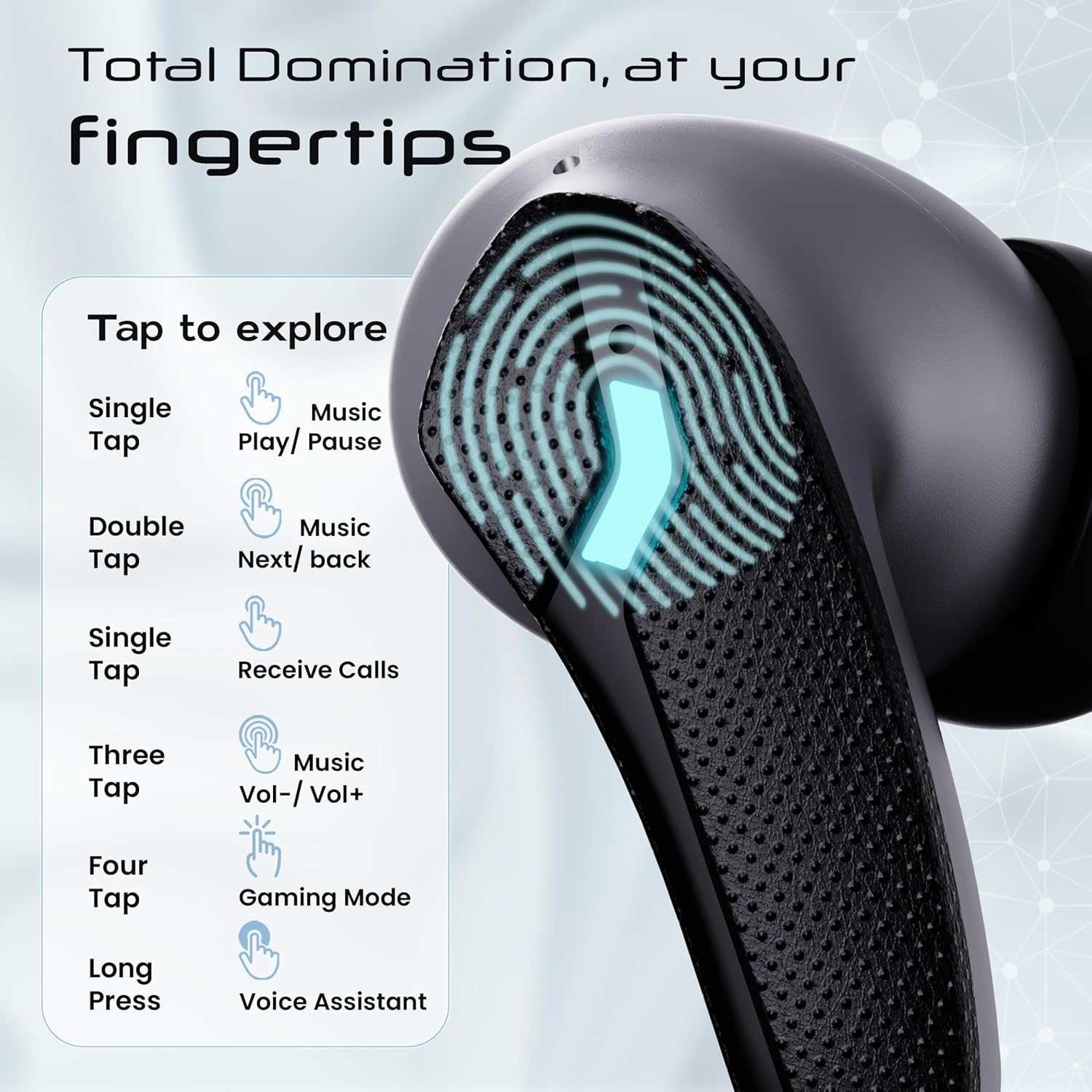
Image: GOBOULT Astra Neo Touch Controls Guide. This graphic details the various touch gestures for controlling music, calls, gaming mode, and voice assistant.
- Tek Dokunuş: Play/Pause music, Receive Calls.
- Çift Dokunma: Music Next/Back (specific earbud for each function).
- Three Tap: Music Volume Up/Down (specific earbud for each function).
- Four Tap: Activate Gaming Mode.
- Uzun basma: Activate Voice Assistant (Google Assistant/Siri).
6.2 Gaming Mode (40ms Low Latency)
Activate Gaming Mode for a synchronized audio experience during gameplay, reducing audio delay to 40ms.
- To activate: Four tap on either earbud.
- To deactivate: Four tap again on either earbud.

Image: GOBOULT Astra Neo Gaming Mode with 40ms Low Latency. This image depicts a user playing a mobile game with the earbuds, highlighting the ultra-low latency feature for an immersive gaming experience.
6.3 ZEN Quad Mic ENC for Calls
The ZEN Quad Mic Environmental Noise Cancellation (ENC) system ensures clear voice calls by filtering out background noise.

Image: GOBOULT Astra Neo ZEN Quad Mic ENC Technology. This image illustrates the internal components and the function of the 4 microphones for clear in-game communication and crystal-clear calling with Acoustic Echo Cancellation (AEC).
6.4 EQ Modu
The Astra Neo earbuds support 4 EQ modes for customized audio experiences. Refer to the product packaging or official GOBOULT website for specific instructions on how to switch between these modes, as this functionality is typically managed via a companion app or specific touch gestures not detailed here.
7. Bakım
7.1 Temizlik
- Kulaklıklarınızı ve şarj kutusunu yumuşak, kuru ve tiftiksiz bir bezle hafifçe silin.
- Sert kimyasallar, temizleme solventleri veya güçlü deterjanlar kullanmayın.
- Kulaklıkların ve şarj kutusunun şarj temas noktalarını düzenli olarak temizleyerek düzgün şarj olmasını sağlayın.
7.2 Suya Dayanıklılık (IPX5)
The Astra Neo earbuds are IPX5 water-resistant, meaning they are protected against sweat, rain, and splashes. They are not designed for submersion in water.
- Kulaklıkları bilerek suya batırmayın.
- If exposed to sweat or rain, wipe them dry before placing them back in the charging case.

Image: GOBOULT Astra Neo IPX5 Water Resistance and Voice Assistant. This image highlights the earbuds' sweatproof, rainproof, and splashproof capabilities, along with compatibility with Google Assistant and Hey Siri.
7.3 Depolama
Kullanmadığınız zamanlarda kulaklıklarınızı şarj kutusunda saklayarak hem koruyun hem de şarjlı kalmasını sağlayın.
8. Sorun Giderme
- Kulaklıklar eşleşmiyor: Her iki kulaklığın da şarj kutusunda olduğundan emin olun, ardından kapağı açarak eşleştirme moduna yeniden girin. Cihazınızın Bluetooth ayarlarını kontrol edin ve yeniden bağlanmayı deneyin.
- Sadece bir kulaklık çalışıyor: Her iki kulaklığı da kutusuna geri yerleştirin, kapağı kapatın, birkaç saniye bekleyin ve ardından tekrar açın. Bu işlem genellikle kulaklıkları yeniden senkronize eder.
- Ses yok: Hem cihazınızın hem de kulaklıklarınızın ses seviyesini kontrol edin. Kulaklıklarınızın cihazınıza düzgün şekilde bağlı olduğundan emin olun.
- Şarj sorunları: Clean the charging contacts on the earbuds and inside the case. Ensure the charging cable is securely connected and the power source is active.
- Kötü çağrı kalitesi: Mikrofonların önünün engellenmediğinden emin olun. Daha sessiz bir ortama geçmeyi deneyin.
9. Özellikler
Key technical specifications for the GOBOULT Astra Neo Earbuds:
| Özellik | Şartname |
|---|---|
| Model Adı | Astra Neo |
| Bluetooth Sürümü | 5.4 |
| Oyun zamanı | 70 saate kadar (şarj kutusu ile) |
| Hızlı Şarj | 10 dakika şarj = 100 dakika oyun süresi |
| Düşük Gecikme | 40ms (Oyun Modu) |
| Sürücü Boyutu | 13mm BoomX Drivers |
| Mikrofon | ZEN Quad Mic ENC |
| Suya Dayanıklılık | IPX5 |
| Kontrol Yöntemi | Dokunmak |
| Bağlantı Teknolojisi | Bluetooth, Kablosuz |
| Kulaklık Girişi | Type-C Hızlı Şarj Girişi |
| Ürün Ağırlığı | 47 Gram |
| Ürün Boyutları | 6.2x5.3x3.2 cm |
| Pil Türü | Lityum Polimer |
| Bluetooth Menzili | 10 Metre |
| Empedans | 32 Ohm |

Image: GOBOULT Astra Neo 13mm BoomX Drivers. This image highlights the 13mm BoomX drivers, emphasizing crystal clear sound and support for MSBC, SBC, and AAC codecs.
10. Garanti ve Destek
The GOBOULT Astra Neo Earbuds come with a 1 yıllık üretici garantisi from the date of purchase. This warranty covers manufacturing defects. For warranty claims or technical support, please refer to the contact information provided on your warranty card or visit the official GOBOULT webalan.