
1. Giriş
Satın aldığınız için teşekkür ederizasing the JVC XS-N1154B Bluetooth Speaker. This manual provides essential information for the safe and efficient operation of your device. Please read it thoroughly before use and retain it for future reference.
2. Güvenlik Bilgileri
- Hoparlörü aşırı sıcaklıklara, doğrudan güneş ışığına veya yüksek neme maruz bırakmayın.
- Hoparlörü düşürmekten veya sert darbelere maruz bırakmaktan kaçının.
- Hoparlörü sökmeye veya değiştirmeye çalışmayın. Bu, garantiyi geçersiz kılar.
- Keep the speaker away from water and liquids, despite its waterproof rating, to prevent damage to internal components.
- Yalnızca belirtilen şarj kablosunu ve güç adaptörünü kullanın.
- Hoparlörü yumuşak ve kuru bir bezle temizleyin. Aşındırıcı temizleyiciler veya çözücüler kullanmayın.
3. Paket İçeriği
Paketin içerisinde tüm ürünlerin mevcut olduğundan emin olun:
- JVC XS-N1154B Bluetooth Speaker
- Şarj kablosu
- Kullanıcı Kılavuzu
- Uzaktan Kumanda (varsa)
4. Ürün Bittiview
Hoparlörün bileşenlerini ve kontrollerini tanıyın.
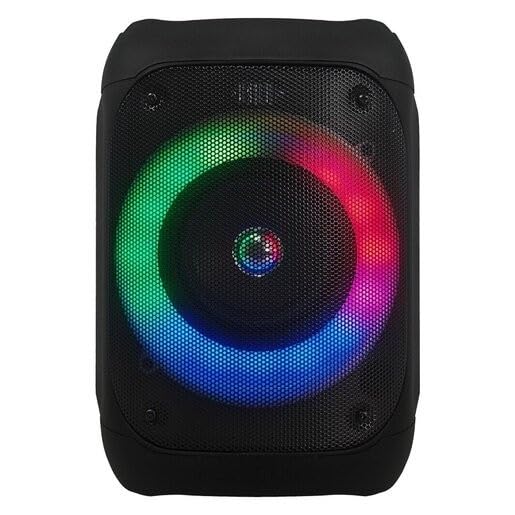
Şekil 1: Ön view of the JVC XS-N1154B Bluetooth Speaker, showcasing the speaker grille and integrated music-activated LED lights.
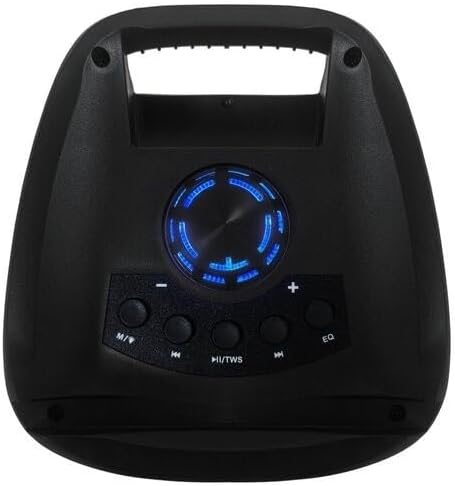
Şekil 2: Tepe view of the JVC XS-N1154B Bluetooth Speaker, displaying the control panel with various buttons and the volume knob.
Kontrol Paneli Fonksiyonları:
- Güç Düğmesi: Hoparlörü açar veya kapatır.
- Mod (M) Düğmesi: Switches between Bluetooth, USB, SD Card, and FM Radio modes.
- Play/Pause (►||) / TWS Button: Plays or pauses audio. Long press for TWS (True Wireless Stereo) pairing.
- Previous Track (◀◀) Button: Skips to the previous track or tunes down in FM mode.
- Next Track (►►) Button: Skips to the next track or tunes up in FM mode.
- EQ Düğmesi: Ekolayzır ön ayarları arasında geçiş yapar.
- Ses Düğmesi: Rotates to adjust the volume level.
5. Kurulum
5.1 Hoparlörü Şarj Etme
- Şarj kablosunu hoparlörün şarj portuna bağlayın.
- Kablo ucunu uygun bir USB güç adaptörüne (dahil değildir) veya güç kaynağı bulunan bir USB portuna takın.
- Şarj sırasında şarj gösterge ışığı genellikle kırmızı renkte yanar.
- Once fully charged, the indicator light may change color (e.g., turn off or turn blue/green). Disconnect the speaker from the power source.
5.2 Açma/Kapatma
- Açmak İçin: Press and hold the Power button until the speaker powers on and you hear an audible prompt.
- Kapatmak İçin: Press and hold the Power button again until the speaker powers off.
6. Kullanım Talimatları
6.1 Bluetooth Eşleştirme
- Ensure the speaker is powered on and in Bluetooth mode. If not, press the Mode (M) button to switch to Bluetooth mode. The speaker will indicate it is ready for pairing (e.g., a blinking LED or audible prompt).
- Mobil cihazınızda (akıllı telefon, tablet, dizüstü bilgisayar) Bluetooth'u etkinleştirin ve kullanılabilir cihazları arayın.
- Select "JVC XS-N1154B" from the list of devices.
- Once paired, the speaker will provide an audible confirmation, and the Bluetooth indicator light will become solid.
- Artık cihazınızdaki sesleri hoparlörünüz aracılığıyla oynatabilirsiniz.
6.2 USB/SD Kart Oynatma
- Desteklenen ses dosyalarına sahip bir USB flash sürücü veya SD kart takın. files) hoparlör üzerindeki ilgili porta.
- The speaker will automatically switch to USB or SD card mode and begin playing audio. If not, press the Mode (M) button to select the correct input.
- Use the Previous Track (◀◀), Next Track (►►), and Play/Pause (►||) buttons to control playback.
6.3 FM Radyo Çalışması
- FM Radyo moduna geçmek için Mod (M) düğmesine basın.
- To auto-scan and save available stations, press and hold the Play/Pause (►||) button. The speaker will scan and store stations automatically.
- Use the Previous Track (◀◀) and Next Track (►►) buttons to navigate between saved FM stations.
6.4 LED Işık Modu
The speaker features music-activated LED lights. These lights typically synchronize with the audio playback. There may be an additional button or a combination of buttons to cycle through different light modes or to turn them off. Refer to the remote control section for specific controls if available.
6.5 Ses Kontrolü
Rotate the Volume Knob on the top panel clockwise to increase volume and counter-clockwise to decrease volume.
6.6 Uzaktan Kumanda Kullanımı
If your package includes a remote control, it provides convenient access to various functions:
- Güç: Açık/Kapalı
- Mod: Switch input sources (Bluetooth, USB, SD, FM)
- Hacim +/-: Sesi ayarla
- Oynat/Duraklat: Oynatmayı kontrol et
- Önceki Sonraki: Skip tracks/stations
- EQ: Change equalizer presets
- NEDEN OLMUŞ: Control LED light modes (if applicable)
7. Bakım
7.1 Temizlik
Wipe the speaker's exterior with a soft, dry, lint-free cloth. Do not use liquid cleaners, sprays, or solvents, as these may damage the finish or internal components. Ensure all ports are dry before use, especially given its waterproof nature.
7.2 Depolama
When not in use for extended periods, store the speaker in a cool, dry place, away from direct sunlight and extreme temperatures. It is recommended to charge the battery periodically to maintain its lifespan.
8. Sorun Giderme
| Sorun | Olası Neden | Çözüm |
|---|---|---|
| Hoparlör açılmıyor. | Pil bitmiş. | Hoparlörü tam olarak şarj edin. |
| Ses yok. | Volume is too low or muted. Device not paired correctly. | Increase volume. Re-pair Bluetooth device. Check audio source. |
| Bluetooth eşleştirme başarısız. | Hoparlör eşleştirme modunda değil. Cihaz çok uzakta. Parazit var. | Ensure speaker is in Bluetooth pairing mode. Move device closer. Turn off other Bluetooth devices. |
| USB/SD kart çalışmıyor. | Yanlış file biçimlendirme. Kart/sürücü doğru şekilde takılmamış. | Sesi sağlayın files are in a supported format. Reinsert the USB drive/SD card. Press Mode button to select correct input. |
| FM radyo alımı zayıf. | Zayıf sinyal. | Hoparlörü daha iyi sinyal alan bir yere taşıyın. |
9. Özellikler
- Modeli: XS-N1154B
- Marka: JVC
- Bağlantı: Bluetooth, USB, SD Kart
- Radyo: Dijital FM Radyo
- Güç Çıkışı: 4 Watt
- Ses Çıkış Modu: Stereo
- Kontrol Yöntemi: Uzak
- Malzeme: Plastik
- Su geçirmez: Evet
- Güç Kaynağı: Pil ile çalışır
- Boyutlar: Yaklaşık 18.6 cm derinlik x 18.9 cm genişlik x 25.5 cm yükseklik
- Ağırlık: Yaklaşık 1.2 kg
- Uyumlu Cihazlar: Dizüstü Bilgisayar, Akıllı Telefon
10. Garanti ve Destek
10.1 Garanti Bilgileri
This JVC XS-N1154B Bluetooth Speaker comes with a 1 Yıl Garanti Satın alma tarihinden itibaren geçerlidir. Bu garanti, normal kullanım koşullarında üretim hatalarını ve işçilik kusurlarını kapsar. Yanlış kullanım, kazalar, yetkisiz değişiklikler veya normal aşınma ve yıpranmadan kaynaklanan hasarları kapsamaz.
10.2 Müşteri Desteği
For technical assistance, warranty claims, or further inquiries, please contact JVC customer support through their official website or the retailer where the product was purchased. Please have your product model number (XS-N1154B) and proof of purchase ready when contacting support.