
1. Giriş
Satın aldığınız için teşekkür ederizasing the JVC XS-N3214PB Portable Bluetooth Party Speaker. This manual provides important information regarding the setup, operation, and maintenance of your speaker. Please read it thoroughly before using the product to ensure proper function and to maximize your listening experience. Keep this manual for future reference.
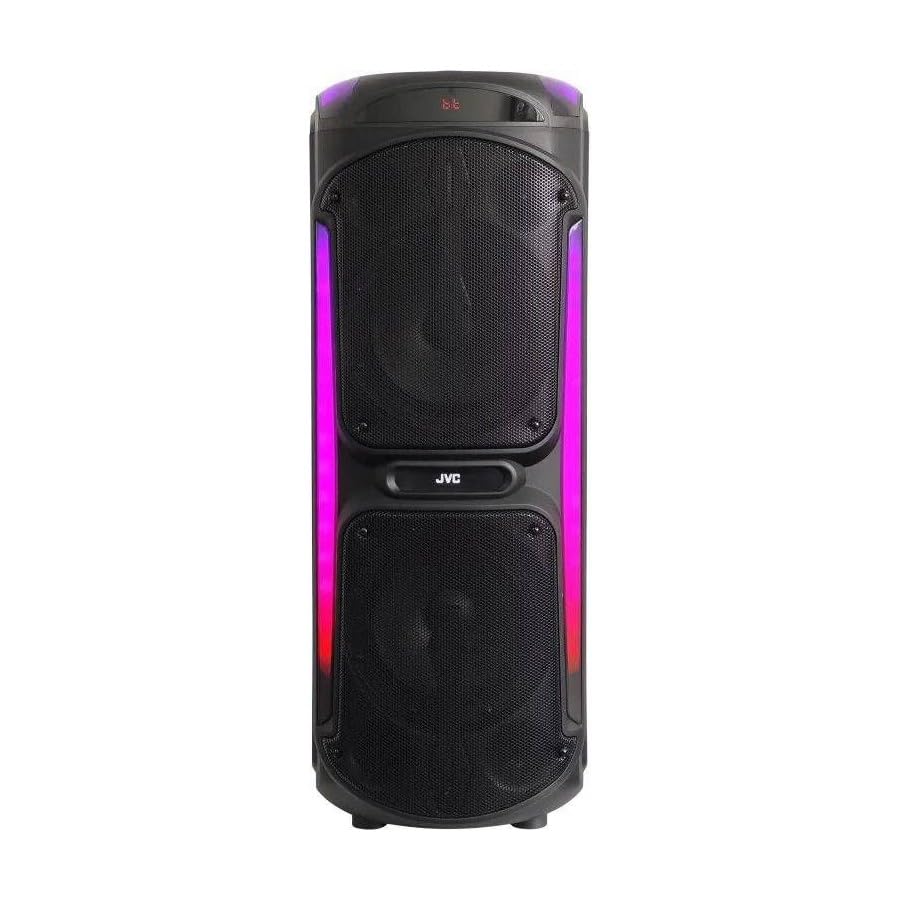
Image: The JVC XS-N3214PB Portable Bluetooth Party Speaker, shown with two microphones, highlighting its versatile connectivity options including Bluetooth, FM Radio, MP3 playback, AUX input, and USB input. The speaker features integrated LED lighting.
2. Güvenlik Bilgileri
Güvenli çalışmayı sağlamak ve hasarı önlemek için lütfen aşağıdaki önlemlere uyun:
- Hoparlörü suya, neme veya aşırı sıcaklıklara maruz bırakmayın.
- Hoparlörü sökmeye veya üzerinde değişiklik yapmaya çalışmayın. Tüm servis işlemlerini yetkili personele yaptırın.
- Hoparlörü ısı kaynaklarından, doğrudan güneş ışığından ve yanıcı maddelerden uzak tutun.
- Yalnızca belirtilen şarj adaptörünü kullanın.
- Hoparlörün üzerine ağır nesneler koymaktan kaçının.
- Hoparlörü yumuşak, kuru bir bezle temizleyin. Sıvı temizleyiciler veya aerosoller kullanmayın.
- Kullanım sırasında hoparlörün etrafında yeterli havalandırma olduğundan emin olun.
3. Paket İçeriği
Paketin içinde tüm öğelerin mevcut olduğundan emin olun:
- JVC XS-N3214PB Portable Bluetooth Party Speaker (1 unit)
- Power Adapter/Charging Cable (1 unit)
- Uzaktan Kumanda (1 adet)
- Kullanım Kılavuzu (bu belge)
- (Optional: Microphone, if included with your specific purchase)
4. Ürün Bittiview
4.1. Özellikler
- Powerful 800W Audio Output
- Bluetooth Kablosuz Bağlantı
- Taşınabilirlik için Dahili Şarj Edilebilir Pil
- Integrated LED Party Lights
- FM Radyo Alıcısı
- USB Oynatma
- AUX Girişi
- Microphone Input for Karaoke
- Uzaktan Kumanda İşlemi
- Deep Bass Performance
4.2. Kontroller ve Bağlantı Noktaları
Familiarize yourself with the speaker's control panel and connection ports. (Refer to diagrams in the full printed manual for exact locations).
- Güç Düğmesi: Hoparlörü açar/kapatır.
- Mod Düğmesi: Switches between Bluetooth, FM, USB, and AUX modes.
- Ses Kontrolü: Ana ses seviyesini ayarlar.
- Oynat/Duraklat Düğmesi: Medya oynatmayı kontrol eder.
- Önceki/Sonraki Parça Düğmeleri: Parçalar veya FM istasyonları arasında gezinmenizi sağlar.
- LED Işık Düğmesi: Toggles LED lighting effects.
- Mikrofon Ses Seviyesi/Yankı Kontrolleri: Adjusts microphone input and echo effect.
- USB Bağlantı Noktası: USB bellekten oynatma için.
- AUX Girişi (3.5 mm): Harici ses aygıtlarını bağlamak için.
- Mikrofon Girişi (6.35 mm): Kablolu mikrofon bağlamak için.
- DC Giriş Bağlantı Noktası: Hoparlörü şarj etmek için güç adaptörünü bağlamak için.
5. Kurulum
5.1. Hoparlörü Şarj Etme
- Connect the power adapter to the DC IN port on the speaker.
- Güç adaptörünün diğer ucunu duvar prizine takın.
- Şarj gösterge ışığı yanarak hoparlörün şarj olduğunu gösterecektir (rengi değişebilir).
- Allow approximately 4-6 hours for a full charge. The indicator light may change or turn off when fully charged.
- Disconnect the power adapter once charging is complete or when using the speaker on battery power.
5.2. Açma/Kapama
- Açmak İçin: Ekran aydınlanana kadar Güç düğmesini birkaç saniye basılı tutun.
- Kapatmak İçin: Press and hold the Power button again for a few seconds until the display turns off.
6. Kullanım Talimatları
6.1. Bluetooth Eşleştirme
- Power on the speaker. It will automatically enter Bluetooth pairing mode, indicated by a flashing Bluetooth icon or voice prompt.
- Mobil cihazınızda (akıllı telefon, tablet vb.) Bluetooth'u etkinleştirin ve kullanılabilir cihazları arayın.
- Select "JVC XS-N3214PB" from the list of devices.
- Once paired, the speaker will confirm with an audible tone or a solid Bluetooth icon.
- Artık cihazınızdaki sesleri hoparlörünüz aracılığıyla oynatabilirsiniz.
6.2. FM Radyo
- Press the Mode button until "FM" is displayed.
- Mevcut FM istasyonlarını otomatik olarak taramak ve kaydetmek için Oynat/Duraklat düğmesine basın.
- Kaydedilmiş istasyonlar arasında gezinmek için Önceki/Sonraki Parça düğmelerini kullanın.
6.3. USB Oynatma
- Insert a USB flash drive (formatted to FAT32) containing MP3 audio fileUSB bağlantı noktasına takın.
- The speaker will automatically switch to USB mode and begin playing the first track. If not, press the Mode button to select USB.
- Oynat/Duraklat ve Önceki/Sonraki Parça düğmelerini kullanarak oynatmayı kontrol edin.
6.4. AUX Girişi
- 3.5 mm ses kablosunun (dahil değildir) bir ucunu hoparlördeki AUX IN girişine bağlayın.
- Connect the other end of the cable to the audio output of your external device (e.g., MP3 player, laptop).
- Press the Mode button until "AUX" is displayed.
- Harici cihazınızdan oynatmayı ve ses seviyesini kontrol edin.
6.5. Microphone and Karaoke Function
- Connect a wired microphone (not included) to the Microphone Input port.
- Adjust the microphone volume and echo effect using the dedicated controls on the speaker.
- Play music via Bluetooth, USB, or AUX, and sing along through the microphone.
6.6. LED Parti Işıkları
Press the LED Light button to cycle through different lighting modes or to turn the lights off.
6.7. Uzaktan Kumanda
The included remote control allows for convenient operation of the speaker from a distance. Functions include power on/off, mode selection, volume adjustment, track control, and LED light control. Ensure the remote control has working batteries and is pointed towards the speaker's sensor.
7. Bakım
- Temizlik: Wipe the speaker's exterior with a soft, dry, lint-free cloth. Do not use abrasive cleaners, waxes, or solvents.
- Depolamak: If storing the speaker for an extended period, ensure it is fully charged, then power it off. Store in a cool, dry place away from direct sunlight. Recharge the battery every few months to maintain its lifespan.
- Pil Bakım: To prolong battery life, avoid fully discharging the speaker frequently. Charge it before the battery is completely depleted.
8. Sorun Giderme
| Sorun | Olası Neden | Çözüm |
|---|---|---|
| Hoparlör açılmıyor. | Battery is depleted. Power cable not connected. | Charge the speaker. Ensure power cable is securely connected to both speaker and outlet. |
| Ses yok. | Volume is too low. Incorrect mode selected. Device not paired (Bluetooth). AUX cable loose. | Increase volume on speaker and source device. Press Mode button to select correct input. Re-pair Bluetooth device. Check AUX cable connection. |
| Bluetooth cihazı eşleştirilemiyor. | Hoparlör eşleştirme modunda değil. Cihaz çok uzakta. Parazit. | Ensure speaker is in Bluetooth mode and flashing. Move device closer to speaker. Turn off other Bluetooth devices. |
| USB üzerinden oynatma çalışmıyor. | USB drive not formatted correctly (FAT32). Unsupported file format. USB drive faulty. | Ensure USB drive is FAT32 and contains MP3 files. Try a different USB drive. |
| Uzaktan kumanda çalışmıyor. | Batteries depleted. Obstruction between remote and speaker. | Replace remote control batteries. Ensure clear line of sight to speaker's IR sensor. |
9. Özellikler
| Model Numarası | XS-N3214PB |
| Marka | JVC |
| Çıkış Gücü | 800W (En Yüksek) |
| Bağlantı | Bluetooth, USB, AUX (3.5mm), FM Radio, Microphone Input (6.35mm) |
| Ses Çıkışı Modu | Stereo |
| Malzeme | Plastik |
| Montaj Tipi | Ayakta |
| Kontrol Yöntemi | Uzaktan Kumanda, Düğme |
| Boyutlar (D x G x Y) | 35D x 31G x 94Y santimetre |
| Dahil Bileşenler | 1 x JVC XS-N3214PB 800W Party Portable Bluetooth Speaker, Power Adapter, Remote Control, User Manual |
10. Garanti ve Destek
10.1. Garanti Bilgileri
This JVC XS-N3214PB speaker comes with a 1 Yıl Garanti from the date of purchase. This warranty covers manufacturing defects and workmanship under normal use. It does not cover damage caused by misuse, accidents, unauthorized modifications, or normal wear and tear. Please retain your proof of purchase for warranty claims.
10.2. Müşteri Desteği
For technical assistance, warranty claims, or product inquiries, please contact JVC customer support through the retailer where the product was purchased or visit the official JVC webBölgenize özel iletişim bilgileri için siteyi ziyaret edin.