
1. Giriş
The MiLESEEY S7 Pro is an advanced laser distance meter designed for precise and efficient measurements in various environments, particularly large outdoor projects. Featuring a digital viewfinder, P2P technology, and app connectivity, this tool offers enhanced accuracy and functionality for professional and DIY users. This manual provides detailed instructions for the safe and effective operation of your device.
2. Güvenlik Bilgileri
Cihazı kullanmadan önce lütfen tüm güvenlik talimatlarını okuyun ve anlayın. Bu talimatlara uyulmaması lazer radyasyonuna maruz kalmaya, elektrik çarpmasına, yangına veya ciddi yaralanmaya neden olabilir.
- Lazer radyasyonu: Bu cihaz 2. sınıf lazer radyasyonu yaymaktadır. Lazer ışınına doğrudan bakmayın veya ışını diğer insanlara veya hayvanlara doğrultmayın.
- Göz Koruması: Always wear appropriate eye protection when operating the device, especially in bright conditions where the laser dot may be difficult to see.
- Çocuklar: Cihazı çocukların erişemeyeceği yerde saklayınız.
- Çevre: Cihazı patlayıcı ortamlarda veya yanıcı sıvı veya gazların yakınında çalıştırmayın.
- Değişiklikler: Cihazı değiştirmeye veya sökmeye çalışmayın. Onarımlar yalnızca yetkili servis personeli tarafından yapılmalıdır.
- Pil Güvenliği: Use only the specified rechargeable AAA batteries. Ensure correct polarity when inserting batteries. Do not mix old and new batteries or different types of batteries.
3. Paket İçeriği
Paketinizde tüm öğelerin mevcut olduğundan emin olun:
- 1x MiLESEEY S7 Pro Outdoor Laser Measure
- 1x Taşıma Çantası
- 1x El Kayışı
- 1x Kullanım Kılavuzu (bu belge)
- 3x Rechargeable AAA Battery
- 1x USB Şarj Kablosu

Image: Contents of the MiLESEEY S7 Pro package, showing the device, case, strap, manual, and batteries.
4. Kurulum
4.1 Pil Kurulumu
- Cihazın arkasındaki pil bölmesi kapağını bulun.
- Open the cover and insert the three rechargeable AAA batteries, ensuring correct polarity (+/-).
- Pil bölmesi kapağını sıkıca kapatın.
4.2 Cihazı Şarj Etme
Connect the device to a USB power source using the provided USB charging cable. The battery indicator on the display will show charging status. Ensure the device is fully charged before first use for optimal performance.
4.3 Açma/Kapatma
- Açmak için, düğmesine basın ve basılı tutun. Güç düğme (
 Ekran aydınlanana kadar.
 - Kapatmak için tuşunu basılı tutun. Güç button again. The device will also automatically power off after a period of inactivity to conserve battery.
5. Kullanım Talimatları
5.1 Temel Ölçüm
- Point the laser aperture towards the target.
- Basın ÖLÇÜM düğme (Lazerin aktifleşmesi için bir kez basın.
- Basın ÖLÇÜM Ölçüm yapmak için düğmeye tekrar basın. Sonuç ekranda görüntülenecektir.
5.2 Dijital Viewbulucu
The integrated 4X adjustable zoom digital camera with on-screen targeting crosshairs allows you to easily locate the laser spot and confidently measure outdoors, even in bright sunlight conditions.
- The viewfinder display shows a live image of the target area.
- Use the crosshairs to precisely align the laser with your desired measurement point.
- Adjust the zoom level as needed for better visibility of distant targets.

Image: The MiLESEEY S7 Pro's digital viewfinder displaying a target with crosshairs for accurate laser point location.

Image: A user aiming the MiLESEEY S7 Pro laser distance meter outdoors, utilizing the digital viewfinder for precise targeting.
5.3 P2P Technology (Point-to-Point)
The 360° high-accuracy tilt sensor and integrated smart base enable P2P technology, allowing you to capture accurate measurements between any two points from a single remote location. This is ideal for complex measurements where direct access to both points is difficult.
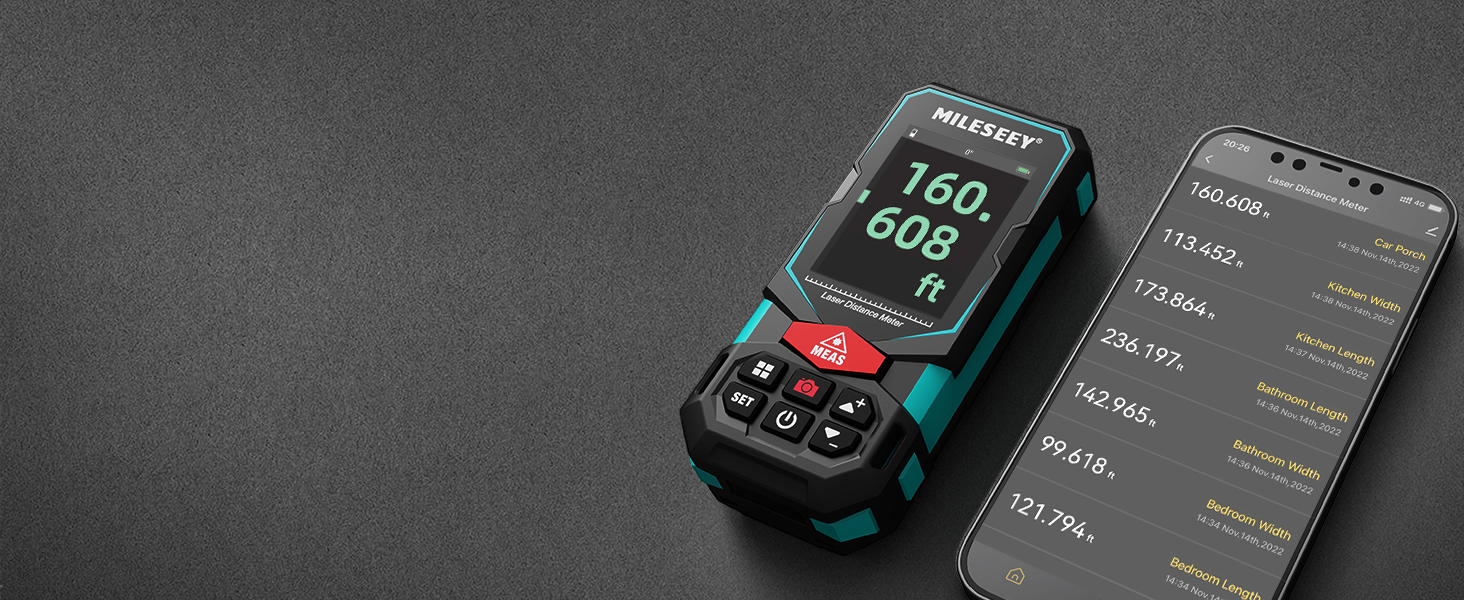
Image: An illustration of the P2P measurement capability, demonstrating how the device measures the distance between two points (P1 and P2) from a single vantage noktası.
5.4 Uygulama Bağlantısı
The MiLESEEY S7 Pro connects to a dedicated app, allowing you to transfer measurement data directly to your smartphone or tablet. Within the app, you can:
- Boyutları yerinde çekilmiş fotoğraflara girin.
- Draw projects and construct plans.
- Store up to 1,000 groups of data in the app's memory.
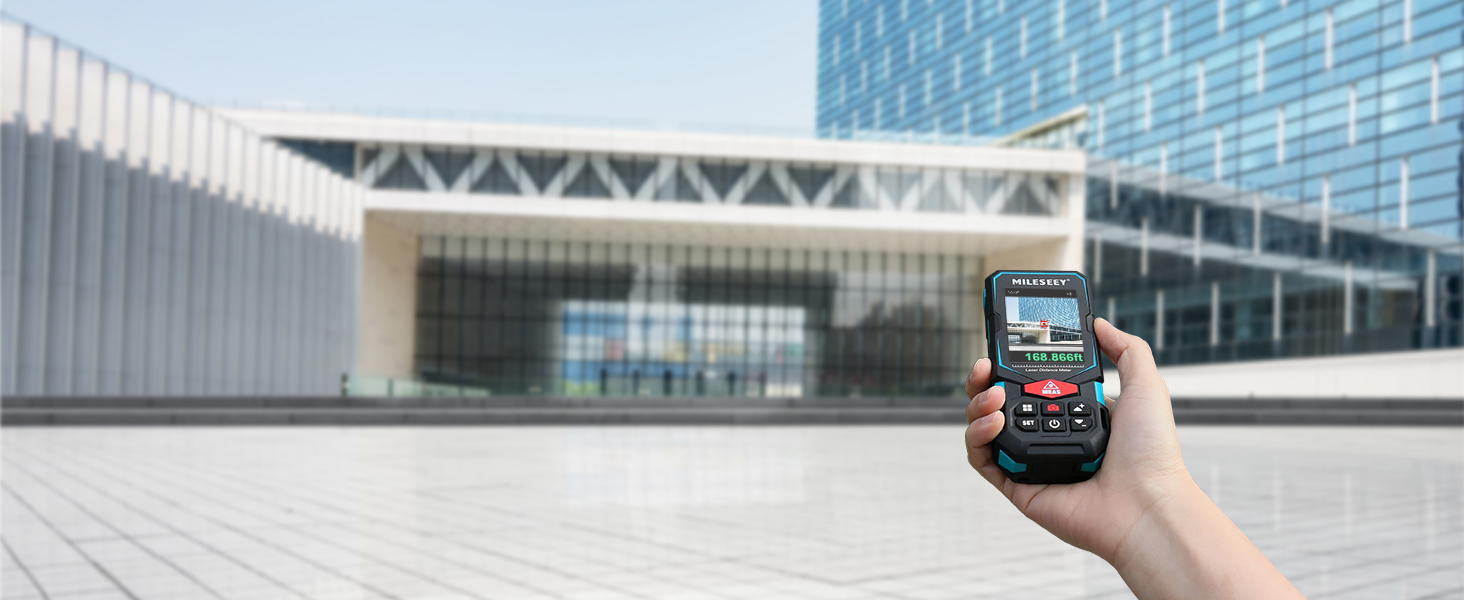
Image: The MiLESEEY S7 Pro connected to a smartphone, showing measurement data being displayed and managed within the companion application.
5.5 Ölçüm Modları
The device offers a variety of measurement modes accessible through its intuitive user interface:
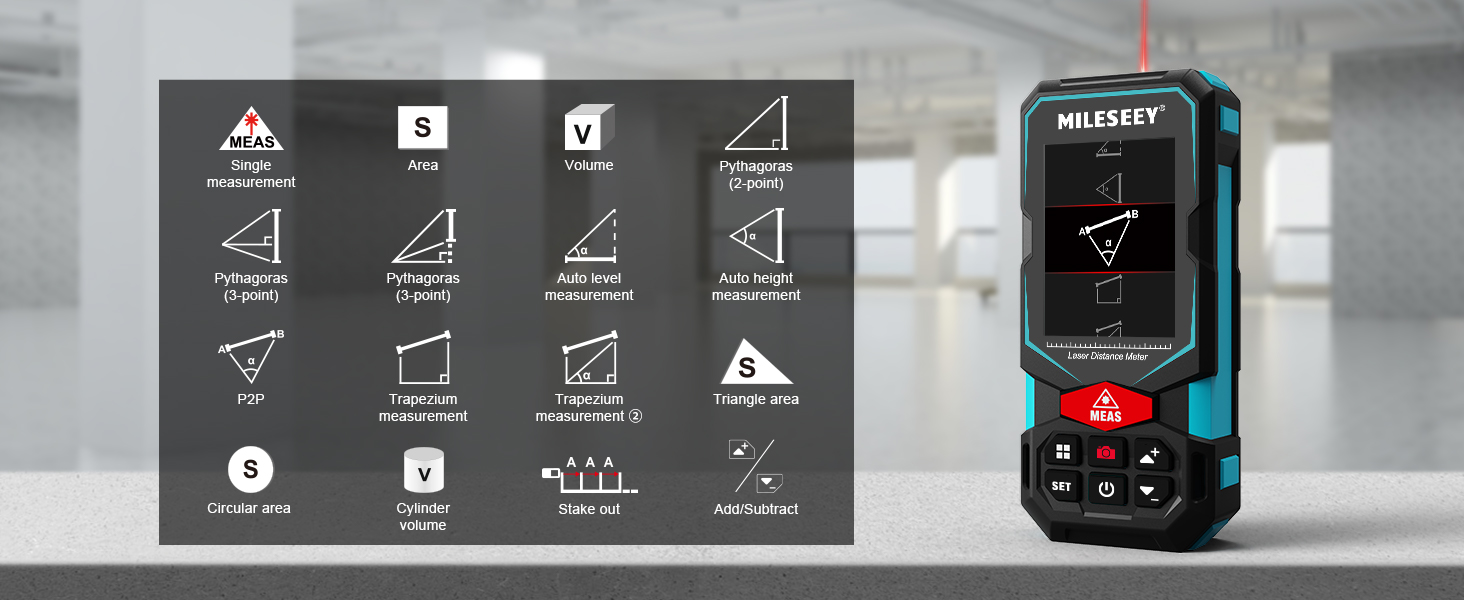
Image: A visual guide to the various measurement functions available on the MiLESEEY S7 Pro, including single measurement, area, volume, and advanced calculations.
- Tek Ölçüm: Standart mesafe ölçümü.
- Alan: Calculates the area of a surface.
- Hacim: Calculates the volume of a space.
- Pythagoras (2-point & 3-point): Pisagor teoremi kullanılarak dolaylı ölçüm.
- Otomatik Seviye Ölçümü: Yatay mesafeyi otomatik olarak ölçer.
- Otomatik Yükseklik Ölçümü: Dikey yüksekliği otomatik olarak ölçer.
- Eşler Arası: Point-to-point measurement (as described above).
- Trapezium Measurement: Calculates area of a trapezium.
- Triangle Area: Calculates the area of a triangle.
- Circular Area: Calculates the area of a circle.
- Silindir Hacmi: Calculates the volume of a cylinder.
- Stake Out: Helps mark out specific distances.
- Add/Subtract: Allows for addition or subtraction of measurements.
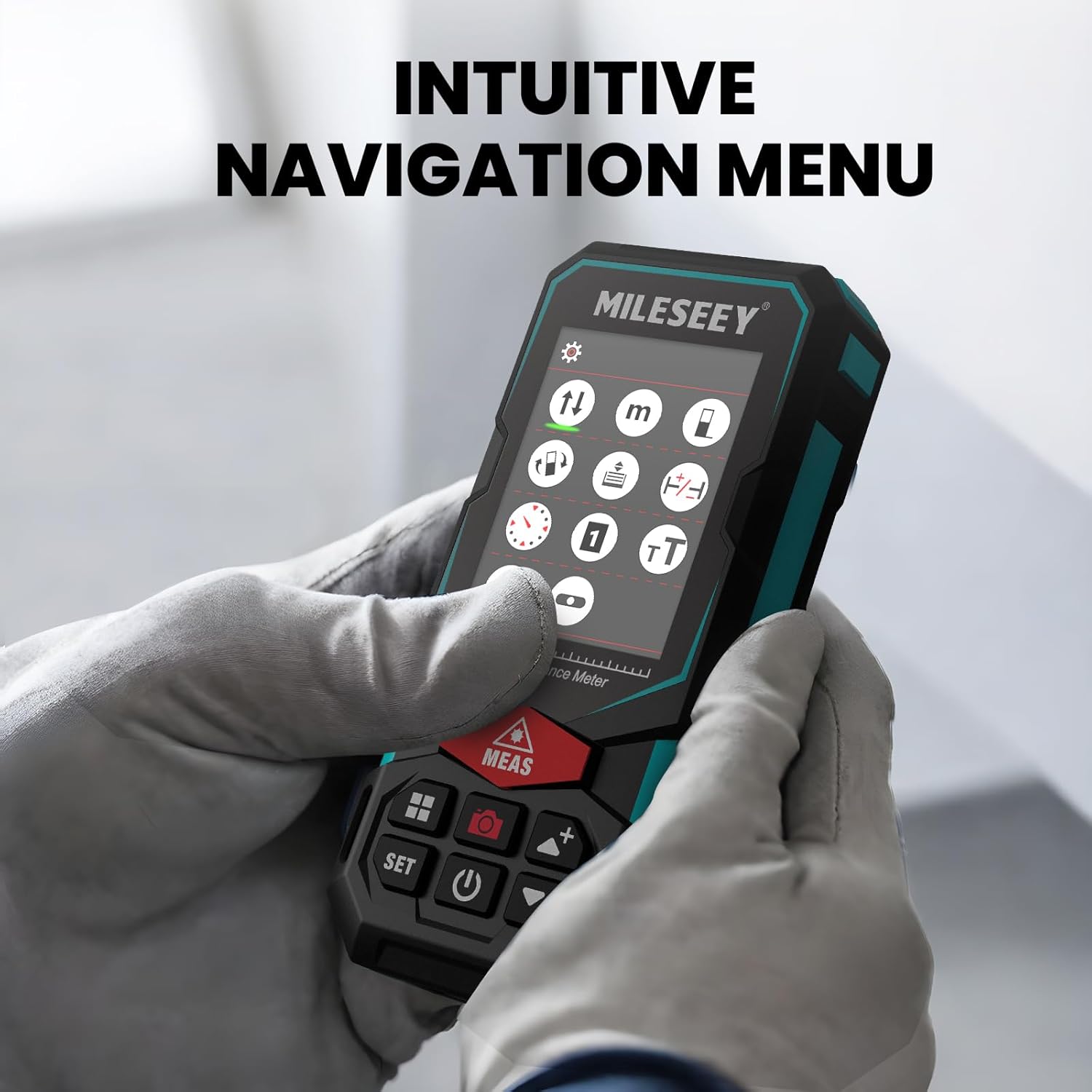
5.6 Kullanıcı Arayüzü ve Ekran
The S7 Pro features a humanized user interface with an intuitive navigation menu and a large 2.4" IPS backlit display. The rotation display keeps measurements aligned with the device, ensuring clear readability from any angle. You can easily switch between white text on a black screen and black text on a white screen for optimal visibility in varying light conditions.

Image: The MiLESEEY S7 Pro's display showcasing its intuitive navigation menu with various function icons.
Image: A user interacting with the MiLESEEY S7 Pro, highlighting the intuitive navigation menu on its screen.
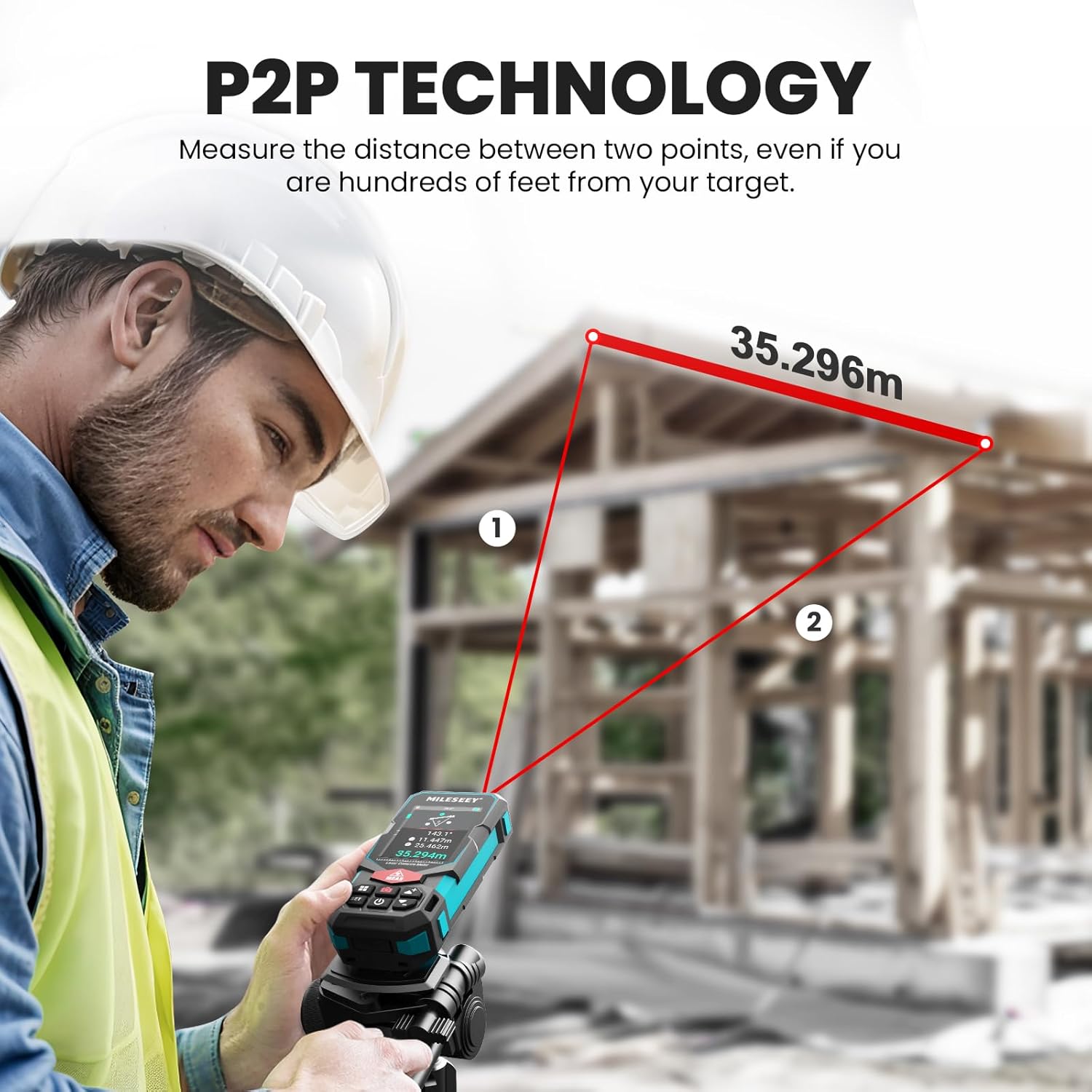
Image: The MiLESEEY S7 Pro's display demonstrating excellent visibility in both bright sunlight and low light environments.
6. Bakım
Proper maintenance ensures the longevity and accuracy of your MiLESEEY S7 Pro.
- Temizlik: Yumuşak bir d kullanınamp cloth to clean the device. Do not use harsh chemicals or abrasive cleaners. Clean the lens regularly with a soft, lint-free cloth.
- Depolamak: Cihazı kullanılmadığı zamanlarda taşıma çantası içinde serin ve kuru bir yerde saklayın. Aşırı sıcaklıklardan ve doğrudan güneş ışığından uzak tutun.
- Pil Bakım: If the device will not be used for an extended period, remove the batteries to prevent leakage. Recharge batteries regularly to maintain their capacity.
- IP65 Koruması: The device features IP65 protection, making it resistant to dust and water splashes. However, it is not designed for submersion. Clean off any dust or dirt after use in harsh conditions.

Image: The MiLESEEY S7 Pro demonstrating its IP65 protection, shown covered in dust but still functional.

Image: The MiLESEEY S7 Pro, designed with IP65 protection, shown in a dusty environment, highlighting its durability.
7. Sorun Giderme
If you encounter issues with your MiLESEEY S7 Pro, refer to the following common problems and solutions:
| Sorun | Olası Neden | Çözüm |
|---|---|---|
| Cihaz açılmıyor. | Aküler zayıf veya bitmiş; akülerin yanlış takılması. | Pilleri şarj edin veya değiştirin. Pillerin doğru kutuplara dikkat edilerek takıldığından emin olun. |
| Hatalı ölçümler. | Laser beam obstructed; unstable surface; device not calibrated. | Ensure clear line of sight. Place device on a stable surface. Perform self-calibration if available (refer to device menu). |
| Uygulama bağlantı sorunları. | Bluetooth etkinleştirilmemiş; uygulama güncellenmemiş; cihaz eşleştirilmemiş. | Ensure Bluetooth is active on both devices. Update the app to the latest version. Follow app pairing instructions. |
| Display not clear in bright light. | Görüntü ayarları. | Switch display mode to black text on white screen for better contrast. |
8. Özellikler
Key technical specifications for the MiLESEEY S7 Pro Laser Distance Meter:
- Marka: MiLESEEY
- Model Numarası: MCLD-CA-MS-S7
- Ölçüm Aralığı: Up to 330 ft (100 yards)
- Kesinlik: Up to +/- 2mm (1/16")
- Dijital Viewbulucu: 4X Adjustable Zoom Camera
- Bağlantı: App Connected (P2P Technology)
- Koruma Sınıfı: IP65 (Toza ve su sıçramalarına karşı dayanıklı)
- Görüntülemek: 2.4" IPS Backlit Display
- Piller: 3x Rechargeable AAA Battery (Included)
- Malzeme: Akrilonitril Bütadien Stiren, Kauçuk
- Ürün Ağırlığı: 300 Gram
- Ürün Ölçüleri: 12L x 5G x 2.5Y Santimetre
9. Garanti ve Destek
The MiLESEEY S7 Pro Laser Distance Meter comes with a 24 ay garanti from the date of purchase, covering manufacturing defects. For warranty claims, technical support, or any inquiries, please contact Mileseey Direct, the manufacturer's contact. Please retain your proof of purchase for warranty validation.