
1. Giriş
This manual provides essential information for setting up, operating, maintaining, and troubleshooting your GIGABYTE AORUS Elite 16 BWH gaming laptop. The AORUS Elite 16 BWH is designed for high-performance gaming and demanding applications, featuring an Intel Core Ultra 9 processor, NVIDIA GeForce RTX 5070 laptop GPU, a 16-inch WQXGA 165Hz display, and Windows 11 Pro.
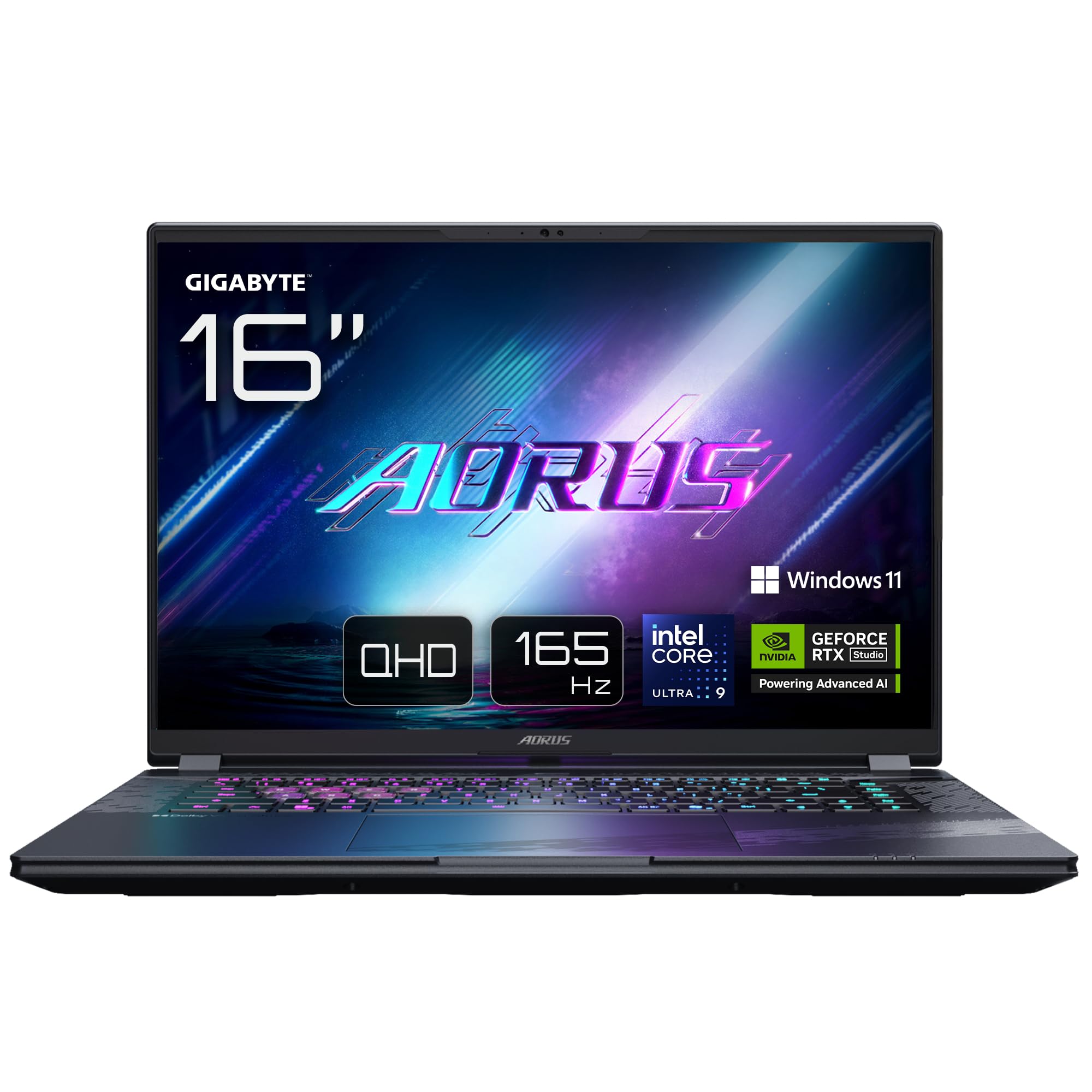
Image: The GIGABYTE AORUS Elite 16 BWH gaming laptop, showcasing its open display and keyboard.
2. Kurulum
2.1 Kutudan Çıkarma ve İlk İnceleme
Carefully remove the laptop and all accessories from the packaging. Verify that all components listed in the "What's in the Box" section are present and undamaged.
- GIGABYTE AORUS ELITE 16 BWHC3FRC65SP Laptop
- Güç Adaptörü ve Kablosu
- Dokümantasyon (bu kılavuz, garanti belgesi)
2.2 Gücün Bağlanması
Connect the power adapter to the laptop's power input port and then plug the power cable into an electrical outlet. It is recommended to fully charge the battery before initial use.
2.3 İlk Açılış
Dizüstü bilgisayarı açmak için güç düğmesine basın. Dil seçimi, ağ bağlantısı ve kullanıcı hesabı oluşturma dahil olmak üzere Windows 11 Pro kurulum işlemini tamamlamak için ekrandaki yönergeleri izleyin.
2.4 Connecting Peripherals and Network
The laptop features various ports for connecting external devices and networks.
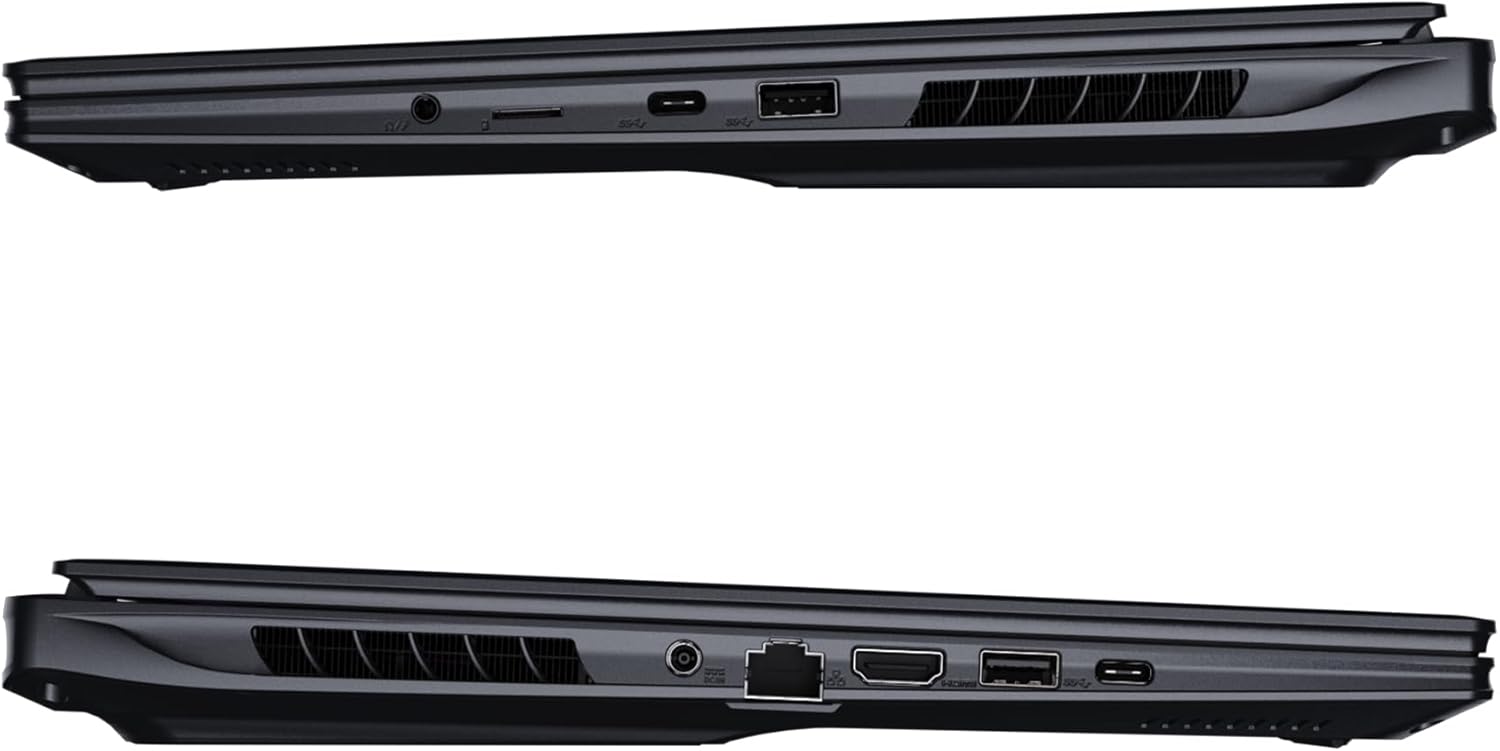
Resim: Yan view of the laptop illustrating the available ports for connectivity.
- USB Bağlantı Noktaları: Fare, klavye veya harici depolama aygıtı gibi USB aygıtlarını bağlayın.
- HDMI Bağlantı Noktası: Connect to an external display or TV.
- Thunderbolt 4 Bağlantı Noktası: Yüksek hızlı veri aktarımı ve görüntü çıktısı için.
- Ethernet Bağlantı Noktası: Kablolu ağ bağlantısı için.
- Kulaklık girişi: Kulaklıklara veya harici hoparlörlere ses çıkışı için.
- Kablosuz 7: Connect to wireless networks via the integrated Wi-Fi 7 module.
- Bluetooth 5.4: Bluetooth özellikli cihazlarla eşleştirin.
3. Dizüstü Bilgisayarınızı Çalıştırma
3.1 Ekran Özellikleri
Your AORUS Elite 16 BWH features a 16-inch WQXGA (2560x1600) IPS display with a 165Hz refresh rate and 16:10 aspect ratio, offering a wide viewing experience. It supports Dolby Vision for enhanced visual quality and is Pantone validated for color accuracy.

Image: The laptop's 16:10 aspect ratio display, highlighting its IPS panel and Pantone validation.
3.2 Klavye ve Dokunmatik Yüzey
The laptop is equipped with a backlit keyboard for comfortable typing in various lighting conditions and a responsive touchpad for navigation.
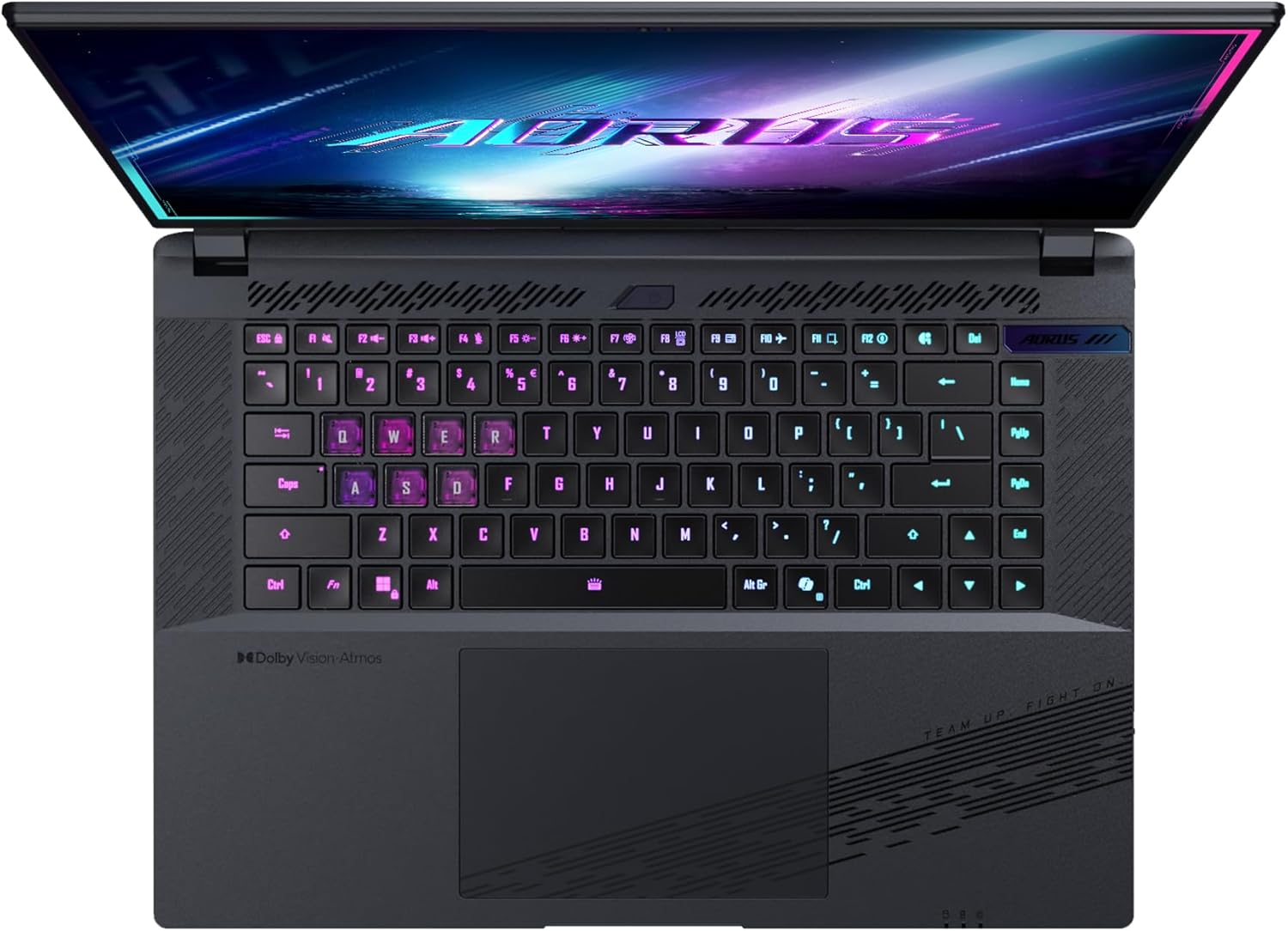
Resim: Yukarıdan aşağıya view dizüstü bilgisayarın klavyesinin, gösterdiği gibiasing its backlit keys.
The keyboard also features a dedicated Copilot Key for quick access to AI functionalities in Windows 11.

Image: Close-up of the keyboard, highlighting the Copilot Key for AI features.
3.3 Ses Sistemi
Experience immersive audio with Dolby Atmos support and integrated 2W speakers. The laptop also includes a built-in microphone for communication.

Image: Visual representation of Dolby Atmos and Dolby Vision audio and visual enhancements.
3.4 Performans Özellikleri
The AORUS Elite 16 BWH is powered by an Intel Core Ultra 9 processor with an integrated NPU for AI acceleration and an NVIDIA GeForce RTX 5070 laptop GPU, ensuring high performance for gaming and demanding tasks. It also features Advanced Optimus with DDS Technology for optimized graphics performance.

Resim: Ayrıntılı view of the Intel Core Ultra 9 processor chip.
Resim: Ayrıntılı view of the NVIDIA GeForce RTX 50 Series laptop GPU chip.
3.5 GiMATE AI Agent
Utilize GiMATE, your personal AI agent, to optimize performance, manage smart cooling, enhance privacy, control power settings, and improve audio and voice functionalities.

Image: GiMATE AI Agent interface showing various optimization features.
4. Bakım
4.1 Soğutma Sistemi
The laptop features the WINDFORCE Infinity cooling system to maintain optimal temperatures during intensive use. Ensure the vents are clear of obstructions to allow proper airflow.

Image: Representation of the WINDFORCE Infinity cooling system.
4.2 Temizlik
Ekranı ve dış yüzeyleri temizlemek için yumuşak, tüy bırakmayan bir bez kullanın. İnatçı lekeler için,ampen the cloth slightly with water or a screen-cleaning solution. Avoid harsh chemicals.
4.3 Pil Bakımı
To prolong battery life, avoid extreme temperatures and do not leave the laptop fully charged or fully discharged for extended periods.
4.4 Yazılım Güncellemeleri
Regularly update your Windows operating system, drivers, and GIGABYTE software to ensure optimal performance and security.
5. Sorun Giderme
5.1 Güç Sorunları
- Dizüstü bilgisayar açılmıyor: Güç adaptörünün güvenli bir şekilde takılı olduğundan ve prizin çalışır durumda olduğundan emin olun. Pilin şarj seviyesini kontrol edin.
- Pil şarj olmuyor: Güç adaptörünün ve kablosunun hasarlı olmadığından emin olun. Farklı bir priz deneyin.
5.2 Ekran Sorunları
- Görüntü yok: Connect an external monitor to check if the issue is with the laptop's screen. Ensure the laptop is powered on.
- Ekranda titreme veya bozulma: Grafik sürücülerini güncelleyin. Harici monitör kullanıyorsanız, ekran kablosu bağlantılarını kontrol edin.
5.3 Bağlantı Sorunları
- Wi-Fi bağlanmıyor: Check if Wi-Fi is enabled in Windows settings. Restart your router and laptop.
- Bluetooth cihazı eşleşmiyor: Cihazın eşleştirme modunda ve menzil içinde olduğundan emin olun. Bluetooth sürücülerini güncelleyin.
5.4 Genel Performans Sorunları
- Yavaş performans: Gereksiz uygulamaları kapatın. Kötü amaçlı yazılım taraması yapın. Yeterli boş disk alanı olduğundan emin olun.
- Aşırı Isınma: Ensure cooling vents are clear. Use the laptop on a hard, flat surface.
For more complex issues, refer to the GIGABYTE support website veya müşteri hizmetleriyle iletişime geçin.
6. Özellikler
| Özellik | Detay |
|---|---|
| Marka | GIGABYTE |
| Model Adı | AORUS ELITE 16 BWHC3FRC65SP |
| Ekran Boyutu | 16 inç |
| Renk | Gri |
| Sabit Disk Boyutu | 2000 GB (2x 1TB SSD Gen4) |
| CPU Modeli | Intel Core Ultra 9 275HX |
| Kurulu RAM Boyutu | 32 GB DDR5 |
| İşletim Sistemi | Windows 11 Pro |
| Özel Özellik | Backlit Keyboard, Memory Card Slot |
| Grafik Kartı Açıklaması | Özel |
| Grafik Eş İşlemcisi | NVIDIA GeForce RTX 5070 |
| Sabit Disk Teknolojisi | SSD |
| Ürün Ağırlığı | 2300 Gram |
| Webcam Capability | Yes (Frontal) |
| Grafik Kartı RAM Boyutu | 8 GB GDDR6 |
| Desteklenen Maksimum RAM | 64 GB |
| Pil Enerji İçeriği | 99 Watt-hours (Lithium-polymer, 4 cells) |
| Bağlantı | Bluetooth 5.4, Ethernet (10/1000 Mbit/s), HDMI (1 port), Thunderbolt 4 (1 port), USB 3.2 Gen 2 (2 ports), Wi-Fi 7 (802.11.be) |
| İşlemci Hızı | 2.7 GHz (Max 5.4 GHz) |
| İşlemci Sayısı | 24 |
| Ekran Çözünürlüğü | 2560 x 1600 piksel (WQXGA) |
| Görüntü Türü | IPS LCD |
| Ses Özellikleri | Dolby Atmos, 2x 2W Integrated Speakers, Integrated Microphone |
7. Garanti Bilgileri
Your GIGABYTE AORUS Elite 16 BWH laptop comes with a 2 yıllık sınırlı garanti. This warranty covers manufacturing defects and hardware malfunctions under normal use. Please retain your proof of purchase for warranty claims. For detailed terms and conditions, refer to the warranty card included with your product or visit the official GIGABYTE webalan.
8. Destek
For technical assistance, driver downloads, and further product information, please visit the official GIGABYTE support webSiteye göz atabilirsiniz. Ayrıca orada sıkça sorulan soruları ve topluluk forumlarını da bulabilirsiniz.
- GIGABYTE Resmi Webalan: www.gigabyte.com
- Müşteri Hizmetleri: Refer to your regional GIGABYTE webyerel iletişim bilgileri için site.