
1. Giriş
The JIGUUN 1500W Pure Sine Wave Inverter is designed to convert 12V DC power from batteries into high-quality 230V AC power, suitable for a wide range of electronic equipment and household appliances. With a continuous output of 1500W and a peak power of 3000W, this inverter features advanced pure sine wave technology for stable and efficient operation. It also includes an integrated 30A charger, mains priority circuit, and UPS (Uninterruptible Power Supply) function to ensure continuous power supply during outages. A wireless remote control and an intelligent LCD display provide convenient monitoring and control.
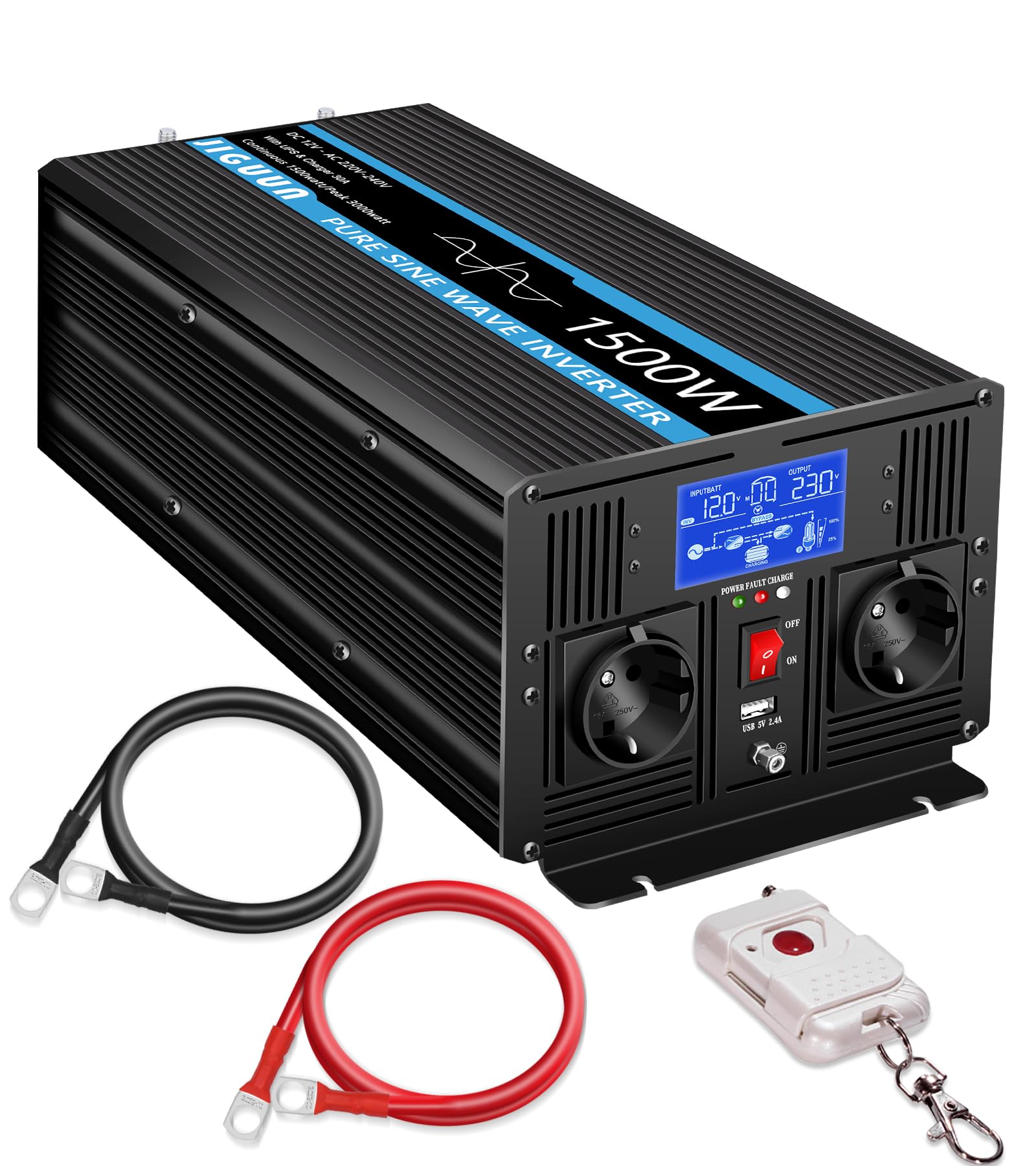
Image 1.1: JIGUUN 1500W Pure Sine Wave Inverter in an outdoor setting.
2. Güvenlik Talimatları
İnvertörü kurmadan veya çalıştırmadan önce lütfen tüm güvenlik talimatlarını okuyun ve anlayın. Bu talimatlara uyulmaması elektrik çarpmasına, yangına veya ciddi yaralanmaya neden olabilir.
- Havalandırma: Ensure the inverter is installed in a well-ventilated area to prevent overheating. Do not block ventilation openings.
- Çevre: Avoid exposure to water, moisture, direct sunlight, heat sources, or flammable materials. Operate the inverter in a dry, cool environment.
- Elektrik Bağlantıları: All wiring must comply with local electrical codes and regulations. Use appropriate gauge cables for DC and AC connections. Ensure all connections are tight and secure to prevent loose contacts and overheating.
- Topraklama: The inverter must be properly grounded. Connect the ground terminal to an appropriate earth ground.
- Pil Güvenliği: Work with batteries in a well-ventilated area. Wear eye protection and gloves. Avoid short-circuiting battery terminals.
- Bakım: Disconnect all power sources before performing any maintenance or cleaning. Do not attempt to open or service the inverter yourself; refer to qualified service personnel.
- Çocuklar: Keep the inverter and its components out of reach of children.

Image 2.1: Inverter protection features.
3. Ürün Özellikleri
The JIGUUN 1500W Pure Sine Wave Inverter offers a range of advanced features for reliable power conversion and management:
- Saf Sinüs Dalgası Çıkışı: Converts 12V DC to 230V AC with a pure sine wave, ensuring compatibility with sensitive electronics and reducing harmonic distortion. Continuous output of 1500W, with a peak power of 3000W.
- Integrated 30A Charger: Features an advanced Power Factor Correction (PFC) charging function with a maximum charging current of 30A, providing efficient battery charging.
- Mains Priority & UPS Function: Automatically switches to inverter power within 20 milliseconds during a power outage, ensuring an uninterrupted power supply for connected devices. Prioritizes mains power when available.
- Kablosuz Uzaktan Kumanda: Allows convenient control of the inverter from a distance, enhancing usability in various setups.
- Akıllı LCD Ekran: Provides real-time monitoring of input/output voltage, input/output frequency, load voltage, operating time, and error messages.
- Çoklu Koruma Mekanizmaları: Built-in safeguards against overload, overvoltage, düşük hacimtage, overheating, and short circuits to protect both the inverter and connected devices.
- Çok Yönlü Çıktı: Equipped with two EU standard AC outlets and a 2.4A USB charging port for various power needs.

Image 3.1: Key features including intelligent chip and battery compatibility.

Image 3.2: Smart charging process diagram.
4. Paket İçeriği
Paketinizi açtığınızda aşağıda listelenen tüm öğelerin paketinizde bulunduğundan emin olun:
- 1 × JIGUUN 1500W Pure Sine Wave Inverter (12V to 230V)
- 1 × Kullanım Kılavuzu
- 1 × Battery Cable Set (1 red, 1 black)
- 1 × Kablosuz Uzaktan Kumanda
- 1 × Earth Ground Cable
- 2 × Protective Covers
- 4 × Sigortalar

Image 4.1: What's in the Box.
5. Ürün Bittiview
Familiarize yourself with the various parts and connections of your JIGUUN 1500W Inverter.

Resim 5.1: Ön ve Arka Panel Üzeriview.
Ön Panel Bileşenleri:
- LCD Ekran: Shows operational status and error codes.
- Güç Göstergesi: Güç durumunu gösteren LED ışık.
- Açma / kapama düğmesi: İnverter için ana güç anahtarı.
- AC Çıkışları (x2): Standard EU sockets for connecting AC appliances.
- USB Bağlantı Noktası: 2.4A USB output for charging devices.
- Topraklama: Terminal for connecting the earth ground cable.
Arka Panel Bileşenleri:
- DC Negative Terminal: Connects to the negative terminal of the battery.
- DC Positive Terminal: Akünün pozitif terminaline bağlanır.
- AC Girişi: For connecting to mains power when using the charger and UPS functions.
- Input AC Fuse: Protection for the AC input circuit.
- Soğutma Fanları (2 adet): Automatically activate to dissipate heat during operation.
6. Kurulum ve Kurulum
Follow these steps for proper installation of your inverter:
- Montaj: Choose a dry, cool, and well-ventilated location for mounting the inverter. Ensure there is sufficient space around the unit for airflow.
- Pil Bağlantısı:
- Bağlan kırmızı akü kablosuna pozitif (+) DC terminal on the inverter and the positive terminal of your 12V battery.
- Bağlan siyah akü kablosuna olumsuz (-) DC terminal on the inverter and the negative terminal of your 12V battery.
- Ensure connections are tight and secure. Incorrect polarity will damage the inverter.
- Topraklama: Connect the included earth ground cable from the inverter's ground terminal to a reliable earth ground point.
- AC Input Connection (Optional, for Charger/UPS): If using the integrated charger and UPS function, connect the inverter's AC input port to a standard 230V AC mains power outlet using a suitable power cord.
- AC Yük Bağlantısı: Plug your 230V AC appliances into the AC outlets on the front panel of the inverter. Do not exceed the inverter's continuous power rating of 1500W.

Image 6.1: Inverter connection exampley.
7. Kullanım Talimatları
7.1 Açma/Kapatma
- Açmak İçin: Ensure all connections are secure. Press the ON/OFF switch on the front panel. The LCD display will illuminate, and the inverter will begin operating.
- Kapatmak İçin: Disconnect all AC loads. Press the ON/OFF switch. The LCD display will turn off.
7.2 Kablosuz Uzaktan Kumandanın Kullanımı
The wireless remote control allows you to power the inverter on or off from a convenient distance.
- Press the power button on the remote control to toggle the inverter's power state.
- Ensure the remote control has fresh batteries and is within range of the inverter.

Image 7.1: Wireless remote control in use.
7.3 LCD Ekran Bilgileri
The intelligent LCD display provides critical operational data:
- Giriş Voltage: DC voltajını gösterir.tage aküden.
- Çıkış Hacmitage: AC çıkış hacmini gösterirtage (örneğin, 230V).
- Giriş Frekansı: Relevant when AC input is connected.
- Çıkış Frekansı: Displays the AC output frequency (e.g., 50Hz).
- Yük Hacmitage: İnverter üzerindeki mevcut yükü gösterir.
- Çalışma Süresi: Shows how long the inverter has been operating.
- Hata Mesajı: Displays specific error codes if a fault occurs.

Image 7.2: Intelligent LCD display.
7.4 UPS and Mains Priority Function
When the inverter is connected to both a battery and an AC mains input, it operates in mains priority mode. It will use mains power to supply loads and charge the battery. If mains power fails, the inverter will automatically switch to battery power within 20 milliseconds, providing an uninterrupted power supply to connected devices.

Image 7.3: Uninterrupted power supply in action.
8. Bakım
Düzenli bakım, invertörünüzün optimum performans göstermesini ve uzun ömürlü olmasını sağlar:
- Temizlik: İnverterin dış yüzeyini düzenli olarak kuru ve yumuşak bir bezle temizleyin. Havalandırma deliklerinin toz ve kalıntılardan arındırılmış olduğundan emin olun. Sıvı temizleyiciler kullanmayın.
- Bağlantı Kontrolleri: Regularly inspect all DC and AC connections for tightness. Loose connections can cause overheating and damage.
- Pil Sağlığı: Monitor your battery's health and charge level, especially if the inverter is used in an off-grid or backup power system.
- Sigorta Değişimi: If a fuse blows, replace it with a fuse of the same type and rating as specified in the manual or on the inverter. Always disconnect power before replacing fuses.
9. Sorun Giderme
The LCD display provides error codes to help diagnose issues. Refer to the table below for common error codes and troubleshooting steps.

Image 9.1: LCD display with error codes.
| Hata Kodu | Hata Mesajı | Olası Neden | Çözüm |
|---|---|---|---|
| 01 | Çıkış Aşırı Yükü | Bağlı yük, invertörün sürekli veya tepe güç değerini aşıyor. | Reduce the connected load. Disconnect some appliances. |
| 02 | Pil Düşük Hacmitage | pil hacmitage is too low. Battery is discharged or faulty. | Recharge the battery. Check battery connections and health. |
| 03 | Output Short Circuit, Overtemperature | Short circuit at the AC output or inverter is overheating. | Check AC output wiring for short circuits. Ensure adequate ventilation. Allow inverter to cool down. |
| 04 | Pil Aşırı Hacmitage | pil hacmitage çok yüksek. | Check charging source (e.g., solar charger, mains charger) and battery voltage. Disconnect charging source if necessary. |
Genel Sorun Giderme İpuçları:
- İnverter çalışmıyorsa, pil bağlantılarını kontrol edin ve pilin şarjlı olduğundan emin olun.
- If there is no AC output, check the ON/OFF switch, AC load connections, and for any error codes on the LCD.
- If the remote control is not working, check its batteries and ensure it is within range.
10. Özellikler
| Şartname | Değer |
|---|---|
| Marka | Jiguun |
| Model Adı | 1500W12V |
| Sürekli Çıkış Gücü | 1500 Watt |
| En Yüksek Çıkış Gücü | 3000 Watt |
| Giriş Voltage | 12 Volt (DC) |
| Çıkış Hacmitage | 220 Volt (AC) |
| Çıkış Dalga Formu | Saf sinus dalgası |
| Sıklık | 50 Hz |
| Şarj Akımı (Maks) | 30A (PFC function) |
| UPS Anahtarlama Süresi | <20ms |
| Yeterlik | ≥%90 |
| Görüntü Türü | LCD |
| Ürün Ağırlığı | 4 Kilogram |
| Sertifikalar | CE |
| Önerilen Kullanımlar | Boats, Camping, RVs, Off-grid systems, Outdoor work |
| UPC | 784847722768 |
| ASIN | B0F4JSFFWT |
11. Garanti ve Destek
JIGUUN stands behind the quality of its products.
- Garanti: This product comes with a one-year free replacement warranty from the date of purchase. This warranty covers manufacturing defects and malfunctions under normal use.
- Müşteri Hizmetleri: For any questions regarding the use, performance, or troubleshooting of your JIGUUN inverter, please contact our friendly 24-hour customer service team.
- İletişim Bilgileri: Please refer to the contact details provided on our official website or your purchase documentation for support.
