
1. Giriş
Thank you for choosing the DEDRA MC0932 Mini Laser Distance Meter. This compact and precise device is designed for quick and accurate distance measurements in various indoor applications. Please read this manual carefully before using the device to ensure safe and proper operation.
1.1 Güvenlik Bilgileri
UYARI: Lazer Radyasyonu
- This device emits Class II laser radiation. Do not stare directly into the laser beam or direct it towards other people's eyes.
- Cihazı sökmeyin veya üzerinde değişiklik yapmayın. Yetkisiz değişiklikler tehlikeli lazer radyasyonuna maruz kalmanıza neden olabilir.
- Cihazı çocukların erişemeyeceği yerde saklayınız.
- Yalnızca belirtilen pilleri kullanın. Eski ve yeni pilleri veya farklı pil türlerini karıştırmayın.
- Cihazınızı uzun süre kullanmayacaksanız pil sızıntısını önlemek için pilleri çıkarın.
2. Paket İçeriği
Kutuyu dikkatlice açın ve aşağıda listelenen tüm öğelerin eksiksiz ve iyi durumda olduğundan emin olun:
- DEDRA MC0932 Mini Laser Distance Meter
- Koruyucu Kese
- Bilek Kayışı
- AAA Piller (2x)

Image: The DEDRA MC0932 Mini Laser Distance Meter, its protective pouch, wrist strap, and two AAA batteries.
3. Ürün Bittiview
3.1 Cihaz Düzeni
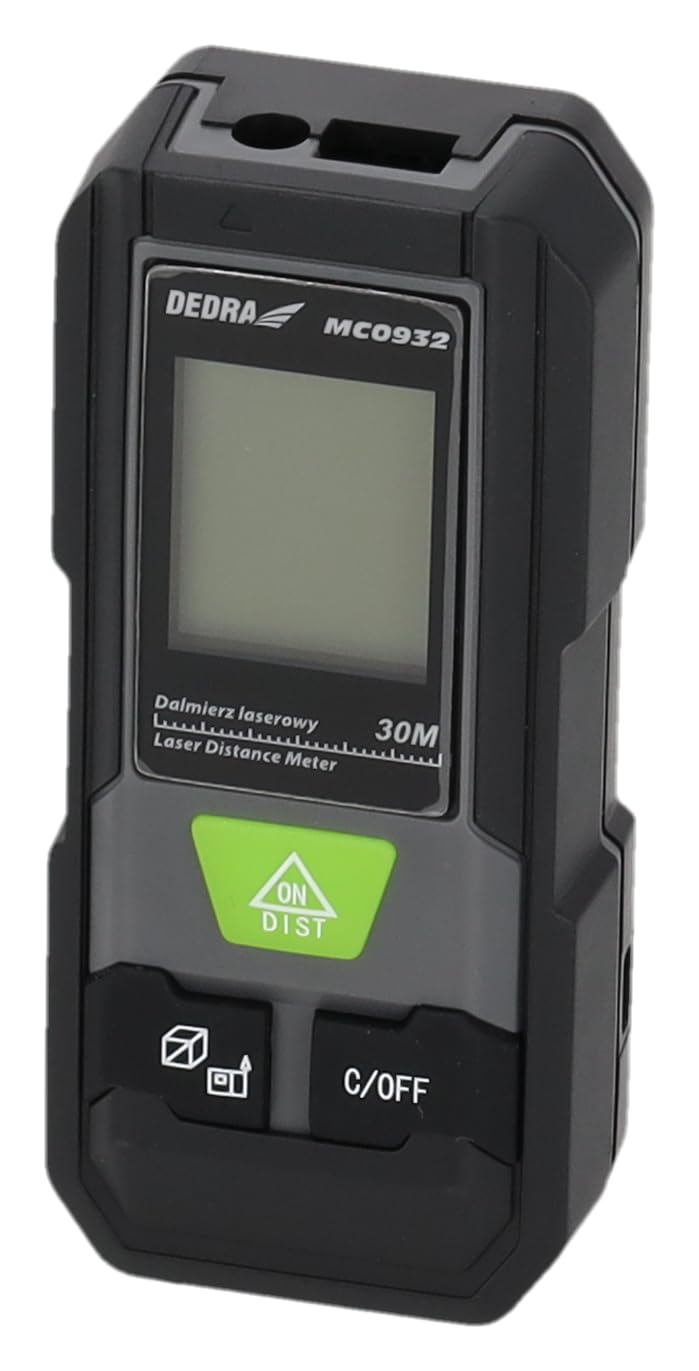
Resim: Ön view of the DEDRA MC0932 showing the display and control buttons.
- Lazer Emisyon Lensi
- Lazer Alım Lensi
- Ekran Görüntüsü
- ON / DIST Button (Power On / Single Measurement / Continuous Measurement)
- C / OFF Button (Clear / Power Off)
- Function / Unit Button (Mode Selection / Unit Switching)
- Reference Point Button (Front/Rear Edge Measurement)

Resim: Arka view of the DEDRA MC0932, highlighting the battery compartment.
- Pil Bölmesi
4. Kurulum
4.1 Pil Kurulumu
- Cihazın arkasındaki pil bölmesi kapağını bulun.
- Bölmeyi açmak için kapağı aşağı doğru kaydırın.
- Bölmenin içinde belirtildiği gibi doğru kutuplara (+/-) dikkat ederek iki (2) adet AAA pil takın.
- Pil bölmesi kapağını yerine oturtup tık sesi duyana kadar kaydırarak kapatın.
5. Kullanım Talimatları
5.1 Güç Açma/Kapatma
- Açmak İçin: Basın AÇIK/DAĞ button once. The laser will activate, and the display will light up.
- Kapatmak İçin: Basılı tutun C/KAPALI button for approximately 2 seconds. The device will also automatically power off after 180 seconds of inactivity.
5.2 Tek Mesafe Ölçümü
- Cihazı açmak için üzerine basın. AÇIK/DAĞ. The laser will activate.
- Aim the laser beam at the target point.
- Basın AÇIK/DAĞ button again. The measurement will be taken and displayed on the screen.
5.3 Sürekli Ölçüm (İzleme)
- Cihazı açın.
- Basılı tutun AÇIK/DAĞ button for approximately 2 seconds. The device will enter continuous measurement mode, displaying real-time distance as you move the device.
- To stop continuous measurement, press the C/KAPALI button once. The last measured value will remain on the display.
5.4 Alan Ölçümü
- Cihazı açın.
- Basın Function / Unit button repeatedly until the area icon (a square with 'm²' or 'ft²') appears on the display.
- İlk kenarı (örneğin uzunluğu) bastırarak ölçün. AÇIK/DAĞ.
- İkinci kenarı (örneğin genişliği) bastırarak ölçün. AÇIK/DAĞ Tekrar.
- Cihaz alanı otomatik olarak hesaplayıp gösterecektir.
5.5 Hacim Ölçümü
- Cihazı açın.
- Basın Function / Unit button repeatedly until the volume icon (a cube with 'm³' or 'ft³') appears on the display.
- İlk kenarı (örneğin uzunluğu) bastırarak ölçün. AÇIK/DAĞ.
- İkinci kenarı (örneğin genişliği) bastırarak ölçün. AÇIK/DAĞ Tekrar.
- Measure the third side (e.g., height) by pressing AÇIK/DAĞ üçüncü kez.
- Cihaz otomatik olarak hacmi hesaplayıp gösterecektir.
5.6 Ünite Değiştirme
To change the measurement unit (meters, feet, inches), press and hold the Function / Unit button for approximately 2 seconds. The unit will cycle through m, ft, and in.
5.7 Referans Noktası Ayarı
The device can measure from its front edge or its rear edge. To switch the reference point, press the Referans noktası button. An icon on the display will indicate whether the measurement is taken from the front or rear of the device.
6. Bakım
6.1 Temizlik
- Yumuşak bir d kullanınamp Cihazı temizlemek için bezasing. Aşındırıcı temizleyiciler veya çözücüler kullanmayın.
- Gently wipe the laser lenses with a clean, lint-free cloth. Avoid touching the lenses with your fingers.
6.2 Depolama
- Store the device in its protective pouch in a cool, dry place, away from direct sunlight and extreme temperatures.
- Remove the batteries if the device will not be used for an extended period (e.g., more than one month) to prevent battery leakage and damage.
6.3 Pil Değişimi
When the low battery indicator appears on the display, replace both AAA batteries with new ones following the instructions in Section 4.1.
7. Sorun Giderme
| Sorun | Olası Neden | Çözüm |
|---|---|---|
| Cihaz açılmıyor | Piller bitmiş veya yanlış takılmış. | Pilleri değiştirin veya kutuplarını kontrol edin. |
| Ekranda "Hata" mesajı var | Laser path is obstructed, target surface is too reflective/absorbent, or measurement range exceeded. | Ensure clear laser path, use a target plate if necessary, ensure target is within 0.03m-30m range. |
| Yanlış ölçümler | Lenses are dirty, device is unstable, or environmental interference. | Clean lenses, ensure device is stable during measurement, avoid strong light sources. |
| Ekran loş veya titriyor | Pil gücü düşük. | Pilleri değiştirin. |
8. Özellikler
| Ölçüm Aralığı | 0.03m - 30m |
| Ölçüm Doğruluğu | ±2mm |
| Ölçüm Birimleri | m / ft / in |
| Lazer Sınıfı | Sınıf II |
| Lazer Tipi | 635nm, <1mW |
| Otomatik Lazer Kapatma | 30 saniye |
| Automatic Device Off | 180 saniye |
| Pil Türü | 2 x AAA (Alkalin pil önerilir) |
| Çalışma Sıcaklığı | 0°C ila 40°C (32°F ila 104°F) |
| Depolama Sıcaklığı | -20°C ila 60°C (-4°F ila 140°F) |
| Boyutlar (Yaklaşık) | 100 x 35 x 20 mm (3.9 x 1.4 x 0.8 inç) |
| Ağırlık (pillerle birlikte) | 200 gr (7.05 oz) |
| IP Derecelendirmesi | IP54 (Toz ve sıçramaya karşı korumalı) |
9. Garanti ve Destek
DEDRA products are manufactured to high-quality standards. For warranty information, please refer to the warranty card included with your purchase or contact your local DEDRA dealer or the seller directly. For technical support or service inquiries, please reach out to the point of purchase or the official DEDRA customer service channels.