
1. Giriş
Satın aldığınız için teşekkür ederizasing the THINKYA TH-A10 Portable CD Player. This device combines classic CD playback with modern connectivity options, including Bluetooth 5.1, USB, AUX, and optical output. Designed for high-fidelity audio, it features built-in stereo speakers, a rechargeable battery, and anti-skip protection for stable playback. Please read this manual thoroughly before use to ensure proper operation and to maximize your listening experience.

Image: The THINKYA TH-A10 Portable CD Player, highlighting its elegant wooden finish and compact form factor.
2. Ürün Bittiview
2.1 Bileşenler ve Kontroller
The TH-A10 CD player is designed with user-friendly controls and a robust build. It features a wooden cabinet for enhanced sound quality and reduced resonance.
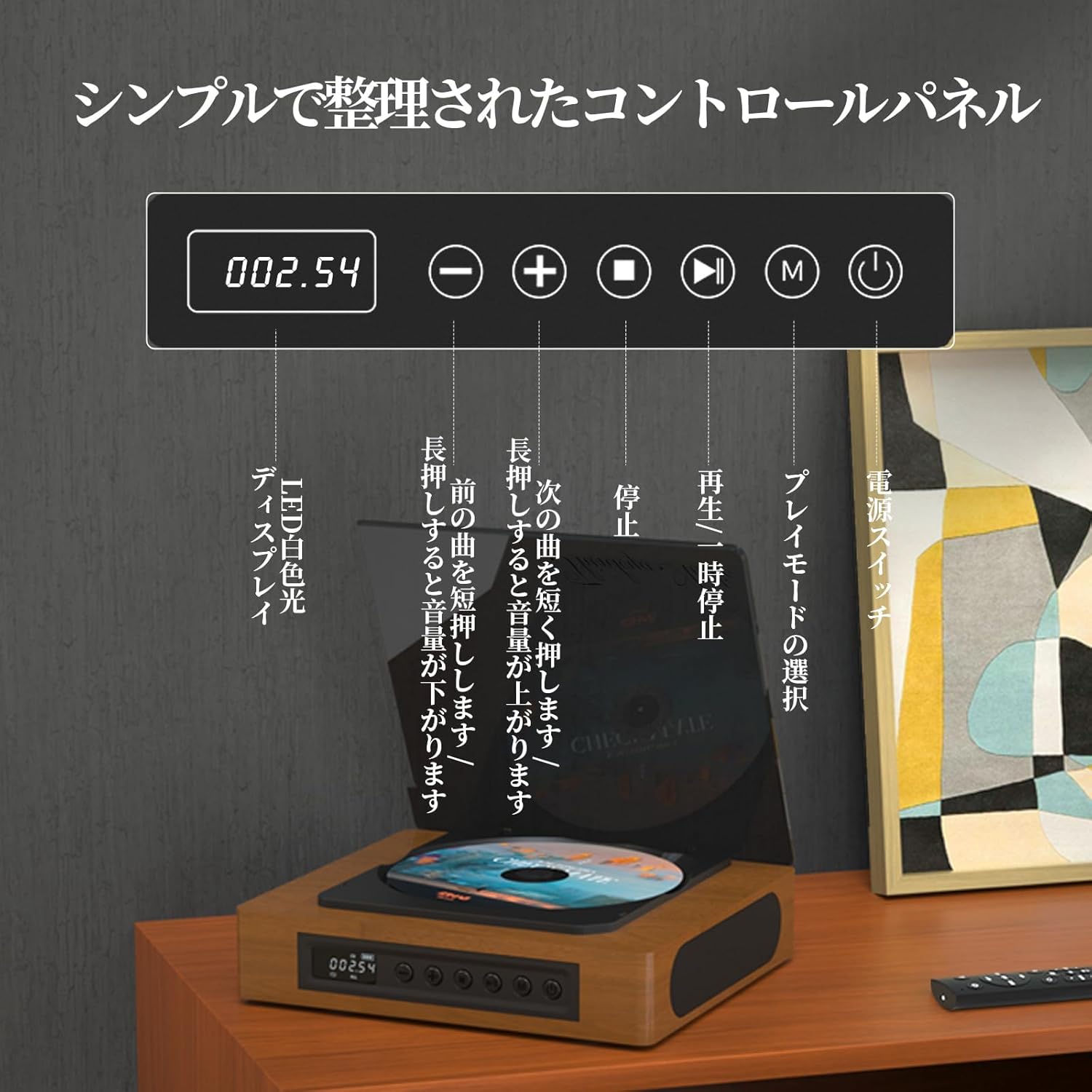
Image: The control panel and LED display of the TH-A10 CD Player. The LED display shows track number and time, while buttons control playback, volume, and mode selection.
Kontrol Paneli Fonksiyonları:
- LED ekran: Shows current track, time, and mode.
- Güç düğmesi: Cihazı açar/kapatır.
- Oynat/Duraklat Düğmesi: Oynatmayı başlatır veya duraklatır.
- Önceki/Sesi Azaltma Düğmesi: Önceki parçaya geçmek için kısa basın, sesi kısmak için uzun basın.
- İleri/Sesi Açma Düğmesi: Sonraki parçaya geçmek için kısa basın, sesi artırmak için uzun basın.
- Durdurma düğmesi: Oynatmayı durdurur.
- Mod Düğmesi (M): Selects playback mode (CD, Bluetooth, USB, AUX, Optical).

Resim: Ayrıntılı view of the LED display, indicating operational status and battery level.
2.2 Arka Panel Bağlantıları
The rear panel provides various ports for external connections.

Image: The rear panel of the TH-A10, displaying the various input/output ports including USB, AUX, Type-C for charging, and Optical output.
Limanlar:
- DC IN (Type-C): For charging the internal battery or powering the device.
- USB Bağlantı Noktası: Ses oynatmak için files from a USB memory stick.
- AUX IN/OUT (3.5mm Jack): For connecting external audio devices or outputting audio to headphones/speakers.
- Optical Output (SPDIF): Harici bir cihaza bağlanmak için amplifier or DAC for high-fidelity audio.
3. Kurulum
3.1 Açma ve Şarj Etme
- Connect the provided Type-C charging cable to the DC IN port on the rear of the player.
- Kablonun diğer ucunu bir USB güç adaptörüne (dahil değildir) veya güç sağlanan bir USB portuna bağlayın.
- The LED display will indicate charging status. A full charge provides approximately 6 hours of playback.
- Press the Power Switch to turn on the device.

Image: Charging options for the TH-A10, including wall adapter, car charger, and power bank, connected via the Type-C port.
3.2 İlk Yerleştirme
Place the CD player on a stable, flat surface. Ensure adequate ventilation around the unit.
4. Kullanım Talimatları
4.1 CD Oynatma
- Toz kapağını yavaşça açın.
- Place a CD (CD, CD-R, CD-RW) onto the spindle, label side up.
- Toz kapağını kapatın.
- Press the 'M' (Mode) button until 'CD' mode is selected.
- Oynatmayı başlatmak için Oynat/Duraklat düğmesine basın.
- Use the Previous/Next buttons to skip tracks. Long press for volume adjustment.
Not: This player does not support Blu-ray discs.

Image: Playback modes (sequential, repeat one, repeat all, random) and the ASP anti-shock function are shown, indicating versatile and stable audio experience.
4.2 Bluetooth Operation (Receive/Transmit)
The TH-A10 supports Bluetooth 5.1 for both receiving and transmitting audio.

Image: The TH-A10's Bluetooth functionality, demonstrating connections to various devices like smartphones, tablets (receiving), and Bluetooth speakers or headphones (transmitting).
4.2.1 Bluetooth Receive Mode:
- Press the 'M' (Mode) button until 'BT' mode is selected. The LED display will show 'BT' and flash, indicating pairing mode.
- Akıllı telefonunuzda veya tabletinizde Bluetooth'u etkinleştirin ve kullanılabilir cihazları arayın.
- Select 'TH-A10' from the list to pair. Once connected, the 'BT' indicator will stop flashing.
- You can now play audio from your device through the TH-A10's speakers.
4.2.2 Bluetooth Transmit Mode:
- Bluetooth kulaklığınızın veya hoparlörünüzün eşleştirme modunda olduğundan emin olun.
- Press the 'M' (Mode) button until 'BT' mode is selected.
- The TH-A10 will automatically search for nearby Bluetooth receiving devices.
- Once connected, audio from the CD player (or other selected source) will be transmitted to your Bluetooth headphones/speaker.
4.3 USB Oynatma
- Insert a USB memory stick containing MP3, WMA, or WAV audio fileKabloyu arka paneldeki USB portuna takın.
- Press the 'M' (Mode) button until 'USB' mode is selected.
- Oynatıcı otomatik olarak ses çalmaya başlayacaktır. fileUSB bellekten s.
4.4 AUX Input/Output
4.4.1 AUX Input:
- Connect an external audio device (e.g., smartphone, MP3 player) to the AUX port using a 3.5mm audio cable.
- Press the 'M' (Mode) button until 'AUX' mode is selected.
- Play audio from your external device. The sound will be output through the TH-A10's speakers.
4.4.2 AUX Output (Headphones/External Speakers):
- Connect headphones or external speakers to the AUX port using a 3.5mm audio cable.
- Select your desired playback mode (CD, Bluetooth, USB).
- Audio will be routed to the connected headphones or external speakers.
4.5 Optik Çıkış
For the highest audio fidelity, use the optical output.
- Connect an optical cable (not included) from the SPDIF Optical Output port on the TH-A10 to an optical input on your amplifier veya DAC.
- Select the optical input on your ampamplifikatör/DAC.
- Play audio from the TH-A10 (CD, USB, or Bluetooth source).
4.6 Uzaktan Kumanda
Ürünle birlikte gelen uzaktan kumanda, 10 metreye kadar mesafeden rahat kullanım imkanı sağlar.
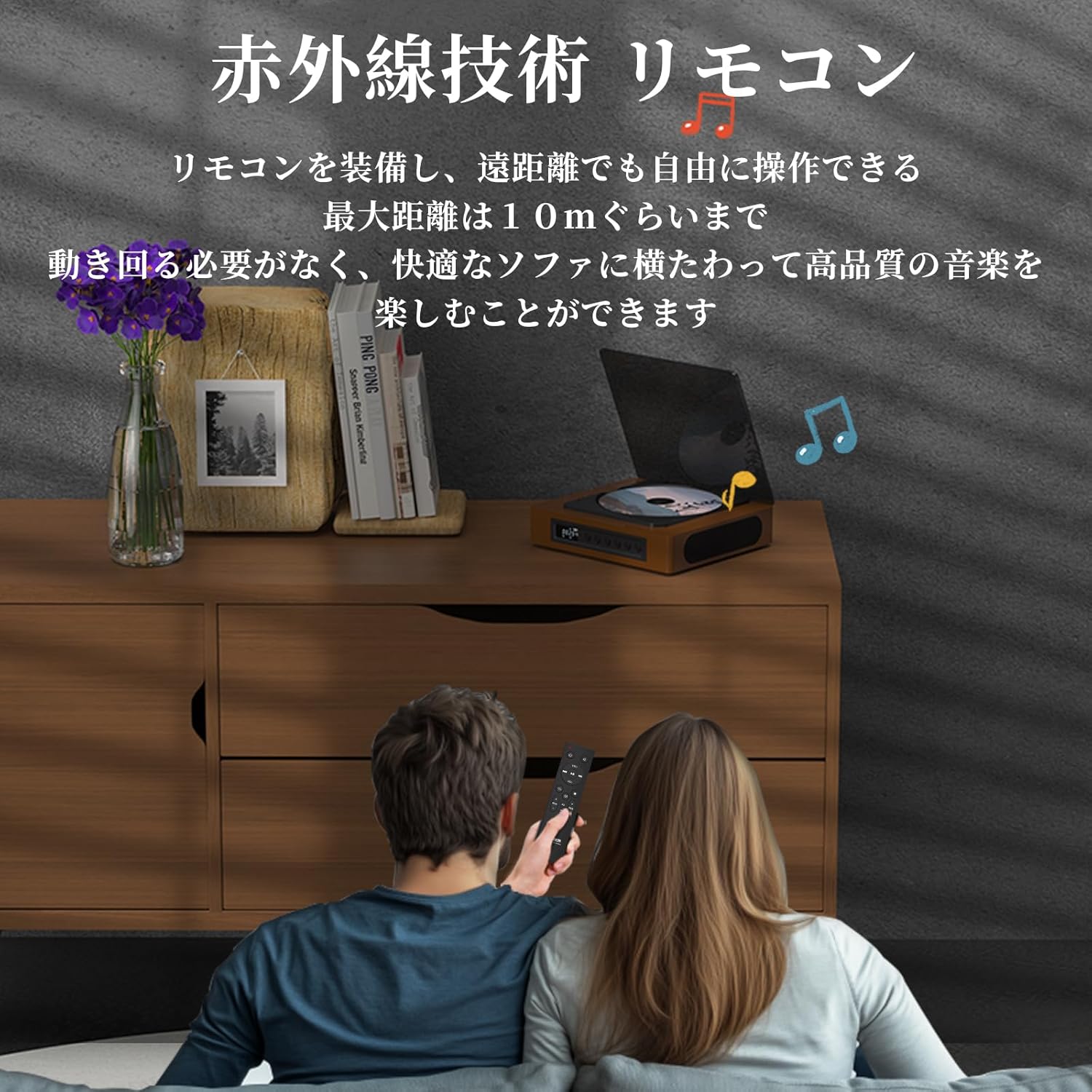
Image: A couple using the remote control for the TH-A10 CD Player, demonstrating its convenience for remote operation.
5. Bakım
5.1 Temizlik
- Ünitenin dışını yumuşak ve kuru bir bezle silin.
- For the CD lens, use a specialized CD lens cleaner. Do not touch the lens directly.
- Keep the transparent dust cover clean to prevent dust accumulation on the CD.

Image: The transparent dust cover of the TH-A10, designed to protect the CD mechanism from dust and moisture.
5.2 Depolama
Uzun süre kullanılmadığı zamanlarda, oynatıcıyı serin, kuru bir yerde, doğrudan güneş ışığından ve aşırı sıcaklıklardan uzakta saklayın.
6. Sorun Giderme
| Sorun | Olası Neden | Çözüm |
|---|---|---|
| Güç yok | Pil boşalmış; güç kablosu bağlı değil. | Pili şarj edin; güç kablosunun güvenli bir şekilde bağlı olduğundan emin olun. |
| CD çalmıyor | CD inserted incorrectly; Disc is dirty or scratched; Incorrect mode selected; Blu-ray disc inserted. | Reinsert CD correctly; Clean or replace disc; Select 'CD' mode; Blu-ray discs are not supported. |
| Hoparlörlerden ses gelmiyor | Volume too low; Mute activated; External headphones/speakers connected to AUX out. | Increase volume; Check mute status; Disconnect external audio devices from AUX out if using internal speakers. |
| Bluetooth eşleştirme başarısız oldu | Cihaz eşleştirme modunda değil; Menzil dışında; Parazit. | Ensure both devices are in pairing mode; Move devices closer; Restart Bluetooth on both devices. |
| Skipping during CD playback | Player is unstable; Disc is damaged; Excessive vibration. | Place player on a stable surface; Clean or replace disc; ASP anti-shock function is active for minor vibrations. |
7. Özellikler
| Özellik | Detay |
|---|---|
| Model Numarası | TH-A10 |
| Marka | DÜŞÜNCE |
| Bağlantı | Bluetooth 5.1 (Receive/Transmit), USB, AUX (3.5mm), Optical (SPDIF), Type-C (Power) |
| Desteklenen Disk Formatları | CD, CD-R, CD-RW (Not compatible with Blu-ray discs) |
| Desteklenen Ses Biçimleri | MP3, WMA, WAV, APE, FLAC (from USB) |
| Pil Kapasitesi | 2600mAh |
| Playback Time (Battery) | Approx. 6-8 hours (depending on usage) |
| Konuşmacılar | Built-in Stereo Speakers (2x50mm Neodymium Iron Boron Magnetic Units) |
| Anti-Shock Protection (ASP) | 60 seconds for CD, 120 seconds for MP3 |
| Boyutlar (U x G x Y) | 17.8x15.8x4.85 cm |
| Ağırlık | 1.12 kilo |
| Dahil Aksesuarlar | CD Player, Audio Line, Type-C Charging Cable, Remote Control, Instruction Manual |
8. Garanti ve Destek
8.1 Garanti Bilgileri
This THINKYA TH-A10 CD Player comes with a 1 yıllık garanti from the date of purchase. This warranty covers defects in materials and workmanship under normal use. If the product fails due to a manufacturing defect within this period, we will provide a free replacement. Please retain your proof of purchase for warranty claims.
Not: Garanti, yanlış kullanım, kaza, yetkisiz değişiklik veya normal aşınma ve yıpranmadan kaynaklanan hasarları kapsamaz.
8.2 Müşteri Desteği
For any questions, technical assistance, or warranty claims, please contact THINKYA customer support through the retailer where you purchased the product. Our team is dedicated to providing prompt and helpful service.


