
1. Giriş
Thank you for choosing the Protec Advance 650 Portable Power Station. This device is designed to provide a reliable and versatile power source for various applications, including camping, travel, and emergency home use. With a 600W output and a 634Wh battery capacity, it ensures stable performance for your electronic devices. This manual provides essential information for safe operation, setup, maintenance, and troubleshooting.
2. Güvenlik Talimatları
- Elektrik santralini kullanmadan önce tüm talimatları okuyun.
- Cihazı sökmeyin, tamir etmeyin veya üzerinde değişiklik yapmayın. Yanlış montaj yangına veya yaralanmaya neden olabilir.
- Cihazı ateşe veya yüksek sıcaklıklara (60°C/140°F'nin üzerinde) maruz bırakmayın.
- Cihazı doğrudan güneş ışığı altında, ısı kaynaklarının yakınında veya yüksek nemli ortamlarda kullanmayın veya saklamayın.
- Üniteyi su ve diğer sıvılardan uzak tutun.
- Cihazı düşürmeyin, vurmayın veya şiddetli darbelere maruz bırakmayın.
- Çocukların erişemeyeceği yerde saklayınız.
- Kullanım ve şarj sırasında uygun havalandırmayı sağlayın.
- Yalnızca önerilen aksesuarları ve şarj cihazlarını kullanın.
- In case of leakage from the battery, avoid contact with skin and eyes. If contact occurs, rinse with water and seek medical attention.
3. Ürün Bittiview
3.1 Bileşenler ve Özellikler
The Protec Advance 650 is equipped with multiple ports and features for versatile power delivery and charging:
- Güç Çıkışı: 600W continuous, 634Wh battery capacity.
- AC Prizleri: Two 230V pure sine wave AC outlets for sensitive electronics.
- USB Bağlantı Noktaları: One USB-C PD 60W port and three USB-A QC 3.0 ports (54W total).
- DC Çıkışı: One 12V DC car charger port.
- Kablosuz Şarj: Integrated 10W Qi wireless charging pad.
- Görüntülemek: Real-time LCD screen showing charge level and remaining runtime.
- Aydınlatma: Emergency lighting (side and handle).
- Dayanıklılık: IP54 rating for dust and splash resistance.
- Şarj Seçenekleri: AC wall charger (100W included), compatible with Protec solar panels.

Ön view of the Protec Advance 650 Portable Power Station, showing the main display, power button, AC outlets, DC car port, and USB ports.

Diagram illustrating the output capabilities of the Protec Advance 650, including two 500W AC outlets, a 1W torch, and three 18W USB-A ports.

Diagram highlighting the display features, a 60W USB-C Quick Charge port, and a 12V DC 10A car charger port on the Protec Advance 650.
4. Kurulum
4.1 İlk Şarj
Before first use, fully charge the Protec Advance 650. This ensures optimal battery performance and extends its lifespan.
- Connect the included AC wall charger to the power station's input port.
- Şarj cihazını standart bir duvar prizine takın.
- Ekran şarj durumunu gösterecektir. Pil göstergesi %100'ü gösterene kadar şarj edin.
4.2 Yerleştirme
Place the power station on a stable, flat surface in a well-ventilated area. Avoid placing it near heat sources or in direct sunlight.
5. Kullanım Talimatları
5.1 Açma/Kapatma
Press and hold the main power button for a few seconds to turn the unit on or off. The LCD display will illuminate when the unit is on.
5.2 Güç İstasyonunun Şarj Edilmesi
The Advance 650 can be recharged using multiple methods:
- AC Duvar Şarj Cihazı: Use the included 100W AC adapter. Connect it to the input port and a wall outlet.
- Solar paneller: Connect compatible Protec solar panels (sold separately) to the DC input port. Ensure the solar panels are placed in direct sunlight for efficient charging.
- Araba Şarj Cihazı: Use a 12V car charger adapter (not specified if included, typically sold separately) to charge from your vehicle's cigarette lighter port.
5.3 AC Çıkışlarının Kullanımı
The power station features two 230V pure sine wave AC outlets, suitable for powering sensitive electronics up to 600W total.
- Press the AC power button to activate the AC outlets. The AC indicator on the display will light up.
- Plug your device into one of the AC outlets.
- Cihazlarınızın toplam güç tüketiminin 600W'ı aşmadığından emin olun.
- When finished, press the AC power button again to turn off the AC outlets and conserve battery.
5.4 Using DC Outputs (USB-A, USB-C, Car Port)
The DC outputs are ideal for charging smartphones, tablets, laptops, and other 12V devices.
- Press the DC power button to activate the DC outputs. The DC indicator on the display will light up.
- Connect your device to the appropriate USB-A, USB-C, or 12V car charger port.
- The USB-C port supports Power Delivery (PD) up to 60W, and USB-A ports support Quick Charge (QC 3.0) up to 54W total.
- İşlem tamamlandığında, DC çıkışlarını kapatmak için DC güç düğmesine tekrar basın.
5.5 Using Wireless Charging
The top of the power station features a 10W Qi wireless charging pad.
- Güç istasyonunun açık olduğundan emin olun.
- Place your Qi-compatible device directly onto the wireless charging pad.
- Cihaz otomatik olarak şarj olmaya başlamalıdır.
5.6 Ekranı Kullanma
LCD ekran gerçek zamanlı bilgi sağlar:
- Pil Seviyesi: Mevcut şarj yüzdesini gösterir.tage.
- Giriş/Çıkış Gücü: Displays the current power input (charging) or output (discharging) in watts.
- Remaining Runtime: Estimates the remaining operating time based on current power consumption.
- Göstergeler: Icons for AC, DC, and fan status.
5.7 Acil Durum Işığının Kullanımı
The power station includes integrated emergency lighting.
- Press the light button to turn on the emergency light.
- Press again to cycle through different brightness modes or turn off.

Examples of domestic use for the Protec Advance 650, showing estimated runtimes for a 60W TV (9h), a 50W PC (approx. 10 recharges), a 10W smartphone (53 recharges), and a 12W fan (45h).

Examples of professional use for the Protec Advance 650, showing estimated runtimes for a 500W lawnmower (1h), a 500W power tool (1h), and recharges for an 18V battery (4 recharges) and a double 18V battery (2 recharges).
6. Bakım
6.1 Temizlik
Güç istasyonunun dış yüzeyini yumuşak, kuru bir bezle silin. Aşındırıcı temizleyiciler veya çözücüler kullanmayın. Tüm bağlantı noktalarının toz ve kirden arındırılmış olduğundan emin olun.
6.2 Depolama
If storing the unit for an extended period, charge it to approximately 50-80% every 3-6 months to maintain battery health. Store in a cool, dry place, away from direct sunlight and extreme temperatures.
6.3 Pil Bakımı
The Protec Advance 650 uses a Lithium-phosphate battery. To maximize its lifespan:
- Pilin sık sık tamamen boşaltılmasından kaçının.
- Yüksek sıcaklıklara uzun süre maruz kalmaktan kaçının.
- Charge the unit fully before long periods of inactivity.
7. Sorun Giderme
- Ünite açılmıyor: Pilin şarjlı olduğundan emin olun. Şarjlı değilse, bir güç kaynağına bağlayın.
- Bağlantı noktalarından herhangi bir çıktı alınamıyor: Check if the respective AC or DC output buttons are activated. Ensure the device is properly connected and within the power station's output limits.
- Yavaş şarj oluyor: Verify that the charger is correctly connected and functioning. For solar charging, ensure panels are in direct sunlight and free of obstructions.
- Aşırı yük koruması: Cihaz kapanırsa, aşırı yüklenmeden kaynaklanıyor olabilir. Bazı cihazların bağlantısını kesin ve güç istasyonunu yeniden başlatın.
- Aşırı Isınma: If the unit feels excessively hot, disconnect all devices and allow it to cool down in a well-ventilated area.
8. Özellikler
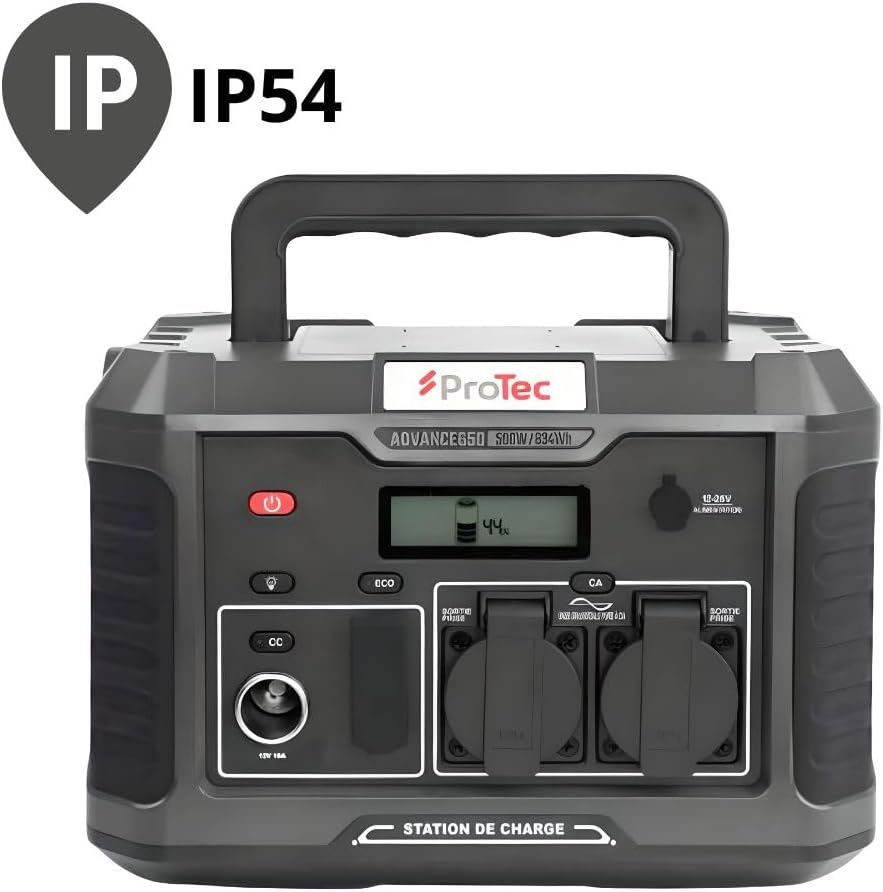
The Protec Advance 650 is rated IP54 for dust and splash resistance.
| Özellik | Şartname |
|---|---|
| Model Numarası | 798720 |
| Marka | Korumalı |
| Pil Türü | Lithium-phosphate |
| Pil Kapasitesi | 634Wh |
| AC Çıkış Gücü | 600W (Saf Sinüs Dalgası) |
| AC Çıkış Hacmitage | 230V |
| USB-C Çıkışı | 1 adet PD 60W |
| USB-A Çıkışı | 3 x QC 3.0 (54W total) |
| DC Araç Port Çıkışı | 1x12V 10A |
| Kablosuz Şarj | 10 W Qi |
| AC Input (Charger) | 100W |
| Boyutlar (U x G x Y) | 1 x 20 x 29 cm (yaklaşık 10L x 200W x 290H mm) |
| Ağırlık | 9.36 kilo |
| Renk | Siyah |
| IP Derecelendirmesi | IP54 (Toza ve Sıçramaya Dayanıklı) |
9. Garanti ve Destek
9.1 Garanti Bilgileri
The Protec Advance 650 Portable Power Station comes with a 2-year availability for spare parts within the EU. For specific warranty terms and conditions, please refer to the documentation provided at the time of purchase or contact Protec customer service.
9.2 Müşteri Desteği
For technical assistance, troubleshooting, or warranty claims, please contact Protec customer support through their official webÜrünün satın alındığı site veya perakendeci.

The Protec Advance 650 Portable Power Station is suitable for various outdoor activities.