
1. Ürün Bittiview
The VERMESS 47" L-Shaped Gaming Computer Desk is designed for versatility and functionality, suitable for gaming, studying, or office work. It features a reversible design, allowing the L-shape configuration to be set up on either the left or right side to fit various room layouts. Integrated power outlets, a monitor stand, and ample storage solutions enhance its utility.
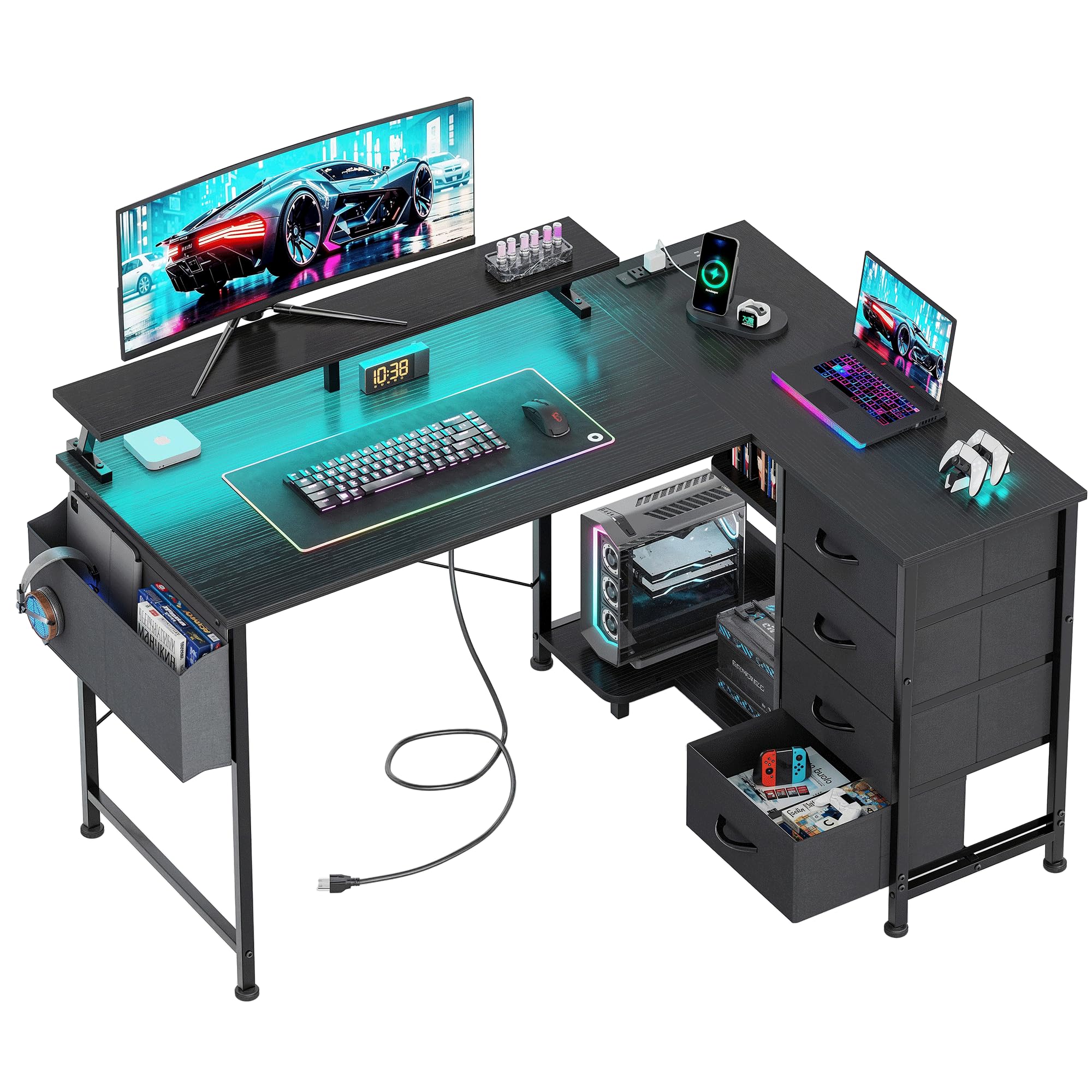
Şekil 1.1: Üzeriview of the VERMESS 47" L-Shaped Gaming Computer Desk.
Temel Özellikler:
- AmpDepolama Alanı: Includes four generously sized fabric drawers and two iron hooks for organizing files, stationery, and personal items.
- Dahili Elektrik Prizi: Features a recessed power outlet with 3 AC outlets, 1 USB port, and 1 Type-C port for convenient device charging.
- Reversible Design with Host Stand: The desk can be configured for left or right-hand orientation. A dedicated CPU stand protects your computer host from moisture and dust.
- Stable and Sturdy Construction: Constructed from durable, waterproof engineered wood and a lightweight, strong iron frame. Adjustable feet ensure stability on uneven surfaces.
- Integrated Monitor Stand: Elevates your computer monitor for an ergonomic viewaçı.
- LED Işıklar: Features LED lighting with 7 color changes and 20 lighting modes to customize your workspace ambiance.
2. Güvenlik Bilgileri
Montaj ve kullanımdan önce lütfen tüm güvenlik talimatlarını okuyun ve anlayın. Bu talimatlara uyulmaması yaralanmaya veya ürünün hasar görmesine neden olabilir.
- Daima verilen montaj talimatlarına uyun.
- Keep electrical components away from water and other liquids to prevent electric shock.
- Do not overload the desk or place heavy objects on the edges to prevent tipping.
- Always unplug electrical components when not in use or when leaving the desk unattended.
- Ensure all connections are secure before using the power outlets.
- Boğulma tehlikesini önlemek için küçük parçaları ve ambalaj malzemelerini çocuklardan uzak tutun.
3. Paket İçeriği
Montaja başlamadan önce, aşağıda listelenen tüm parçaların eksiksiz ve hasarsız olduğundan emin olun. Herhangi bir parça eksik veya hasarlıysa, lütfen müşteri desteğiyle iletişime geçin.
- Desk Boards (various sizes for L-shape configuration)
- Metal Çerçeve Bileşenleri (ayaklar, destek çubukları)
- Kumaş Çekmeceler (4 adet)
- Monitör Standı
- İşlemci Sehpası
- Power Outlet Unit with Power Cord
- LED Işık Şeridi
- Fabric Storage Bag
- Demir Kancalar (2 adet)
- Montaj Donanımı (vidalar, cıvatalar, somunlar vb.)
- Assembly Tool Kit (e.g., Allen wrench, screwdriver)
- Kullanım Kılavuzu
4. Kurulum ve Montaj Talimatları
Assembly is designed to be straightforward. Please follow the numbered steps and refer to the diagrams. It is recommended to assemble the desk on a soft, clean surface to prevent scratches.
4.1. Choose Your Desk Orientation
The VERMESS L-shaped desk is reversible. Decide whether you want the longer section of the L-shape on the left or right side of your workspace before starting assembly. This will determine the placement of certain frame components and desk boards.

Figure 4.1: The desk can be assembled with the L-section on either side.
4.2. General Assembly Steps (Refer to included manual for detailed diagrams):
- Parçaları Paketinden Çıkarın ve Tanımlayın: Lay out all components and hardware. Match them with the parts list in your included manual.
- Metal Çerçeveyi Birleştirin: Connect the main metal frame components using the provided screws and tools. Ensure all connections are finger-tight initially.
- Attach Desk Boards: Secure the engineered wood desk boards to the assembled metal frame. Pay attention to the pre-drilled holes and the chosen orientation.
- Çekmeceleri ve rafları monte edin: Insert the fabric drawers into their designated compartments. Attach any open storage shelves or the CPU stand as per the manual.
- Monitör Standını Monte Edin: Place the monitor stand on the desktop in your desired position. It is a free-to-place assembly.
- Elektrik prizini takın: Secure the recessed power outlet unit into its designated slot on the desktop.
- LED Işık Şeridi Uygulayın: Adhere the LED light strip to the underside of the monitor stand or desk edge as desired.
- Aksesuarları Takın: Install the fabric storage bag and iron hooks to the side of the desk.
- Son Sıkma: Once all components are in place, carefully tighten all screws and bolts using the provided tools. Do not overtighten.
- Dengeleme Ayaklarını Ayarlayın: Adjust the feet at the bottom of the desk legs to ensure the desk is stable and level on your floor.
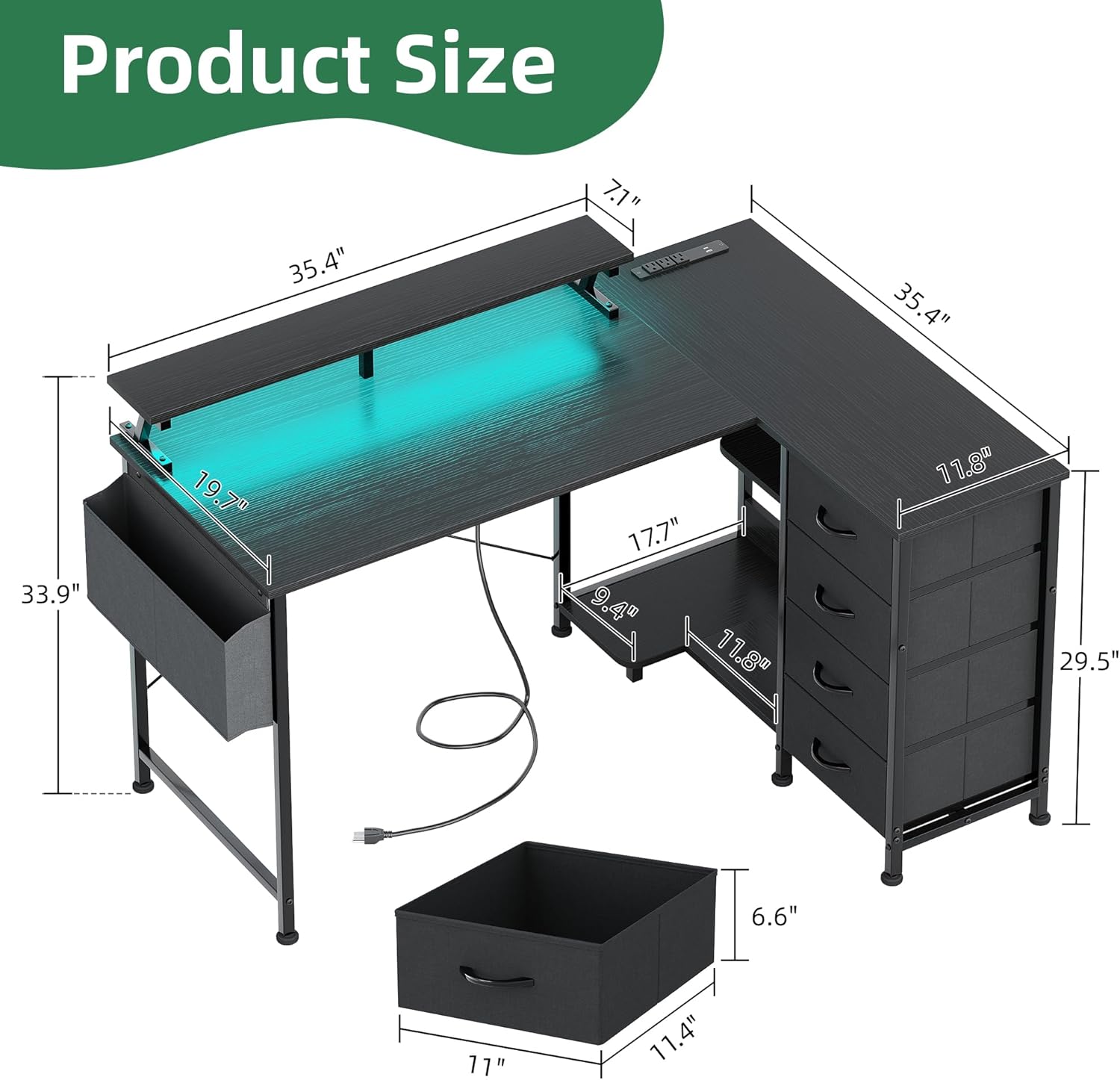
Şekil 4.2: Alan planlamanız için ürün boyutları.
5. Kullanım Talimatları
5.1. Dahili Elektrik Prizlerinin Kullanımı
The desk includes a convenient power outlet unit to power your devices directly from your workspace.
- Duvar Prizine Bağlayın: Plug the desk's power cord into a standard wall electrical outlet.
- Şarj Cihazları: Use the 3 AC outlets for laptops, monitors, or other electronics. The 1 USB port and 1 Type-C port are suitable for charging smartphones, tablets, and other USB-powered devices.
- Güvenlik Önlemi: Do not exceed the maximum power rating of the outlet unit. Unplug devices when not in use.

Figure 5.1: Integrated power outlets for convenient charging.
5.2. Controlling the LED Lights
The integrated LED light strip allows you to customize the ambiance of your workspace.
- Güç Açma/Kapatma: Use the control button on the LED strip or remote (if included) to turn the lights on or off.
- Renkleri Değiştir: Cycle through the 7 available colors using the designated button.
- Select Lighting Modes: Choose from 20 different lighting modes to create dynamic effects.

Figure 5.2: Customize your gaming or work environment with LED lights.
5.3. Depolama Özelliklerini Kullanma
The desk offers various storage options to keep your workspace organized.
- Kumaş Çekmeceler: Use the four fabric drawers for documents, office supplies, or personal items.
- Fabric Storage Bag: The side storage bag is ideal for headphones, cables, or small accessories.
- Açık Depolama Rafları: Utilize the open shelves for frequently accessed items or decorative elements.
- Demir Kancalar: Hang headphones, bags, or other items on the two iron hooks.

Figure 5.3: Fabric storage drawers for organized storage.

Figure 5.4: Fabric storage bag and open shelves for additional organization.
6. Bakım
Proper care and maintenance will extend the life and appearance of your VERMESS desk.
- Temizleme Yüzeyleri: Wipe desk surfaces with a soft, damp cloth. Avoid harsh chemicals or abrasive cleaners that may damage the laminated engineered wood finish.
- Kumaş Çekmeceler: The fabric drawers can be spot cleaned with a mild detergent and water. Allow to air dry completely. Do not machine wash.
- Metal çerçeve: Metal çerçeveyi reklamla temizleyinamp Kumaş. Paslanmayı önlemek için hemen kurulayın.
- Elektrik Bileşenleri: Ensure the power outlet unit and LED lights are unplugged before cleaning. Wipe with a dry cloth only.
- Düzenli Kontroller: Tüm vida ve cıvataların sıkılığını düzenli olarak kontrol edin. Gerekirse tekrar sıkın.
- Doğrudan Güneş Işığından Kaçının: Prolonged exposure to direct sunlight may cause fading or damage to the desk materials.
7. Sorun Giderme
Masaüstünüzle ilgili herhangi bir sorunla karşılaşırsanız, aşağıdaki yaygın sorunlar ve çözümlerine bakın.
| Sorun | Olası Neden | Çözüm |
|---|---|---|
| Masa sallanıyor veya dengesiz. | Zemin düzensiz; bağlantılar gevşek. | Adjust the leveling feet at the bottom of the legs. Check and tighten all assembly screws and bolts. |
| Elektrik prizleri çalışmıyor. | Desk power cord not plugged in; wall outlet issue; overloaded circuit. | Ensure the desk's power cord is securely plugged into a functional wall outlet. Test the wall outlet with another device. Reduce the number of devices plugged into the desk's outlets. |
| LED lights are not turning on or changing colors. | LED strip not connected to power; faulty connection; control button issue. | Check that the LED strip is properly connected to its power source. Ensure the power outlet is functional. Try pressing the control button firmly. |
| Çekmecelerin açılıp kapanması zor. | Overloaded drawer; obstruction; improper installation. | Reduce the contents of the drawer. Check for any items obstructing the drawer's movement. Ensure the drawer is inserted correctly into its compartment. |
If the problem persists after attempting these solutions, please contact VERMESS customer support for further assistance.
8. Özellikler
Detailed specifications for the VERMESS 47" L-Shaped Gaming Computer Desk.
| Özellik | Detay |
|---|---|
| Marka | VERMESS |
| Model Numarası | VMS-4CTJCB-BK |
| Renk | Siyah |
| Ürün Boyutları | 90D x 120W x 86.2H Santimetre (35.4"D x 47.2"W x 34"H) |
| Ürün Ağırlığı | 18.3 kilo |
| Malzeme | Mühendislik Ahşap, Metal |
| Bitiş Türü | Lamine edilmiş |
| Masa Tasarımı | L Şeklinde Bilgisayar Masası |
| Özel Özellikler | Reversible, Built-In USB Outlet (3 AC, 1 USB, 1 Type-C), Monitor Stand, 4 Fabric Drawers, Host Stand, LED Lights |
9. Garanti ve Destek
VERMESS is committed to customer satisfaction. While specific warranty details are not provided in this manual, a professional after-sales team is available to assist you.
Müşteri Desteği:
If you have any questions, require assistance with assembly, or encounter any issues with your VERMESS desk, please contact our customer support team. We aim to reply to your message within 24 hours and resolve any concerns to your satisfaction.
Lütfen perakendeciye başvurun. website or your purchase documentation for contact information or any applicable warranty terms.