
giriiş
Thank you for choosing the Billboard Soul Advance True Wireless Stereo (TWS) Earbuds. These earbuds are designed to provide a superior audio experience with Active Noise Cancellation (ANC), Environmental Noise Cancellation (ENC), and a comfortable, splash-resistant design. This manual will guide you through the setup, operation, and maintenance of your new earbuds.
Güvenlik Bilgileri
- Do not expose the earbuds or charging case to extreme temperatures or direct sunlight for extended periods.
- Cihazınızı düşürmekten veya üzerine aşırı kuvvet uygulamaktan kaçınınız.
- Keep the earbuds and charging case away from water and liquids, except for light splashes as per IPX4 rating. Do not submerge.
- Ürünü sökmeye veya üzerinde değişiklik yapmaya çalışmayın. Bu, garantiyi geçersiz kılar.
- Yalnızca verilen şarj kablosunu veya sertifikalı bir eşdeğerini kullanın.
- Listening at high volumes for prolonged periods can cause hearing damage. Adjust volume to a safe level.
Paket İçeriği
- Billboard Soul Advance TWS Earbuds (Left and Right)
- Şarj Kutusu
- USB Şarj Kablosu
- Kullanıcı Kılavuzu
Ürün Bittiview
Familiarize yourself with the components of your Billboard Soul Advance TWS Earbuds and charging case.
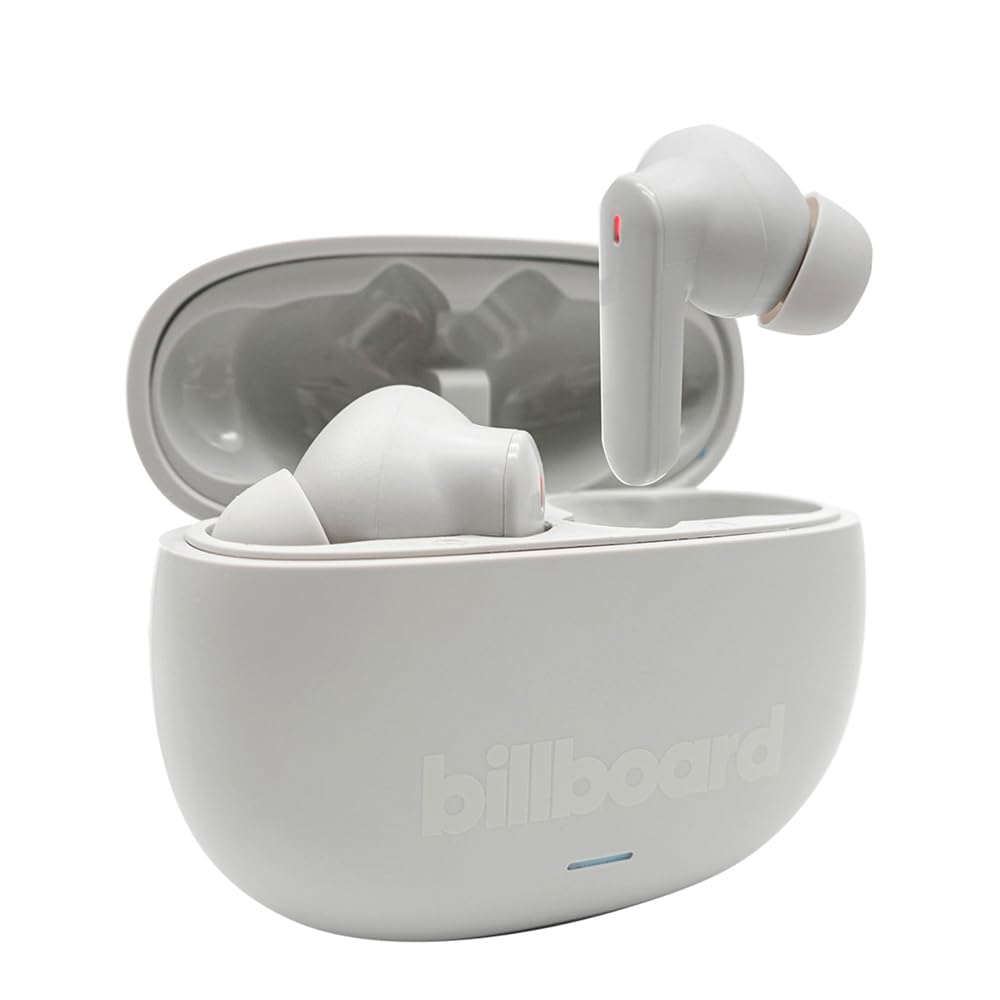
Image: The Billboard Soul Advance TWS Earbuds resting inside their open charging case. The earbuds are grey with red indicator lights visible, and the case is also grey with the 'billboard' logo embossed on the front.

Image: The Billboard Soul Advance TWS Earbuds charging case in a closed position. The case is grey with the 'billboard' logo embossed on the front and a small indicator light at the bottom.
Image: A person holding a single Billboard Soul Advance TWS earbud and the open charging case, demonstrating the compact size and design.
Kurmak
1. Kulaklıkları ve Kutuyu Şarj Etme
İlk kullanımdan önce kulaklıklarınızı ve şarj kutusunu tamamen şarj edin.
- Kulaklıkları şarj kutusuna yerleştirin. Kulaklıkların ilgili yuvalarına doğru şekilde oturduğundan emin olun.
- USB şarj kablosunu kılıf üzerindeki şarj portuna ve bir USB güç kaynağına (örneğin, bilgisayar, duvar adaptörü) bağlayın.
- The indicator light on the case will show charging status. Once fully charged, the indicator will change or turn off. A full charge takes approximately 5 hours for the case and earbuds.
2. Bir Cihazla Eşleştirme
To connect your earbuds to a smartphone or other Bluetooth-enabled device:
- Şarj kutusunu açın. Kulaklıklar, üzerindeki yanıp sönen ışıklarla gösterilen şekilde otomatik olarak eşleştirme moduna geçecektir.
- Cihazınızda Bluetooth ayarlarına gidin ve Bluetooth'un etkin olduğundan emin olun.
- Arama available devices and select "Billboard Soul Advance" from the list.
- Bağlantı kurulduktan sonra kulaklık gösterge ışıkları yanıp sönmeyi durduracaktır.
- Kulaklıklar, cihazda Bluetooth etkinse, kutudan çıkarıldığında son eşleştirilen cihaza otomatik olarak yeniden bağlanacaktır.
İşletim
Dokunmatik Kontroller
The earbuds feature touch-sensitive controls on their outer surface. Specific functions may vary slightly by device or app.
| Aksiyon | İşlev |
|---|---|
| Tek Dokunuş (Sol/Sağ) | Müziği çal/duraklat, Çağrıyı cevapla/bitir |
| Çift Dokunma (Sağ) | Sonraki parça |
| Çift Dokunma (Sol) | Önceki parça |
| Üçlü Musluk (Sol/Sağ) | Sesli Asistanı Etkinleştir |
| Uzun Basma (Sol/Sağ) | ANC/Şeffaflık Modunu Değiştir |
| Gelen Çağrıya Uzun Basma | Çağrıyı reddet |
Aktif Gürültü Önleme (ANC) ve Çevresel Gürültü Önleme (ENC)
The Soul Advance earbuds feature both ANC and ENC for an optimized listening and calling experience.
- Aktif Gürültü Önleme (ANC): Reduces external ambient noise, allowing for a more immersive audio experience. Activate/deactivate by long-pressing an earbud.
- Çevresel Gürültü Engelleme (ENC): Utilizes 4 built-in microphones to filter out background noise during calls, ensuring clearer conversations for both you and the listener. This feature is active automatically during calls.

Image: A graphic illustrating the concept of Ultra ANC (Active Noise Cancellation), showing sound waves being blocked by headphones, emphasizing a quiet listening experience.
Bakım
Temizlik
- Kulaklıklarınızı ve şarj kutusunu yumuşak, kuru ve tiftiksiz bir bezle hafifçe silin.
- Aşındırıcı temizleyiciler, alkol veya kimyasal çözücüler kullanmayın.
- Ensure charging contacts on both earbuds and case are clean and dry for optimal charging.
Depolamak
Kullanmadığınız zamanlarda kulaklıklarınızı şarj kutusunda saklayarak hem koruyun hem de şarjlı kalmasını sağlayın.
Sorun giderme
| Sorun | Çözüm |
|---|---|
| Kulaklıklar eşleşmiyor | Kulaklıklarınızın şarjlı olduğundan emin olun. Cihazınızın Bluetooth'unu kapatıp açın. Bluetooth ayarlarından cihazı unutun ve yeniden eşleştirin. |
| Sadece tek kulaklık çalışıyor | Place both earbuds back in the case, close it, then open again. Ensure both are charged. |
| Ses yok | Cihazın ses seviyesini kontrol edin. Kulaklıkların bağlı olduğundan emin olun. Farklı ses dosyaları çalmayı deneyin. |
| Şarj sorunları | Ensure charging cable is securely connected. Clean charging contacts. Try a different USB port or cable. |
Özellikler
- Model Adı: Soul Advance
- Bağlantı Teknolojisi: Kablosuz
- Dahil Bileşenler: Şarj istasyonu
- Belirli Kullanımlar: Outdoor activities, Sports
- Şarj Süresi: Yaklaşık 5 Saat
- Uyumlu Cihazlar: Phones, Tablets
- Suya Dayanıklılık Seviyesi: IPX4 (Sıçrama Direnci)
- Ortalama Pil Ömrü: 27 Saat (şarj kutusu ile)
- Kulak Yerleşimi: Kulak içi
- Form Faktörü: Kulak içi
- Gürültü kontrolü: Aktif Gürültü Önleme

Image: A graphic highlighting long battery life, showing headphones with '40H' and earbuds with '42H*' (battery + case), indicating extended usage times.
Resmi Ürün Videoları
Video: Product demonstration video (0:49 duration).
Video: Product feature overview (0:44 duration).
Video: Additional product details (0:44 duration).
Video: Short product highlight (0:24 duration).
Video: Product feature showcase (0:24 duration).
Video: Detailed product review/demonstration (1:57 duration).
Video: Quick product overview (0:34 duration).
Video: Comprehensive product guide (2:00 duration).
Garanti ve Destek
Your Billboard Soul Advance TWS Earbuds come with a standard manufacturer's warranty. For detailed warranty information, please refer to the warranty card included in your package or visit the official Billboard website. For technical support or customer service, please contact the retailer or manufacturer directly.
For returns, a 30-day free return policy is available from the purchase date.