
M113
User Manual for AI Intelligent Translation M113 Bluetooth Headset
Model: M113 | Marka: Genel
giriiş
Thank you for choosing the Generic M113 AI Intelligent Translation Bluetooth Headset. This manual provides detailed instructions on how to set up, operate, and maintain your new headset. Designed for convenience and high-quality audio, these true wireless earbuds feature a multi-function screen display and long battery life, making them ideal for various uses including entertainment and communication.
Güvenlik Bilgileri
- Cihazı aşırı sıcaklıklara veya neme maruz bırakmayın.
- Keep the device away from water and liquids, as it is not water resistant.
- Cihazı düşürmekten veya güçlü darbelere maruz bırakmaktan kaçının.
- Cihazı kendiniz sökmeye veya onarmaya çalışmayın. Yetkili servis personeliyle iletişime geçin.
- Yalnızca sağlanan veya onaylanan şarj kablolarını ve adaptörlerini kullanın.
- Yüksek ses seviyelerinde uzun süreli dinleme, işitme hasarına neden olabilir.
Paket İçeriği
Lütfen paketi aşağıdaki öğeler açısından kontrol edin:
- Generic M113 AI Intelligent Translation Bluetooth Headset (Left and Right Earbuds)
- Şarj Kutusu
- Kulak Yastıkları
- Kullanıcı Kılavuzu
- Şarj kablosu
Ürün Bittiview
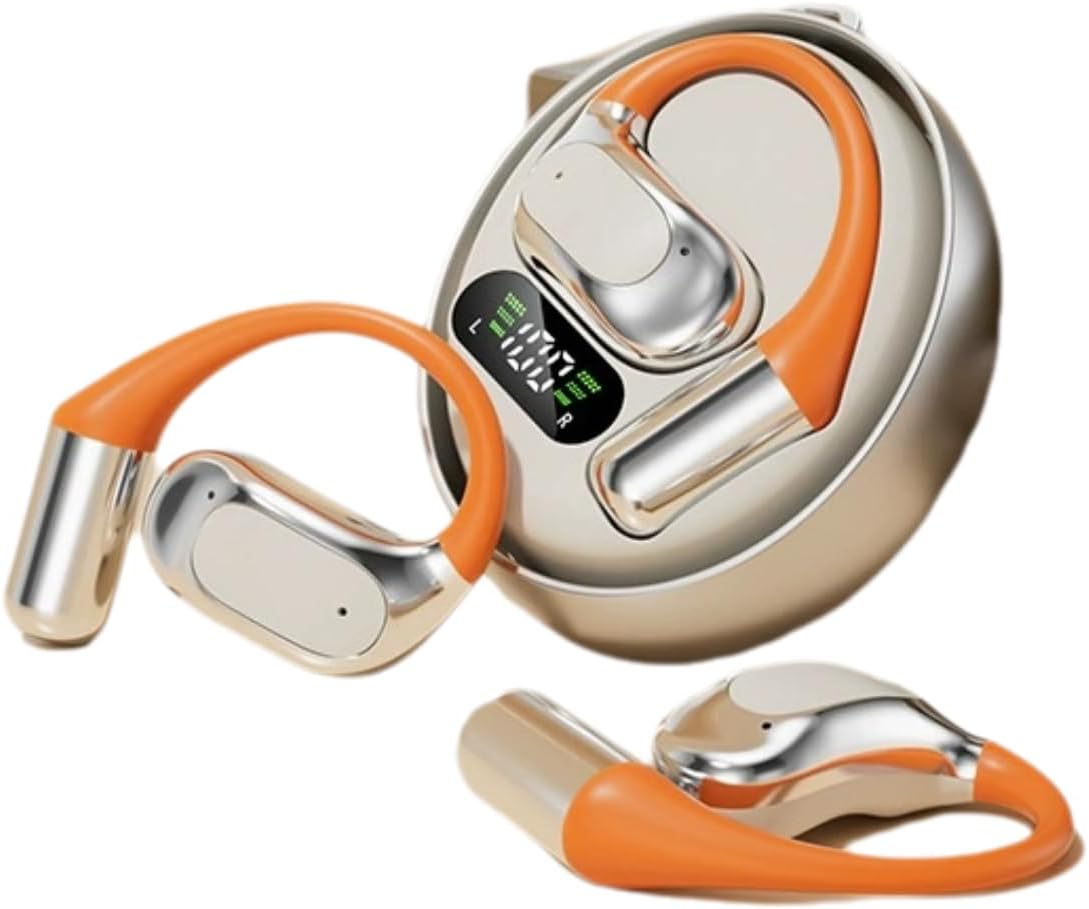
Şekil 1: M113 Headset and Charging Case. This image displays the two earbuds alongside their charging case, which features a digital display indicating battery levels for both the case and individual earbuds.

Şekil 2: Earbud in Charging Case. This image shows one earbud partially inserted into its charging slot within the case, highlighting the design and charging contacts.
Bileşenler:
- Kulaklık: Left (L) and Right (R) earbuds with in-ear design.
- Şarj Kutusu: Portable case with a multi-function screen display for battery status.
- Dokunmatik Kontrol Alanı: For playback, calls, and AI translation activation.
- Şarj Kişileri: Located on earbuds and inside the charging case.
Kurmak
1. Kulaklığı Şarj Etme
- Place both earbuds into the charging case. Ensure they are correctly seated, and the charging indicators on the case's screen light up.
- Connect the charging case to a power source using the provided charging cable. The screen display will show the charging progress.
- Kulaklıkların tam şarj olması genellikle 1-2 saat, şarj kutusunun ise 2-3 saat sürer.
- The digital display on the case indicates the battery level of the case and each earbud (L and R).
2. Bluetooth Eşleştirme
- Kulaklıklarınızın tam şarjlı olduğundan emin olun.
- Şarj kutusunu açın. Kulaklıklar otomatik olarak eşleştirme moduna girecek ve (varsa) gösterge ışığı yanıp sönecektir.
- Cihazınızda (akıllı telefon, tablet vb.) Bluetooth’u etkinleştirin.
- Arama available Bluetooth devices. Select "M113" from the list.
- Once connected, a voice prompt will confirm the successful pairing, and the indicator light will turn off or change color.
- Eşleştirme başarısız olursa, kulaklıkları kutusuna geri koyun, kutuyu kapatın ve adımları tekrarlayın.
Kullanım Talimatları
Güç Açık/Kapalı
- Güç Açık: Şarj kutusunu açın, kulaklıklar otomatik olarak açılacaktır. Alternatif olarak, her iki kulaklığın dokunmatik kontrol alanına 3 saniye boyunca basılı tutun.
- Kapat: Kulaklıkları şarj kutusuna geri yerleştirin ve kapağı kapatın. Otomatik olarak kapanacak ve şarj olmaya başlayacaklardır. Alternatif olarak, her iki kulaklığın dokunmatik kontrol alanına 5 saniye boyunca basılı tutun.
Müzik Çalma
- Oynat/Duraklat: Kulaklıkların her birindeki dokunmatik kontrol alanına bir kez dokunun.
- Sonraki Parça: Double-tap the touch control area on the Right earbud.
- Önceki parça: Double-tap the touch control area on the Left earbud.
- Sesi aç: Triple-tap the touch control area on the Right earbud.
- Sesi kıs: Triple-tap the touch control area on the Left earbud.
Yönetim Çağrı
- Çağrıyı Cevapla/Sonlandır: Kulaklıkların her birindeki dokunmatik kontrol alanına bir kez dokunun.
- Çağrıyı Reddet: Her iki kulaklığın dokunmatik kontrol alanına 2 saniye boyunca basılı tutun.
AI Intelligent Translation Function
The M113 headset features AI intelligent translation capabilities. To utilize this function, you may need to download a dedicated application on your smartphone. Please refer to the app's instructions for language selection and real-time translation usage.
Bakım
- Temizlik: Kulaklıklarınızı ve şarj kutusunu temizlemek için yumuşak, kuru ve tiftiksiz bir bez kullanın. Aşındırıcı temizleyiciler veya çözücüler kullanmayın.
- Depolamak: Kullanılmadığı zamanlarda kulaklığı tozdan ve hasardan korumak için şarj kutusunda saklayın. Serin ve kuru bir yerde muhafaza edin.
- Pil Bakım: Pil ömrünü uzatmak için, pili sık sık tamamen boşaltmaktan kaçının. Cihazı uzun süre kullanmasanız bile düzenli olarak şarj edin.
- Suya Maruz Kalma: The device is not water resistant. Avoid exposure to rain, sweat, or other liquids.
Sorun giderme
| Sorun | Olası Neden | Çözüm |
|---|---|---|
| Kulaklıklar açılmıyor. | Pil zayıf. | Kulaklıkları ve şarj kutusunu tamamen şarj edin. |
| Cihazla eşleştirilemiyor. | Bluetooth is off; earbuds not in pairing mode; device too far. | Ensure Bluetooth is enabled on your device. Place earbuds in case, close, then open to re-enter pairing mode. Keep devices within 10 meters. |
| Tek kulaklıktan ses gelmiyor. | Earbud not connected; low battery; dirty charging contacts. | Place both earbuds back in the case, close, then open. Ensure both are charged. Clean charging contacts. |
| Kötü ses kalitesi. | Weak Bluetooth signal; earbud placement; dirty ear cushions. | Move closer to your device. Adjust earbud fit. Clean or replace ear cushions. |
Özellikler
| Özellik | Detay |
|---|---|
| Model Adı | M113 |
| Marka | Genel |
| Kulak Yerleşimi | Kulakta |
| Form Faktörü | Kulakta |
| Bağlantı Teknolojisi | Bluetooth (Kablosuz) |
| Kontrol Türü | App Control / Touch Control |
| Malzeme | Alüminyum |
| Su Direnç Seviyesi | Suya dayanıklı değil |
| Ürün Ağırlığı | 200 Gram (7.1 ons) |
| Paket Boyutları | 4 x 4 x 1.58 inç |
| Dahil Bileşenler | Kulak Yastıkları |
Garanti ve Destek
Garanti bilgileri ve teknik destek için lütfen satın alma işleminizle birlikte verilen belgelere bakın veya doğrudan satıcıyla iletişime geçin. Herhangi bir garanti talebi için satın alma belgenizi saklayın.
For further assistance, you may visit the Generic brand's official support channels if available, or contact the retailer where the product was purchased.
İlgili belgelerM113


Ask a question about this manual
Ask about setup, troubleshooting, compatibility, parts, safety, or missing instructions. Manuals+ will review the question and use this page’s manual context to help answer it.