
1. Giriş
Thank you for choosing the PGST WiFi Home Security Alarm System. This comprehensive kit is designed to provide reliable and customizable security for your home, villa, or apartment. With easy DIY installation, real-time alerts via the Tuya and Smart Life apps, and no subscription fees, you can enjoy peace of mind knowing your property is protected. This manual will guide you through the setup, operation, and maintenance of your new security system.
2. Paket İçeriği
Lütfen aşağıda listelenen tüm öğelerin paketinizde yer aldığından emin olun:
- 1 x PGST108 Home Alarm System (Main Panel)
- Door/Window Sensors (Quantity varies by kit, 8 PIECES KIT includes multiple)
- Motion Sensors (Quantity varies by kit, 8 PIECES KIT includes multiple)
- Remote Controls (Quantity varies by kit)
- RFID Tags (Quantity varies by kit)
- Güç Adaptörü
- Montaj Donanımı (Vidalar, dübeller)
- Kullanım Kılavuzu (Bu belge)
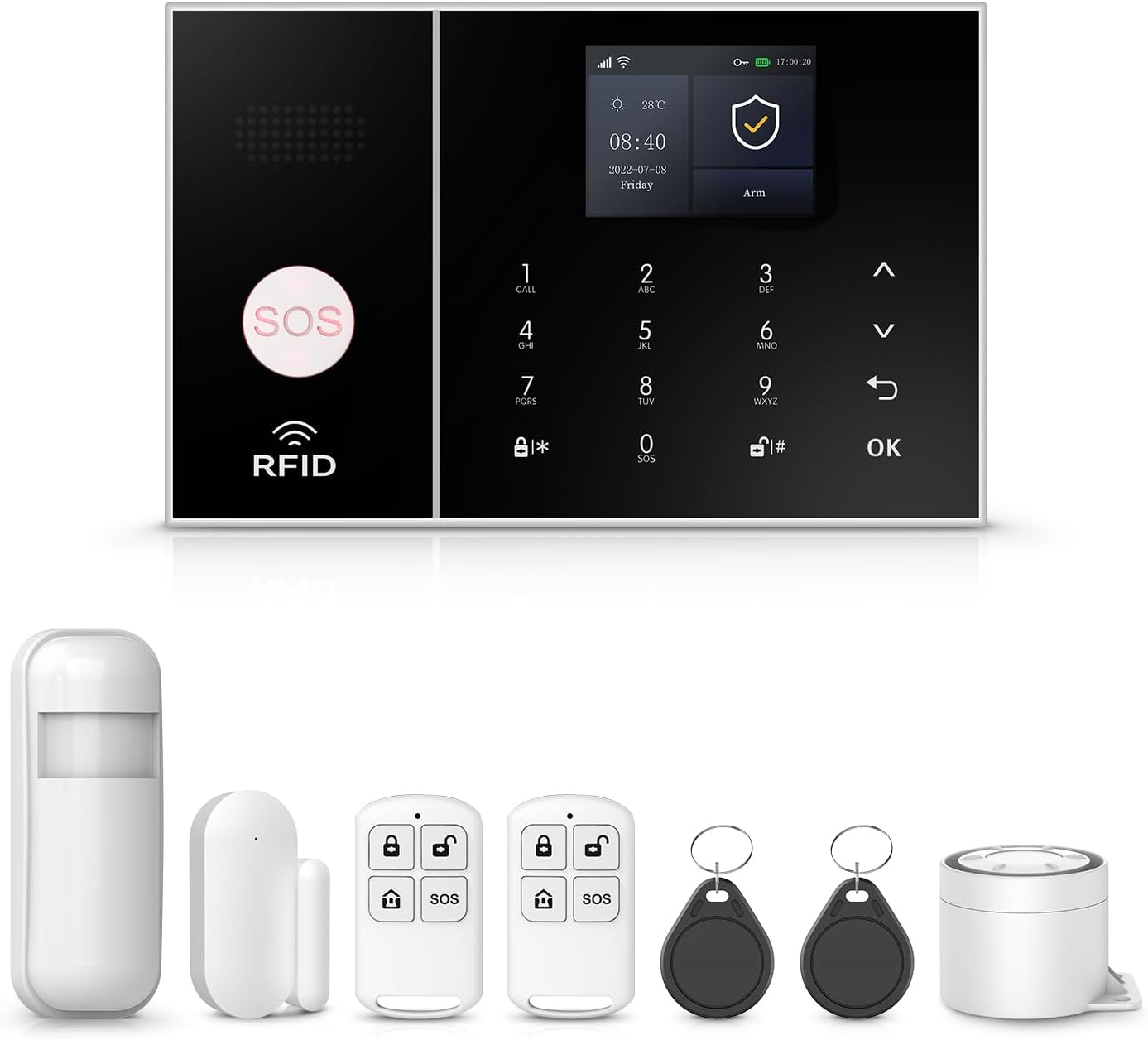
Resim: Üzeriview of the PGST WiFi Home Security Alarm System 8-piece kit, showing the main panel, motion sensor, door/window sensor, remote controls, and RFID tags.
3. Ürün Özellikleri
- Instant Alerts and No Contract Fee: Receive real-time notifications directly to your smartphone via Tuya and Smart Life App whenever motion is detected or sensors are triggered. Stay connected even when you are away. No hidden costs or recurring charges.
- Customizable and Expandable: The system is highly customizable, allowing you to choose which areas of your home to protect. You can add more sensors, cameras, or other security devices from our store in the future.
- One-Click SOS Function: Once the SOS button is activated, the security alarm system immediately sends out a distress signal to pre-designated emergency contacts or authorities.
- Easy DIY Installation and Use: Requiring no complex installation steps, it can be easily installed in key areas of your home. It is simple to operate, allowing both the elderly and children to quickly get the hang of it.
- 4.3-inch TFT Colorful Display Screen: The main panel features a vibrant display for easy navigation and status updates.
- Support for Alexa and Google Assistant: Integrate with your smart home ecosystem for convenient voice control.
- Çoklu Dil Desteği: The system supports 11 languages, allowing for free switching of menu display, voice operation, and alarm SMS settings.

Image: A woman interacting with the 4.3-inch TFT colorful display screen of the alarm system, highlighting its multi-functionality.

Image: A diagram illustrating how the alarm system links with other smart home products like outdoor cameras, door sensors, and motion detectors, controlled via the Tuya Smart and Smart Life apps.

Image: A visual representation of the alarm system's ability to dial up to 5 preset alarm calls, ensuring no alarm information is missed.

Image: A woman and her dog in a living room, demonstrating the alarm system's support for Alexa voice control, with a speech bubble showing "Alexa, Disarm my home!"

Image: The alarm system's display showcasing its support for 11 languages, including Chinese, English, German, Russian, Spanish, Polish, Italian, French, Portuguese, Greek, and Romanian.
4. Kurulum
4.1 Initial Setup of the Main Panel
- Unpack the main alarm panel and connect it to a power source using the provided adapter.
- The panel will power on automatically. Follow the on-screen prompts to select your preferred language.
- Ağ yapılandırması: The system supports 2.4GHz WiFi (5GHz WiFi is not supported).
There are two primary methods to configure the network:
- Method 1 (Soft AP Configure):
Ana bilgisayar işlemi: Menü → Wifi → Yumuşak AP Yapılandırması → Otomatik Arama
Phone operation: Wi-Fi (2.4GHz) → Bluetooth → Akıllı yaşam uygulaması → Cihaz ekle - Method 2 (Air Link Configure):
Ana bilgisayar işlemi: Menü → Wifi → Hava Bağlantısı Yapılandır
Phone operation: Wi-Fi (2.4GHz) → Akıllı yaşam uygulaması → Cihaz ekle → Sensörler → Alarm → Wifi → Hızla Göz Kırp

Image: A diagram illustrating the two methods for configuring the network connection for the alarm system, involving both host panel and smartphone app operations.
4.2 Sensör Kurulumu
Install the door/window sensors and motion sensors in strategic locations to maximize coverage.
- Kapı/Pencere Sensörleri: Mount the two parts of the sensor on the door/window frame and the door/window itself, ensuring they are aligned and within 1 cm of each other when closed.
- Hareket Sensörleri: Install motion sensors in corners or areas with high traffic, ensuring a clear line of sight for detection. Avoid placing them near heat sources or direct sunlight.

Resim: Yakın çekim view of a door window sensor installed on a window frame, demonstrating its magnetic field technology for detecting opening and closing.

Image: A PIR motion detector installed in a room, illustrating its ability to precisely detect an intruder's movement within its wide-angle detection range.
4.3 App Setup (Tuya / Smart Life)
- Download the Tuya Smart or Smart Life app from your smartphone's app store.
- Yeni bir hesap oluşturun veya zaten bir hesabınız varsa giriş yapın.
- Follow the in-app instructions to add your PGST alarm system. Ensure your phone is connected to the same 2.4GHz WiFi network as the alarm panel during setup.
- Once connected, you can manage sensors, arm/disarm the system, and receive alerts directly from the app.
5. Kullanım Talimatları
5.1 Kurma ve Devre Dışı Bırakma
The system can be armed and disarmed via the main panel, remote control, or the mobile app.
- Kol (Uzak Mod): Activates all sensors. Ideal when no one is home.
- Silahı Hazırda Bekle (Ev Modu): Activates perimeter sensors (e.g., door/window sensors) while allowing free movement inside.
- Silahsızlandır: Tüm sensörleri devre dışı bırakır.
You can also set regular arm/disarm schedules through the app for convenience.

Image: Four panels illustrating how the system can be set to arm and disarm regularly, saving time and effort. Examples include automatically disarming upon waking up, automatic arming when leaving out, automatically disarming upon returning home, and automatic arming when sleeping.
5.2 SOS Fonksiyonu
In case of an emergency, press the SOS button on the main panel or remote control. The system will immediately send a distress signal and notify your preset emergency contacts.

Image: An elderly woman and a man, with an SOS button prominently displayed, highlighting the system's friendly design for the elderly and its ability to send reminders when the SOS button is pressed.
5.3 App Control and Notifications
The Tuya Smart or Smart Life app provides full control over your alarm system from anywhere. You will receive instant push notifications for any detected activity, such as sensor triggers or low battery alerts.

Image: A smartphone screen displaying app alert messages, indicating that when someone tries to enter the house and a door sensor or PIR detector is activated, the user will receive phone messages, calls, and app push alerts.

Image: A woman looking at her phone, with icons representing five family members, illustrating the feature to preset five alarm calls to ensure every alert is received and home safety is maintained.
6. Bakım
6.1 Pil Değişimi
The wireless sensors are battery-powered. The system will notify you via the app when a sensor's battery is low.
- When a low battery alert is received, replace the batteries in the affected sensor promptly.
- Refer to the specific sensor's compartment for battery type (e.g., Alkaline).

Image: A diagram illustrating the wireless sensor low battery alarm process, where a door magnet or infrared sensor sends low voltage signals to the host, which then pushes information to the user through the app.
6.2 Temizlik
Wipe the main panel and sensors with a soft, dry cloth. Avoid using abrasive cleaners or solvents that could damage the surfaces.
7. Sorun Giderme
This section addresses common issues you might encounter with your PGST alarm system.
| Sorun | Olası Neden | Çözüm |
|---|---|---|
| System not connecting to WiFi | Yanlış WiFi bandı (5GHz), yanlış şifre, zayıf sinyal. | Ensure your router is broadcasting a 2.4GHz network. Double-check the WiFi password. Move the panel closer to the router or use a WiFi extender. |
| Sensors not triggering alarm | Low battery, improper installation, sensor out of range. | Check sensor batteries and replace if needed. Verify sensor alignment (door/window) or clear line of sight (motion). Ensure sensors are within the main panel's wireless range. |
| Uygulama bildirimleri yok. | App permissions not granted, phone's notification settings, app not running in background. | Check your phone's app settings to ensure notifications are enabled for Tuya Smart/Smart Life. Ensure the app is allowed to run in the background. |
| Yanlış alarm | Improper sensor placement, pets, environmental factors. | Adjust motion sensor sensitivity or reposition to avoid pets. Ensure door/window sensors are securely mounted and not affected by drafts. |
| Anti-demolition alarm triggered | Main panel moved or tampile birlikte. | This is a security feature. If the main panel is detached from its mounting, it will trigger an alarm and send a notification. Re-secure the panel properly. |

Image: A close-up of the main alarm panel's back, illustrating the anti-demolition alarm function. If the detachable device at the back is removed, the host will beep and send a call or text message.
8. Özellikler
| Özellik | Detay |
|---|---|
| Marka | PGST |
| Model Numarası | PGST A108F |
| Güç Kaynağı | Battery Powered (for sensors), AC Powered (for main panel) |
| Uyumlu Cihazlar | Akıllı telefon, Tablet |
| Dimensions (Main Panel) | 8.6 x 5.9 x 3.9 inç |
| Bağlantı Teknolojisi | Wireless (2.4GHz WiFi) |
| Kurulum Türü | Vidalama |
| Uyarı Tipi | Audio & Motion, App Push, Call, SMS |
| Kontrol Yöntemi | App, Touch Screen, Remote Control |
| Pil Hücresi Kompozisyonu | Alkaline (for sensors) |
| Sensör Teknolojisi | Motion Sensor, Door/Window Magnetic Sensor |
| UPC | 704444502396 |
| Ürün Ağırlığı | 1 pound (toplam set ağırlığı) |
9. Garanti ve Destek
9.1 Garanti Bilgileri
The PGST WiFi Home Security Alarm System comes with a 1 Yıllık Garanti Satın alma tarihinden itibaren geçerlidir. Bu garanti, üretim hatalarını ve normal kullanımdaki arızaları kapsar. Garanti talepleriniz için lütfen satın alma belgenizi saklayın.
9.2 Müşteri Desteği
If you have any questions, require assistance with setup, or encounter any issues not covered in this manual, please do not hesitate to contact PGST customer support. We are committed to providing prompt and helpful service.
For more information and additional products, please visit the official PGST Store: PGST Store on Amazon
- Sık Sorulan Sorular:
- Q: What network does this home security system support?
A: It only supports 2.4GHz WiFi (not for 5G WiFi) and 4G GSM card. You can receive a Tuya app alert push, while a 4G card can call you or send you a message if an emergency happens. - Q: What should I do if I don't know how to set it up after receiving it?
A: We can provide additional operation videos if necessary. - Q: Does this device support adding more sensors and accessories?
A: Yes, you can add more sensors and accessories, like sirens and cameras, from our store.