
1. Ürün Bittiview
The Hisense 65E7Q QLED Smart TV offers a premium viewing experience with its 65-inch QLED display. This television integrates advanced technologies such as Dolby Vision and Dolby Atmos for immersive audio-visuals, AI Smooth Motion for fluid images, and dedicated modes for gaming and sports. Powered by the VIDAA operating system, it provides easy access to a wide range of streaming content and smart features, including voice control.

Ön view of the Hisense 65E7Q QLED Smart TV.
Temel Özellikler:
- QLED Colour: Experience rich, vibrant, and realistic colors.
- Yapay Zeka Destekli Akıcı Hareket: Advanced MEMC and 3D Noise Reduction for fluid, blur-free images.
- Dolby Vision ve Dolby Atmos: Cinematic picture and immersive sound for an enhanced entertainment experience.
- Oyun Modu Artı: Reduces input lag to 16ms, with 60Hz VRR and ALLM for ultra-fluid gaming.
- Yapay Zeka Spor Modu: Optimizes picture and sound for sports content, reducing motion blur and enhancing stadium-like audio.
- Yapay Zeka Destekli 4K Yükseltici: Enhances blurry images to near-4K quality.
- VIDAA Smart TV OS: Fast, secure, and intuitive operating system with access to popular streaming applications.
- Ses Kontrolü: Integrated Alexa and VIDAA Voice for convenient operation.
2. Güvenlik Bilgileri
Please read all safety instructions carefully before using your TV. Keep this manual for future reference. Always ensure the TV is placed on a stable surface to prevent tipping. Do not expose the TV to rain or moisture. Refer to the full safety guidelines in the included safety manual.
3. Paket İçeriği
Kutunun içindeki tüm öğelerin eksiksiz olduğundan emin olun:
- Hisense 65E7Q QLED Smart TV
- Güç kablosu
- Uzaktan Kumanda (1 adet AAAA pil dahildir)
- TV Sehpası (2 adet)
- Stand Montajı için Vidalar
- Kullanım Kılavuzu (bu belge)
- Garanti Kartı
4. Kurulum
4.1 Standın Montajı
- Televizyonun hasar görmesini önlemek için ekranı alta gelecek şekilde yumuşak ve düz bir yüzeye dikkatlice yerleştirin.
- Stand parçalarını televizyonun alt kısmındaki ilgili yuvalara hizalayın.
- Birlikte verilen vidaları kullanarak ayak parçalarını sabitleyin. Vidaların iyice sıkıldığından emin olun.

Diagram illustrating TV dimensions and stand installation points.
4.2 Duvara Montaj
If you plan to wall mount your TV, ensure you use a VESA-compatible wall mount kit (not included). The Hisense 65E7Q supports a VESA mounting standard of 600 x 400 mm. Follow the instructions provided with your wall mount kit for safe installation.
4.3 Çevre Birimlerini Bağlama
Connect your external devices to the TV's ports as needed. Refer to the port diagram below:

Arka view showing available ports and connections.
- HDMI Bağlantı Noktaları (x3): Connect Blu-ray players, game consoles, and other HDMI devices. One port supports eARC for enhanced audio return.
- USB Bağlantı Noktaları (x2): Connect USB flash drives for media playback. (1x USB 3.0, 1x USB 2.0)
- Anten Girişleri (x2): Karasal veya kablolu anteninizi bağlayın.
- Ethernet (LAN): Kablolu ağ bağlantısı için.
- Optik Ses Çıkışı: Dijital ses için bir soundbar veya ses alıcısına bağlayın.
- Kulaklık girişi: Özel dinleme için.
- AV Girişleri: Kompozit video ve stereo ses kablolarını kullanarak eski cihazları bağlamak için.
4.4 İlk Güç Açma
- Güç kablosunu televizyona ve ardından elektrik prizine bağlayın.
- Uzaktan kumandanın veya televizyonun güç düğmesine basın.
- Ekranda gösterilen talimatları izleyerek dil seçimi, ağ bağlantısı ve kanal taraması dahil olmak üzere ilk kurulumu tamamlayın.
5. TV'nizi Çalıştırma
5.1 Uzaktan Kumanda
The included remote control allows you to navigate the TV's features. Insert the provided AAAA battery into the remote. The remote supports voice control for convenient operation.
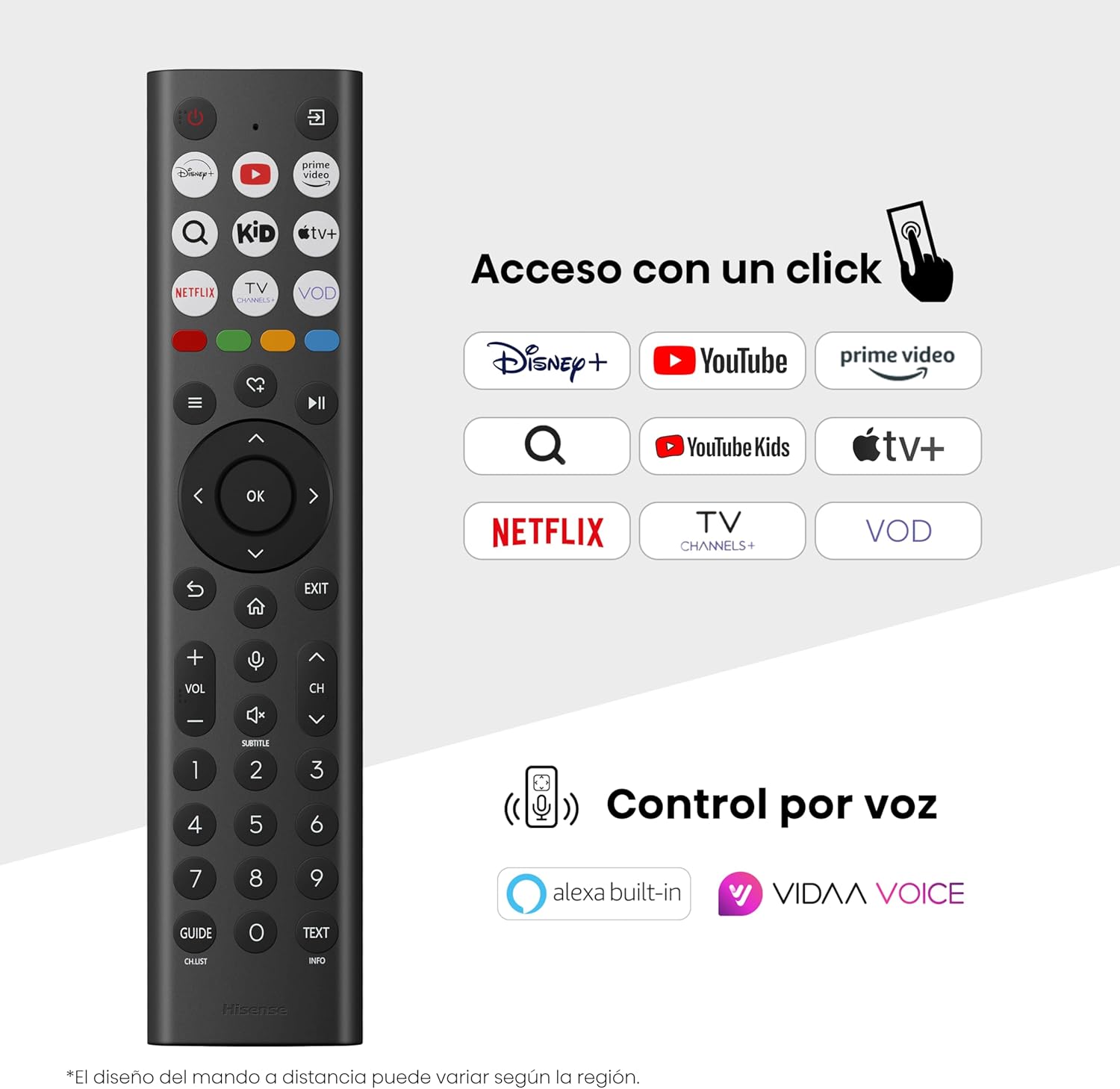
Hisense Smart TV remote control with dedicated app buttons and voice control.
5.2 Akıllı TV Özellikleri (VIDAA OS)
Your Hisense TV runs on the VIDAA operating system, offering a user-friendly interface for accessing various applications and services.

The VIDAA Smart TV interface with popular streaming applications.
- Uygulamalar: Access pre-installed apps like Netflix, YouTube, Prime Video, and more.
- Ses Kontrolü: Use the remote's voice function to search for content, adjust settings, or interact with Alexa built-in and VIDAA Voice.
- Screen Mirroring (AirPlay): Share content from your Apple devices directly to the TV.
- TV'de paylaş: Easily send content from your mobile devices to the TV.
5.3 Resim Ayarları
Optimize edin viewing experience with various picture enhancement technologies:
- QLED Colour: Delivers over a billion shades of vibrant, lifelike colors.
- Yapay Zeka Destekli 4K Yükseltici: Automatically enhances lower-resolution content to near-4K quality.
- Yapay Zeka Destekli Akıcı Hareket: Reduces motion blur in fast-paced scenes, ensuring clear and fluid visuals.
- Dolby Vision: Provides stunning brightness, contrast, and color for a dramatic visual experience.
- Film Yapımcısı Modu: Preserves the original aspect ratio, colors, and frame rates to display movies as intended by the director.
- Yapay Zeka Işık Sensörü: Intelligently adjusts screen brightness based on ambient light for optimal viewve enerji verimliliği.
- Göz Bakımı Modu: Göz yorgunluğunu en aza indirmek için mavi ışık emisyonunu azaltır.
- Enerji Tasarruf Modu: Optimizes power consumption without significantly compromising picture quality.

QLED technology delivers over a billion vibrant color tones.

AI 4K Upscaler enhances lower resolution content to near 4K clarity.

AI Smooth Motion ensures fluid images without blur, especially in fast-moving scenes.

Filmmaker Mode presents content exactly as the director intended.
5.4 Ses Ayarları
Enhance your audio experience with:
- Dolby Atmos: Immersive, multi-dimensional sound that fills your room.
- Entegre Hoparlör: Built-in speakers with a maximum output of 1 Watt per channel.
- EzPlay: Seamlessly control compatible Hisense soundbars directly from your TV screen.

Dolby Vision and Dolby Atmos combine for a spectacular audio-visual experience.
5.5 Oyun Özellikleri
Oyunseverler için TV şunları sunuyor:
- Oyun Modu Artı: Reduces input lag to 16ms, ensuring responsive gameplay.
- 60Hz VRR (Değişken Yenileme Hızı): Synchronizes the TV's refresh rate with the game console's output to prevent screen tearing.
- ALLM (Otomatik Düşük Gecikme Modu): Automatically switches the TV to low-latency mode when a game is detected.
- Oyun Çubuğu: An integrated control center for quick access to game settings and real-time performance monitoring.

Game Mode Plus provides ultra-fluid, lag-free gaming.

The Game Bar offers centralized control for game settings.
5.6 Spor Özellikleri
- Yapay Zeka Spor Modu: Automatically detects sports content and optimizes picture and sound settings for a stadium-like experience, enhancing clarity and audio effects.
6. Bakım
6.1 TV'nin temizlenmesi
- Televizyonu temizlemeden önce mutlaka fişini çekin.
- Yumuşak, kuru ve tüy bırakmayan bir bez kullanarak ekranı ve televizyon gövdesini nazikçe silin.
- İnatçı izler için hafifçe silinampBezi su veya özel bir ekran temizleyicisi ile silin (doğrudan ekrana sıkmayın).
- Aşındırıcı temizleyiciler, alkol, benzen veya tiner kullanmaktan kaçının, çünkü bunlar televizyonun yüzeyine zarar verebilir.
6.2 Yazılım Güncellemeleri
Televizyonunuz, performansı iyileştirmek ve yeni özellikler eklemek için periyodik olarak yazılım güncellemeleri alabilir. Bu güncellemeleri alabilmek için televizyonunuzun internete bağlı olduğundan emin olun. Güncellemeleri genellikle televizyonun ayarlar menüsünden manuel olarak kontrol edebilirsiniz.
7. Sorun Giderme
Televizyonunuzda sorunlarla karşılaşırsanız aşağıdaki yaygın çözümlere başvurun:
- Güç Yok: Güç kablosunun sağlam bir şekilde bağlı olup olmadığını ve prizin çalışır durumda olup olmadığını kontrol edin. Farklı bir priz deneyin.
- Görüntü/Ses Yok: Doğru giriş kaynağının seçildiğinden emin olun. Tüm kablo bağlantılarını (HDMI, anten) kontrol edin.
- Uzaktan Kumanda Çalışmıyor: Check the battery (1 AAAA battery). Ensure there are no obstructions between the remote and the TV.
- Ağ Bağlantı Sorunları: Wi-Fi şifrenizi veya Ethernet kablosu bağlantınızı doğrulayın. Yönlendiricinizi yeniden başlatın.
- Kötü Görüntü Kalitesi: Görüntü ayarlarını (parlaklık, kontrast, keskinlik) düzenleyin. Giriş kaynağının yüksek kaliteli bir sinyal sağladığından emin olun.
- Ses Bozulması: Check audio settings. If using external speakers, ensure they are connected correctly.
For more detailed troubleshooting, consult the full electronic user manual or contact Hisense customer support.
8. Özellikler
Detailed technical specifications for the Hisense 65E7Q QLED Smart TV:
| Özellik | Şartname |
|---|---|
| Model Numarası | 65E7Ç |
| Ekran Boyutu | 65 inç |
| Ekran Teknolojisi | QLED |
| Çözünürlük | 4K (3840x2160) |
| Yenileme Hızı | 60 Hz |
| HDR Format Desteği | Dolby Vizyonu |
| Motion Enhancement Technology | Yapay Zeka Pürüzsüz Hareket |
| Görüntü Kalitesi Geliştirme | AI 4K Upscaler, AI Smooth Motion, QLED Colour |
| Tepki Süresi | 100 Milisaniye |
| Arka Aydınlatma Yapılandırması | Direct Illumination, Dimming |
| Konuşmacı Açıklaması | Integrated speaker with Dolby Atmos |
| Maksimum Hoparlör Çıkış Gücü | 1 Vat |
| Ses Kanalı | Çok kanallı |
| Surround Sound Format | Dolby Atmos |
| İşletim Sistemi | VİDA |
| Bellek Depolama Kapasitesi | 1 GB |
| Kontrol Yöntemi | Ses |
| Bağlantı Teknolojisi | Bluetooth, HDMI, Wi-Fi |
| Internet Applications | Netflix, YouTube, Prime Video, AirPlay 2 |
| HDMI Bağlantı Noktaları | 3 (including HDMI 2.1 with eARC) |
| USB Bağlantı Noktaları | 2 (1x USB 3.0, 1x USB 2.0) |
| Kablosuz Teknoloji | Wifi |
| Screen Mirroring Technology | Hava Oynat |
| VESA Montaj Standardı | 600x400 mm |
| Ürün Boyutları (DxGxY) | 7.6x145.3x83.8 cm |
| Ürün Ağırlığı | 15.2 kg (standlı) |
| Enerji Verimliliği Sınıfı | E |
| Yıllık Enerji Tüketimi | 84 kWh/1000h (SDR), 160 kWh/1000h (HDR) |
| Güç | 1 Watt (bekleme modu) |
| Cilttage | 100-240 VCA 50-60 Hz |
| Dahil Bileşenler | Güç Kablosu, Uzaktan Kumanda, Stand |
| Model Yılı | 2025 |
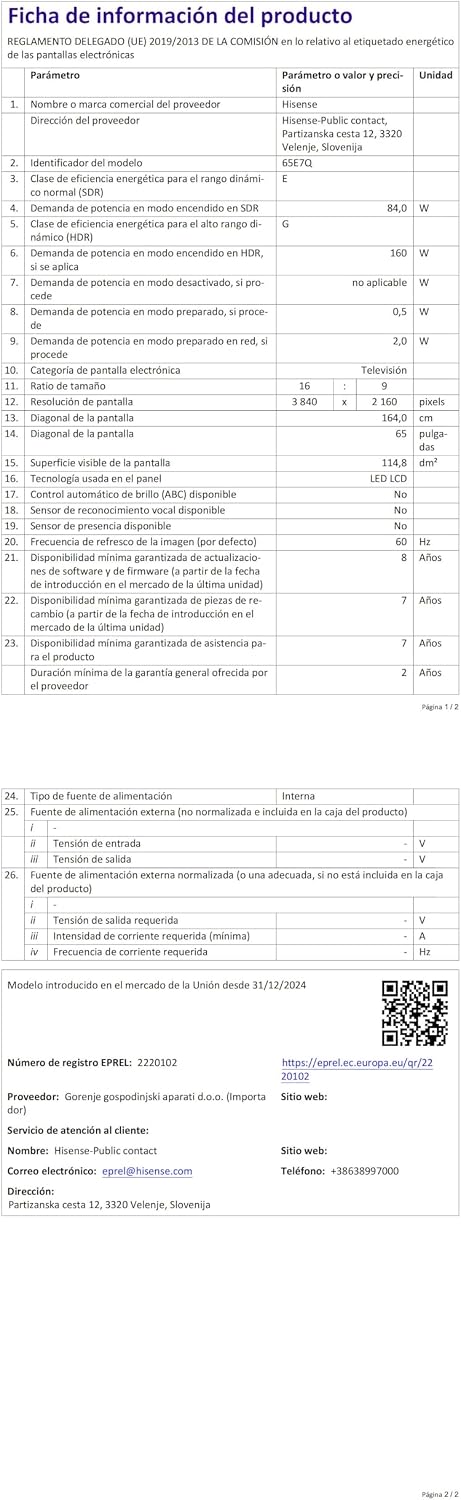
Energy label for the Hisense 65E7Q TV.
Daha detaylı ürün bilgileri için lütfen EPREL veri tabanına bakın: https://eprel.ec.europa.eu/qr/2220102
9. Garanti ve Destek
9.1 Ürün Garantisi
Bu Hisense televizyon şunlarla birlikte geliyor: 3 yıl ürün garantisiLütfen garanti talepleriniz için satın alma belgenizi saklayın.
9.2 Yedek Parça Bulunabilirliği
Spare parts for this model are guaranteed to be available in the EU for a duration of 10 yıl from the product's market introduction.
9.3 Müşteri Desteği
For technical assistance, troubleshooting, or warranty service, please contact Hisense customer support. Refer to the contact information provided in your warranty card or visit the official Hisense webBölgeniz için site.