
ASECAM 5MP 8CH DVR + 4 5MP Cameras
ASECAM 5MP 8-Channel DVR Security Camera System User Manual
Comprehensive instruction manual for the ASECAM 5MP 8-Channel DVR Security Camera System, covering setup, operation, maintenance, troubleshooting, and specifications.
1. Giriş
This manual provides detailed instructions for the installation, operation, and maintenance of your ASECAM 5MP 8-Channel DVR Security Camera System. This wired system offers stable signal output and is designed for reliable outdoor surveillance with advanced features like facial, human, and vehicle detection.

Resim 1.1: Üzeriview of the ASECAM 5MP 8-Channel DVR Security Camera System, including the DVR, four 5MP cameras, 1TB HDD, and connection cables.
2. Paket İçeriği
Paketinizde tüm bileşenlerin mevcut olduğunu doğrulayın:
- 4x 5MP HD Security Cameras
- 1x 5MP HD 8-Channel DVR with pre-installed 1TB Hard Drive
- 4x 18-meter Copper Core BNC Video Cables
- 1x Ethernet Kablosu
- 1x USB Fare
- 4x Screw Bags for camera mounting
- Güç Adaptörleri
- Hızlı Başlangıç Kılavuzu
- Uyarı Çıkartmaları

Image 2.1: Visual representation of all items included in the ASECAM 5MP 8-Channel DVR Security Camera System package.
3. Kurulum Talimatları
3.1 DVR Bağlantısı
- Kameraları Bağlayın: Connect the BNC video cables from each camera to the corresponding BNC input ports on the back of the DVR.
- Gücü bağlayın: Connect the power adapters to the cameras and the DVR.
- Monitörü Bağla: Use an HDMI or VGA cable to connect your monitor to the DVR's video output port.
- Fareyi Bağla: USB fareyi DVR'ın USB portuna takın.
- Connect Network (Optional for Remote Access): Connect an Ethernet cable from the DVR to your router for internet access and remote viewIng.
- Güç Açık: Plug in the power adapters for the DVR and cameras. The system will boot up automatically.
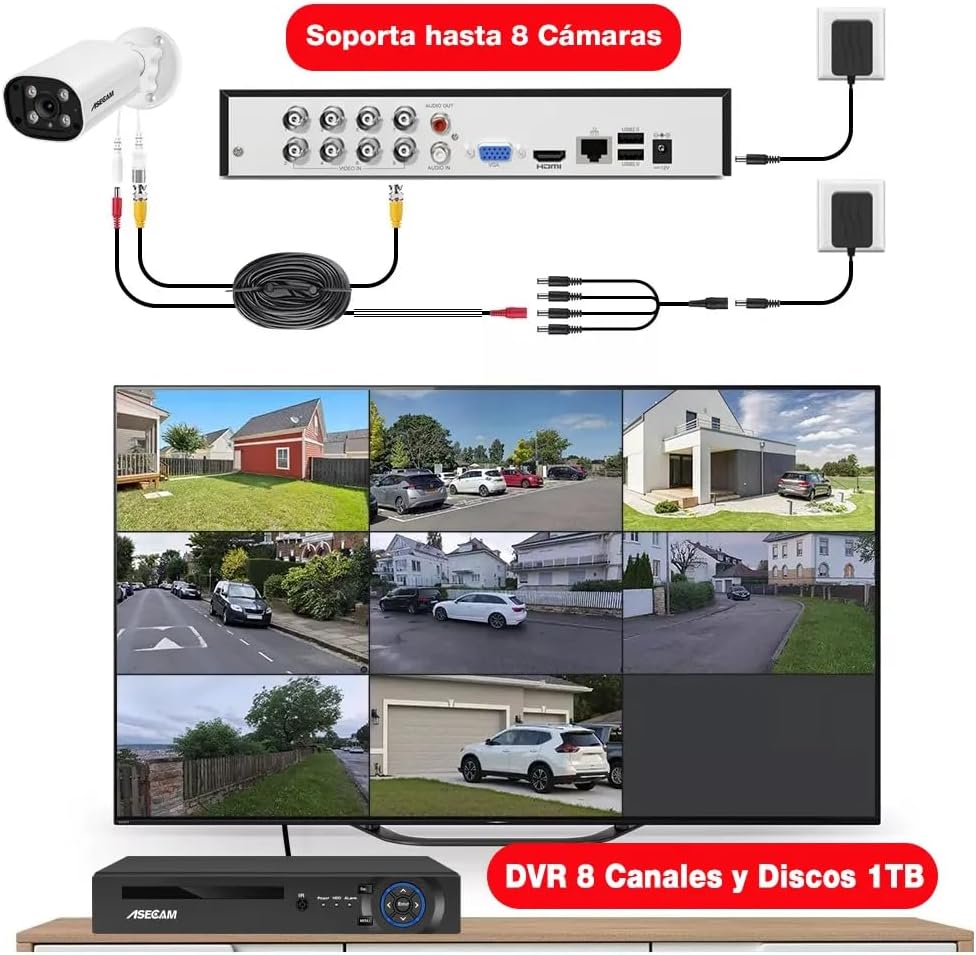
Image 3.1: Illustration of the DVR's rear panel connections, demonstrating how to connect up to 8 cameras, a monitor, and power sources.
3.2 İlk Yapılandırma
Follow the on-screen prompts to complete the initial setup, including setting the date/time, creating a password, and configuring network settings if applicable.
4. Kullanım Talimatları
4.1 Kayıt ve Depolama
The DVR comes with a pre-installed 1TB hard drive, supporting 24/7 loop recording for 30-60 days. The H.265+ encoding technology optimizes storage space, saving up to 80% compared to H.264 systems.
4.2 Akıllı Algılama Özellikleri
- Facial Recognition and Playback: The system can capture faces and allows for intelligent facial playback. This feature assists in quickly locating specific individuals in recorded footage.

Image 4.1: Demonstration of the facial detection and intelligent playback interface, showing how detected faces can be used to search recordings.
- İnsan ve Araç Tespiti: Receive push notifications on your phone when a person or vehicle enters your property. This AI-based detection accurately identifies relevant events, reducing false alarms.

Resim 4.2: Görsel örnekample of human and vehicle detection in a surveillance area, highlighting how the system identifies and tracks subjects.
- Özelleştirilebilir Hareket Algılama ve Uyarılar: Define specific areas for motion detection to receive alerts via app push notifications or email. This helps focus on critical zones and minimize unnecessary alerts.
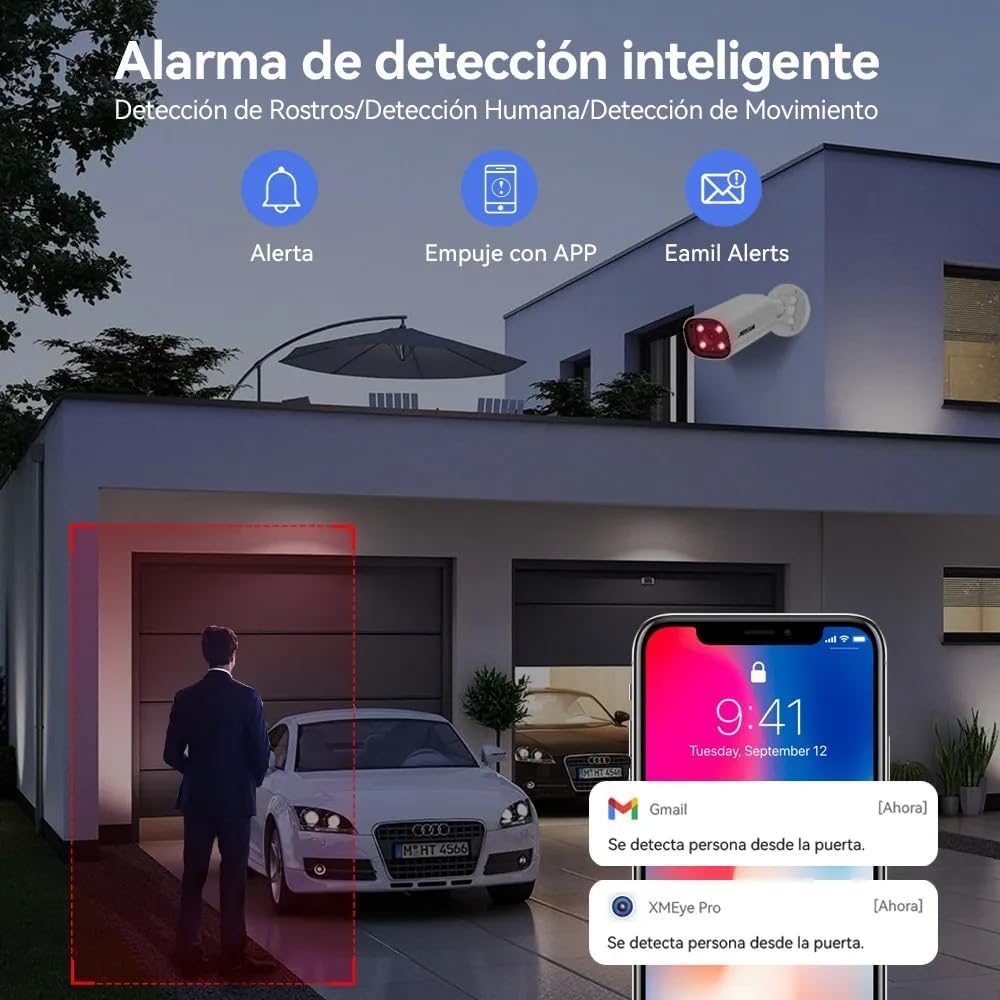
Resim 4.3: Örn.ample of smart detection alerts, showing notifications for person detection via app and email.
4.3 Ses İşlevselliği
The 5MP cameras feature built-in high-quality microphones for one-way audio recording, capturing sound from the surveillance area.

Image 4.4: Illustration of the one-way audio feature, demonstrating sound capture from the camera's location.
4.4 Gündüz ve Gece Görüşü
The cameras provide 5MP Super HD clarity during the day and utilize powerful infrared chips for clear night vision up to 50 meters, even in complete darkness.

Image 4.5: Comparison showing the clarity of 5MP Super HD day vision and detailed infrared night vision.
4.5 Uzaktan Erişim
Access your camera feeds remotely from anywhere using the "XMEye Pro" application on your smartphone or by visiting "xmeye.net" on a PC/MAC. The system supports multi-screen viewing and shared access for multiple users.
5. Bakım
Düzenli bakım, güvenlik sisteminizin optimum performans göstermesini ve uzun ömürlü olmasını sağlar.
- Kamera Temizliği: Periyodik olarak fotoğraf makinesi lenslerini yumuşak bir bezle temizleyin.amp Toz ve kirin temizlenmesi için bez, tıkanıklığa neden olabilecek kalıntıları gidermek için kullanılır. view.
- Bağlantı Kontrolü: Ensure all cables (video, power, network) are securely connected and free from damage.
- Hava Koşullarına Dayanıklılık: The cameras are IP67 rated, providing protection against rain and dust. However, avoid directing high-pressure water jets directly at the cameras.

Image 5.1: The IP67 waterproof rating ensures the camera's durability in various outdoor conditions, suitable for homes, offices, and warehouses.
- DVR Havalandırması: Ensure the DVR is placed in a well-ventilated area to prevent overheating.
- Yazılım Güncellemeleri: Üreticinin kontrol edin website or the "XMEye Pro" app for any available firmware updates for the DVR or cameras.
6. Sorun Giderme
Aşağıda sık karşılaşılan sorunlar ve çözümleri yer almaktadır:
| Sorun | Olası Neden | Çözüm |
|---|---|---|
| Monitörde video görüntüsü yok. | Gevşek video kablosu, yanlış monitör girişi, DVR'ın açık olmaması. | Check BNC and HDMI/VGA connections. Ensure DVR is powered. Select correct input on monitor. |
| Cameras not showing images. | Camera power issue, cable damage, camera malfunction. | Verify camera power supply. Inspect video cables for damage. Test camera with a known working cable/port. |
| "HDD not available for recording" error. | Hard drive connection issue, hard drive failure, incorrect DVR settings. | Check the internal SATA connection of the HDD. Restart the DVR. Access DVR settings to verify HDD status and format if necessary (this will erase data). If the issue persists, the HDD may need replacement. |
| Poor image resolution/color distortion. | Dirty lens, cable interference, camera settings, faulty camera. | Clean camera lens. Ensure cables are not near strong electrical interference. Check camera resolution settings in DVR. If problem persists, camera may be faulty. |
| Uzaktan erişim çalışmıyor. | No internet connection, incorrect network settings, app issues. | Verify DVR is connected to the internet. Check network settings on DVR and router. Ensure "XMEye Pro" app is updated and configured correctly. |
7. Özellikler
| Özellik | Detay |
|---|---|
| Marka | ASECAM |
| Örnek | 5MP 8CH DVR + 4 5MP Cameras |
| Video Yakalama Çözünürlüğü | 5 MP |
| Bağlantı Teknolojisi | Kablolu |
| Özel Özellikler | Human Detection, Audio Recording, Automatic Overwrite, Night Vision |
| Kanal Sayısı | 8 |
| Güç Kaynağı | Kablolu Elektrik |
| DVR Depolama | 1 TB HDD (önceden takılı) |
| Kamera Giriş Koruma (IP) Derecesi | IP67 (Su geçirmez) |
| Boyutlar (Ürün) | 37 x 30 x 18 cm; 4.4 kg |
8. Garanti ve Destek
For product support, please contact ASECAM customer service. Refer to your purchase documentation for specific warranty terms.
- İade politikasi: This product typically includes a 30-day return period from the date of purchase. Please check with your retailer for exact terms.
- Teknik Destek: For technical assistance, troubleshooting, or questions regarding your ASECAM security system, please visit the official ASECAM websiteyi ziyaret edin veya müşteri destek kanallarıyla iletişime geçin.
Ask a question about this manual
Ask about setup, troubleshooting, compatibility, parts, safety, or missing instructions. Manuals+ will review the question and use this page’s manual context to help answer it.