
giriiş
Satın aldığınız için teşekkür ederizasing the Sharp Digital Alarm Clock, Model SPC5148AMZ. This alarm clock features a large, easy-to-read red LED display, dual alarms, adjustable alarm volume, and a convenient snooze function. It is designed for simple operation and includes a battery backup feature to maintain time and alarm settings during power outagee.
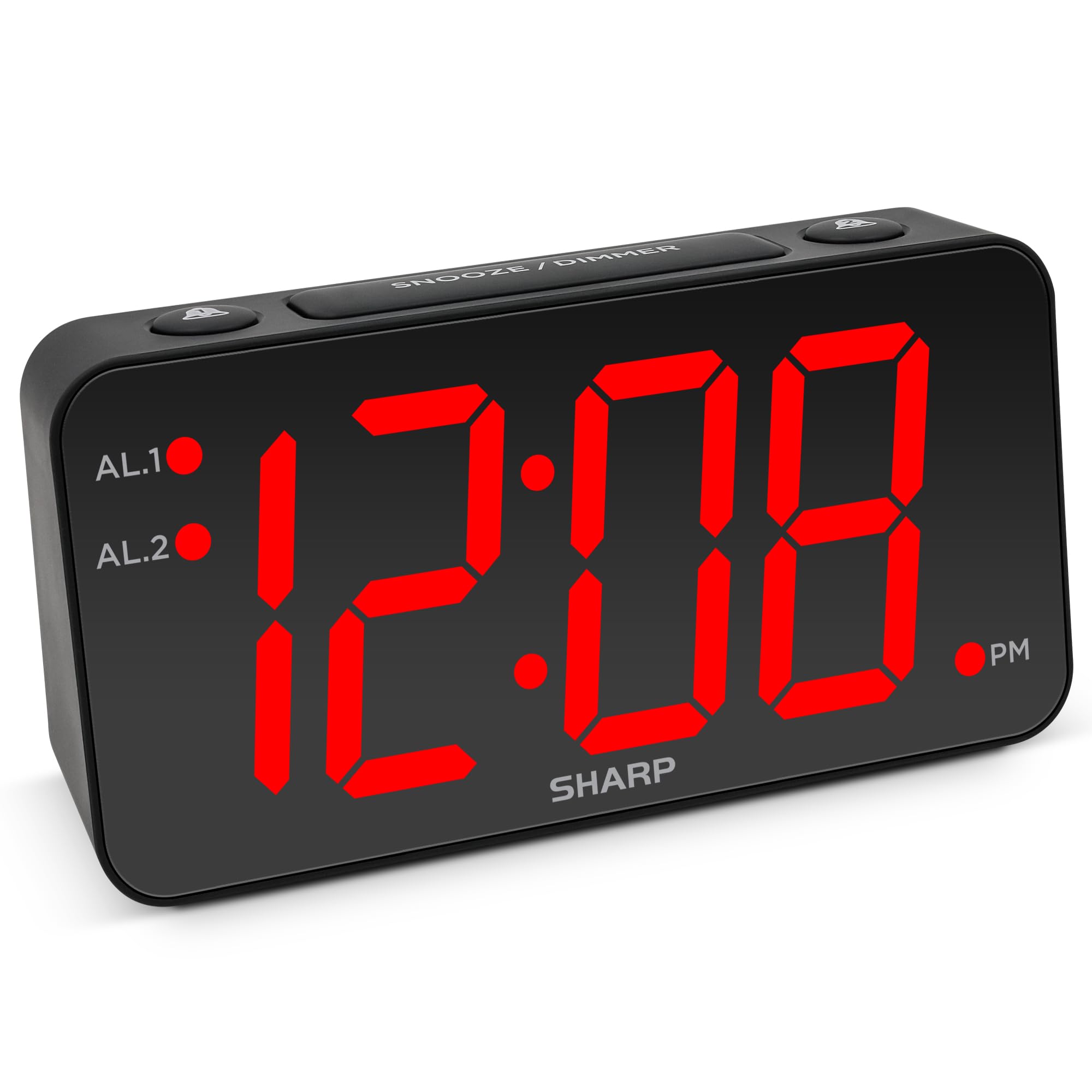
Resim: Ön view of the Sharp Digital Alarm Clock, Model SPC5148AMZ, showcasing its large red LED time display.
Ürün Bileşenleri ve Kontrolleri
Çalar saatinizin çeşitli parçalarını ve kontrollerini iyice öğrenin.
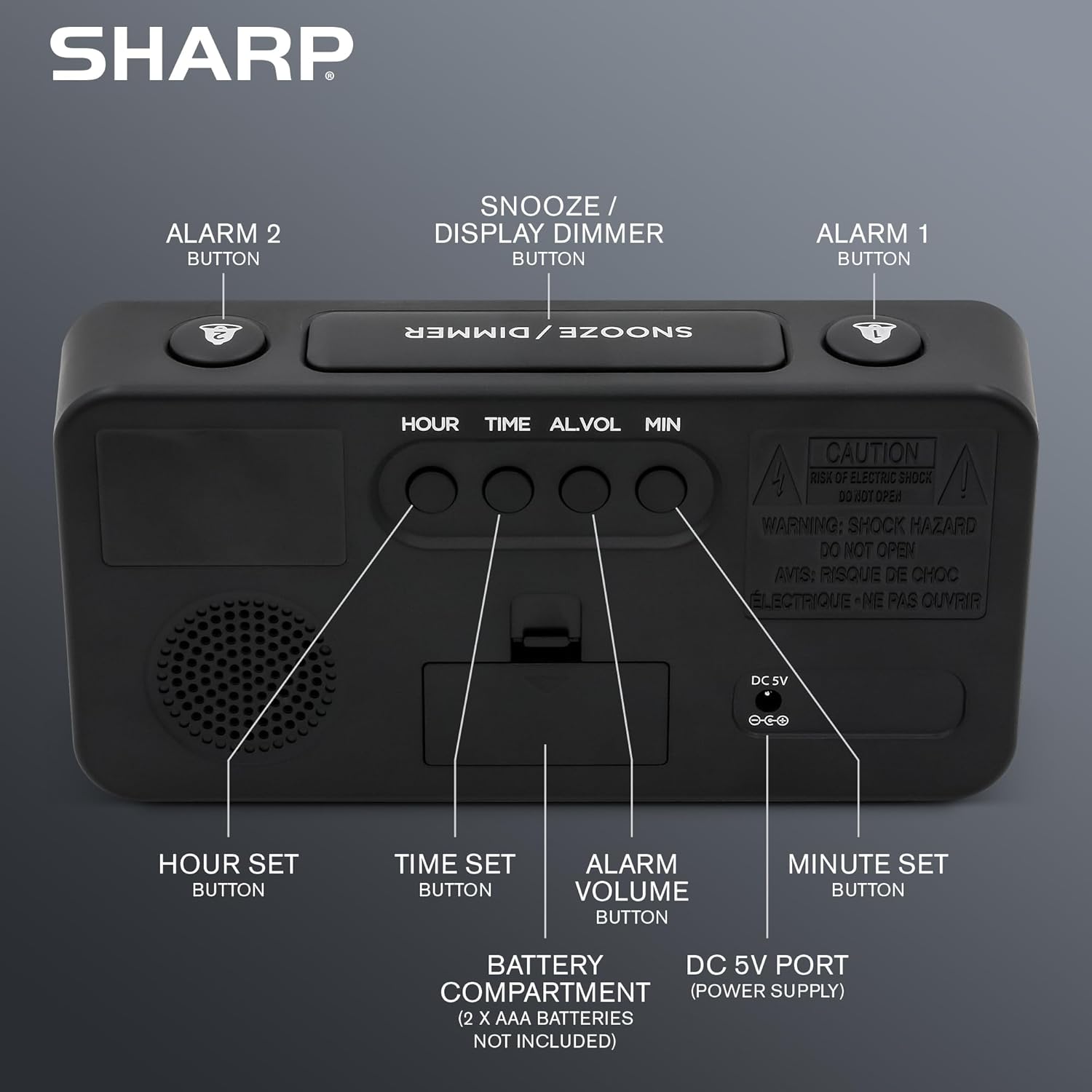
Resim: Arka view of the alarm clock, highlighting the Hour Set, Time Set, Alarm Volume, Minute Set buttons, Battery Compartment, and DC 5V Power Port.
- Erteleme / Işık Kısma Düğmesi: Located on top. Press to snooze alarm or adjust display brightness.
- ALARM 1 Button: Located on top. Activates/deactivates Alarm 1.
- ALARM 2 Button: Located on top. Activates/deactivates Alarm 2.
- HOUR SET Button: Located on the back. Used to set the hour for time or alarm.
- ZAMAN AYARLA düğmesi: Located on the back. Used to enter time setting mode.
- ALARM VOLUME Button: Located on the back. Adjusts the alarm loudness.
- MINUTE SET Button: Located on the back. Used to set the minute for time or alarm.
- DC 5V Bağlantı Noktası: Power input for the clock.
- Pil Bölmesi: Holds 2 x AAA batteries (not included) for backup.
Kurmak
Güç Bağlantısı
- Connect the provided power adapter to the DC 5V port on the back of the alarm clock.
- Plug the adapter into a standard 110V/120V AC power outlet. The display will illuminate.
Yedek Batarya Kurulumu
For battery backup, which retains time and alarm settings during a power outage (display will be blank), install batteries:
- Cihazın arkasındaki pil bölmesi kapağını açın.
- Insert 2 new AAA batteries (not included), observing the correct polarity (+ and -).
- Pil bölmesi kapağını sıkıca kapatın.
Önemli: Batteries are for backup only. The clock requires AC power for the display to function and for the alarm to sound at full volume.
Kullanım Talimatları
Zamanı Ayarlama
- Basılı tutun SAAT AYARI Saat kadranının arkasındaki düğmeye, saat rakamları yanıp sönmeye başlayana kadar basın.
- Basın SAAT TAKIMI button repeatedly to adjust the hour. Pay attention to the PM indicator light.
- Basın DAKİKA TAKIMI Dakikaları ayarlamak için düğmeye art arda basın.
- İstenilen süre ayarlandıktan sonra, tuşuna basın. SAAT AYARI Zaman ayarı modundan çıkmak ve onaylamak için tekrar düğmeye basın.
Setting the Alarm (Alarm 1 and Alarm 2)
This clock features dual alarms. The procedure is the same for both Alarm 1 and Alarm 2.
- Basılı tutun ALARM 1 or ALARM 2 button on the top of the clock until the alarm hour digits begin to flash.
- Basın SAAT TAKIMI Alarm saatini ayarlamak için düğmeye art arda basın. Doğru AM/PM seçildiğinden emin olun.
- Basın DAKİKA TAKIMI Alarm süresini ayarlamak için düğmeye art arda basın.
- Basın ALARM 1 or ALARM 2 button again to confirm the alarm time. The corresponding alarm indicator light (AL.1 or AL.2) will illuminate on the display, indicating the alarm is active.
Alarmları Etkinleştirme/Devre Dışı Bırakma
- To activate an alarm: Press the ALARM 1 or ALARM 2 button once. The corresponding indicator light will turn on.
- To deactivate an alarm: Press the ALARM 1 or ALARM 2 button again. The corresponding indicator light will turn off.
Erteleme Fonksiyonu
Alarm çaldığında, büyük düğmeye basın. ERTELEME / DIMMER button on top of the clock. The alarm will pause for 9 minutes and then sound again. You can repeat this process until the alarm is manually turned off.
Adjusting Display Brightness (Dimmer)
Basın ERTELEME / DIMMER button (when the alarm is not sounding) to cycle through the display brightness levels: High, Medium, Low, or OFF.
Alarm Sesi Ayarı
Basın ALARM SES button on the back of the clock to cycle through the alarm loudness levels: High, Medium, Low.
Bakım
- Temizlik: Saati yumuşak, kuru bir bezle silin. Aşındırıcı temizleyiciler veya çözücüler kullanmayın.
- Pil Değişimi: Replace backup batteries annually or when the clock experiences frequent power outages to ensure settings are retained.
- Atama: Place the clock on a stable, flat surface. Avoid direct sunlight, extreme temperatures, and high humidity.
Sorun giderme
| Sorun | Çözüm |
|---|---|
| Saat göstergesi boş. | Ensure the AC power adapter is securely plugged into both the clock and a working electrical outlet. Check if there's a power outage. If using battery backup, the display will be blank during an outage, but timekeeping continues. |
| Alarm çalmıyor. |
|
| Zaman veya alarm ayarlanamıyor. | Ensure you are pressing and holding the correct SET button until the digits flash. Release the button, then use HOUR SET and MINUTE SET to adjust. Press the SET button again to confirm. |
| Ekran çok parlak/loş. | Basın ERTELEME / DIMMER button (when alarm is not sounding) to cycle through brightness levels. |
Özellikler
- Modeli: SPC5148AMZ
- Marka: Keskin
- Görüntüleme Türü: Dijital LED (Kırmızı)
- Ekran Boyutu: 3 inches (Jumbo Numbers)
- Güç Kaynağı: Corded Electric (110V/120V AC)
- Pil Yedekleme: 2 x AAA pil (dahil değildir)
- Boyutlar (G x Y): 8.27" x 4.13"
- Ağırlık: 0.41 Kilogram
- Özel Özellikler: Dual Alarms, Adjustable Brightness (High, Medium, Low, OFF), Adjustable Alarm Volume (High, Medium, Low), 9-minute Snooze.
Garanti Bilgileri
Sharp products are manufactured and sold by M.Z. Berger & Co. Inc. This product comes with a limited warranty against defects in materials and workmanship. For specific warranty details, including duration and terms, please refer to the warranty card included in your product packaging or contact customer support.
Müşteri Desteği
For assistance with your Sharp Digital Alarm Clock, please contact the manufacturer's customer support. Contact information can typically be found on the product packaging or the manufacturer's official webalan.
Manufacturer: Sharp (M.Z. Berger & Co. Inc.)
Ürün Bittiview Video
Video: An official Sharp video showcasing various Sharp clocks, including features like alarm, decor, charging, precision, and specialty functions. This video provides a general overview of Sharp's clock offerings.