
giriiş
Thank you for choosing the Belkin Portable 20,000 mAh Power Bank. This device is designed to provide reliable and fast charging for your mobile devices, featuring an integrated USB-C cable and 30W Power Delivery. Its compact and lightweight design makes it ideal for travel, ensuring your devices stay powered wherever you go. This manual provides essential information on how to set up, operate, maintain, and troubleshoot your power bank.

Image: The Belkin Portable 20,000 mAh Power Bank in blue, showcasinŞık tasarımıyla dikkat çekiyor.
Temel Özellikler
- Entegre USB-C Kablosu: For convenient charging on the go.
- 30W Güç Dağıtımı: Enables fast charging for smartphones, tablets, and even some laptops like the MacBook Air.
- 20,000 mAh Kapasite: Provides up to 87 hours of additional battery life for an iPhone 16 Pro, charging 0-50% in approximately 25 minutes.
- Eşzamanlı Şarj: Charge up to three devices concurrently using the integrated USB-C cable, USB-C port, and USB-A port, with a shared output of 30W.
- LED Göstergesi: Displays the power bank's charging status.
- Geçişli Şarj: Charge your devices while the power bank itself is being recharged.
- Lightweight and Travel-Friendly: Weighing less than 395 grams, it meets aviation safety standards for carry-on luggage.
- Sürdürülebilir Tasarım: Made from 72% post-consumer recycled materials with 100% plastic-free packaging.
Kurmak
Power Bank'ın İlk Şarjı
Before first use, fully charge your Belkin Power Bank. Connect the power bank to a wall charger using a compatible USB-C cable (not included for recharging the power bank itself, only the integrated cable is for output). The LED indicators will show the charging progress. A full charge typically takes up to 12 hours.

Image: The power bank connected to a wall outlet for recharging, simultaneously charging a smartphone via its integrated cable. This illustrates pass-through charging.
Kullanım Talimatları
Cihazlarınızı Şarj Etme
- Entegre USB-C Kablosunu Kullanma: Extend the integrated USB-C cable from the power bank and connect it directly to your USB-C compatible device.
- USB-C Portunu Kullanma: Cihazınızın USB-C şarj kablosunu power bank'in USB-C çıkış portuna bağlayın.
- USB-A Portunu Kullanma: Cihazınızın USB-A şarj kablosunu power bank'in USB-A çıkış portuna bağlayın.

Image: The Belkin power bank connected to an iPhone via its integrated USB-C cable, demonstrating seamless high-speed charging.
Birden Fazla Cihazı Şarj Etme
The power bank supports charging up to three devices simultaneously with a combined output of 30W. You can use the integrated USB-C cable, the USB-C port, and the USB-A port at the same time.
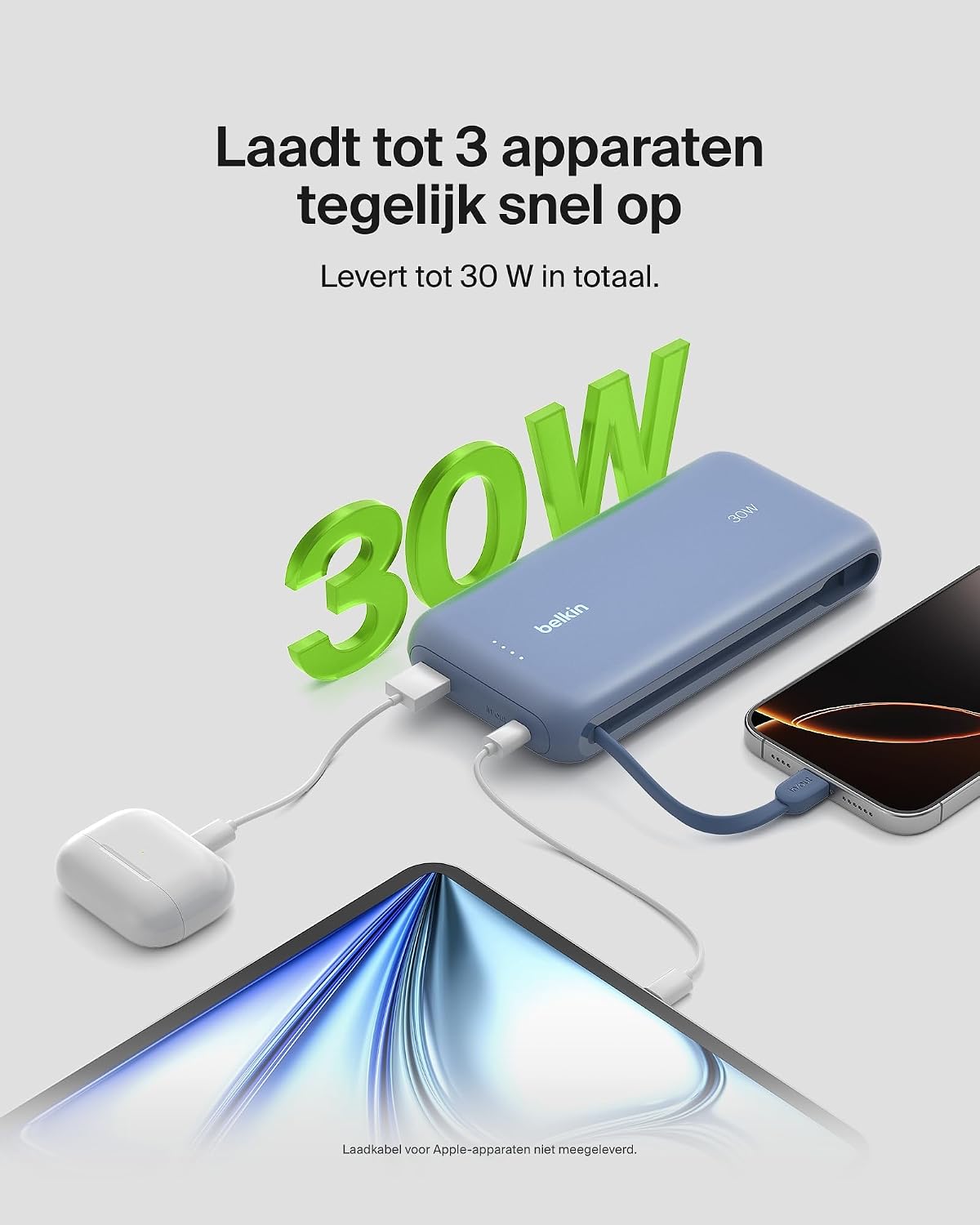
Image: The power bank simultaneously charging a smartphone, a tablet, and wireless earbuds, illustrating its capability to charge up to three devices with a total output of 30W.
LED Pil Durum Göstergesi
The power bank features LED lights that indicate the remaining battery level and charging status. Refer to the table below for interpretation:
| LED Durumu | Anlam |
|---|---|
| Tüm LED'ler sağlam | Tam şarjlı |
| LEDs blinking sequentially | Şarj işlemi devam ediyor |
| Fewer LEDs solid | Kalan pil kapasitesi |
Bakım
- Temizlik: Power bank'i temizlemek için yumuşak, kuru bir bez kullanın. Sert kimyasallar veya aşındırıcı malzemeler kullanmaktan kaçının.
- Depolamak: Powerbank cihazınızı serin, kuru ve doğrudan güneş ışığından ve aşırı sıcaklıklardan uzak bir yerde saklayın.
- Pil Bakım: To prolong battery life, avoid fully discharging the power bank regularly. Recharge it when the battery level is low.
- Integrated Cable Care: When not in use, ensure the integrated USB-C cable is properly stowed to prevent damage.
Sorun giderme
Yaygın Sorunlar ve Çözümleri
- Cihaz şarj olmuyor:
- Ensure the power bank is charged. Check the LED indicators.
- Şarj kablosunun hem powerbank'a hem de cihazınıza güvenli bir şekilde bağlandığından emin olun.
- Powerbank'inizde farklı bir şarj kablosu veya portu deneyin.
- Confirm your device is compatible with the power bank's charging specifications.
- Yavaş şarj oluyor:
- Ensure your device supports fast charging (Power Delivery) to utilize the 30W output.
- If charging multiple devices, the total 30W output is shared, which may result in slower charging for individual devices.
- Check if the cable used supports fast charging.
- Taşınabilir şarj cihazı şarj olmuyor:
- Ensure the wall adapter and cable used for recharging the power bank are functional and properly connected.
- Try a different wall adapter or cable.
Belkin SmartProtect Safety Features
The Belkin Power Bank is equipped with SmartProtect technology, which includes multiple safety features to protect your devices and the power bank itself:
- Aşırı Yük Koruması
- Aşırı Akım Koruması
- Aşırı Güç Koruması
- Kısa Devre Koruması
- Çıkış Aşırı Hacmitage Koruma
- Output High/Low Temperature Protection
- Input High/Low Temperature Protection
- Sinyal Girişimine Karşı Koruma
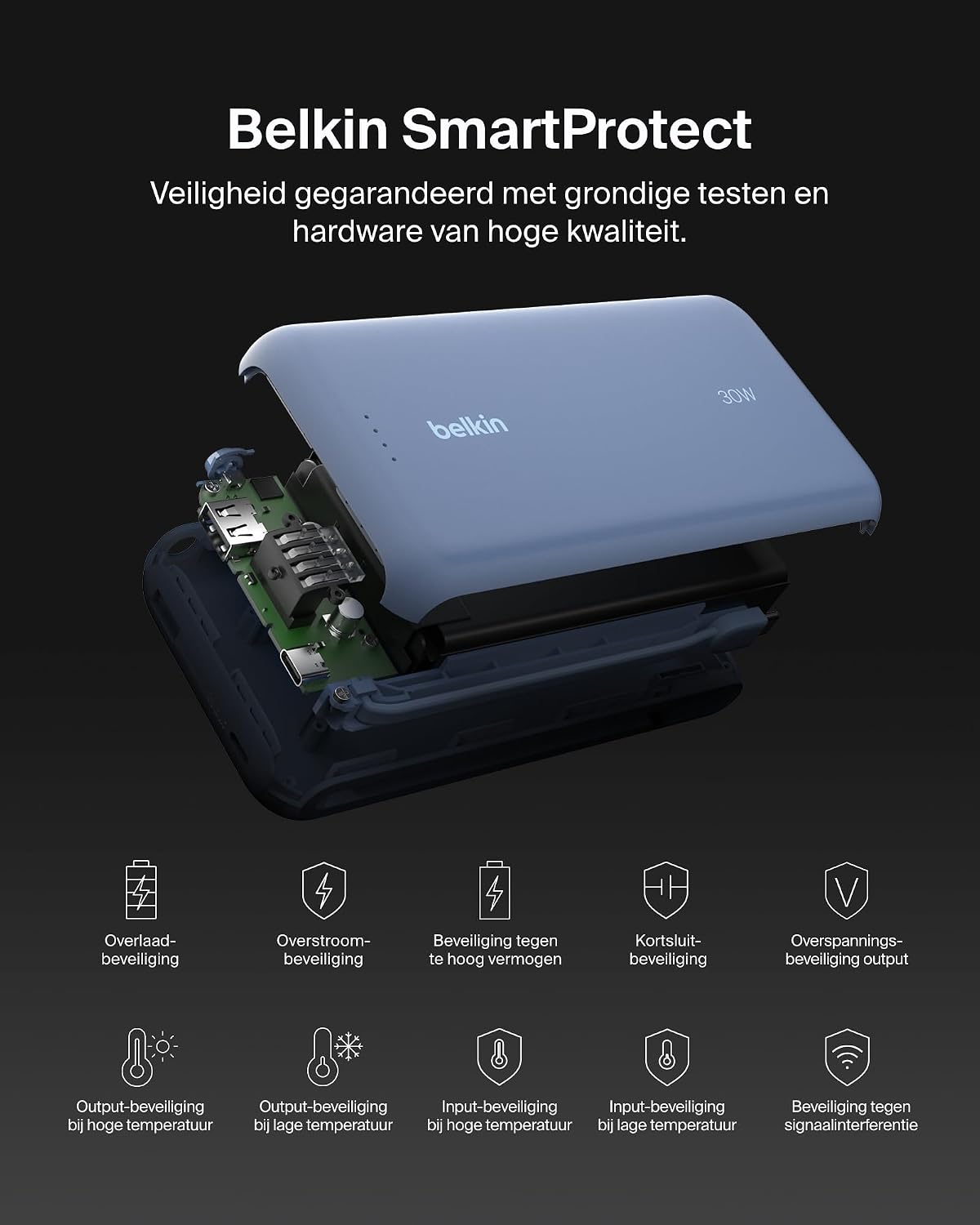
Resim: Patlamış bir view of the Belkin Power Bank, highlighting its internal components and the comprehensive Belkin SmartProtect safety features, including protection against overcharge, overcurrent, and short-circuits.
Özellikler
| Özellik | Detay |
|---|---|
| Model Numarası | BPB024hqBL |
| Pil Kapasitesi | 20,000 mAh |
| Çıkış Gücü | Up to 30W Power Delivery (shared) |
| Bağlayıcı Türü | Integrated USB-C cable, 1x USB-C port, 1x USB-A port |
| Cilttage | 5 Volt |
| Ampöfke | 3 Ampburada |
| Şarj Süresi (Power Bank) | Yaklaşık 12 saat |
| Ürün Boyutları | 15.4x7.62x2.51 cm |
| Ürün Ağırlığı | 395 gram |
| Pil Hücresi Kompozisyonu | Lityum iyon |
| Uyumlu Cihazlar | Apple iPhone 16 series, iPhone 15 series, iPhone 14 series, iPhone 13 series, Samsung Galaxy S22/S23/S24/S25 series, iPad Pro, iPad Air, iPad, iPad Mini, and other USB-C/USB-A compatible devices. |
Garanti ve Destek
Garanti Bilgileri
This Belkin Portable Power Bank comes with a 2 yıllık üretici garantisi. Additionally, it includes a Connected Equipment Warranty, providing peace of mind for your connected devices. Please retain your proof of purchase for warranty claims.
Müşteri Desteği
Daha fazla yardım, teknik destek veya garanti sorularınız için lütfen resmi Belkin destek sayfasını ziyaret edin. webDaha fazla bilgiyi web sitelerinde bulabilir veya müşteri hizmetleriyle iletişime geçebilirsiniz. www.belkin.com/support.