
ASD A-LFM12D20SRGBW-N-4p
ASD 12 Inch Smart RGBW Flush Mount Ceiling Light Instruction Manual
Marka: ASD | Modeli: A-LFM12D20SRGBW-N-4p
1. Giriş
Thank you for choosing the ASD 12 Inch Smart RGBW Flush Mount Ceiling Light. This fixture combines a stylish minimalist design with efficient, versatile lighting solutions. Featuring multicolor RGBW capabilities, smart app control, and remote operation, it offers a wide range of lighting effects for your space. This manual provides essential information for safe installation, effective operation, and proper maintenance of your new lighting fixture.

Figure 1.1: ASD 12 Inch Smart RGBW Flush Mount Ceiling Light with accessories.
2. Güvenlik Bilgileri
Kurulum ve kullanımdan önce lütfen tüm talimatları dikkatlice okuyun. Bu kılavuzu ileride başvurmak üzere saklayın.
- Elektriksel Güvenlik: Always turn off power at the circuit breaker before installing, cleaning, or servicing the fixture. Consult a qualified electrician if you are unsure about wiring.
- Sadece İç Mekanda Kullanım: This fixture is designed for indoor use in dry and damp Bulunduğu yerlerde doğrudan su püskürtmesine maruz bırakmayın veya suya batırmayın.
- Cilttage: Güç kaynağı hacmini sağlayıntage matches the fixture's requirements (120V).
- Montaj: Mount the fixture securely to a standard electrical outlet box.
- İşleme: Parçalara zarar vermemek için armatürü dikkatli kullanın.
3. Paket İçeriği
Kuruluma başlamadan önce tüm bileşenlerin mevcut olduğundan emin olun:
- ASD 12 Inch Smart RGBW Flush Mount Ceiling Light Fixture (4 units)
- Uzaktan kumanda
- Montaj Donanımı (vidalar, kablo bağlantı somunları)
- Kullanım Kılavuzu
4. Özellikler
| Özellik | Detay |
|---|---|
| Marka | otizm spektrum bozukluğu |
| Model Adı | ÇATI ODASI |
| Parça Numarası | A-LFM12D20SRGBW-N-4p |
| Renk | 12" | Nickel | RGBW |
| Malzeme | Alloy Steel, Acrylic |
| Stil | Modern |
| Ürün Boyutları | 11.3"U x 11.3"G x 3.4"Y |
| Belirli Kullanımlar | Sadece iç mekanda kullanılabilir |
| Güç Kaynağı | Sabit kablolu |
| Işık Kaynağı Türü | NEDEN OLMUŞ |
| Bitiş Türü | Boyalı |
| Gölge Malzemesi | Plastik |
| Cilttage | 120 Volt |
| Netage | 20 watt |
| Montaj Tipi | monteli |
| Ortalama Hayat | 50,000 Saat |
| Özel Özellikler | 1064/1220LM, Remote Control, RGBW, Smart App, CCT Adjustable 2700-6500K |

Şekil 4.1: Ürün boyutları ve temel özellikleri.
5. Kurulum
Follow these steps to install your ASD Smart RGBW Flush Mount Ceiling Light:
- Kurulum için Hazırlanın: Turn off power at the circuit breaker before starting. Ensure the mounting surface is clean and stable.
- Remove the Lens: Gently remove the lens from the fixture by rotating it clockwise. This will expose the mounting holes and wiring connections.
- Fikstürü Takın: Attach the fixture's base to the electrical outlet box using the provided screws. Ensure it is securely fastened.
- Kablo Bağlantıları: Connect the wires: Black to Black (Live), White to White (Neutral), and Ground to Ground. Secure all connections with wire nuts. Carefully tuck all wires back into the outlet box.
- Attach the Lens: Once wiring is complete and secure, attach the lens by aligning it with the fixture and rotating it counter-clockwise until it locks into place.
- Gücü Geri Yükle: Sigortadan elektriği tekrar açın.
- Download ASD SMART App: For smart control features, download the "ASD SMART" application from your smartphone's app store. Scan the QR codes below or click the links to download.
Google Play Mağazası (Android)
Apple Uygulama Mağazası (iOS) - Add Fixture to App: Follow the in-app instructions to add your new ceiling light to the ASD SMART app. This typically involves putting the light into pairing mode and connecting it to your Wi-Fi network.

Figure 5.1: Initial installation steps: removing the lens and wiring.
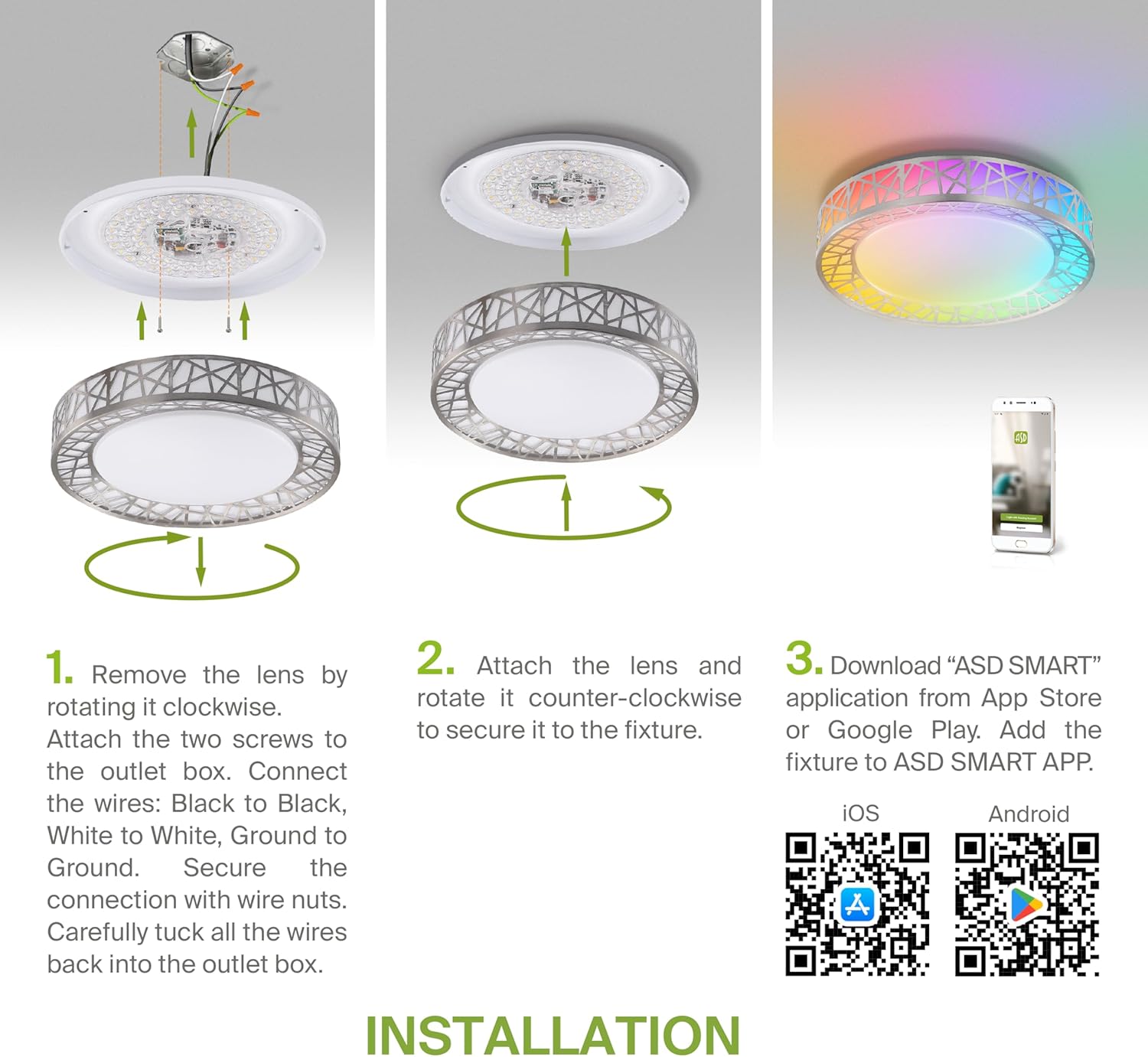
Figure 5.2: Complete installation overview including app download.
6. Kullanım Talimatları
Your ASD Smart RGBW Flush Mount Ceiling Light offers multiple control methods:
6.1 Uzaktan Kumanda
The included remote control allows for basic functions:
- Açık/Kapalı: Işığı açın veya kapatın.
- Karartma: Adjust brightness levels smoothly.
- SKK Ayarı: Change color temperature (e.g., from warm white to cool white).
- RGB Renk Seçimi: Cycle through or select specific RGB colors.
6.2 ASD SMART App Control
The ASD SMART app provides full control and advanced features:
- 16.7 Milyon Renk: Choose any color from the full RGBW spectrum.
- Smooth Dimming & CCT: Precisely adjust brightness and color temperature (2700K-6500K).
- Lighting Patterns: Select pre-set or custom lighting scenes and effects.
- Gruplama: Control multiple fixtures simultaneously.
- Planlama: Set timers for lights to turn on/off or change settings automatically.

Figure 6.1: RGBW color capabilities.

Figure 6.2: Control via remote and smart app.

Figure 6.3: Seamless dimming functionality.
6.3 Sesli Kontrol (Alexa ve Google Asistan)
The fixture is compatible with Amazon Alexa and Google Assistant for convenient voice commands:
- Ensure your ASD SMART app is linked to your Alexa or Google Home account.
- Use commands such as "Alexa, turn on the living room light" or "Hey Google, set the bedroom light to blue."

Figure 6.4: Compatibility with Alexa and Google Assistant.
7. Bakım
To ensure the longevity and optimal performance of your ceiling light:
- Temizlik: Temizlemeden önce elektriği kesin. Armatürü yumuşak, kuru bir bezle silin. Aşındırıcı temizleyiciler veya çözücüler kullanmayın.
- Ampul Değişimi: This fixture uses integrated LED technology and does not require bulb replacement.
8. Sorun Giderme
Tavan lambanızla ilgili sorunlarla karşılaşırsanız, aşağıdaki yaygın sorunlar ve çözümlerine göz atın:
| Sorun | Olası Neden | Çözüm |
|---|---|---|
| Işık yanmıyor | No power, loose wiring, faulty switch | Devre kesiciyi kontrol edin. Tüm kablo bağlantılarının sağlam olduğundan emin olun. Duvar anahtarını test edin. |
| Uzaktan kumanda çalışmıyor | Dead battery, out of range, interference | Replace remote battery. Ensure you are within range. Remove any obstructions. |
| Uygulama ışığa bağlanamıyor. | Incorrect Wi-Fi password, light not in pairing mode, 5GHz Wi-Fi network | Verify Wi-Fi password. Reset light to pairing mode (refer to app instructions). Ensure you are on a 2.4GHz Wi-Fi network. |
| Ses kontrolü yanıt vermiyor | App not linked to voice assistant, incorrect device name | Check linking in ASD SMART app and voice assistant app. Verify device name in voice assistant app. |
9. Garanti ve Destek
ASD sağlar 5 yıllık sınırlı garanti for this product, guaranteeing top quality and safety. The fixture is ETL certified, ensuring compliance with North American safety standards.
For technical support, warranty claims, or any questions not covered in this manual, please contact ASD customer service. Refer to the product packaging or the official ASD webiletişim bilgileri için site.
Ask a question about this manual
Ask about setup, troubleshooting, compatibility, parts, safety, or missing instructions. Manuals+ will review the question and use this page’s manual context to help answer it.