
1. Giriş
This manual provides detailed instructions for the installation, setup, and operation of your ASD 20-Inch Smart RGBW Flush Mount Ceiling Light. This LED lighting fixture combines a modern design with advanced smart features, offering a versatile lighting solution for various indoor spaces. It features RGBW color-changing capabilities, dimming, and control via a remote or a smartphone app, with compatibility for Alexa and Google Assistant.
2. Güvenlik Bilgileri
Kurulum ve kullanımdan önce lütfen tüm talimatları dikkatlice okuyun. Bu kılavuzu ileride başvurmak üzere saklayın.
- Elektriksel Güvenlik: Always turn off power at the circuit breaker before installing, servicing, or cleaning the fixture. Consult a qualified electrician if you are unsure about electrical wiring.
- Kurulum: Montaj yüzeyinin armatürün ağırlığını taşıyabileceğinden emin olun. Tüm yerel elektrik yönetmeliklerine ve kurallarına uyun.
- İşleme: Do not handle the fixture with wet hands. Avoid direct eye exposure to the light source when illuminated.
- Çevre: Bu armatür D sınıfı olarak derecelendirilmiştir.amp locations but is intended for indoor use only. Do not expose to direct water spray or submersion.
- Temizlik: Use a soft, dry cloth for cleaning. Do not use harsh chemicals or abrasive cleaners.
3. Paket İçeriği
Kuruluma başlamadan önce tüm bileşenlerin mevcut olduğundan emin olun:
- ASD 20-Inch Smart RGBW Flush Mount Ceiling Light Fixture (2 units)
- Uzaktan Kumanda (1 adet)
- Montaj Donanımı (vidalar, kablo bağlantı somunları)
- Kullanım Kılavuzu
4. Ürün Özellikleri
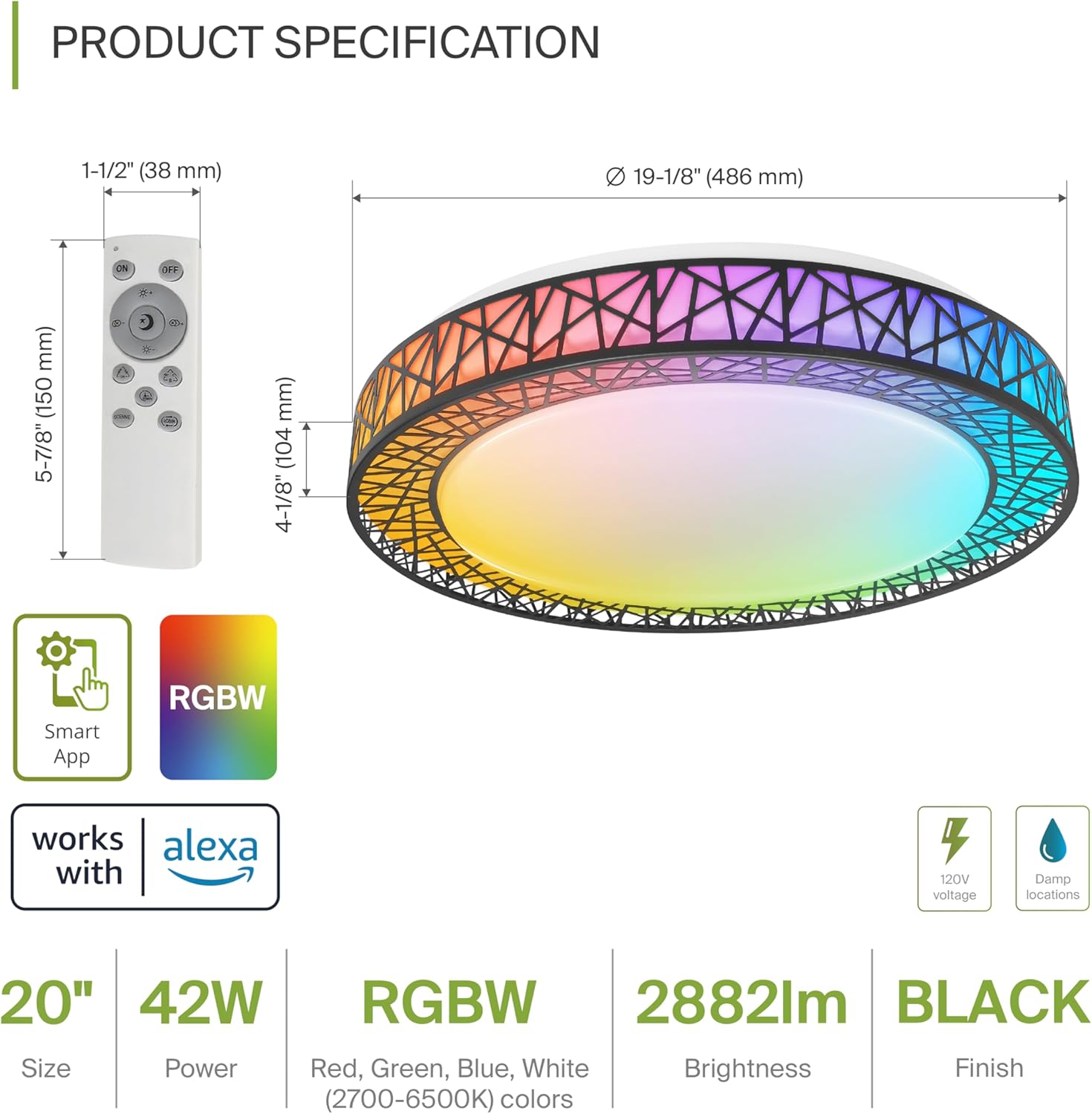
Product Specification Diagram: Dimensions, remote control, and key features.
| Özellik | Detay |
|---|---|
| Marka | otizm spektrum bozukluğu |
| Model Adı | ÇATI ODASI |
| Model Numarası | A-LFM20D42SRGBW-B-2p |
| Renk | 20" | Black | RGBW |
| Malzeme | Acrylic, Alloy Steel |
| Ürün Boyutları | 19.1"U x 19.1"G x 4.1"Y |
| Güç Kaynağı | Sabit kablolu |
| Netage | 42 watt |
| Cilttage | 120 Volt |
| Parlaklık | 2579 lümen (maks.) |
| Renk Sıcaklığı | 2700-6500K (ŞKK Ayarlanabilir) |
| Özel Özellikler | RGBW, Remote Control, Smart App, Dimmable |
| Kontrol Yöntemi | Remote, Voice (Alexa, Google Assistant) |
| İç/Dış Mekan Kullanımı | Kapalı |
| Su Direnç Seviyesi | Suya Dayanıklı (D)amp Locations Rated) |
| Ortalama Hayat | 50,000 Saat |
| Sertifikasyon | ETL Listelendi |
5. Kurulum Talimatları
Before starting, ensure the power is turned off at the circuit breaker.

Installation Diagram: Visual guide for mounting the light fixture.
- Fikstürün Hazırlanması: Remove the lens from the light fixture by rotating it clockwise.
- Braketi Monte Edin: Attach the two screws to the outlet box on your ceiling.
- Kablo Bağlantıları: Connect the wires: Black to Black, White to White, and Ground to Ground. Secure these connections with wire nuts.
- Sabitlemeyi Sabitleyin: Carefully tuck all wires back into the outlet box. Attach the light fixture to the mounting bracket.
- Reattach the Lens: Rotate the lens counter-clockwise to secure it to the fixture.
Kurulum tamamlandıktan sonra devre kesiciden gücü geri getirin.
6. Smart Feature Setup
6.1. ASD SMART App Control
The ASD Smart RGBW Flush Mount Ceiling Light can be controlled via the ASD SMART App on your smartphone (Wi-Fi internet connection required).
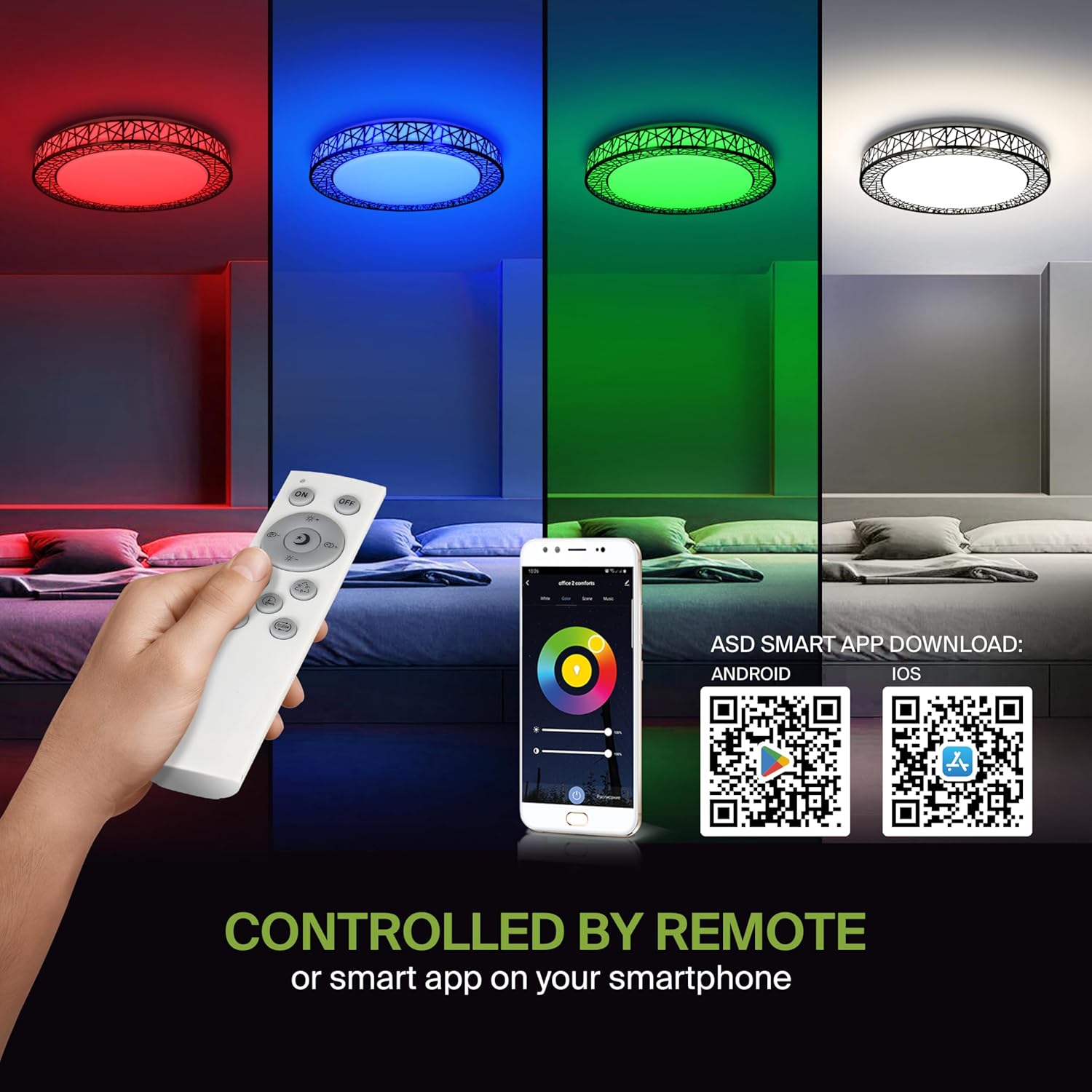
Remote control and ASD SMART App interface with QR codes for download.
- Uygulamayı indirin: Scan the QR code provided in the product images or search for "ASD SMART" in the Apple Uygulama Mağazası (iOS için) veya Google Play Mağazası (Android için).
- Kayıt Ol/Giriş Yap: Hesap oluşturmak veya giriş yapmak için uygulama içi yönergeleri izleyin.
- Cihaz Ekle: In the app, select the option to add a new device. Follow the pairing instructions to connect your ceiling light to the app via Wi-Fi.
6.2. Ses Kontrolü (Alexa ve Google Asistan)
The fixture is compatible with Amazon Alexa and Google Assistant for convenient voice control.

Voice control compatibility with Alexa and Google Assistant.
- Hesabı Bağla: Open your Alexa or Google Home app. Navigate to the 'Skills' or 'Works with Google' section.
- Arama ASD SMART: Arama the "ASD SMART" skill/service and enable it.
- Bağlamak: Link your ASD SMART account with your Alexa or Google Home account.
- Cihazları Keşfedin: Ask Alexa or Google Assistant to discover new devices, or manually initiate device discovery in their respective apps.
7. Kullanım Talimatları
7.1. Uzaktan Kumanda İşlemi
Use the included remote control to manage your light fixture's functions.
Remote control for easy access to light functions.
- Güç Açma/Kapatma: Işığı açmak veya kapatmak için güç düğmesine basın.
- Parlaklık Ayarı: Use the brightness buttons to increase or decrease the light intensity (smoothly dimmable).
- Color Selection (RGBW): Press the dedicated color buttons (Red, Green, Blue, White) or use the color wheel/mode buttons to cycle through 16.7 million colors.
- Renk Sıcaklığı (CCT): Adjust the white light color temperature between 2700K (warm white) and 6500K (cool white).
- Sahne Modları: Select pre-programmed lighting patterns or scenes.
7.2. App Control Operation
The ASD SMART App offers comprehensive control over your light fixture.
- Tam Renk Spektrumu: Access the full 16.7 million RGBW color palette.
- Precise Dimming: Adjust brightness levels with fine control.
- Planlama: Set schedules for the light to turn on/off or change modes at specific times.
- Gruplama: Group multiple ASD smart lights to control them simultaneously.
- Özel Sahneler: Kendi özel aydınlatma sahnelerinizi yaratın ve kaydedin.
7.3. Voice Command Examples
After linking your device to Alexa or Google Assistant, use commands such as:
- "Alexa, turn on the [Light Name]."
- "Hey Google, [Işık Adı]'nı maviye ayarla."
- "Alexa, dim the [Light Name] to 50%."
- "Hey Google, make the [Light Name] warmer."
8. Bakım
To ensure the longevity and optimal performance of your ASD Smart RGBW Flush Mount Ceiling Light, follow these maintenance guidelines:
- Temizlik: Temizlemeden önce, armatürün elektriğinin kapatıldığından emin olun. Yumuşak, kuru veya hafif nemli bir bez kullanın.amp cloth to wipe the surface. Avoid using abrasive cleaners, solvents, or harsh chemicals, as these can damage the finish or electrical components.
- Denetleme: Periodically check the fixture for any signs of damage, loose connections, or wear. If any issues are found, turn off the power and consult a qualified electrician.
- Ampul Değişimi: This fixture uses integrated LED technology and does not require bulb replacement. The LEDs are designed for a long lifespan.
9. Sorun Giderme
If you encounter issues with your ASD Smart RGBW Flush Mount Ceiling Light, refer to the following common solutions:
| Sorun | Olası Neden | Çözüm |
|---|---|---|
| Işık yanmıyor | No power, loose wiring, faulty switch | Devre kesiciyi kontrol edin. Tüm kablo bağlantılarının sağlam olduğundan emin olun. Duvar anahtarını test edin. |
| Uzaktan kumanda çalışmıyor | Dead batteries, remote out of range, pairing issue | Replace remote batteries. Ensure remote is within operating range. Re-pair the remote with the light (refer to app instructions for pairing). |
| Uygulama denetimi çalışmıyor | No Wi-Fi connection, incorrect app pairing, outdated app | Verify Wi-Fi connectivity. Ensure the light is correctly paired in the ASD SMART App. Update the app to the latest version. |
| Ses kontrolü yanıt vermiyor | Account not linked, device not discovered, incorrect commands | Ensure ASD SMART account is linked to Alexa/Google Assistant. Redo device discovery. Use correct voice commands. |
| Işık beklenmedik şekilde titriyor veya kararıyor | Unstable power supply, loose wiring, incompatible dimmer (if applicable) | Check power supply stability. Verify wiring. This light is dimmable via remote/app; external dimmers may cause issues. |
10. Garanti Bilgileri
ASD sağlar 5 yıllık sınırlı garanti for this product. This warranty covers defects in materials and workmanship under normal use. Please retain your proof of purchase for warranty claims. For detailed warranty terms and conditions, please refer to the official ASD website veya müşteri desteği ile iletişime geçin.
11. Müşteri Desteği
If you have any questions, require technical assistance, or need to make a warranty claim, please contact ASD customer support through the following channels:
- Webalan: Visit the official ASD Lighting webSSS ve destek kaynakları için site.
- E-posta: Refer to your product packaging or the ASD webMüşteri hizmetleri e-posta adresleri için site.
- Telefon: Refer to your product packaging or the ASD webMüşteri hizmetleri telefon numaraları için site.
Please have your model number (A-LFM20D42SRGBW-B-2p) and purchase date ready when contacting support.