
1. Giriş
The dockteck M.2 NVMe SATA SSD Enclosure Adapter (Model DH0005) provides a convenient and efficient solution for converting your M.2 NVMe or SATA SSD into a portable external storage device. Featuring a tool-free design and high-speed USB 3.2 Gen 2 interface, this enclosure supports data transfer rates up to 10Gbps for NVMe SSDs and 6Gbps for SATA SSDs. It is compatible with various M.2 SSD sizes (2230, 2242, 2260, 2280) and operating systems, making it a versatile accessory for data management and expansion.
2. Paket İçeriği
Lütfen paketinizde tüm öğelerin mevcut olduğundan emin olun:
- 1 x dockteck M.2 SSD Enclosure Adapter
- 1 x USB-C to C Cable (approx. 9.8 inches / 25 cm)
- 1 x USB-A to C Cable (approx. 9.8 inches / 25 cm)
- 1 x Termal Ped
- 1 x Spare Mounting Pin
- 1 x Kullanım Kılavuzu (bu belge)
3. Özellikler
- Yüksek Hızlı Veri Aktarımı: USB 3.2 Gen 2 Type-C interface supports up to 10Gbps for NVMe SSDs and 6Gbps for SATA SSDs.
- UASP/TRIM Protocol Support: Enhances SSD read and write speeds for efficient large file Transferler.
- Aletsiz Kurulum: Easy slide-open design for quick SSD insertion and removal without tools.
- Etkili Isı Dağıtımı: Constructed with an aluminum alloy shell and includes a silicone thermal pad to maintain optimal operating temperatures and ensure data stability.
- Geniş Uyumluluk: Supports M-Key and B+M Key M.2 NVMe and SATA SSDs of sizes 2230, 2242, 2260, and 2280, up to 4TB capacity.
- Geniş Cihaz Desteği: Compatible with Windows, Mac OS, Linux, and Android systems, connecting to PCs, laptops, tablets, smartphones, game consoles, and smart TVs.
- Otomatik Uyku Modu: Enters sleep mode after 15 minutes of inactivity to protect your SSD and conserve power.
4. Kurulum ve Kurulum
M.2 SSD'nizi muhafazaya takmak için şu adımları izleyin:
- Muhafazayı Açın: Press the button on the end of the enclosure and slide the internal tray out.
- SSD'yi takın: Gently insert your M.2 SSD into the slot at a 45-degree angle. Ensure the key type (M-Key or B+M Key) matches the enclosure's slot.
- SSD'yi güvenli hale getirin: Push the SSD down until it is flat, then secure it with the provided rubber mounting pin at the end of the SSD.
- Isı yalıtım pedi uygulayın: Peel off the protective films from both sides of the thermal pad and place it onto the SSD chip. This helps dissipate heat to the aluminum casing.
- Muhafazayı Kapatın: Slide the internal tray back into the aluminum shell until it clicks into place.

Figure 1: Easy Installation Steps for M.2 SSD
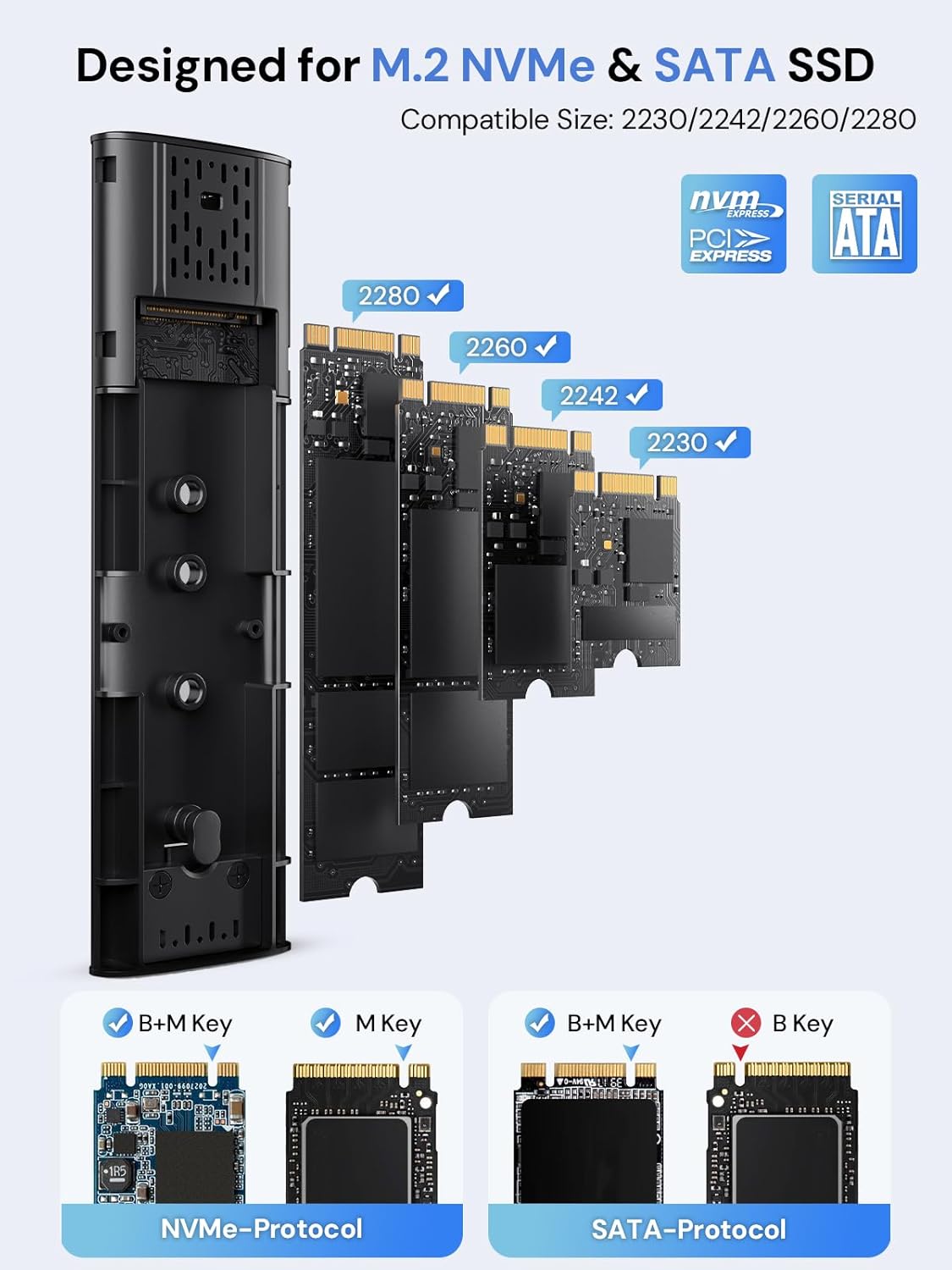
Figure 2: Compatible M.2 SSD Sizes and Key Types
5. Kullanım Talimatları
Once your SSD is installed, connect the enclosure to your device using one of the provided USB cables. The enclosure is plug-and-play, requiring no additional drivers for most operating systems.
- Bağlantı: Use the USB-C to C cable for devices with a USB-C port, or the USB-A to C cable for devices with a standard USB-A port.
- Veri Transferi: The enclosure will appear as an external drive on your computer or compatible device. You can drag and drop files, or use your system's file Veri aktarımı için yönetim araçları.
- LED Göstergesi: A clear LED indicator on the enclosure will show activity during data transfer.
- Otomatik Uyku: To protect your SSD and conserve power, the enclosure will automatically enter sleep mode after 15 minutes of no read/write activity.
Video 1: Demonstration of M.2 SSD Enclosure Adapter usage, including tool-free installation, high-speed data transfer, heat dissipation features, and connectivity with various devices like smartphones and laptops.
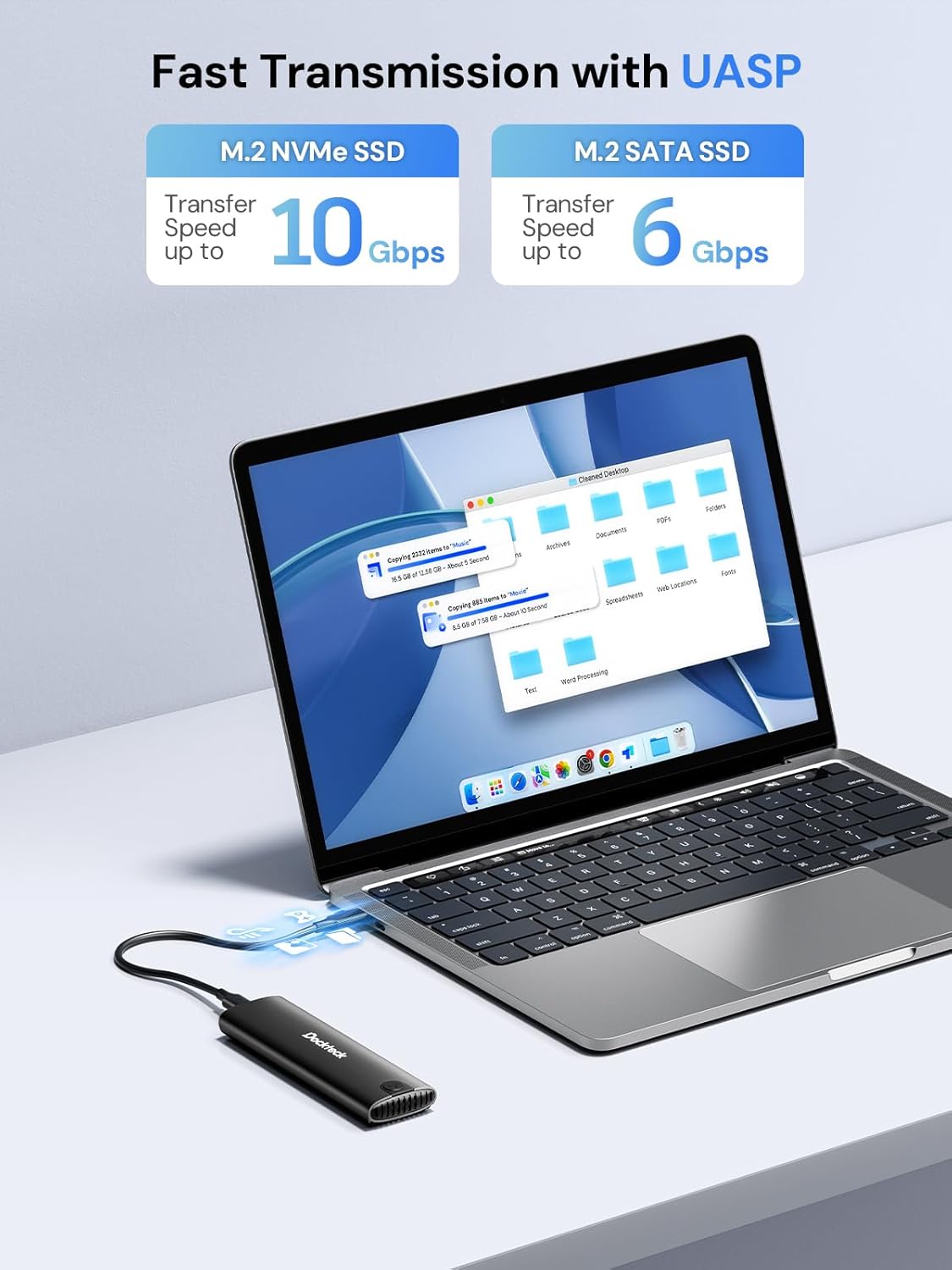
Figure 3: Fast Data Transmission with UASP
6. Isı Dağılımı
The dockteck M.2 SSD Enclosure is designed with effective heat dissipation in mind to ensure stable performance and prolong the life of your SSD.
- Alüminyum Alaşımlı Kabuk: Sağlam alüminyum casing acts as a heatsink, drawing heat away from the SSD.
- Silicone Thermal Pad: The included thermal pad creates efficient contact between the SSD and the aluminum shell, further enhancing heat transfer.
- Isı Dağıtım Delikleri: Strategically placed holes on the enclosure facilitate airflow and heat release.

Figure 4: Effective Heat Dissipation Design
7. Uyumluluk
This enclosure offers broad compatibility with various M.2 SSDs and host devices.
- SSD Protocols: Supports both NVMe (PCIe) and SATA protocols.
- SSD Key Types: Compatible with M-Key and B+M Key M.2 SSDs. (Note: B-Key only SATA SSDs are not supported).
- SSD Boyutları: Supports M.2 SSDs of form factors 2230, 2242, 2260, and 2280.
- Maksimum Kapasite: Supports M.2 SSDs up to 4TB.
- İşletim Sistemleri: Works with Windows, Mac OS, Linux, and Android systems.
- Uyumlu Cihazlar: Can be connected to PCs, laptops, tablets, smartphones (with USB-C), game consoles, and smart TVs.

Figure 5: Wide Device and System Compatibility
8. Sorun Giderme
Sorunlarla karşılaşırsanız, lütfen aşağıdaki yaygın sorun giderme adımlarına bakın:
- SSD Algılanmadı:
- Ensure the M.2 SSD is correctly inserted and secured within the enclosure.
- Verify that your SSD is either NVMe (M-Key or B+M Key) or SATA (B+M Key). B-Key only SATA SSDs are not supported.
- Check if the SSD is initialized and formatted. New SSDs typically need to be initialized and formatted in Disk Management (Windows) or Disk Utility (Mac OS) before use.
- Try connecting the enclosure to a different USB port on your device.
- Mümkünse farklı bir USB kablosuyla test edin.
- Yavaş Transfer Hızları:
- Ensure your device's USB port supports USB 3.2 Gen 2 (10Gbps) for optimal performance. Older USB 2.0 or 3.0 ports will result in lower speeds.
- İşletim sisteminizin ve sürücülerinizin güncel olduğundan emin olun.
- Confirm that the SSD itself is capable of high speeds (e.g., NVMe SSDs are faster than SATA SSDs).
- Çok sayıda küçük parçayı transfer etmekten kaçının fileAynı anda birden fazla işlem yapılması, genel aktarım hızını düşürebilir.
- Enclosure Gets Warm:
- Alüminyum kasanın yoğun kullanım sırasında ısınması normaldir, çünkü SSD'den gelen ısıyı dağıtmak üzere tasarlanmıştır.
- Ensure the thermal pad is correctly installed on the SSD to facilitate heat transfer to the enclosure.
- Avoid placing the enclosure in enclosed spaces that restrict airflow.
- Aralıklı Bağlantı Kesintileri:
- Ensure the USB cable is securely connected to both the enclosure and your device.
- Farklı bir USB portu veya kablo deneyin.
- Check for power management settings on your computer that might be turning off USB ports to save power.
9. Özellikler
| Özellik | Detay |
|---|---|
| Model Numarası | DH0005 |
| Ürün Boyutları | 4.9 x 1.5 x 0.6 inç (12.4 x 3.8 x 1.5 cm) |
| Ürün Ağırlığı | 1.92 ons (54.4 gr) |
| Arayüz | USB 3.2 Gen 2 Tip-C |
| Veri Aktarım Hızı | Up to 10Gbps (NVMe), Up to 6Gbps (SATA) |
| Supported SSD Protocols | NVMe (PCIe) and SATA |
| Supported SSD Key Types | M-Key, B+M Key |
| Desteklenen SSD Boyutları | 2230, 2242, 2260, 2280 |
| Max SSD Capacity | 4TB |
| Uyumlu İşletim Sistemleri | Windows, MacOS, Linux, Android |
| Malzeme | Alüminyum Alaşımı |
| Renk | Siyah |
| Üretici | dockteck |
10. Garanti ve Destek
dockteck products are designed for reliability and performance. For warranty information, technical support, or any inquiries regarding your M.2 NVMe SATA SSD Enclosure Adapter, please contact dockteck customer service through their official webÜrünün satın alındığı site veya perakendeci.
You can visit the official dockteck store for more information: dockteck Store on Amazon.