
FUWANG A3354 A3355 A3356 A2696 A2757 A2777
FUWANG Keyboard Case for iPad A16 11th/10th Generation User Manual
Model: A3354, A3355, A3356, A2696, A2757, A2777
1. Ürün Bittiview
The FUWANG Keyboard Case is designed to enhance your iPad experience, transforming it into a versatile laptop-like device. It features a detachable wireless Bluetooth keyboard with 7-color backlighting, multiple viewing angles, and a protective case with an integrated pencil holder. The case is crafted from durable synthetic leather with a unique marble pattern and a soft TPU inner shell for comprehensive protection.
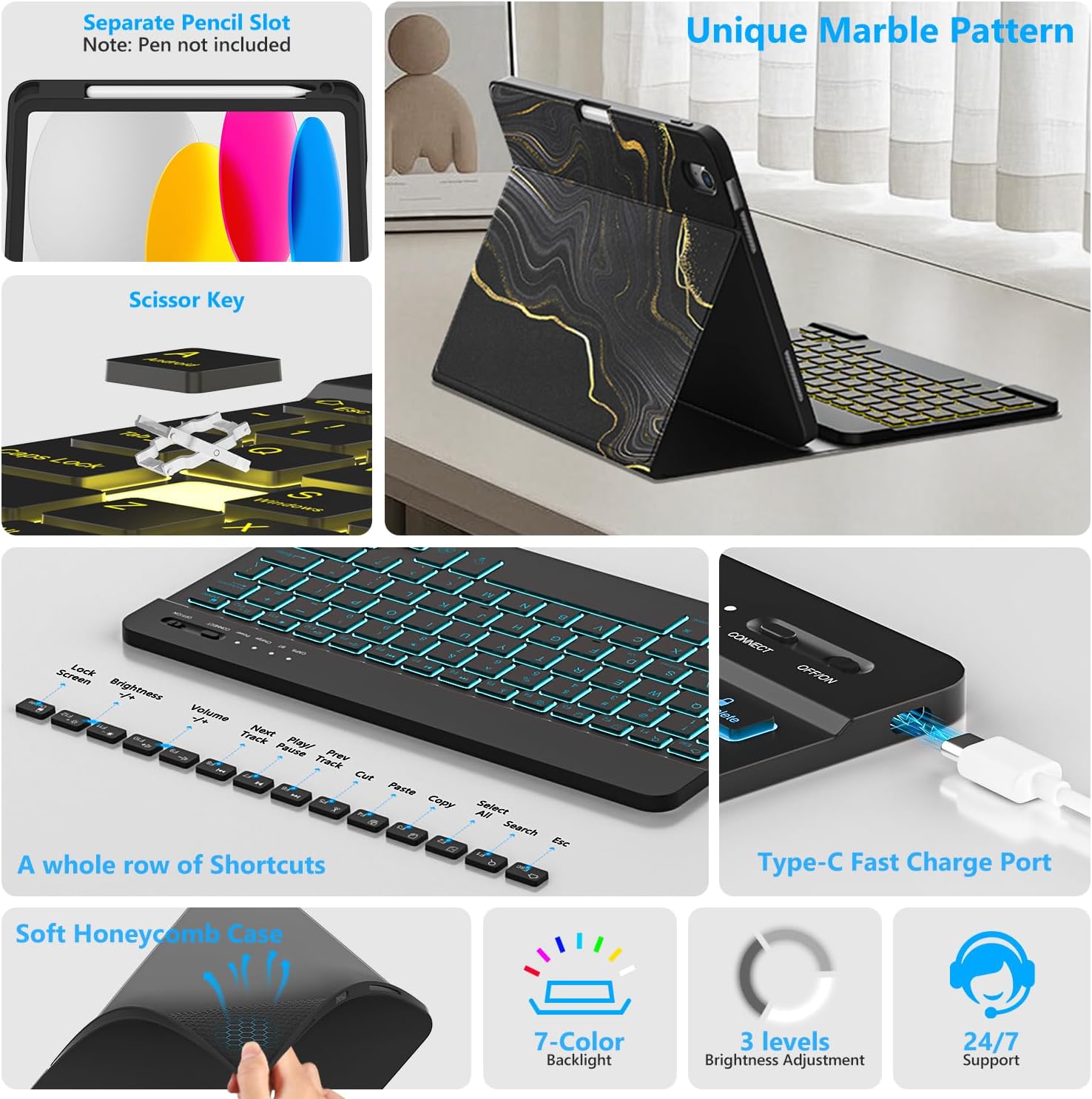
Resim 1.1: Üzerindeview of FUWANG Keyboard Case features, highlighting the pencil slot, scissor-key mechanism, keyboard shortcuts, Type-C charging port, and the soft honeycomb case for heat dissipation.
2. Paket İçeriği
- 1 x FUWANG iPad Case (for A16 11th/10th Generation)
- 1 x Wireless Backlit Bluetooth Keyboard
- 1 x Type-C Şarj Kablosu
- 1 x Kullanım Kılavuzu
Note: iPad tablet and stylus are not included.
3. Uyumluluk
Bu klavye kılıfı, aşağıdaki iPad modelleri için özel olarak tasarlanmıştır:
- iPad A16 11th Generation 11" 2025: Model Numaraları A3354, A3355, A3356
- iPad 10th Generation 10.9" 2022: Model Numaraları A2696, A2757, A2777, A3162
To verify your iPad model, please check the back of your tablet for a model number starting with "A". This case is not compatible with other iPad models.
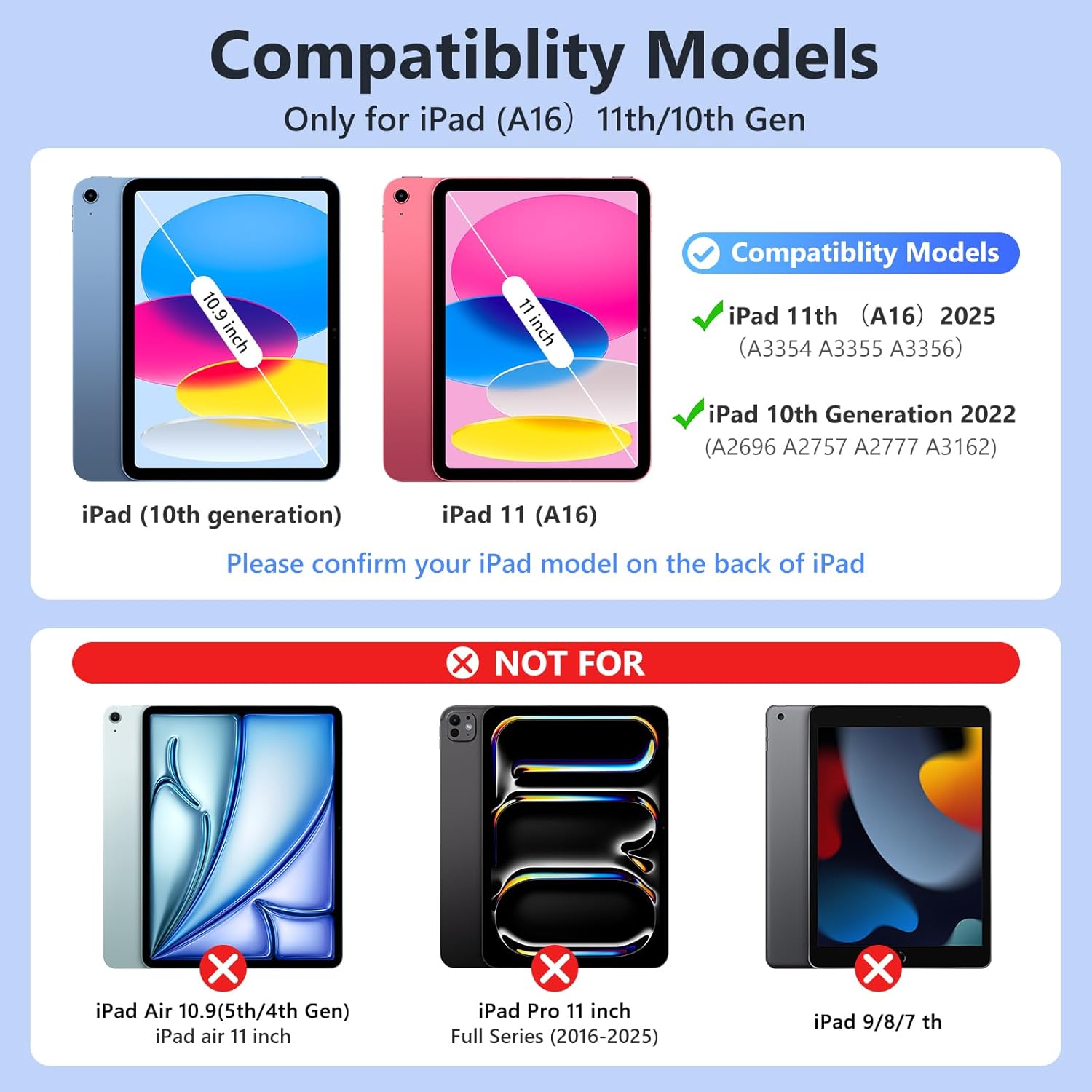
Resim 3.1: Visual guide for iPad model compatibility. Please confirm your iPad model number on the back of your device.
4. Kurulum Talimatları
4.1 Initial Charging of the Keyboard
Before first use, fully charge the keyboard for 2 to 3 hours using the provided Type-C charging cable. Connect the cable to the keyboard's Type-C port and a USB power source. The power indicator light will flash during charging and turn off when fully charged.

Resim 4.1: Keyboard charging via Type-C port. Initial charge takes 2-3 hours.
4.2 Bluetooth Klavyenin Eşleştirilmesi
- Klavyenin şarjlı olduğundan emin olun.
- Turn on the keyboard by sliding the power switch to the "ON" position. The power indicator will flash for approximately 3 seconds and then turn off.
- iPad'inizde şuraya gidin: Ayarlar > Bluetooth ve Bluetooth'u açın.
- The iPad will search for available devices. Select "Bluetooth Keyboard" (or similar name) from the list.
- If prompted, enter the pairing code displayed on your iPad onto the keyboard and press Girmek.
- Once paired, the keyboard's indicator light will turn off, and your iPad will show the keyboard as "Connected".
For subsequent uses, simply turn on your iPad's Bluetooth and the keyboard's power. Press any key on the keyboard, and it should automatically reconnect.
4.3 Installing the iPad into the Case
Gently insert your iPad into the soft TPU inner shell of the case. Ensure all cutouts for the camera, speakers, and volume buttons align perfectly. The case provides full protection against drops and scratches.
5. Kullanım Talimatları
5.1 Arkadan Aydınlatmalı Klavyenin Kullanımı
The keyboard features 7-color backlighting with 3 adjustable brightness levels.
- To change backlight colors: Press the Ampul simgesi key (often next to the Spacebar or Function keys).
- Parlaklığı ayarlamak için: Basın. Ampul simgesi anahtar + Yukarı/Aşağı ok tuşları or a dedicated brightness key (if available).

Resim 5.1: Demonstrating the 7-color backlit keyboard with adjustable brightness settings.
5.2 Ayarlama ViewAçılar
The case is designed with three anti-slip grooves, allowing you to adjust your iPad to multiple viewing angles (e.g., 110°, 120°, 130°) for comfortable typing, viewçizmek veya çizmek.
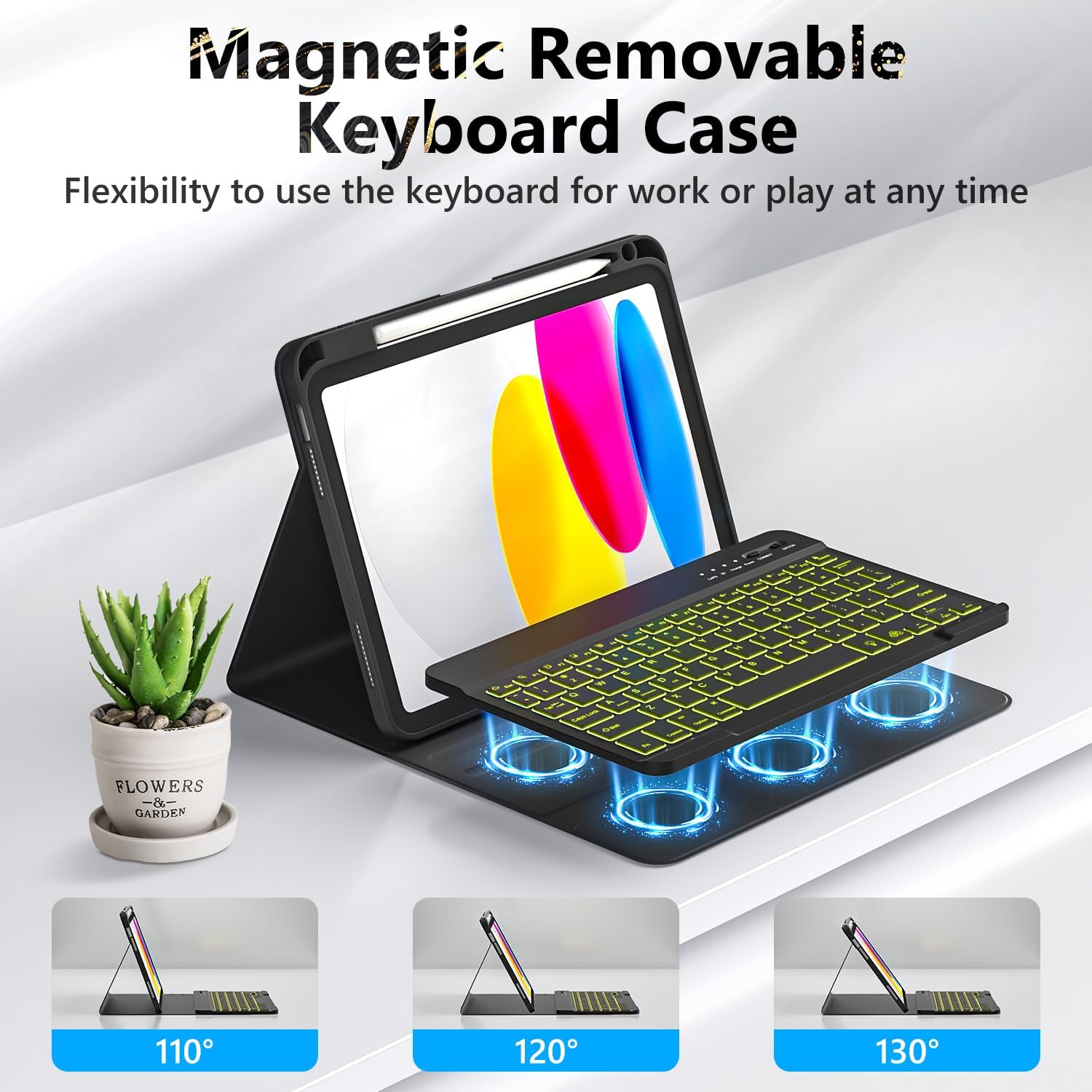
Resim 5.2: The magnetic removable keyboard case offers flexible viewing angles for various tasks.
5.3 Klavye Kısayolları
The keyboard includes a row of dedicated function keys and shortcuts for quick access to iPad features:
- Kilit Ekranı
- Parlaklık Ayarı
- Ses Kontrolü
- Medya Oynatma Kontrolleri (Previous Track, Play/Pause, Next Track)
- Copy, Cut, Paste
- Tümünü Seç
- Ara
- Ev
5.4 Otomatik Uyku/Uyanma Fonksiyonu
The case supports the iPad's automatic sleep/wake function, preserving battery life. When closing the case, the iPad will go to sleep; opening it will wake the iPad. For optimal performance of this feature, it is recommended to remove the wireless Bluetooth keyboard from the case, as the keyboard's magnetic components can interfere with the iPad's magnets.
5.5 Kalem Tutucunun Kullanımı
The integrated pencil holder securely stores your stylus, keeping it accessible and preventing loss. Simply slide your stylus into the designated slot.
6. Bakım
- Kasanın Temizlenmesi: Wipe the synthetic leather case with a soft, damp Bez. Sert kimyasallardan veya aşındırıcı temizleyicilerden kaçının.
- Klavyeyi Temizleme: Use a soft, dry cloth to clean the keyboard keys. For stubborn dirt, a slightly damp Klavyeye nem girmemesini sağlamak için bez kullanılabilir.
- Pil Bakım: Pil ömrünü uzatmak için klavyenin pilini sık sık tamamen boşaltmaktan kaçının. Özellikle uzun süre kullanılmadığında düzenli olarak şarj edin.
7. Sorun Giderme
- Klavye Bağlantısı Kurmuyor:
- Klavyenin tam şarjlı olduğundan emin olun.
- Make sure the keyboard's power switch is ON.
- iPad'inizde Bluetooth'un etkinleştirildiğinden emin olun.
- iPad'inizin Bluetooth ayarlarından cihazı unutun ve yeniden eşleştirmeyi deneyin.
- Hem iPad'inizi hem de klavyenizi yeniden başlatın.
- Arka ışık çalışmıyor/değişmiyor:
- Klavyenin açık olduğundan emin olun.
- Press the backlight control key (light bulb icon) to cycle through colors and brightness levels.
- If the battery is low, backlighting may be disabled to conserve power. Charge the keyboard.
- Tuşlar Yanıt Vermiyor:
- Klavyenin Bluetooth ile bağlı olup olmadığını kontrol edin.
- Klavyenin şarjlı olduğundan emin olun.
- Tuşların etrafındaki kalıntıları temizleyin.
- Auto Sleep/Wake Function Issues:
- iPad'in kılıfa doğru şekilde yerleştirildiğinden emin olun.
- Remove the detachable keyboard from the case when closing the cover, as its magnets can interfere with the auto sleep/wake feature.
8. Özellikler
| Marka | FUWANG |
| Model Numaraları | A3354, A3355, A3356, A2696, A2757, A2777 |
| Bağlantı | Bluetooth |
| Klavye Türü | Detachable, Backlit (7 colors, 3 brightness levels) |
| Pil Kapasitesi | 500 mAh Lithium-ion (rechargeable) |
| Şarj Süresi | 2-3 saat |
| Çalışma Zamanı | Approx. 120 hours (without backlight) |
| Bekleme Süresi | > 130 gün |
| Çalışma Mesafesi | 3 metreye kadar |
| Malzeme | Premium Synthetic Leather, Thermoplastic Polyurethane (TPU) |
| Özel Özellikler | Pencil holder, Full protection, Multiple viewing angles, Auto sleep/wake function |
9. Garanti ve Destek
For any questions or issues regarding your FUWANG Keyboard Case, please refer to the contact information provided with your purchase or reach out to the seller directly. Specific warranty details may vary by region and retailer.
Ask a question about this manual
Ask about setup, troubleshooting, compatibility, parts, safety, or missing instructions. Manuals+ will review the question and use this page’s manual context to help answer it.