
Womier MT75
Womier MT75 75% Wireless Mechanical Gaming Keyboard User Manual
Model: MT75 | Brand: Womier
giriiş
Thank you for choosing the Womier MT75 75% Wireless Mechanical Gaming Keyboard. This keyboard is designed to provide a versatile and customizable typing and gaming experience with its tri-mode connectivity, hot-swappable switches, dynamic RGB lighting, and unique dot-matrix display. This manual will guide you through the setup, operation, and customization of your new keyboard.
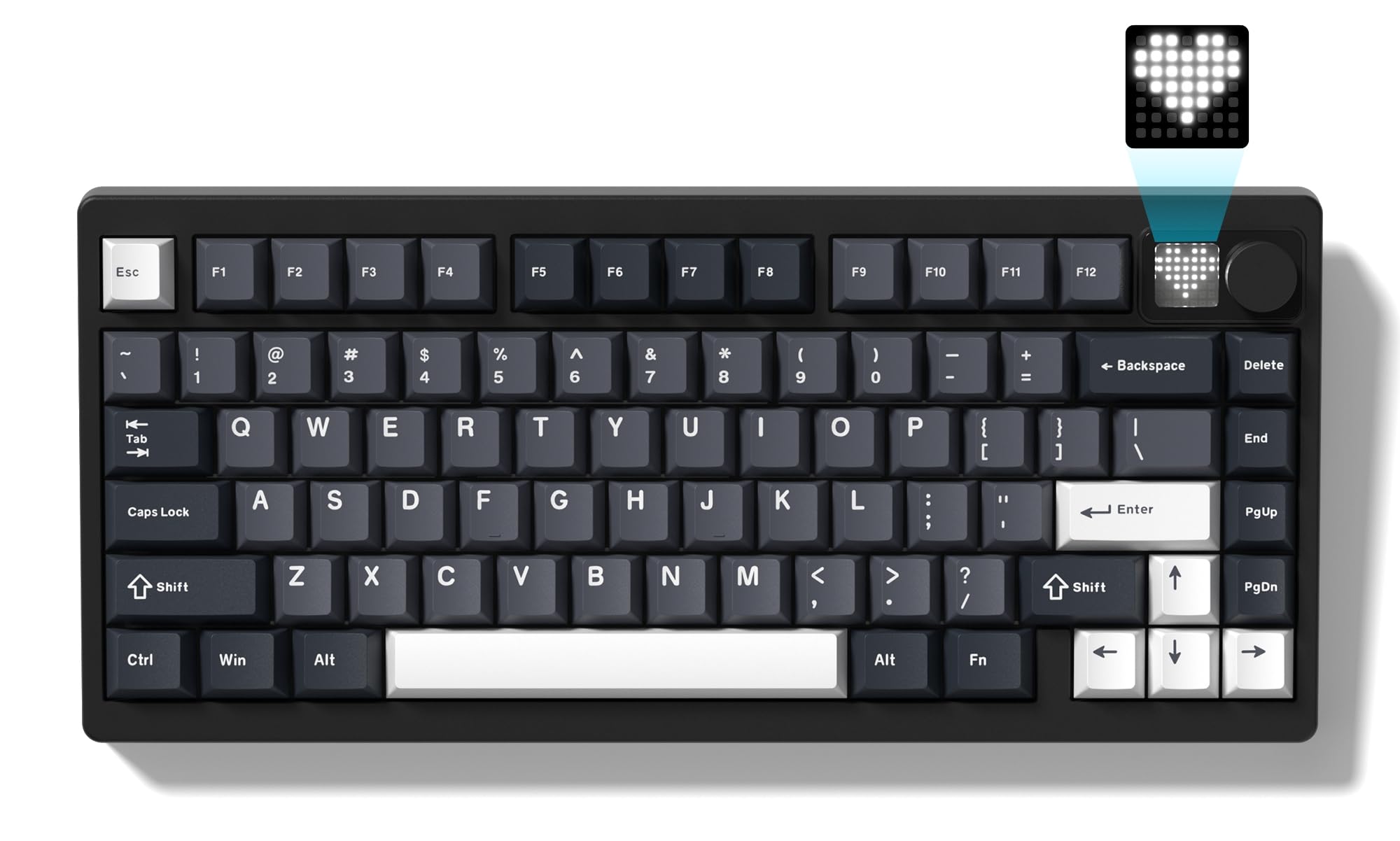
Image: The Womier MT75 keyboard in grey, showcasing its compact 75% layout, RGB backlighting, and integrated knob and dot-matrix display.
Paket İçeriği
Lütfen paketi aşağıdaki öğeler açısından kontrol edin:
- Womier MT75 Keyboard
- USB-C Kablosu
- 2'si 1 arada Tuş Takımı ve Anahtar Çektirici
- Ek Anahtarlar (3 adet)
- Kullanıcı Kılavuzu

Image: A visual representation of the Womier MT75 keyboard and its included accessories, such as the USB cable, keycap/switch puller, and extra switches.
Ürün Özellikleri
- %75 Kompakt Düzen: Efficient design with 79 keys, including function row and navigation keys, saving desk space.
- Üç Modlu Bağlantı: Supports Bluetooth 5.0, 2.4GHz wireless (via dongle), and wired USB-C connection. Connects up to 5 devices simultaneously.
- Custom Dot-Matrix Display: Features a 49 RGB lamp bead display with 6 preset modes, customizable images, colors, and dynamic effects via software.
- 8000mAh Yüksek Kapasiteli Pil: Ensures extended usage for productivity and gaming without frequent charging.
- Dinamik RGB Arka Aydınlatma: 16.8 million colors with various dynamic effects, monochrome, full-color modes, and musical rhythm mode. Fully programmable via software.
- Hot-Swappable Gasket Mount: Allows easy replacement of 3-pin or 5-pin mechanical switches to customize typing feel and acoustics.
- High-Quality POM Linear Switches: Pre-installed POM switches offer a smooth and creamy typing experience.
- Programlanabilir Yazılım: Supports professional keyboard editing software for key remapping, macro creation, and fine-tuning settings.
- Geniş Uyumluluk: Compatible with Windows and Mac operating systems.
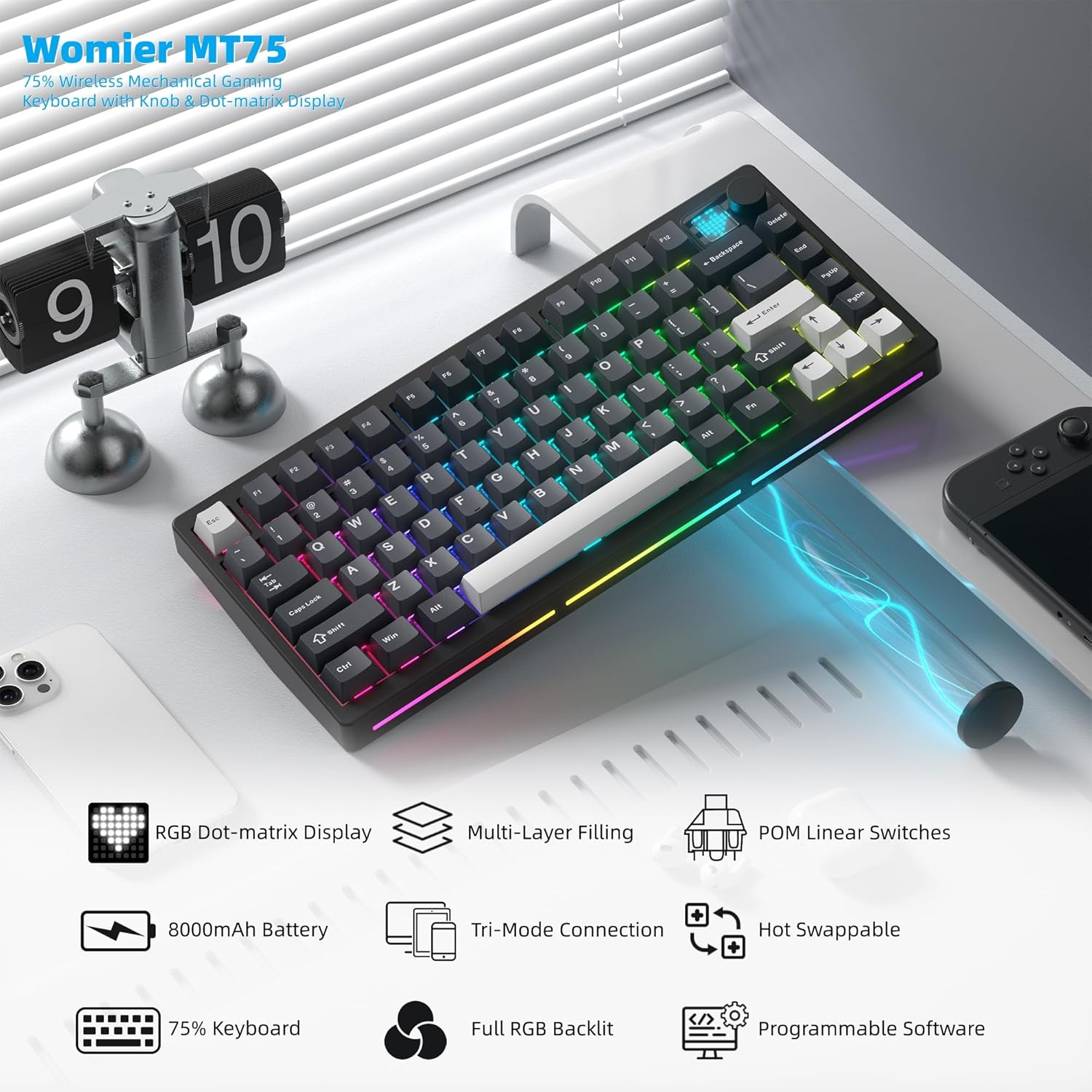
Resim: Bir overview of the Womier MT75 keyboard highlighting its main features including RGB dot-matrix display, multi-layer filling, POM linear switches, 8000mAh battery, tri-mode connection, hot-swappable design, 75% layout, full RGB backlit, and programmable software.
Bağlantı kurulumu
The Womier MT75 keyboard offers three connection modes: wired, 2.4GHz wireless, and Bluetooth 5.0.
1. Kablolu Bağlantı
- Verilen USB-C kablosunu klavyenin USB-C portuna bağlayın.
- USB-C kablosunun diğer ucunu bilgisayarınızdaki boş bir USB portuna takın.
- Klavye otomatik olarak tanınacak ve kullanıma hazır olacaktır.
2. 2.4 GHz Kablosuz Bağlantı
- Locate the 2.4GHz wireless dongle stored under the detachable badge on the top right of the keyboard.
- 2.4GHz dongle'ı bilgisayarınızdaki kullanılabilir bir USB portuna takın.
- Turn the power switch on the keyboard to the 'ON' position.
- Basılı tutun FN + R for 3 seconds. The keyboard's backlight will flash, indicating it's in 2.4GHz pairing mode.
- Once connected, the backlight will stop flashing.
3. Bluetooth 5.0 Bağlantısı
Klavye, en fazla üç Bluetooth cihazına bağlanabilir.
- Turn the power switch on the keyboard to the 'ON' position.
- Basılı tutun FN + S, FN + B, veya FN + E for 3 seconds to enter Bluetooth pairing mode for the corresponding channel (BT1, BT2, BT3). The backlight will flash rapidly.
- On your device (PC, laptop, tablet, phone), enable Bluetooth and search for 'Womier MT75' or 'SK71 PRO'.
- Select the keyboard to pair. Once connected, the backlight will stop flashing.
- Eşleştirilmiş Bluetooth cihazları arasında geçiş yapmak için sadece tuşuna basın FN + S, FN + B, veya FN + E.

Image: The Womier MT75 keyboard connected to various devices (PC, laptop, tablet, phone, game consoles) via USB-C, 2.4GHz, and Bluetooth, illustrating its versatile tri-mode connectivity.
Video: This video demonstrates the Womier MT75 keyboard's features, including its tri-mode connectivity, RGB lighting, and overall design, highlighting its suitability for PC gaming and computer use.
Key Functions & Customization
FN Kombinasyon Tuşları
The Womier MT75 utilizes FN key combinations for various functions:
| Kombinasyon | İşlev |
|---|---|
| FN + ↑/↓ | Arka aydınlatma parlaklığı +/- |
| FN + ←/→ | Arka ışık hızı +/- |
| FN + Geri Al | Turn off all backlights (including screen) |
| FN + ← | Arka ışık efektlerini değiştir |
| FN + Gir | Arka ışık renklerini değiştir |
| FN + 0 | Turn side light on/off |
| FN + - | Yan ışık efektlerini değiştir |
| FN + Delete (hold 3s) | Fabrika ayarlarını geri yükle |
| FN + 1/2/3 | Switch Bluetooth channel (1/2/3) |
| FN + 4 | 2.4G modu |
| FN + L_WIN | Lock/unlock Windows key (only works on Windows systems) |
| FN + Boşluk | Pil seviyesi kontrolü |
| FN + P | Ekran Görüntüsü |
| FN + = | Yan ışık renklerini değiştir |
| FN + [ / ] | Side light brightness +/- |
| FN + A (hold 3s) | Switch between Windows and Mac systems (Windows key flashes once for Windows, three times for Mac) |

Image: A table detailing the various FN key combinations for controlling backlight, connection modes, and system functions on the Womier MT75 keyboard.
RGB Arka Aydınlatma
The MT75 features vibrant RGB backlighting with 16.8 million colors and numerous dynamic effects. Use the FN key combinations above to cycle through effects, adjust brightness, and change colors.
Dot-Matrix Display Customization
The unique dot-matrix display can be customized:
- Ön Ayar Modları: Cycle through 6 built-in display modes using FN key combinations.
- Renk Ayarı: Change the monochrome and color settings of the display.
- Custom Images: Use the keyboard editing software to design and upload custom static or dynamic icons to the display.

Image: A close-up of the Womier MT75's dot-matrix display, showing various customizable patterns and colors, along with the metal knob for volume control.
Video: This video demonstrates the customizable dot-matrix display on the Womier MT75 keyboard, showing how to change lighting effects, colors, and create custom patterns using the software.
Programlanabilir Yazılım
The Womier MT75 supports dedicated software for advanced customization. This software allows you to:
- Herhangi bir tuşu farklı bir fonksiyona yeniden atayın.
- Karmaşık makrolar oluşturun ve bunlara atama yapın.
- Adjust RGB lighting modes, colors, and effects.
- Customize the dot-matrix display with static or dynamic images.
Download the latest software from the official Womier webtam işlevsellik için site.

Image: A screenshot of the Womier MT75's programmable software interface, showing options for lighting, key remapping, macros, and display customization.
Sıcak Değiştirilebilir Anahtarlar
The MT75 features a hot-swappable PCB, allowing you to easily change mechanical switches without soldering. This supports both 3-pin and 5-pin switches.
Anahtarları Değiştirme:
- Use the provided keycap puller to carefully remove the keycap from the desired switch.
- Anahtar sökme aletini kullanarak anahtarın üst ve alt klipslerini nazikçe kavrayın.
- Anahtarı PCB'den çıkarmak için düz bir şekilde yukarı çekin.
- Yeni anahtarın pinlerini PCB üzerindeki deliklerle hizalayın. Bükülmeyi önlemek için pinlerin düz olduğundan emin olun.
- Yeni anahtarı yerine güvenli bir şekilde oturana kadar yavaşça bastırın.
- Tuş başlığını değiştirin.

Image: A demonstration of the hot-swappable feature of the Womier MT75 keyboard, showing a switch being removed and replaced using the included 2-in-1 puller tool. Details about the pre-installed POM linear switches are also visible.
Video: This video highlights the high-quality POM linear switches and the hot-swappable design of the Womier MT75 keyboard, demonstrating the ease of switch replacement and the smooth typing experience.
Pil Bilgileri
The Womier MT75 is equipped with a large 8000mAh Lithium Polymer battery, providing extended usage time. To check the battery level, press FN + Boşluk. The dot-matrix display will show the current battery status.
To charge the keyboard, connect it via the USB-C cable to a power source. The keyboard can be used while charging.

Image: An illustration emphasizing the Womier MT75's massive 8000mAh battery, highlighting its long-lasting power for uninterrupted work or gaming sessions.
Özellikler
| Özellik | Detay |
|---|---|
| Örnek | MT75 (JM-AZ-129) |
| Düzen | %75 (79 tuş) |
| Bağlantı | Bluetooth 5.0, 2.4 GHz Kablosuz, USB-C Kablolu |
| Anahtarlar | Womier POM Linear (Hot-swappable 3/5-pin) |
| keycaps | PBT (Polibütilen Tereftalat) |
| Arka aydınlatma | Full RGB (16.8 million colors) |
| Görüntülemek | Custom Dot-Matrix Display (49 RGB lamp boncuklar) |
| Pil | 8000mAh Lityum Polimer |
| Uyumluluk | PC (Windows), Mac |
| Ürün Boyutları | 13.39 x 6.69 x 1.38 inç |
| Ürün Ağırlığı | 3.53 pound |
Sorun giderme
- Klavye yanıt vermiyor: Ensure the keyboard is charged and the power switch is ON. Check the connection mode (wired, 2.4GHz, Bluetooth) and ensure it matches your device.
- 2.4GHz bağlantı sorunları: Ensure the dongle is securely plugged in and the keyboard is in 2.4GHz mode (FN + R). Try plugging the dongle into a different USB port.
- Bluetooth eşleştirme hatası: Ensure the keyboard is in Bluetooth pairing mode (FN + Q/W/E) and your device's Bluetooth is enabled. Remove any previous pairings on your device and try again.
- Arka ışık çalışmıyor: Check backlight brightness (FN + ↑/↓). Ensure backlights are not turned off (FN + Backspace).
- Tuşlar doğru şekilde kaydedilmiyor: If you recently changed switches, ensure they are fully seated and their pins are not bent. Try resetting the keyboard to factory settings (FN + Delete for 3 seconds).
- Yazılım klavyeyi algılamıyor: Ensure the keyboard is connected via wired USB-C mode when using the software for customization.
Garanti ve Destek
Womier products come with a standard manufacturer's warranty. For detailed warranty information, technical support, or service inquiries, please refer to the official Womier webSite üzerinden satın alabilir veya doğrudan müşteri hizmetleriyle iletişime geçebilirsiniz. Garanti talepleriniz için satın alma fişinizi saklayın.
Ask a question about this manual
Ask about setup, troubleshooting, compatibility, parts, safety, or missing instructions. Manuals+ will review the question and use this page’s manual context to help answer it.