
giriiş
This manual provides detailed instructions for the proper use and maintenance of your 82Ms-A Scientific Calculator. Designed for students and professionals, this calculator features a 2-line display, multi-function keys, and supports up to 240 functions, including trigonometric calculations. Please read this manual thoroughly to ensure optimal performance and longevity of your device.
Kutuda Neler Var?

Image: The 82Ms-A Scientific Calculator as packaged, indicating one unit is included.
- 82Ms-A Scientific Calculator (1 unit)
- Kullanım Kılavuzu (bu belge)
Kurmak
Pil Kurulumu

Resim: Ayrıntılı view showing the open battery compartment of the calculator, revealing two AAA batteries.
The 82Ms-A Scientific Calculator is powered by a long-lasting battery. To install or replace batteries:
- Hesap makinesinin açık olduğundan emin olun KAPALI.
- Hesap makinesinin arkasındaki pil bölmesi kapağını bulun.
- Okla gösterilen yönde (varsa) kapağı kaydırarak çıkarın.
- Insert new batteries, ensuring correct polarity (+/-) as marked inside the compartment.
- Pil bölmesi kapağını yerine tam oturana kadar kapatın.
Kullanım Talimatları
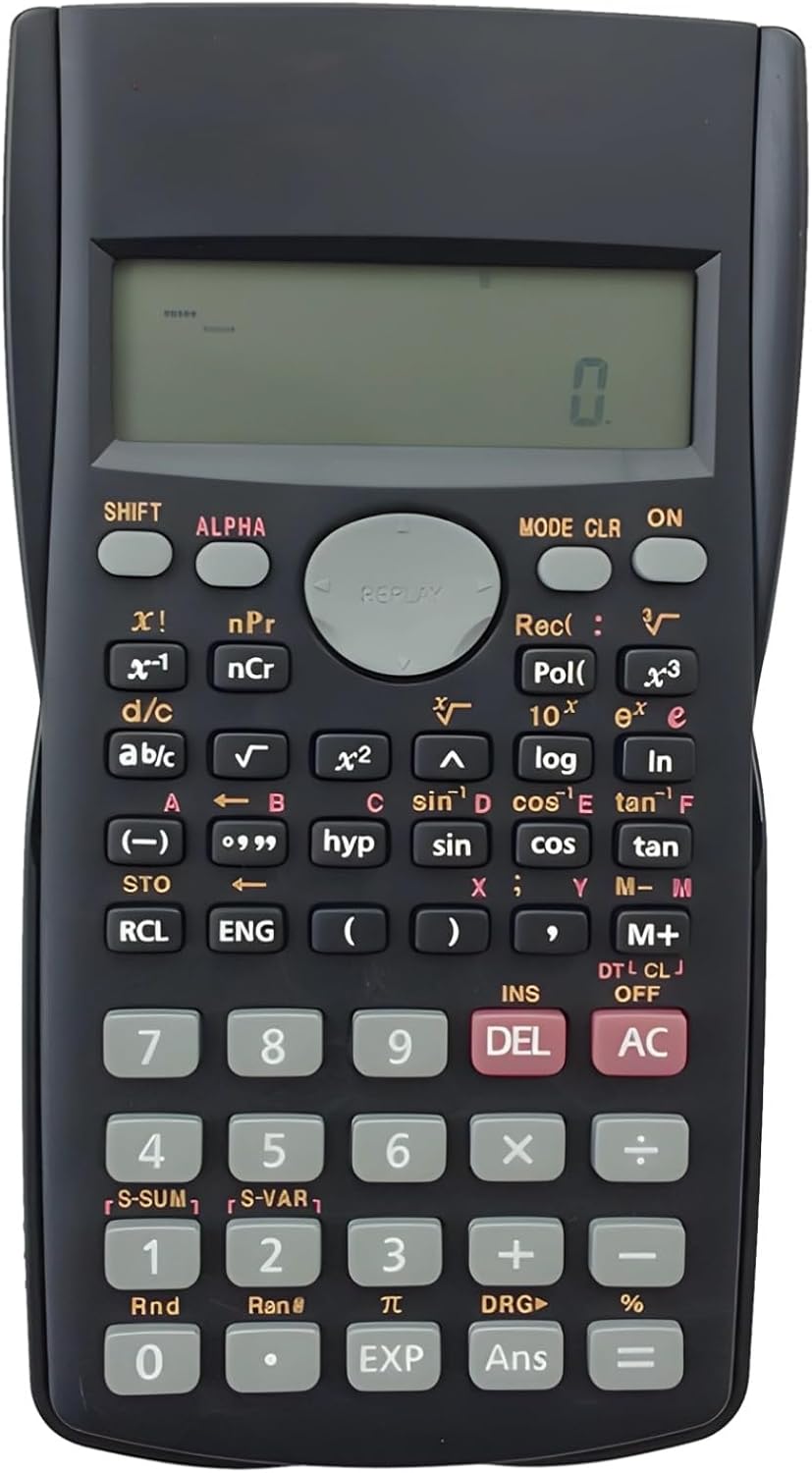
Image: The full layout of the 82Ms-A Scientific Calculator, highlighting its 2-line display and various function keys.
Güç Açık/Kapalı
- Açmak için: Basın ON anahtar.
- Kapatmak için: Basın VARDİYA Daha sonra AC (KAPALI).
Temel Hesaplamalar
Sayısal tuş takımını kullanarak sayı girin. Kullanın +, -, ×, Ve ÷ keys for standard arithmetic operations. Press = Sonucu görüntülemek için.
Multi-Function Keys and 2-Line Display
The calculator features a 2-line display, showing both the input expression and the result simultaneously. Many keys have multiple functions, indicated by colored labels above or below them. These functions are accessed using the VARDİYA Ve ALFA anahtarlar.
- VARDİYA: Activates the yellow-labeled functions. Press VARDİYA, then the desired key.
- ALFA: Activates the red-labeled functions (variables, constants). Press ALFA, then the desired key.
- MOD: Changes the calculator's mode (e.g., COMP, STAT, EQN). Press MOD repeatedly to cycle through options.
- ÇÖZÜM: Clears specific data or settings. Press VARDİYA Daha sonra ÇÖZÜM to access clear options.
- SİL: Deletes the character at the cursor position.
- AC: Clears all input and returns to the initial state.
Gelişmiş Fonksiyonlar
The 82Ms-A supports 240 functions, including trigonometric (sin, cos, tan), logarithmic (log, ln), power (x², x³), roots (√, ³√), fractions (a b/c), and statistical calculations. Refer to the specific key labels and their SHIFT/ALPHA functions for detailed usage.
- Trigonometrik Fonksiyonlar: Kullanmak günah, çünkü, bronz keys. For inverse functions (sin⁻¹, cos⁻¹, tan⁻¹), use VARDİYA with these keys.
- Logarithmic Functions: Kullanmak kayıt (10 tabanında) ve ln (doğal logaritma) anahtarları.
- Power and Root Functions: Kullanmak x² Kareleme için, VARDİYA Daha sonra x² for square root (√). For other powers and roots, use x³ or VARDİYA Daha sonra x³ (³√).
- Kesirler: Kullanın ABC key to input and convert fractions.
Bakım
Temizlik
To clean the calculator, use a soft, dry cloth. For stubborn dirt, slightly dampen the cloth with water or a mild, non-abrasive cleaner. Do not use strong solvents, alcohol, or abrasive cleaners, as these can damage the casing ve görüntüleme.
Depolamak
Store the calculator in a cool, dry place away from direct sunlight and extreme temperatures. If storing for an extended period, it is recommended to remove the batteries to prevent leakage.
Sorun giderme
| Sorun | Olası Neden | Çözüm |
|---|---|---|
| Hesap makinesi açılmıyor. | Piller bitmiş veya yanlış takılmış. | Pilleri yenileriyle değiştirin, kutupların doğru olmasına dikkat edin. |
| Ekran soluk veya boş. | Pil gücü düşük. | Pilleri değiştirin. |
| Yanlış hesaplama sonucu. | Incorrect mode setting or previous calculation error. | Basmak AC to clear. Check the current mode using the MOD key and adjust if necessary. |
| Tuşlar tepkisiz. | Tuşların altında toz veya kir birikmiş olabilir; dahili arıza. | Gently clean around the keys. If problem persists, contact support. |
Özellikler

Image: The 82Ms-A Scientific Calculator with its length, width, and thickness measurements indicated.
| Özellik | Detay |
|---|---|
| Model Numarası | 71T71524TQPRRJC1J26SKQF |
| Görüntü Türü | 2 Satırlı Ekran |
| Fonksiyon Sayısı | 240 fonksiyona kadar |
| Güç Kaynağı | Pil ile çalışır |
| Boyutlar (U x G x Y) | 6.1 x 3.27 x 0.39 inç |
| Ürün Ağırlığı | 5.3 ons |
| Renk | Siyah |
| Malzeme | Plastik |
Garanti ve Destek
Specific warranty information for this product is not provided within this manual. For warranty details, technical support, or service inquiries, please refer to the product packaging or contact the retailer from whom the product was purchased. Keep your purchase receipt as proof of purchase.