
giriiş
This manual provides detailed instructions for the installation, operation, and maintenance of your ZUMIMALL Anti-Theft Video Doorbell Mount. Designed for enhanced security and easy, no-drill installation, this mount protects your video doorbell in various settings, including homes, apartments, and businesses.
Güvenlik Bilgileri
- Ensure all components are handled carefully to prevent damage.
- Do not attempt to modify the mount, as this may compromise its security features.
- Küçük parçaları çocuklardan uzak tutun.
- Verify door thickness and doorbell dimensions for proper fit before installation.
Paket İçeriği
Lütfen paketinizde tüm öğelerin mevcut olduğundan emin olun:
- Anti-Theft Case *1
- Doorbell Mount *1
- Screw Handle (M8*35) *2
- Iron Door Bracket *1
- Doorbell Stand (5.5mm EVA) *1
- Screw Pack for Doorbell (stand by 10pcs KM5*8 & 6pcs KM5*12)
- Cross Screwdriver *1
- Kullanım Kılavuzu *1
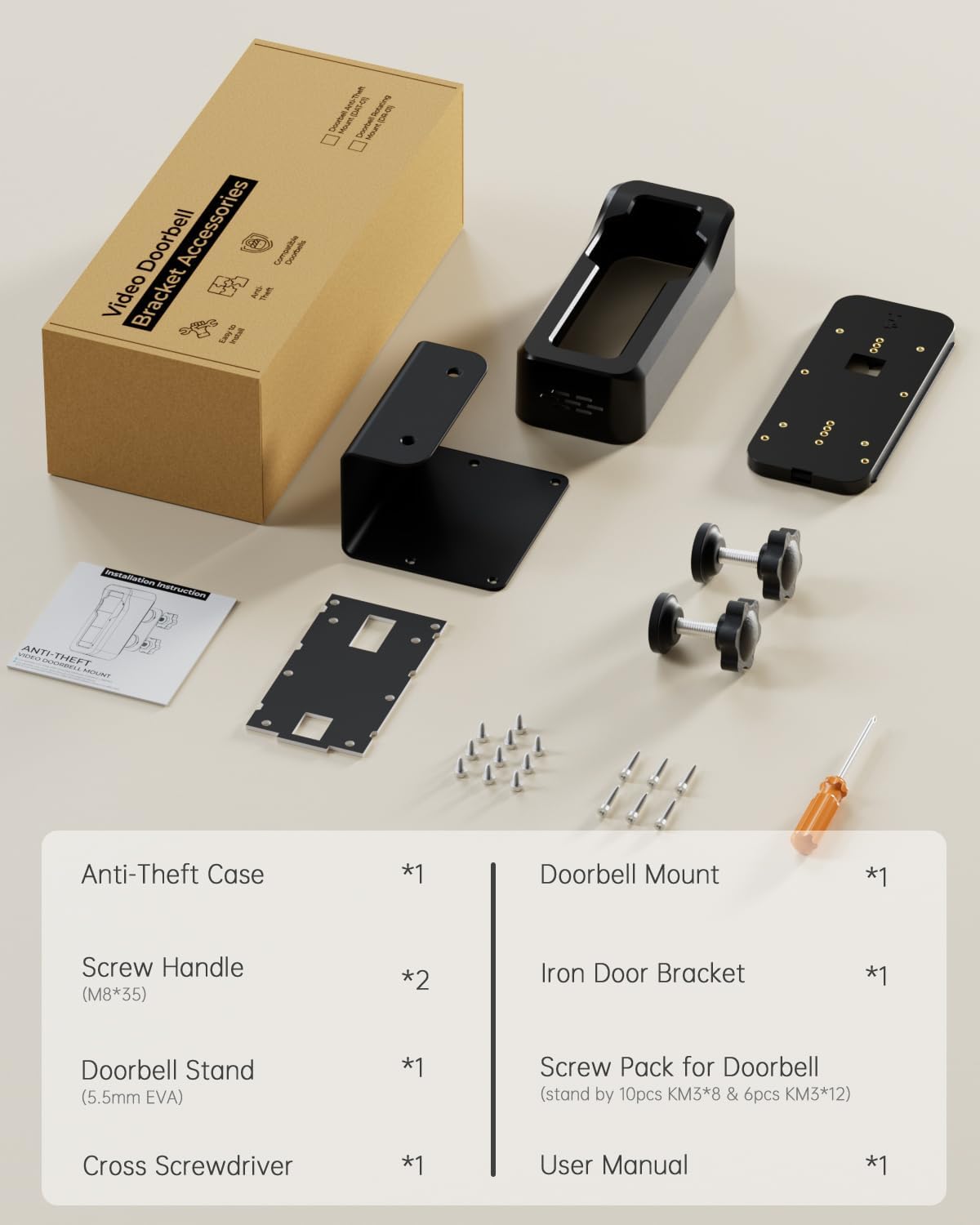
The image displays all parts of the ZUMIMALL Anti-Theft Video Doorbell Mount kit, laid out on a surface. It includes the main anti-theft case, the mounting bracket, two screw handles, an iron door bracket, a doorbell stand, various screws, and a screwdriver, along with the instruction manual.
Ürün Bittiview
The ZUMIMALL Anti-Theft Video Doorbell Mount is designed to secure your video doorbell without drilling, offering robust protection against theft and weather elements.
Temel Özellikler:
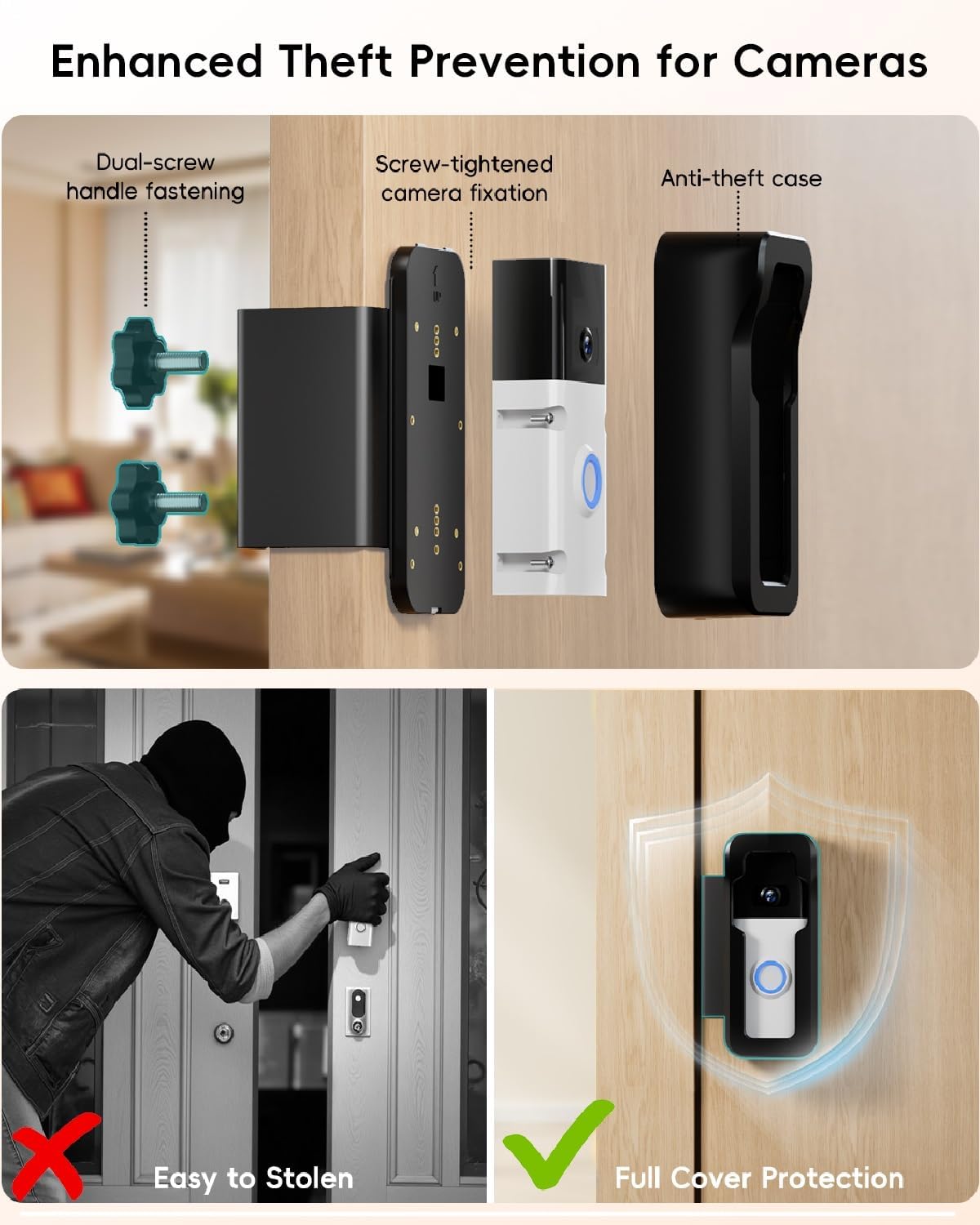
- Hırsızlığa Karşı Güvenlik: Özellikler tamper-proof screws and an anti-pry design.
- Matkapsız Kurulum: Secures to the door using adjustable screw handles.
- Evrensel Uyumluluk: Fits most standard doorbell sizes (2.5”–4.5” width) and ZUMIMALL P8/P8W models.
- Hava koşullarına dayanıklı: Constructed with corrosion-resistant ABS material for outdoor use.
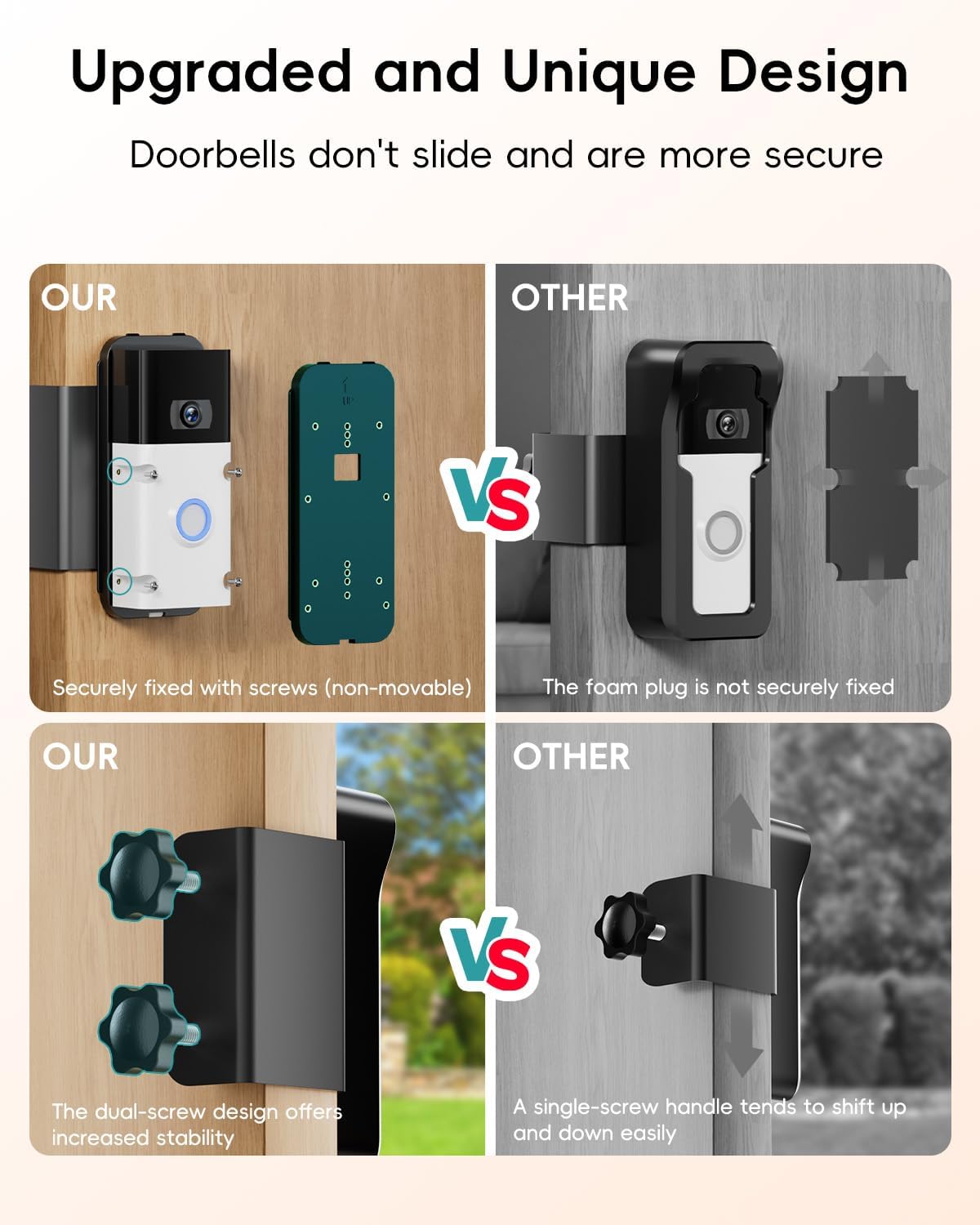
- Upgraded Two Screw Handles: Provides enhanced stability compared to single-screw designs.
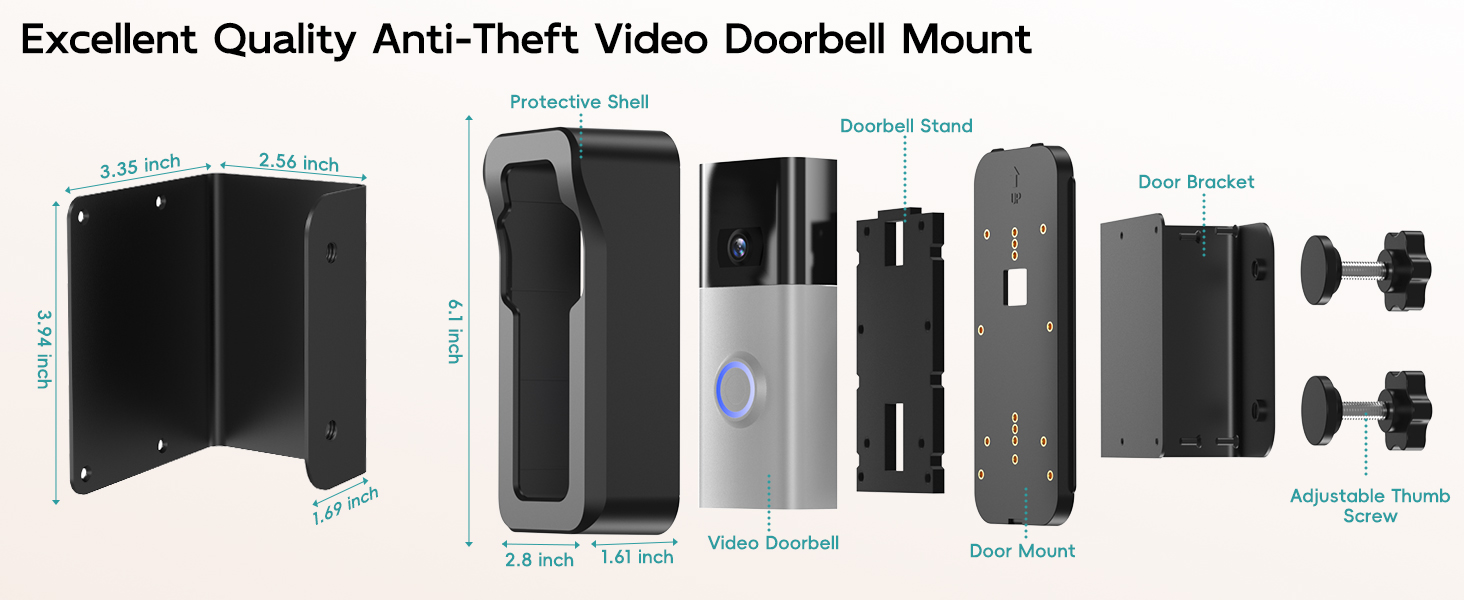
This diagram breaks down the ZUMIMALL Anti-Theft Video Doorbell Mount into its individual parts: the protective outer shell, the internal doorbell stand, the video doorbell itself (not included), the door mount, the door bracket, and the adjustable thumb screws. Key dimensions are also provided for each component.
Özellikler
| Özellik | Detay |
|---|---|
| İç/Dış Mekan Kullanımı | Dış mekan |
| Uyumlu Cihazlar | ZUMIMALL P8/P8W and most doorbells (2.5”–4.5” width) |
| Montaj Tipi | Matkap Yok |
| Malzeme | Akrilonitril Bütadien Stiren (ABS) |
| Ürün Boyutları (U x G x Y) | 2.5 x 2.38 x 5.8 inç |
| Su Direnç Seviyesi | Su geçirmez |
| Ürün Ağırlığı | 1.08 pound |
| Özel Özellik | Anti Theft |
Kurulum Kılavuzu
Follow these steps for a secure and easy installation of your ZUMIMALL Anti-Theft Video Doorbell Mount.
Step 1: Prepare the Mount and Doorbell
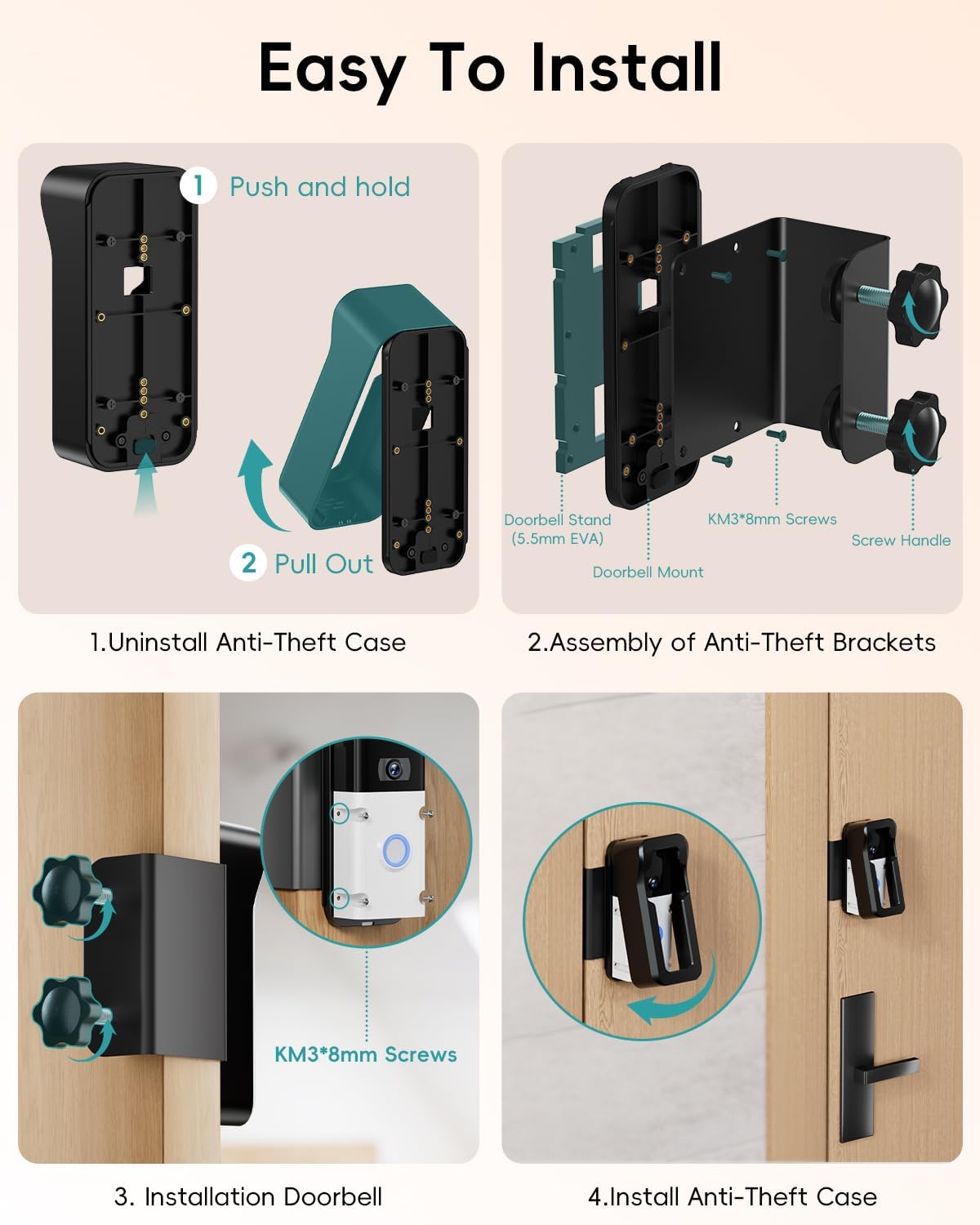
- Detach Anti-Theft Case: Push and hold the button upward on the bottom of the mount to detach the anti-theft outer case.
- Detach Doorbell Backplate: Remove the backplate from your video doorbell using the provided screwdriver.
- Choose Screws: Identify the 12mm long screws (for use with EVA spacer) and 8mm short screws (for direct attachment).
This video demonstrates how to assemble the ZUMIMALL Anti-Theft Video Doorbell Mount and install a doorbell within it, including detaching the anti-theft case and securing the doorbell backplate. It also shows how to remove the doorbell from the mount.
Step 2: Assemble the Doorbell Mount
- Secure Doorbell Backplate:
Method 1 (Using EVA Spacer for Elevation): Align the screw holes of the doorbell backplate with the EVA spacer, then secure them to the doorbell mount using the 12mm long screws.
Method 2 (Direct Attachment): Align the screw holes of the doorbell backplate directly with the doorbell mount, then secure them using the 8mm short screws.
- Attach Iron Door Bracket: Assemble the iron door bracket to the doorbell mount using the 8mm screws.
- Assemble Screw Handles: Attach the two screw handles to the iron door bracket.
This image illustrates the four main steps for easy installation: 1. Pushing and pulling to uninstall the anti-theft case. 2. Assembling the doorbell mount with the iron door bracket and screw handles. 3. Installing the video doorbell into the assembled bracket using KM3*8mm screws. 4. Installing the anti-theft case onto the doorbell and mount.

This image provides a close-up comparison of how the doorbell is secured. The ZUMIMALL mount features a custom-designed mounting plate with multiple threaded holes, allowing the doorbell to be securely fixed with screws, making it non-movable. This is contrasted with other methods that rely on foam plugs, which are less secure.

This diagram highlights the anti-theft features: dual-screw handle fastening for the bracket, screw-tightened camera fixation within the mount, and the protective anti-theft outer case. It visually contrasts an easily stolen doorbell with the full cover protection offered by the ZUMIMALL mount.
Step 3: Mount to the Door
- Pozisyon Montajı: Place the assembled mount onto the edge of your door. Ensure the direction matches your door's swing (inward/outward).
- Tighten Screw Handles: Secure the mounting bracket to the door by tightening the two screw handles firmly until it cannot be unscrewed.
- Install Doorbell: Snap your video doorbell into the assembled bracket.
- Attach Anti-Theft Case: Position the anti-theft case top-down over the doorbell and mount. Press the upper clips, then lock the base.
This step-by-step video provides a comprehensive guide on how to install the ZUMIMALL Anti-Theft Video Doorbell Mount, from assembling the components to securing it onto the door.
This image clearly shows the ZUMIMALL mount secured to a door frame using screw handles, emphasizing that no drilling is required. It contrasts this with a traditional doorbell installation that involves drilling holes and potentially damaging walls.
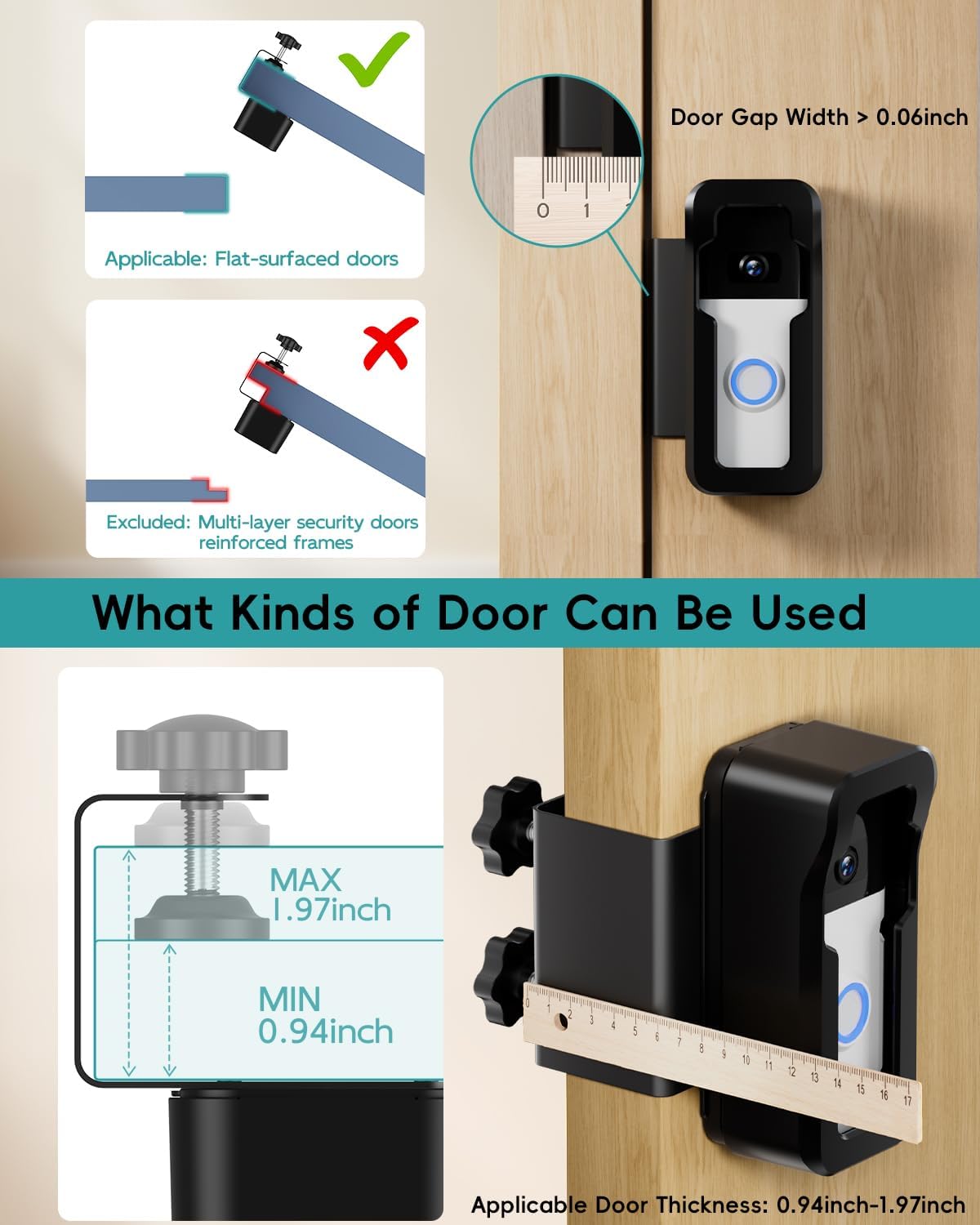
This diagram specifies the types of doors compatible with the mount. It is applicable to flat-surfaced doors with a door gap width greater than 0.06 inches and a door thickness ranging from 0.94 inches to 1.97 inches. Multi-layer security doors or reinforced frames are excluded.
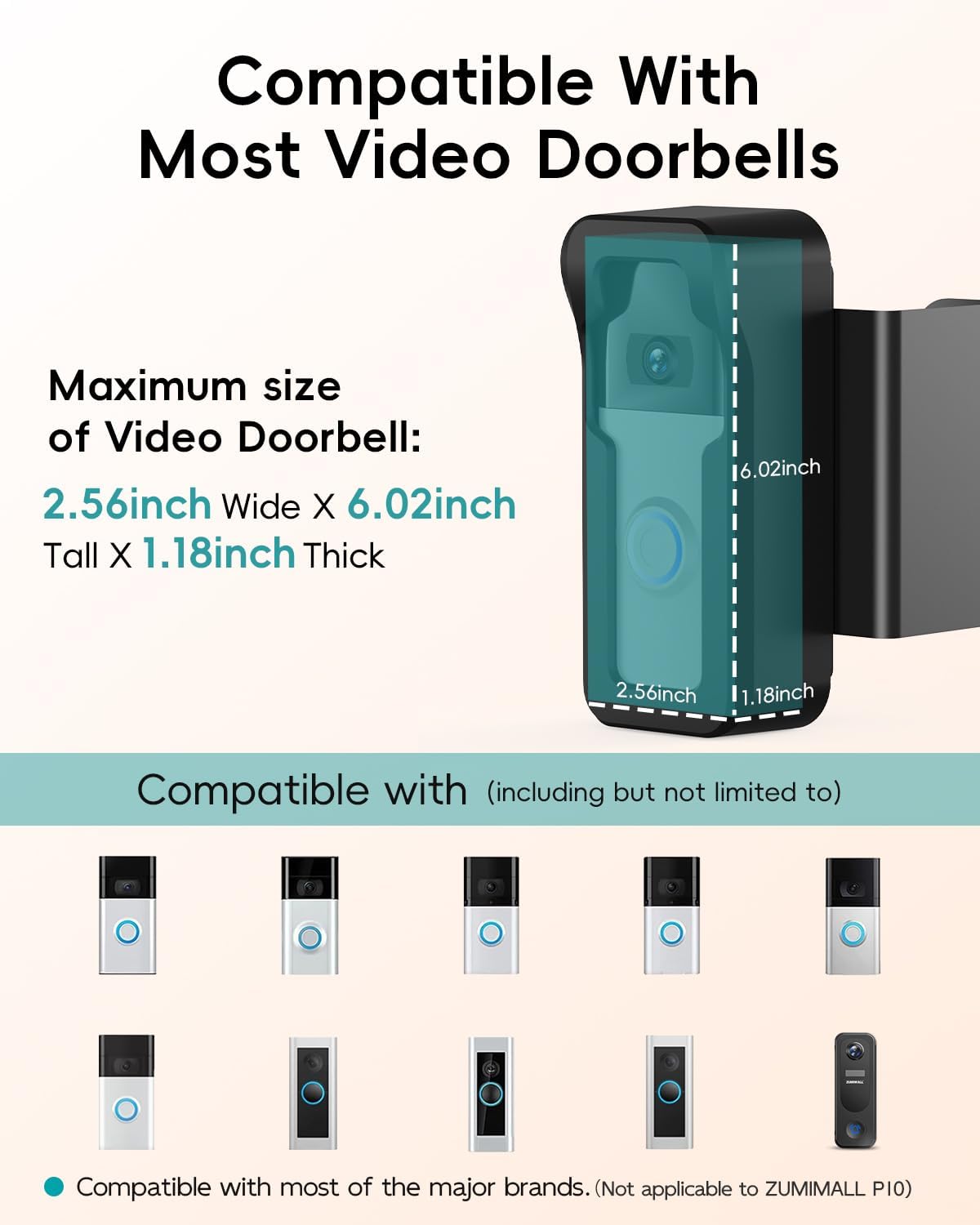
This image illustrates the broad compatibility of the ZUMIMALL mount with most video doorbells, including several Ring models and the ZUMIMALL P8. It also provides the maximum compatible doorbell dimensions: 2.56 inches wide, 6.02 inches tall, and 1.18 inches thick.
This image visually confirms the versatility of the mount, showing it can be installed on doors that swing open from either the left or the right, adapting to various door configurations.
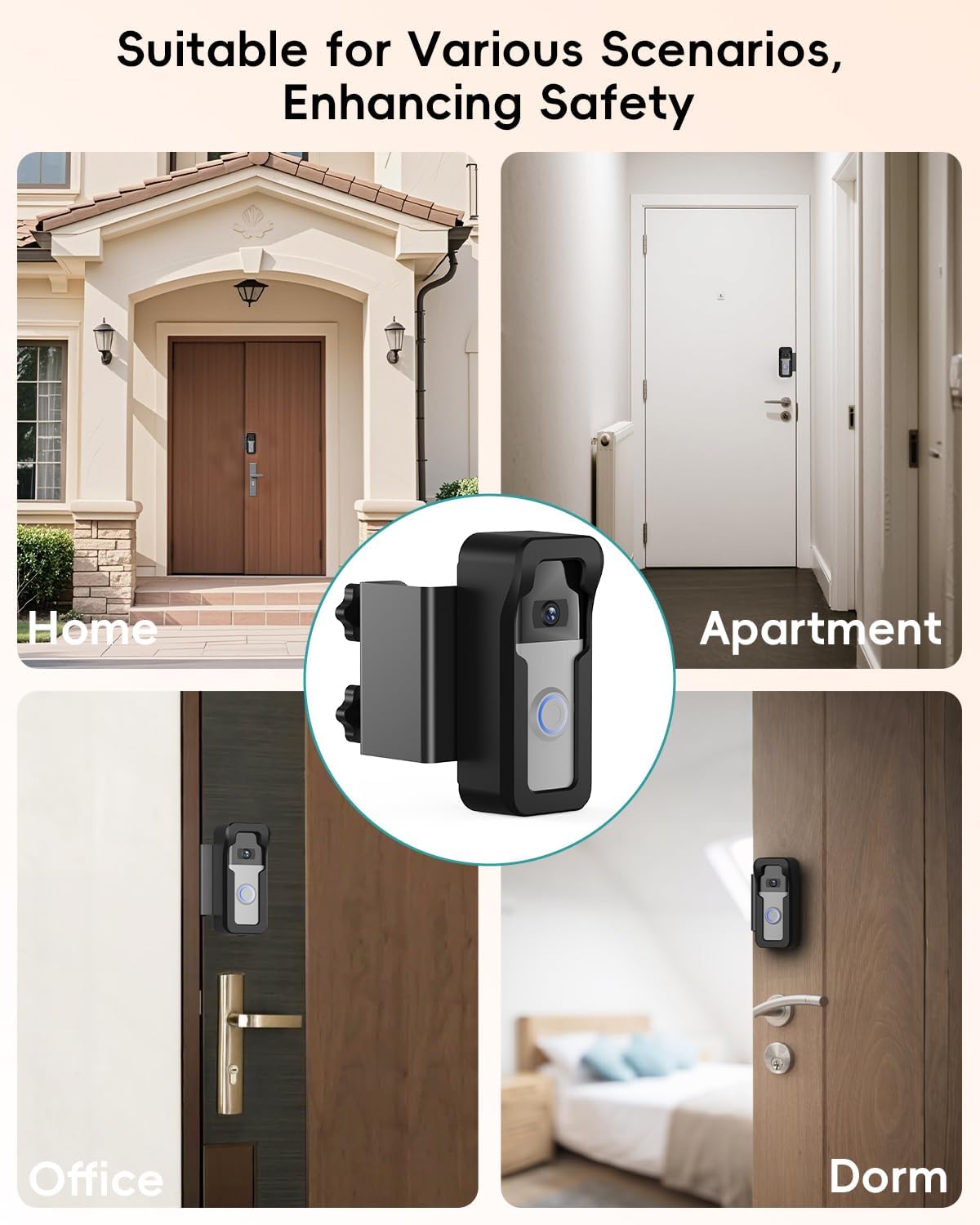
This collage showcases the ZUMIMALL mount's adaptability, depicting its installation on doors in different settings such as a home, an apartment, an office, and a dorm room, emphasizing its broad utility.
Operating the Anti-Theft Mount
Once installed, the ZUMIMALL Anti-Theft Video Doorbell Mount provides continuous protection for your video doorbell. The secure design prevents unauthorized removal.
- The anti-theft case cannot be disassembled from the outside of the door, requiring the door to be opened for access.
- The dual screw handles ensure the mount remains firmly attached to the door, resisting tamperiyor.
Bakım
- Periodically check the tightness of the screw handles to ensure the mount remains secure.
- Clean the exterior of the mount with a soft, damp Gerektiğinde bezle silin. Aşındırıcı temizleyicilerden kaçının.
- Montaj parçasını, özellikle şiddetli hava koşullarından sonra, aşınma veya hasar belirtileri açısından inceleyin.
Sorun giderme
Issue: Mount does not fit the door.
Çözüm: Verify your door thickness is between 0.94-1.97 inches and the door gap width is greater than 0.06 inches. The mount is designed for flat-surfaced doors and may not be suitable for multi-layer security doors or reinforced frames.
Issue: Doorbell does not fit inside the mount.
Çözüm: Ensure your doorbell's dimensions do not exceed 2.56 inches wide, 6.02 inches tall, and 1.18 inches thick. The mount is compatible with ZUMIMALL P8/P8W and most standard doorbell cameras.
Issue: Mount feels loose after installation.
Çözüm: Re-tighten the two screw handles firmly. Ensure they are fully secured against the door to prevent movement.
Garanti ve Destek
ZUMIMALL is committed to customer satisfaction. If you have any questions or require assistance with your Anti-Theft Video Doorbell Mount, please contact our customer service team. We aim to provide quick and effective solutions.
For your convenience, all required accessories are included for an effortless setup. Should any part be missing or damaged, please reach out to us for support.