
1. Giriş
This manual provides detailed instructions for the proper use and maintenance of the GODIAG GT107 Gear-Box Data Adapter and the GODIAG GT105 ECU AD Break Out Box. These tools are designed to assist automotive technicians and ECU engineers in diagnosing, repairing, and programming various gearbox and engine control units (ECUs).
The GT107 is specifically engineered for connecting to and working with gearbox ECUs such as DQ250, DQ200, VL381, VL300, DQ500, and DL501. The GT105 serves as a versatile connection adapter for OBD2 short-circuiting, ECU diagnosis, and power supply for outdoor vehicle maintenance.
2. Güvenlik Bilgileri
Lütfen bu ürünü kullanmadan önce tüm güvenlik uyarılarını ve talimatlarını okuyun. Bu talimatlara uyulmaması elektrik çarpmasına, yangına veya ciddi yaralanmaya neden olabilir.
- Always ensure proper connections are made before applying power to avoid damage to the device or vehicle ECU.
- Do not attempt to disassemble or modify the devices. Refer all servicing to qualified personnel.
- Use the devices in a well-ventilated area.
- Cihazlarınızı sudan, nemden ve aşırı sıcaklıklardan uzak tutun.
- Wear appropriate personal protective equipment (PPE) when working with automotive electrical systems.
- Ensure the vehicle battery is adequately charged before performing any diagnostic or programming procedures to prevent data corruption.
3. Paket İçeriği
Aşağıda listelenen tüm öğelerin paketinizde bulunduğunu doğrulayın:
- 1 x GODIAG GT107 Gear-box Data Adapter
- 1 x GODIAG GT105 ECU AD Break Out Box ECU Connector
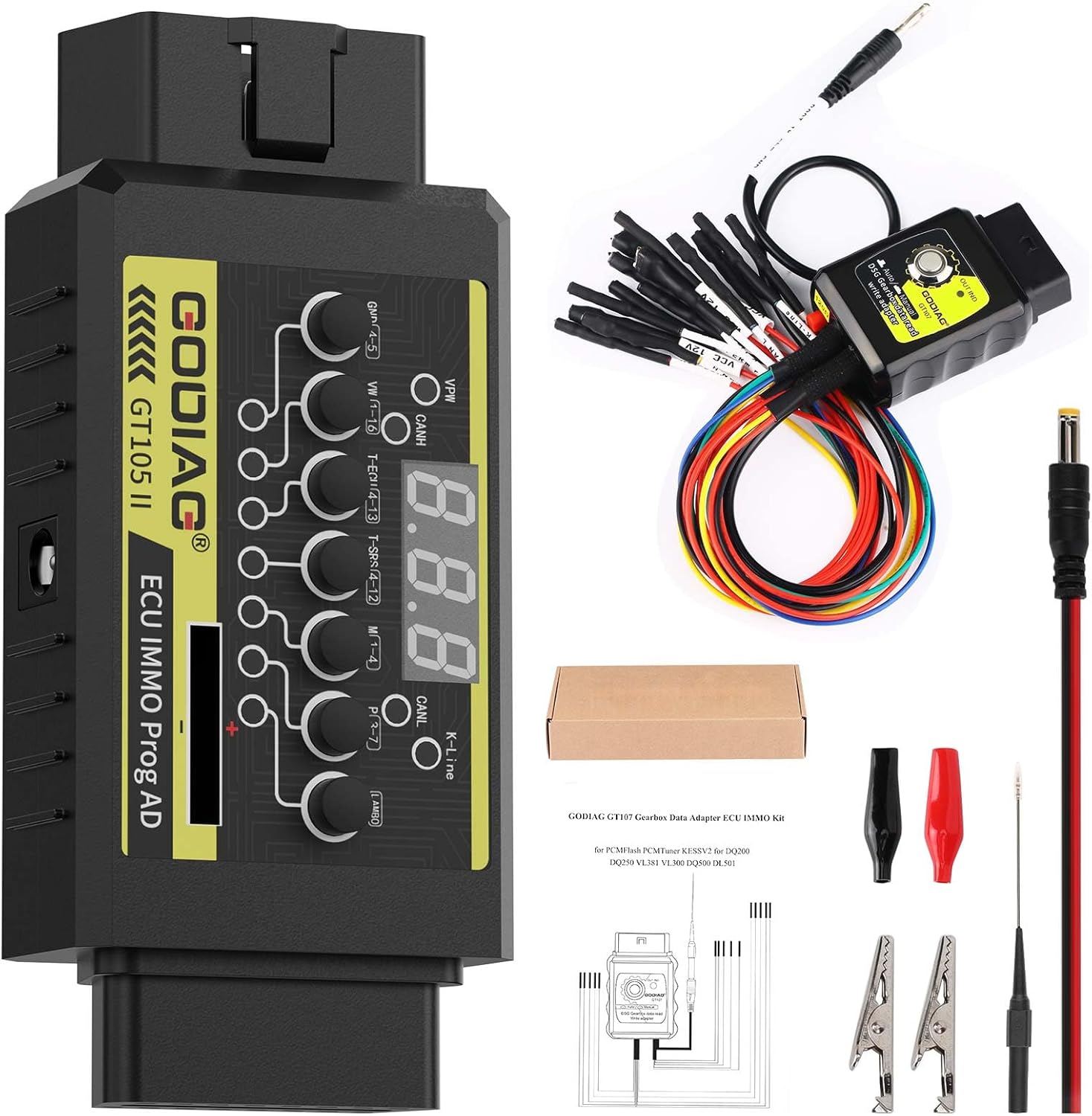
Şekil 3.1: The complete GODIAG GT107 and GT105 kit, including the GT107 gearbox adapter, GT105 ECU break out box, and various connection cables and accessories.
4. Ürün Bittiview
4.1 GODIAG GT107 Gear-Box Data Adapter
The GODIAG GT107 is a specialized adapter designed for direct connection to various gearbox ECUs. It facilitates reading, writing, and diagnostic operations for gearbox maintenance engineers.

Şekil 4.1.1: Ön view of the GODIAG GT107 Gear-Box Data Adapter, showing the "Auto/Manual" switch and "DSG Gearbox data read write adapter" label.

Şekil 4.1.2: The GODIAG GT107 adapter connected to its multi-pin cable harness, used for direct connection to gearbox ECUs.
4.2 GODIAG GT105 ECU AD Break Out Box
The GODIAG GT105 is an ECU connection adapter used for OBD2 short-circuiting, ECU diagnosis, and providing power. It features signal communication indicators for various protocols.

Şekil 4.2.1: Tepe view of the GODIAG GT105 ECU AD Break Out Box, displaying its digital voltage display, various connection buttons, and communication indicator LEDs.
5. Kurulum ve Bağlantı
5.1 Connecting the GT107 Gear-Box Data Adapter
The GT107 adapter is designed for direct connection to specific gearbox ECUs. Refer to the pinout diagrams below for correct wiring configurations for different gearbox models.
- Identify the specific gearbox ECU model (e.g., DQ250, DQ200, VL381, VL300, DQ500, DL501).
- Consult the relevant pinout diagram to match the GT107's cable connections to the ECU's pins.
- Ensure all connections are secure and correct before proceeding with any operations. Incorrect wiring can damage the ECU or the adapter.

Şekil 5.1.1: Pinout diagram illustrating connections for DQ200 (0AM, 0CW), DQ250 (02E, 0D9), VL381 (0AW), and DQ500 (0BT, 0BH) gearbox ECUs with the GODIAG GT107.

Şekil 5.1.2: Pinout diagram showing connections for V30 (01J) and VL300 (01J) gearbox ECUs, including an example of a Hytronic VL300 connection point.

Şekil 5.1.3: Pinout diagram detailing connections for DL382 (0CK), DL501 (0B5), DC0/DC4 Gen2 (Renault), and LuK-UDCT (Honda) gearbox ECUs.
5.2 Connecting the GT105 ECU AD Break Out Box
The GT105 can be used for various purposes, including OBD2 short-circuiting, ECU diagnosis, and providing external power. It connects to the vehicle's OBD2 port or directly to the ECU via its breakout cables.
- For OBD2 short-circuiting or diagnosis, connect the GT105 to the vehicle's OBD2 port.
- For direct ECU connection, use the provided breakout cables to connect to the ECU's pins, ensuring correct pin assignments for power, ground, and communication lines.
- The GT105 can draw power from the vehicle's battery for outdoor maintenance by connecting the appropriate power cables.
6. Kullanım Talimatları
6.1 Using the GODIAG GT107 Gear-Box Data Adapter
The GT107 features an analog ignition switch with two modes:
- Otomatik mod: Anahtar basılmamış.
- Manuel Mod: The switch is pressed down.
Önemli: When performing data reading or writing operations, ensure you select the corresponding mode (Auto or Manual) within your diagnostic or programming software (e.g., PCMFlash, PCMTuner, Kessv2) to match the GT107's switch setting. Mismatched modes can lead to communication errors or failed operations.
6.2 Interpreting GT105 Communication Indicators
The GT105 is equipped with LED indicators for various communication protocols. These indicators help in verifying communication status:
- PWM+ (PIN2): Indicates Pulse Width Modulation communication activity.
- CANH (PIN6): Indicates CAN High communication activity.
- CANL (PIN14): Indicates CAN Low communication activity.
- K-line (PIN7): Indicates K-line communication activity.
When data communication occurs on a specific protocol, the corresponding indicator LED will flash. This allows you to quickly determine if the diagnostic or programming device is successfully communicating with the ECU.
7. Özellikler
| Özellik | Şartname |
|---|---|
| Marka | GODIAG |
| Örnek | GT107-05 |
| Güç Kaynağı | Kablolu Elektrik |
| Operating System (GT105 related) | Android (Note: Refers to compatible diagnostic software platforms) |
| Otomotiv Uyum Türü | Araç Özel Uyum |
| Ürün Ağırlığı | 7.8 ons |
| Paket Boyutları | 8.6 x 4.3 x 1.5 inç |
| UPC | 889327099375 |
8. Sorun Giderme
- İletişim yok:
- Verify all cable connections are secure and correctly matched to the ECU pinout.
- Check the GT107's Auto/Manual switch setting matches the software's selected mode.
- Observe the GT105's communication indicator LEDs. If no LEDs flash, there might be an issue with power supply or the ECU itself.
- Ensure the diagnostic/programming software is correctly configured and compatible with the specific ECU.
- Güç Sorunları:
- Araç aküsünün yeterli voltaja sahip olduğundan emin olun.tage.
- Check all power supply connections to the GT105.
- Yazılım Hataları:
- Refer to the specific diagnostic or programming software's user manual for error code explanations.
- Ensure the software is up-to-date.
9. Bakım
- Keep the devices clean and free from dust and debris. Use a soft, dry cloth for cleaning.
- Cihazları serin, kuru, doğrudan güneş ışığından ve aşırı sıcaklıklardan uzak bir yerde saklayın.
- Inspect cables and connectors regularly for any signs of wear or damage. Replace damaged components immediately.
- Do not expose the devices to liquids.
10. Garanti ve Destek
For warranty information, technical support, or service inquiries, please contact GODIAG customer support through their official channels. Keep your purchase receipt as proof of purchase for warranty claims.