
1. Giriş
The Fanvil V66-Pro is a professional IP phone designed for modern business communication. It features a 7-inch adjustable touch screen, supports 20 SIP lines, and includes built-in 2.4G/5G Wi-Fi (Wi-Fi 6) and a wireless Bluetooth handset. This manual provides detailed instructions for the proper installation, configuration, and operation of your Fanvil V66-Pro IP Phone.
2. Paket İçeriği
Paketinizdeki tüm ürünlerin eksiksiz olduğundan emin olun. Herhangi bir ürün eksik veya hasarlıysa, derhal satıcınızla iletişime geçin.
- Fanvil V66-Pro IP Phone Unit
- Kablosuz Bluetooth Ahize
- Ahize Kablosu
- Ethernet kablosu
- Güç Adaptörü
- Masa Standı
- Hızlı Kurulum Kılavuzu
3. Fiziksel Aşırıview
Familiarize yourself with the components of your Fanvil V66-Pro IP Phone.
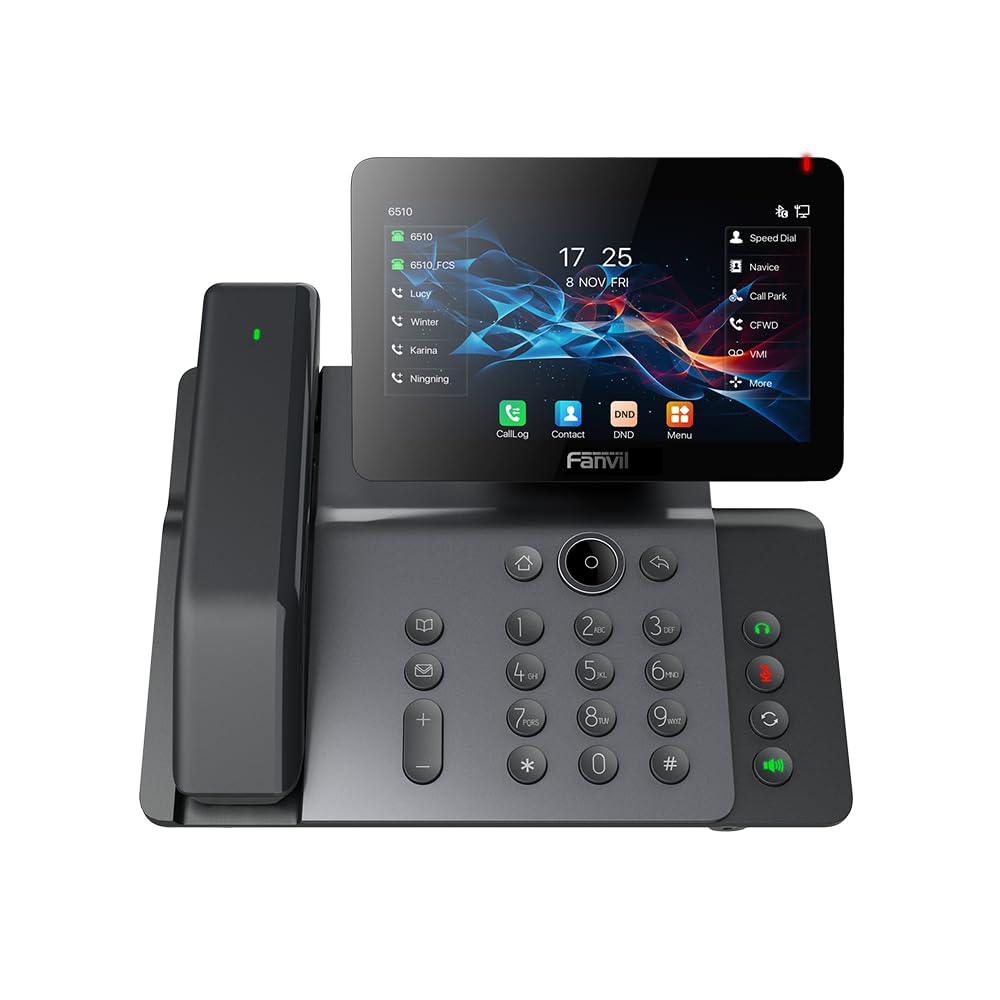
Figure 3.1: Fanvil V66-Pro IP Phone with its wireless Bluetooth handset shown separately.
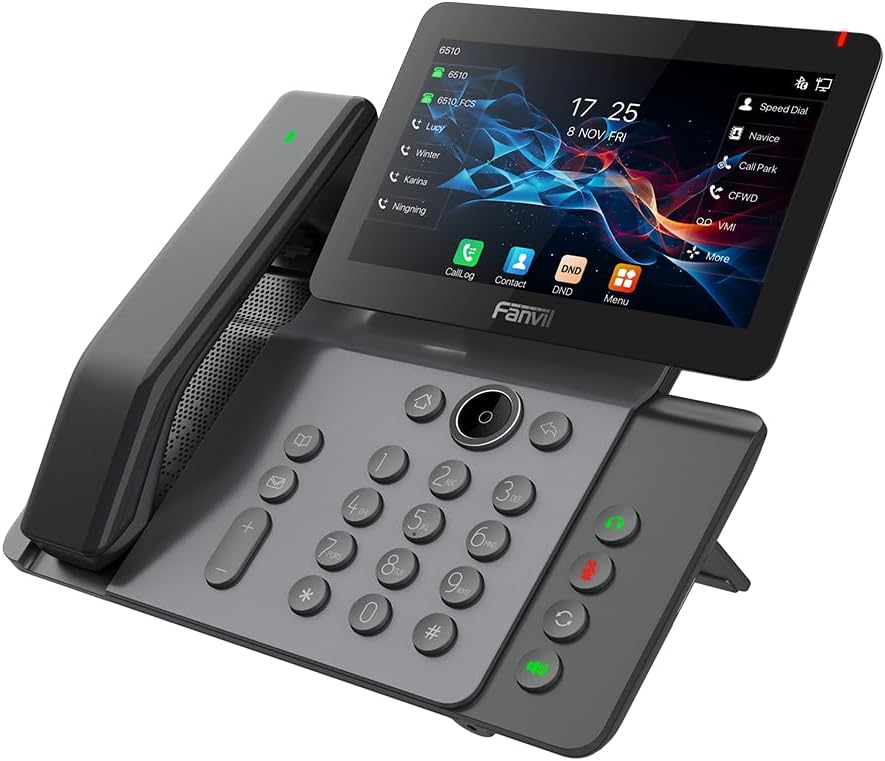
Şekil 3.2: Ön view of the Fanvil V66-Pro IP Phone with the handset attached to the main unit.
3.1 Temel Bileşen
- Ayarlanabilir Dokunmatik Ekran: 7-inch color display for navigation and information.
- Klavye: Standard numeric and function keys for dialing and control.
- Wireless Bluetooth Handset: For cordless communication.
- Hoparlör: Integrated speaker and microphone for hands-free calls.
- Fonksiyon Tuşları: Dedicated buttons for common features like message, hold, transfer, and conference.
- Limanlar: Ethernet ports (LAN/PC), Power port, USB port, Headset port.
4. Kurulum
4.1 Telefonun Montajı
- Attach the desk stand to the main phone unit.
- Connect the coiled handset cord to the main unit and the wired handset (if using a wired handset). For the wireless Bluetooth handset, ensure it is placed on the charging cradle.
4.2 Şebeke ve Güç Bağlantısı
- Ağ bağlantısı: Connect one end of the Ethernet cable to the LAN port on the back of the phone and the other end to your network switch or router. If connecting a PC, use the PC port on the phone.
- Güç Bağlantısı: Connect the power adapter to the power port on the phone and then plug it into an electrical outlet. The phone will automatically power on.
4.3 Initial Boot-Up and Configuration
Upon first power-up, the phone will display a boot-up sequence. Once complete, it will attempt to obtain network settings via DHCP. If your network requires static IP configuration or specific SIP server details, these can be configured via the phone's menu or a web interface. Consult your network administrator for specific settings.
5. Kullanım Talimatları
5.1 Arama Yapma ve Alma
- Telefon çağrısı yapmak: Pick up the handset, press the speakerphone button, or press a line key. Dial the number and press the Dial soft key or #.
- Bir Aramayı Cevaplamak için: Pick up the handset, press the speakerphone button, or press the Answer soft key.
- Aramayı Bitirmek İçin: Hang up the handset, press the speakerphone button again, or press the End Call soft key.
5.2 Dokunmatik Ekranın Kullanımı
The 7-inch touch screen allows for intuitive navigation. Tap icons to access features like Call Log, Contacts, DND (Do Not Disturb), and Menu. Swipe gestures may be supported for additional screens or options.
5.3 Temel Arama Özellikleri
- Tutmak: Etkin bir çağrı sırasında, Tutmak Tuşa tekrar basarak aramayı devam ettirebilirsiniz.
- transferi: Etkin bir çağrı sırasında, Aktarım Yumuşak tuş. Aktarmak istediğiniz numarayı çevirin, ardından tuşa basın. Aktarım soft key again (blind transfer) or wait for the party to answer and then press Aktarım (transfere katıldı).
- Konferans: Etkin bir çağrı sırasında, Konferans soft key. Dial the second party's number and wait for them to answer. Press the Konferans Tüm taraflara katılmak için tekrar yumuşak tuşa basın.
5.4 Wi-Fi and Bluetooth Setup
- Wifi: Navigate to the phone's menu, select 'Settings' > 'Wi-Fi'. Enable Wi-Fi, scan for available networks, select your network, and enter the password if required.
- Bluetooth: Navigate to the phone's menu, select 'Settings' > 'Bluetooth'. Enable Bluetooth. For the wireless handset, ensure it is charged and in pairing mode. Select the handset from the discovered devices list to pair.
6. Bakım
6.1 Cihazın Temizlenmesi
Use a soft, dry cloth to clean the phone's surface and screen. Avoid using liquid cleaners or abrasive materials, as they may damage the device. For stubborn marks, a slightly damp cloth with water may be used, ensuring no moisture enters openings.
6.2 Yazılım Güncellemeleri
Periodically check for firmware updates to ensure optimal performance and access to new features. Updates can typically be performed via the phone's web interface or through your service provider's provisioning system. Consult your network administrator or service provider for guidance on updates.
7. Sorun Giderme
7.1 Çevir sesi yok
- Check all cable connections (Ethernet, power, handset).
- Ensure the phone is powered on and the screen is active.
- Ağ bağlantısını doğrulayın.
- Contact your service provider to confirm SIP registration status.
7.2 Cannot Connect to Network
- Ensure the Ethernet cable is securely connected to the LAN port and your network.
- Check if your network switch or router is functioning correctly.
- If using Wi-Fi, verify the correct network is selected and the password is entered accurately.
- Restart the phone and your network equipment.
7.3 Ekran Sorunları
- If the screen is blank, ensure the phone is powered on.
- Adjust screen brightness settings in the phone's menu.
- Telefonu yeniden başlatın.
8. Özellikler
| Özellik | Detay |
|---|---|
| Ürün Boyutları | 9 x 7 x 5.6 inç |
| Ürün Ağırlığı | 3.3 pound |
| ASIN | B0DYKWF779 |
| Üretici | Fanvil |
| Renk | siyah |
| Telefon Türü | fitilli |
| Malzeme | Metal, Plastik |
| Güç Kaynağı | Kablolu Elektrik |
| Yanıtlama Sistemi Türü | Dijital |
| Uyumlu Cihazlar | VoIP Services, Traditional Phone Networks |
| Konferans Görüşmesi Yeteneği | Temel |
| Çoklu Hat İşlemi | Çok Hatlı İşletme |
9. Garanti Bilgileri
Fanvil products are typically covered by a limited manufacturer's warranty. The specific terms and duration of the warranty may vary by region and retailer. Please refer to the warranty card included with your product or visit the official Fanvil webAyrıntılı garanti bilgileri için lütfen siteyi ziyaret edin. Garanti talepleri için satın alma fişinizi saklayın.
10. Destek
For technical assistance, product inquiries, or further support, please contact your vendor or visit the official Fanvil support webalan:
Fanvil Resmi Webalan: www.fanvil.com
You may find FAQs, firmware downloads, and additional documentation on their support pages.