
giriiş
This manual provides detailed instructions for the operation and maintenance of your Mycket Portable DAB/DAB+ Radio. This device offers high-quality digital radio reception (DAB/DAB+), traditional FM radio, and Bluetooth 5.0 connectivity for audio streaming. Its portable design and rechargeable battery make it suitable for various environments.
Ürün Bittiview
The Mycket Portable DAB/DAB+ Radio is a compact and versatile audio device. It features a clear color display, intuitive controls, an extendable antenna for optimal reception, and various connectivity options.

Resim: Ön view of the Mycket Portable DAB/DAB+ Radio, highlighting its compact dimensions (5.5 inches wide, 3.1 inches high, 1.6 inches deep). The radio features a speaker grille on the left, a color display on the right, and control buttons below the display. An extendable antenna is visible on top.

Resim: A white digital radio device with a display screen and control buttons. The image shows multiple connectivity icons including Bluetooth, headphone, and speaker options, indicating the radio's versatile audio output capabilities.
Bileşenler:
- Renkli LCD Ekran: İstasyon bilgilerini, saatini ve menü seçeneklerini gösterir.
- Kontrol Düğmeleri: MODE, OK, M (Menu), FAV (Favorites), and navigation buttons.
- Volume/Selection Knob: Located on top for adjusting volume and navigating menus.
- Uzatılabilir Anten: For optimal DAB/DAB+ and FM reception.
- USB-C Şarj Portu: Dahili bataryayı şarj etmek için.
- 3.5 mm Kulaklık Girişi: Özel dinleme için.
Kurmak
1. İlk Şarj
- Before first use, fully charge the radio using the provided USB-C cable. Connect the cable to the radio's USB-C port and a compatible USB power adapter (not included).
- A full charge takes approximately 2.5 hours and provides up to 10-12 hours of playback.

Resim: The Mycket Portable DAB/DAB+ Radio displaying a DAB station, with an icon indicating over 12 hours of battery life. This highlights the radio's long-lasting rechargeable battery, ideal for extended use.
2. Açma/Kapama
- Basılı tutun MOD button to power the radio on or off.
3. İlk Tarama (DAB/DAB+)
- Upon first power-on, the radio will automatically perform a full scan for available DAB/DAB+ stations. Ensure the antenna is fully extended for best reception.
- The display will show the scanning progress and the number of stations found.

Resim: The Mycket Portable DAB/DAB+ Radio displaying a DAB station, with text indicating 'AUTO SCAN & 40 PRESET'. This illustrates the radio's ability to automatically scan for stations and save up to 40 presets (20 DAB and 20 FM).
4. Dil Ayarları
- If prompted, use the navigation buttons and OK button to select your preferred language.
Kullanım Talimatları
1. Selecting Modes (DAB/FM/Bluetooth)
- Basın MOD button repeatedly to cycle through DAB, FM, and Bluetooth modes.

Resim: A digital radio with an LCD screen displaying three distinct connectivity modes: DAB radio, local FM, and Bluetooth 5.0. The image highlights the integrated speaker and antenna, showcasing the radio's multi-functional capabilities.
2. DAB/DAB+ Radyo Kullanımı
- In DAB mode, use the navigation buttons to browse available stations. Press OK bir istasyon seçmek için.
- Tam tarama yapmak için tuşuna basın. M (Menü) button, navigate to 'Full Scan', and press OK.
- Bir radyo istasyonunu ön ayar olarak kaydetmek için, istediğiniz istasyona ayarlayın, ardından tuşlardan birine basılı tutun. FAVORİ buttons (1-4) until the display confirms it's saved. You can save up to 20 DAB presets.
- To recall a preset, short press the corresponding FAVORİ düğme.
3. FM Radyonun Çalıştırılması
- FM modunda, OK button to auto-scan for the next available station.
- To manually tune, use the navigation buttons.
- To save an FM station as a preset, tune to the desired station, then press and hold one of the FAVORİ buttons (1-4) until the display confirms it's saved. You can save up to 20 FM presets.
- To recall a preset, short press the corresponding FAVORİ düğme.
4. Bluetooth 5.0 Pairing
- Switch the radio to Bluetooth mode using the MOD Düğmeye basın. Ekranda 'Bluetooth Eşleştirme' yazısı görünecektir.
- On your mobile device, enable Bluetooth and search for 'Mycket D009'.
- Select 'Mycket D009' to pair. Once connected, the radio will confirm the connection.
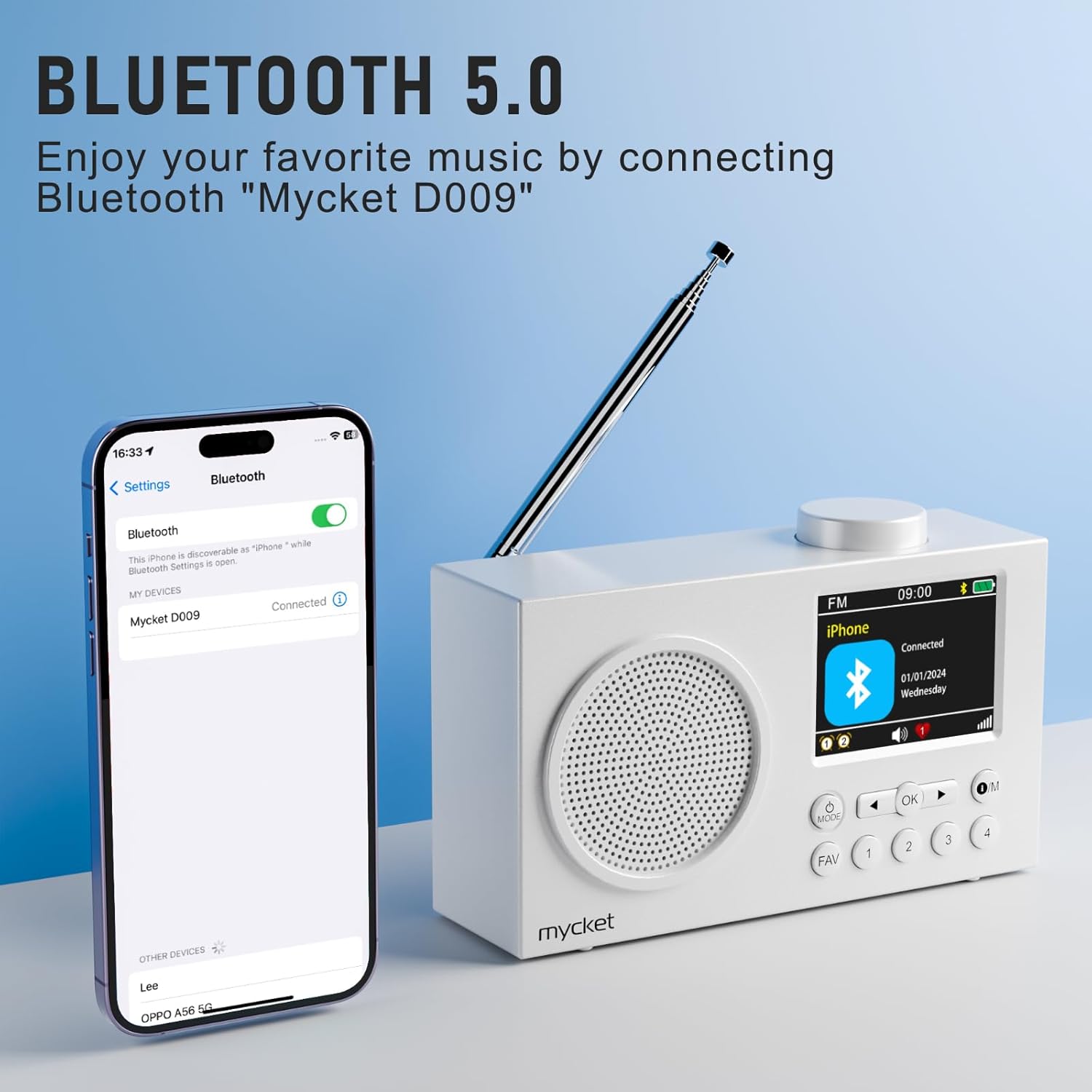
Resim: The Mycket Portable DAB/DAB+ Radio displaying a Bluetooth connection, with a smartphone screen showing 'Mycket D009' as a connected device. This illustrates the radio's Bluetooth 5.0 capability for wireless audio streaming.
5. Çift Alarm Ayarı
- Basın M (Menü) button, navigate to 'Alarm', and press OK.
- Select 'Alarm 1' or 'Alarm 2' and configure the time, source (DAB/FM/Buzzer), and frequency.

Resim: The Mycket Portable DAB/DAB+ Radio displaying its dual alarm function on the LCD screen. The image shows options for setting two separate alarms, along with the speaker grille and antenna.
6. Uyku Zamanlayıcı Fonksiyonu
- Basın M (Menü) button, navigate to 'Sleep', and press OK.
- Select the desired duration (e.g., 15, 30, 45, 60 minutes, or 1 hour 15 minutes) after which the radio will automatically turn off.

Resim: A white digital radio displaying the sleep timer settings on its LCD screen, with options for various durations. The image illustrates the automatic shutdown function, allowing users to fall asleep to their favorite radio program.
7. Ses Kontrolü
- Rotate the knob on top of the radio to adjust the volume level.
8. Kulaklık Kullanımı
- Plug 3.5mm headphones into the headphone jack on the side of the radio for private listening. The internal speaker will automatically mute.

Resim: A diagram illustrating a silent listening system, showing a person using headphones connected to a small device, which is linked to a larger audio unit. This demonstrates the option for private audio enjoyment.
Bakım
1. Temizlik
- Radyoyu yumuşak, kuru bir bezle silin. Aşındırıcı temizleyiciler veya çözücüler kullanmayın.
- Avoid exposing the radio to excessive moisture.
2. Pil Bakımı
- Pil ömrünü uzatmak için pili sık sık tamamen boşaltmaktan kaçının.
- If storing the radio for an extended period, charge it to approximately 50% every few months.
Sorun giderme
| Sorun | Olası Neden | Çözüm |
|---|---|---|
| Güç yok | Pil bitmiş. | Radyoyu USB-C kablosu kullanarak şarj edin. |
| Zayıf DAB/FM alımı | Antenna not extended, weak signal area. | Fully extend the antenna. Try repositioning the radio or moving to an area with better signal. Perform a full scan. |
| Bluetooth bağlanmıyor | Radio not in pairing mode, device too far, previously paired device connected. | Ensure the radio is in Bluetooth pairing mode. Move your device closer to the radio. Disconnect from other Bluetooth devices. |
| Ses yok | Ses seviyesi çok düşük, kulaklık takılı. | Sesi artırın. Hoparlörden ses almak istiyorsanız kulaklıkları çıkarın. |
Özellikler
- Marka: Mycket
- Model Numarası: 6dd4bdb8-92a9-450e-bc79-df90b5ab3ff1
- Renk: Beyaz
- Bağlantı Teknolojisi: Bluetooth 5.0, DAB/DAB+ (174.928-239.20 MHz with DLS display), FM (87.5-108 MHz with RDS)
- Ürün Ölçüleri: 13.9U x 4G x 8Y santimetre
- Güç Kaynağı: Battery/Wired (2200 mAh integrated lithium battery)
- Özel Özellikler: Integrated AM antenna (likely a translation error, should be DAB/FM antenna), Integrated Clock, Lightweight, Portable, Rechargeable
- Ses Çıkış Modu: Stereo (via headphones)
- Görüntüleme Türü: LED (2.4" Color TFT)
- Arayüz: USB 3.0 Tip C
- Dahil Bileşenler: 1 Portable DAB Radio, 1 USB Charging Cable, User Manual
Garanti ve Destek
Garanti Bilgileri:
This Mycket Portable DAB/DAB+ Radio comes with a 12-month warranty from the date of purchase. Please retain your proof of purchase for warranty claims.
Müşteri Desteği:
For any questions, technical assistance, or warranty claims, please contact Mycket customer service. Refer to the contact information provided in the packaging or on the official Mycket webalan.