
1. Giriş
This manual provides detailed instructions for the setup, operation, and maintenance of your Itari M102 Label Maker Machine. Please read this manual thoroughly before using the device to ensure proper function and longevity.
2. Paket İçeriği
Paketinizde tüm öğelerin mevcut olduğundan emin olun:
- Itari M102 Label Maker Machine
- 3 Rolls of Thermal Labels (1.57" x 1.18" / 40mm x 30mm)
- USB Type-C Şarj Kablosu
- Kullanım Kılavuzu (bu belge)

Image 2.1: The Itari M102 Label Maker Machine shown with the included label rolls.
3. Ürün Bittiview
Familiarize yourself with the components of your label maker.
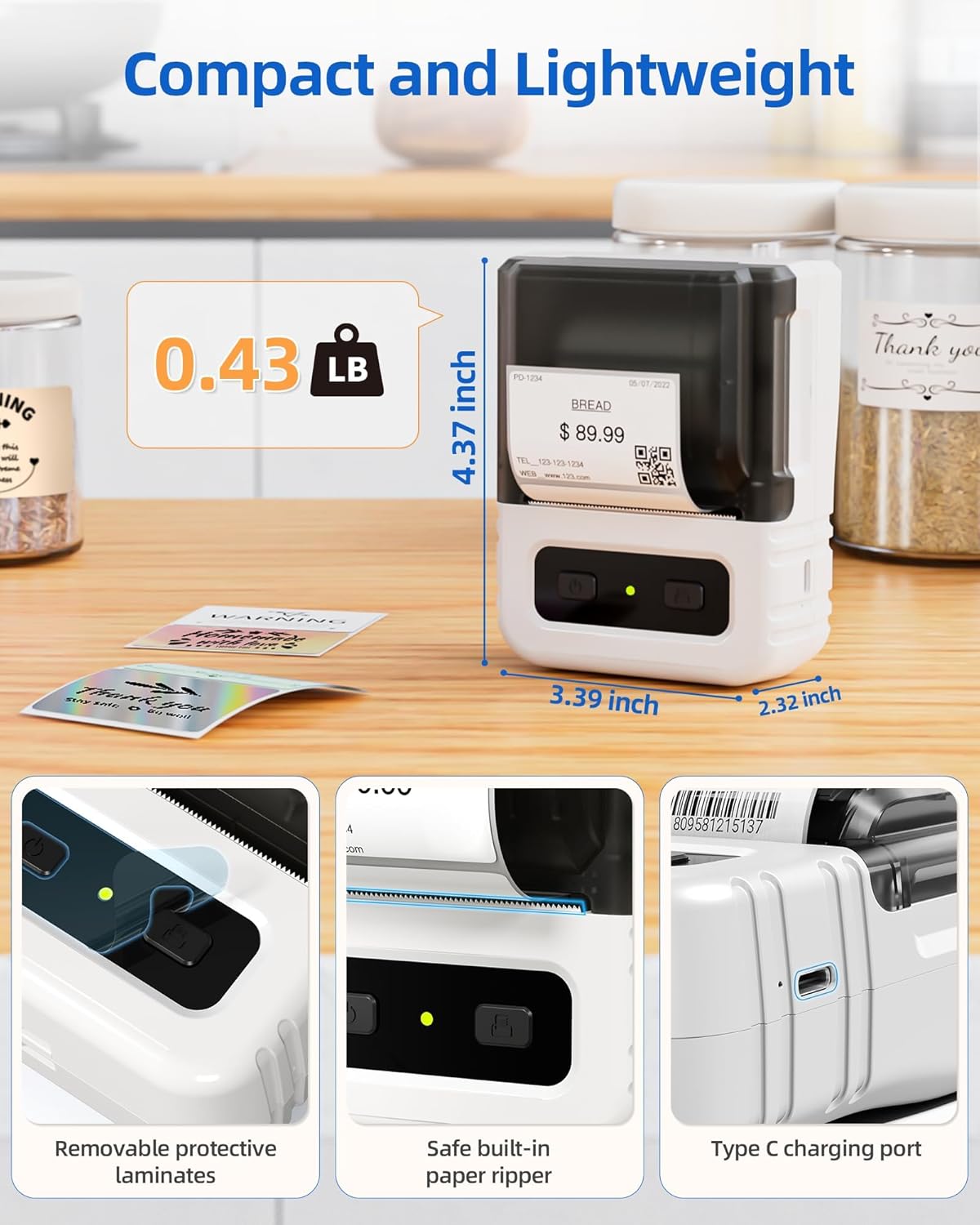
Resim 3.1: Ayrıntılı view highlighting the dimensions, safe built-in paper ripper, removable protective laminates, and Type-C charging port.
Temel Özellikler:
- Güç Düğmesi: Cihazı açmak/kapatmak için kullanılır.
- Label Compartment: Holds the label roll.
- Adjustable Guide: Ensures proper alignment for various label widths (supports 20-50mm wide labels).
- Paper Exit Slot: Basılı etiketlerin ortaya çıktığı yer.
- Built-in Paper Ripper: For cleanly detaching printed labels.
- C Tipi Şarj Bağlantı Noktası: Dahili bataryayı şarj etmek için.
4. Kurulum
4.1. Cihazın Şarj Edilmesi
Before first use, fully charge the label maker. Connect the provided USB Type-C cable to the charging port on the device and a compatible USB power adapter (not included). A full charge takes approximately 2 hours and provides up to 1 month of typical usage.
4.2. Etiketleri Yükleme
- Etiket bölmesinin kapağını açın.
- Insert a roll of thermal labels into the compartment, ensuring the labels feed from the bottom and the printing side faces upwards.
- Adjust the label guides to fit the width of your label roll snugly. The device supports labels from 20mm to 50mm wide.
- Pull a small portion of the label paper out through the paper exit slot.
- Etiket bölmesinin kapağını sıkıca kapatın.

Image 4.1: The label compartment open, illustrating how to insert a label roll and adjust the width guides.
4.3. App Installation and Connectivity
The Itari M102 Label Maker connects wirelessly via Bluetooth to your smartphone or tablet, and via USB to computers. Download the dedicated label editing application from your device's app store (e.g., Apple App Store for iOS, Google Play Store for Android).
- Bluetooth Bağlantısı İçin:
- Etiket yazıcısını açın.
- Mobil cihazınızda Bluetooth'u etkinleştirin.
- Open the Itari label app and follow the in-app instructions to search for and pair with your M102 device. Pairing typically takes less than 2 seconds.
- USB Bağlantısı için:
- Connect the label maker to your computer using the USB Type-C cable.
- Install the necessary drivers or software for your operating system (Windows, macOS, Chrome OS, Linux) as prompted or available on the Itari support webalan.

Image 4.2: Illustrates wireless Bluetooth connectivity for iOS and Android, and USB connectivity for Chrome OS, Windows, Mac OS, and Linux.
5. Kullanım Talimatları
5.1. Etiket Oluşturma ve Özelleştirme
The Itari label app provides extensive customization options:
- Şablonlar: Access over 300 free label templates for various uses (address, price, food, clothing, cable, jewelry, folder labels, etc.).
- Fonts & Symbols: Choose from over 100 fonts and 1000 symbols to personalize your labels.
- Resimler: Embed images into your label designs.
- Metin Düzenleme: Adjust text size, style, alignment, and add multiple lines.
- Barkodlar ve QR Kodları: Generate and print various types of barcodes and QR codes.
5.2. Etiketleri Yazdırma
- Ensure the label maker is powered on and connected to your device (Bluetooth or USB).
- Open the Itari label app and create or select your desired label design.
- Confirm the label size in the app matches the loaded label roll.
- Tap the 'Print' button in the app.
- The label maker will print the label. Use the built-in paper ripper to cleanly detach the label from the roll.
6. Bakım
6.1. Temizlik
To maintain print quality and device longevity:
- Turn off the label maker before cleaning.
- Gently wipe the print head with a soft, lint-free cloth moistened with isopropyl alcohol. Allow it to dry completely before use.
- Clean the exterior of the device with a soft, dry cloth. Do not use harsh chemicals or abrasive cleaners.
6.2. Etiket Saklama
Store thermal labels in a cool, dry place away from direct sunlight and heat to prevent premature fading or damage to the thermal coating.
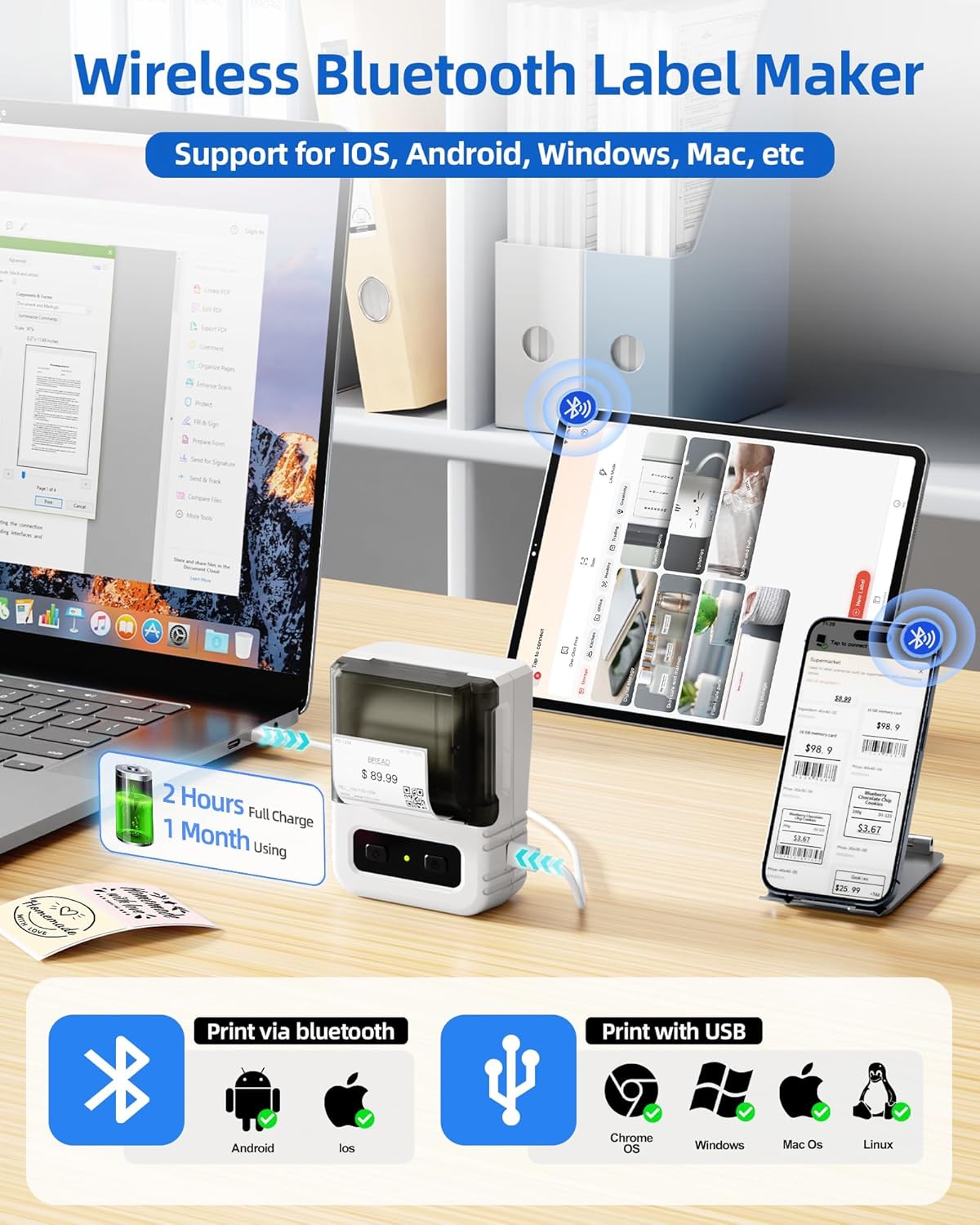
Image 6.1: Itari thermal label rolls, highlighting the 1.57" x 1.18" (40mm x 30mm) size, 230 sheets per roll, and high-quality thermal paper.
7. Sorun Giderme
If you encounter issues with your Itari M102 Label Maker, refer to the following common problems and solutions:
| Sorun | Olası Neden | Çözüm |
|---|---|---|
| Cihaz açılmıyor | Düşük pil | Cihazı, kutu içeriğinde bulunan USB Type-C kablosuyla şarj edin. |
| Baskı yok veya silik baskı |
|
|
| Bluetooth bağlantı hatası |
|
|
| Labels jam |
|
|
8. Özellikler
- Modeli: M102
- Baskı Teknolojisi: Termal (Mürekkepsiz)
- Supported Label Width: 20 mm - 50 mm
- Included Label Size: 1.57" x 1.18" (40 mm x 30 mm)
- Bağlantı: Bluetooth, USB Tip-C
- Pil Ömrü: Up to 1 month of typical use (2 hours full charge)
- Boyutlar: Yaklaşık 4.37" (Y) x 3.39" (G) x 2.32" (D)
- Ağırlık: Yaklaşık 0.43 lbs (0.195 kg)
9. Garanti ve Destek
For warranty information and technical support, please refer to the contact details provided with your purchase or visit the official Itari webSite. Satın alma fişinizi, garanti talepleriniz için satın alma belgeniz olarak saklayın.