
Bw9
BW9 Ultra Smartwatch
Kullanıcı Kılavuzu
Model: BW9 Ultra | Brand: Generic
giriiş
Thank you for choosing the BW9 Ultra Smartwatch. This device is designed to enhance your daily life with advanced connectivity and health monitoring features. It combines 4G SIM compatibility, Bluetooth calling, a vibrant HD display, and a built-in selfie camera, all within a stylish and functional design. This manual provides essential information for setting up, operating, maintaining, and troubleshooting your smartwatch to ensure optimal performance.
1. Başlarken: Kurulum
1.1 Unboxing Your Smartwatch
Upon opening the package, ensure all components are present. The standard package for your BW9 Ultra Smartwatch includes:
- BW9 Ultra Smartwatch (with gold-toned case and orange strap)
- Şarj kablosu
- Silicone Strap (additional or pre-attached)
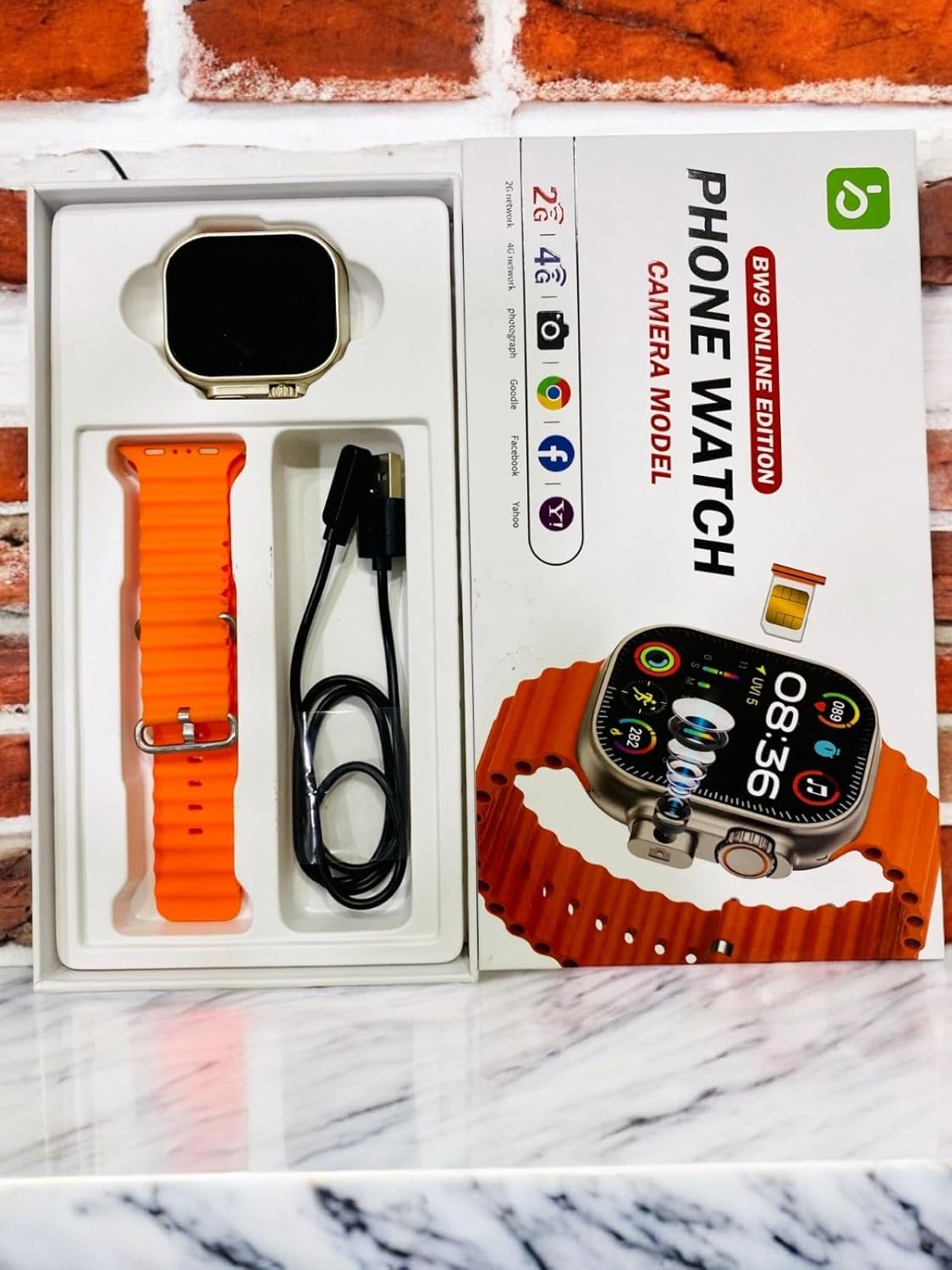
Image: BW9 Ultra Smartwatch and its components neatly arranged within the product packaging, including the watch, charging cable, and silicone strap.
1.2 Akıllı Saati Şarj Etme
İlk kullanımdan önce akıllı saatinizi tamamen şarj edin.
- Şarj kablosunu akıllı saatin arkasındaki şarj portuna bağlayın.
- Kablo ucunu standart bir USB güç adaptörüne (dahil değildir) veya bilgisayarın USB portuna takın.
- Saat ekranı şarj durumunu gösterecektir. Tam şarj genellikle yaklaşık 2 saat sürer.
Önemli: Use only the provided charging cable to prevent damage to the device.
1.3 SIM Kart Kurulumu
The BW9 Ultra Smartwatch supports 4G SIM cards for independent cellular connectivity.
- Akıllı saatin yan tarafında bulunan SIM kart yuvasını bulun.
- Carefully insert the SIM card into the tray, ensuring correct orientation as indicated by the diagram near the slot.
- SIM tepsisini yerine oturana kadar yavaşça saate doğru itin.

Image: A hand holding the BW9 Ultra Smartwatch, with a small SIM card tray visible next to the watch, illustrating the SIM card installation process.
1.4 İlk Güç Açma ve Eşleştirme
To power on your smartwatch, press and hold the power button (usually located on the side) until the screen illuminates.
To unlock full functionality, pair your smartwatch with your smartphone via Bluetooth:
- Hem akıllı telefonunuzda hem de akıllı saatinizde Bluetooth'un etkinleştirildiğinden emin olun.
- On your smartwatch, navigate to the Bluetooth settings.
- Arama available devices on your smartphone and select "BW9 Ultra" from the list.
- İstenirse her iki cihazda da eşleştirme kodunu onaylayın.
- Download and install the recommended companion application (refer to the watch's on-screen instructions or packaging for app name) for advanced features and data synchronization.
2. Akıllı Saatinizi Çalıştırma
2.1 Display Navigation and Controls
The BW9 Ultra features an HD touchscreen display for intuitive interaction.
- Yukarı/Aşağı Kaydırma: Hızlı ayarlara veya bildirimlere erişin.
- Sola/Sağa Kaydır: Navigate between different widgets and applications (e.g., activity tracker, heart rate monitor, music control).
- Musluk: Bir öğeyi seçin veya bir uygulamayı açın.
- Basılı Tut: Customize watch faces or access context-sensitive menus.
- Yan Düğme(ler): Typically used for power on/off, returning to the home screen, or accessing the app menu.

Image: The BW9 Ultra Smartwatch display showing a colorful interface with time, date (SAT JUL 27), and various activity metrics and application icons.
2.2 Bluetooth Calling and 4G Connectivity
With a SIM card installed or paired via Bluetooth, you can make and receive calls directly from your wrist.
- Arama Yapma: Access the dialer or contacts app on the watch.
- Çağrı Alma: An incoming call notification will appear; tap to answer or decline.
- 4G Modu: When a SIM card is active, the watch can operate independently for calls and data.
- Bluetooth Modu: When paired, calls are routed through your smartphone.
2.3 Selfie Kamerasını Kullanma
The integrated selfie camera allows for quick photo capture.
- Navigate to the Camera application on your smartwatch.
- Position the watch to capture your desired shot.
- Tap the screen or press the designated button to take a photo.
- Photos are saved to the watch's internal memory.
2.4 Fitness Tracking and Health Monitoring
The smartwatch offers various health and fitness tracking features:
- Adım Sayacı: Günlük adım sayınızı takip eder.
- Activity Metrics: Monitors distance, calories burned, and active hours.
- Kalp Atış Hızı Monitörü: Provides real-time heart rate readings.
- Uyku Monitörü: Analyzes sleep patterns (requires wearing the watch during sleep).
Data can be synchronized with the companion app on your smartphone for detailed analysis and historical tracking.
2.5 Notifications and Music Control
Stay updated and control your music directly from your wrist.
- Bildirimler: Receive alerts for calls, messages, and app notifications from your paired smartphone. Customize notification settings via the companion app.
- Müzik Kontrolü: Play, pause, skip tracks, and adjust volume for music playing on your paired smartphone.
3. Bakım ve Özen
Proper care ensures the longevity and optimal performance of your BW9 Ultra Smartwatch.
- Temizlik: Wipe the watch and strap regularly with a soft, dry, lint-free cloth. For stubborn dirt, slightly dampBezi suyla yıkayın. Sert kimyasallardan veya aşındırıcı malzemelerden kaçının.
- Suya Dayanıklılık: While designed for daily wear, avoid prolonged submersion in water or exposure to high-pressure water jets. Refer to specifications for exact water resistance rating.
- Depolamak: Uzun süre kullanılmayacaksa, saati serin, kuru ve doğrudan güneş ışığından ve aşırı sıcaklıklardan uzak bir yerde saklayın.
- Pil Bakım: Avoid fully discharging the battery frequently. Charge the device regularly to maintain battery health.
4. Sorun Giderme
Akıllı saatinizle ilgili sorun yaşıyorsanız, aşağıdaki çözümleri deneyin:
- Saat açılmıyor: Pilinin şarjlı olduğundan emin olun. Tekrar açmayı denemeden önce en az 15 dakika şarj cihazına bağlı bırakın.
- Akıllı telefonla eşleştirilemiyor:
- Her iki cihazda da Bluetooth'un etkinleştirildiğinden emin olun.
- Saatin eşleştirme modunda olduğundan emin olun.
- Hem saati hem de akıllı telefonu yeniden başlatın.
- Forget the device from your smartphone's Bluetooth settings and try pairing again.
- Kötü çağrı kalitesi:
- If using SIM, check SIM card insertion and network signal strength.
- If using Bluetooth, ensure the watch is within range of your smartphone.
- Fitness data not syncing:
- Ensure the companion app is open and running on your smartphone.
- Akıllı telefonunuzun internet bağlantısını kontrol edin.
- Restart both devices and try syncing again.
- Ekran tepkisiz: Try restarting the watch by pressing and holding the power button. If unresponsive, allow the battery to fully drain and then recharge.
Sorun devam ederse daha fazla yardım için müşteri desteğiyle iletişime geçin.
5. Özellikler
Key technical specifications for the BW9 Ultra Smartwatch:
| Marka | Genel |
| Model Adı | BW9 Ultra |
| Görüntü Türü | HD Ekran |
| Ayakta Ekran Görüntüleme Boyutu | 1.78 İnç (Görünür ekran köşegeni: 2" / 5 cm) |
| Bağlantı Teknolojisi | Bluetooth, 4G Hücresel |
| Kablosuz Tip | 2.4 GHz Radyo Frekansı, Bluetooth |
| İşletim Sistemi | Tescilli işletim sistemi |
| Bellek Depolama Kapasitesi | 8 MB |
| Kurulu RAM Bellek Boyutu | 1 MB |
| Pil Kapasitesi | 100 Miliamp Saat |
| Şarj Süresi | 2 Saat |
| Özel Özellikler | Bluetooth Calling, HD Display, Selfie Camera, SIM Card Slot |
| Montaj Donanımı | Silikon Kayış |
| Ürün Ağırlığı | 300 gr |
| Paket Boyutları | 23x4.5x2.5 cm |
6. Garanti ve Destek
Your BW9 Ultra Smartwatch comes with a 1 Ay Garanti from the date of purchase. This warranty covers manufacturing defects and material flaws under normal use. It does not cover damage caused by misuse, accidents, unauthorized modifications, or normal wear and tear.
For warranty claims or technical support, please refer to your purchase documentation for contact information of the seller or manufacturer. Ensure you have your proof of purchase readily available.
For general inquiries or further assistance, you may also visit the product's support page on the retailer's websitesine gidin veya müşteri hizmetleriyle iletişime geçin.
Ask a question about this manual
Ask about setup, troubleshooting, compatibility, parts, safety, or missing instructions. Manuals+ will review the question and use this page’s manual context to help answer it.