
1. Ürün Bittiview
The Fanvil V60P is a professional IP phone designed for business communication. It features a color display, programmable keys, and Power over Ethernet (PoE) support for simplified installation and operation. This manual provides essential information for setting up, operating, and maintaining your device.
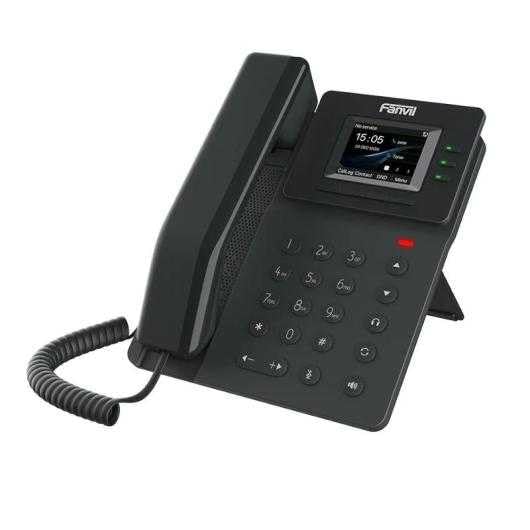
Figure 1: Fanvil V60P Professional IP Phone. This image shows the black IP phone with its handset, color display, and numeric keypad. The display shows "15:05" and menu options.
2. Kurulum ve Kurulum
2.1 Paket İçeriği
Kurulumdan önce, pakette tüm öğelerin mevcut olduğundan emin olun:
- Fanvil V60P IP Phone unit
- Telefon ve spiral kablo
- Ethernet kablosu
- Durmak
- Hızlı Kurulum Kılavuzu (varsa)
2.2 Fiziksel Bağlantı
- Standı takın: Securely attach the desk stand to the back of the phone unit.
- Telefonu bağlayın: Sarmal kablonun bir ucunu ahizeye, diğer ucunu ise telefon tabanındaki ahize girişine takın.
- Connect to Network and Power (PoE):
- Ethernet kablosunun bir ucunu şuraya bağlayın: Yerel Ağ port on the phone.
- Connect the other end of the Ethernet cable to a Power over Ethernet (PoE) enabled switch or injector. The phone will power on automatically.
- Bilgisayara bağlanın (İsteğe bağlı): If you need to connect a computer through the phone, connect an Ethernet cable from your PC to the PC port on the phone.
Note: If PoE is not available, a separate power adapter (not included) may be required. Refer to the product specifications for compatible power adapter details.
3. Kullanım Talimatları
3.1 Temel Çağrı Fonksiyonları
- Arama yapmak:
- Pick up the handset or press the Speakerphone button.
- Tuş takımını kullanarak istediğiniz numarayı çevirin.
- Basın Aramak soft key or wait for the automatic dialing timeout.
- Bir Aramayı Cevaplama:
- Ahizeyi kaldırın.
- Alternatively, press the Speakerphone button or the Cevap yazılım tuşu.
- Aramayı Bitirme: Hang up the handset or press the Speakerphone button.
3.2 Using Programmable DSS Keys
The Fanvil V60P features 6 programmable DSS (Direct Station Select) keys. These keys can be configured for various functions such as speed dial, line keys, busy lamp field (BLF), or other custom features as defined by your system administrator.
- To use a programmed DSS key, simply press the corresponding button.
- Configuration of DSS keys is typically done via the phone's web interface or your IP PBX system.
3.3 Local Phonebook
The phone supports a local phonebook with up to 1000 entries.
- Access the phonebook via the Dizin or İletişim soft key on the display.
- Use the navigation keys to browse entries.
- Select an entry and press the Aramak Arama başlatmak için kullanılan tuş.
3.4 Audio Conferencing
The V60P supports local 6-party audio conferencing.
- Establish a call with the first participant.
- Basın Konf soft key. The first participant will be put on hold.
- Dial the number of the second participant and establish the call.
- Basın Konf soft key again to merge all participants into a conference.
- Repeat steps 2-4 to add more participants, up to a total of 6.
4. Bakım
4.1 Cihazın Temizlenmesi
To maintain the appearance and functionality of your Fanvil V60P IP Phone (made of plastic material), follow these cleaning guidelines:
- Disconnect the phone from its power source (PoE) before cleaning.
- Yumuşak, hafif sert bir bez kullanınamp, lint-free cloth to wipe the surfaces.
- Avoid using harsh chemicals, abrasive cleaners, or solvents, as these can damage the plastic and display.
- Temizlik ürünlerini doğrudan telefonun üzerine püskürtmeyin.
4.2 Firmware Güncellemesi
Firmware updates may be released periodically to improve performance, add features, or fix bugs. Consult your IT administrator or Fanvil's official website for information on available updates and instructions for installation.
5. Sorun Giderme
This section addresses common issues you might encounter with your Fanvil V60P IP Phone.
| Sorun | Olası Neden | Çözüm |
|---|---|---|
| Telefon açılmıyor. | PoE bağlantısı yok veya Ethernet kablosu arızalı. | Ensure the Ethernet cable is securely connected to the LAN port and a PoE-enabled switch/injector. Verify the PoE source is active. |
| Çevir sesi yok. | SIP registration failure or network issue. | Check network connectivity. Verify SIP account settings with your IT administrator. Restart the phone. |
| Arama yapılamıyor/alınamıyor. | Network issues, incorrect SIP configuration, or firewall blocking. | Confirm network connection. Check SIP registration status on the phone's display. Contact your IT administrator for network and SIP configuration verification. |
| Kötü ses kalitesi. | Network congestion or faulty handset/speaker. | Check network bandwidth and latency. Try using a different handset or speaker mode. If the issue persists, contact support. |
6. Özellikler
| Özellik | Detay |
|---|---|
| Örnek | V60P |
| Sistem | Linux |
| Görüntülemek | 2.4-inch, 320 x 240 Color Screen |
| DSS Anahtarları | 6 Programlanabilir Tuş |
| SIP Hatları | 4 |
| Local Phonebook | 1000 Yazılar |
| El cihazı | Kablolu Ahize |
| Sesli Konferans | 6-party Local Conference |
| Wideband Codecs | G.722, Eser |
| Narrowband Codecs | G.711, G.723.1, G.726, G.729, G.729A, G.729B, G.729AB, iLBC |
| PoE | Evet |
| Ağ Bağlantı Noktaları | 2 x 10/100 Mbps Ethernet Portu |
| EHS Support | Evet |
| IPv6 Desteği | Evet |
| Malzeme | Plastik |
| Boyutlar (UxGxY) | 15x200x15 cm |
| Ağırlık | 600 Gram |
| Arayan Kimliği | Evet |
| Çoklu Hat İşlemi | Evet |
| Conference Call Functionality | Support Multiple Conferences |
| Standby Duration (if applicable) | 10 saat |
7. Garanti ve Destek
7.1 Ürün Garantisi
The Fanvil V60P IP Phone comes with a Üretim hatalarına karşı üç yıl garanti.Bu garanti, normal kullanım koşullarındaki malzeme ve işçilik kusurlarını kapsar. Garanti talepleriniz için lütfen satın alma belgenizi saklayın.
7.2 Teknik Destek
For technical assistance, troubleshooting beyond this manual, or warranty inquiries, please contact your reseller or Fanvil's official customer support channels. You may need to provide your product model (V60P) and serial number.