1. Giriş
The Generic EDF8 Electronic Multifunction Dehumidistat is designed to provide precise control over your home's ventilation system, helping to manage indoor humidity levels and air quality. This electronic control offers multiple operational modes and fan speed settings to optimize your environment.
It functions as an accessory to your existing ventilation setup, integrating seamlessly to enhance its capabilities. The unit is white in color, designed for discreet placement within your home.
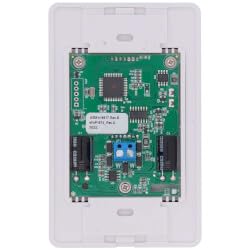
Şekil 1: Ön view of the EDF8 Electronic Multifunction Dehumidistat. This image displays the compact, white design of the control unit, typically mounted on a wall.
2. Kurulum ve Kurulum
Proper installation is crucial for the safe and effective operation of your EDF8 Dehumidistat. It is recommended that installation be performed by a qualified technician.
2.1 Güvenlik Önlemleri
- UYARI: Disconnect all power to the ventilation system before installation or servicing to prevent electrical shock.
- Tüm kablolamanın yerel elektrik kodlarına ve yönetmeliklerine uygun olduğundan emin olun.
- Do not install in locations where the unit may be exposed to water or extreme temperatures.
2.2 Montaj Yeri
Select a central location within the conditioned space, away from direct sunlight, drafts, and heat sources. Avoid mounting near exterior doors or windows where readings might be inaccurate.
2.3 Kablolama
The EDF8 Dehumidistat connects to your ventilation system's control wiring. Refer to the wiring diagram provided with your specific ventilation unit for detailed connection instructions. Generally, connections involve low-voltage wiring for power and control signals to the ventilation unit's fan and damper mechanisms.
Note: Specific wiring diagrams are not included in this manual. Consult your ventilation system's documentation for compatibility and detailed wiring instructions.
2.4 İlk Güçlendirme
After installation and wiring are complete, restore power to the ventilation system. The dehumidistat should power on and display its current settings. Allow a few minutes for the unit to stabilize and display accurate humidity readings.
3. Kullanım Talimatları
The EDF8 Dehumidistat offers three primary operational modes and adjustable fan speeds to suit your indoor air quality needs.
3.1 Operasyonel Modlar
Use the mode selection control (button or switch, depending on model) to cycle through the following modes:
- Havalandırma Modu: In this mode, the system actively removes stale indoor air and introduces fresh outdoor air. This is ideal for improving overall air quality and reducing indoor pollutants.
- Devridaim Modu: This mode circulates air within your home without introducing outdoor air. It helps to redistribute conditioned air, balancing temperatures and humidity throughout different rooms. No outdoor air is brought in during this mode.
- Bekleme Modu: The system remains inactive in Standby mode unless the indoor relative humidity rises above the setpoint you have configured. Once the humidity exceeds the setpoint, the system will activate to reduce humidity until the setpoint is met.
3.2 Humidity Setpoint Adjustment
Adjust the desired indoor relative humidity (RH) setpoint using the dedicated control. The system will aim to maintain humidity levels at or below this setpoint, particularly when in Standby mode or when humidity control is prioritized in other modes.
3.3 Fan Hızı Ayarları
The fan speed can be adjusted to one of three settings:
- Azaltışmış: Lower fan speed for quieter operation and less aggressive air exchange.
- Orta: Moderate fan speed for balanced performance.
- Normal (20min/h): Full fan speed for maximum air exchange and humidity reduction. This setting typically indicates 20 minutes of operation per hour.
4. Bakım
The EDF8 Electronic Multifunction Dehumidistat requires minimal maintenance to ensure continued optimal performance.
4.1 Temizlik
Periodically wipe the exterior of the unit with a soft, dry cloth to remove dust and debris. Do not use abrasive cleaners, solvents, or spray cleaners directly onto the unit, as these can damage the casing veya dahili bileşenler.
4.2 Muayene
Occasionally inspect the unit for any visible damage or loose connections. If any issues are observed, contact a qualified technician for assistance.
4.3 User Serviceable Parts
The EDF8 Dehumidistat contains no user-serviceable parts. Attempting to open or repair the unit yourself will void any warranty and may result in damage or injury.
5. Sorun Giderme
If you encounter issues with your EDF8 Dehumidistat, refer to the following common problems and solutions before contacting support.
| Sorun | Olası Neden | Çözüm |
|---|---|---|
| Ünite açılmıyor. | Elektrik yok; kablolama gevşek. | Check circuit breaker. Ensure all wiring connections are secure. |
| System not responding to mode selection. | Incorrect wiring; internal fault. | Verify wiring against ventilation system diagram. If problem persists, contact support. |
| Humidity readings appear inaccurate. | Improper mounting location; sensor obstruction. | Ensure unit is not in direct sunlight or near drafts. Clean any dust from sensor area. |
| Fan speed not changing. | Control issue; wiring to fan. | Cycle through fan speed settings. Check wiring to the ventilation unit's fan. |
Sorun giderme adımları sorunu çözmezse müşteri desteğine veya kalifiye bir teknisyene başvurun.
6. Özellikler
- Modeli: EDF8 Elektronik Çok Fonksiyonlu Nem Alma Cihazı
- Parça Numarası: SPH-415517
- Başvuru: Accessory for Ventilation Systems
- Renk: Beyaz
- Üretici: Genel
- ASIN: B0DTKMY83G
- Operasyonel modları: Ventilation, Recirculation, Standby
- Fan Hızı Ayarları: Reduced, Medium, Normal (20min/h)
7. Garanti ve Destek
For warranty information, please refer to the documentation provided at the time of purchase or contact the seller directly. Warranty terms typically cover defects in materials and workmanship for a specified period.
For technical support or service inquiries, please contact the manufacturer or your authorized dealer. Ensure you have your model number (SPH-415517) and purchase details available when seeking assistance.